Quick answer: the AI model leaderboard in 2026 is useful only if you read it as a checked-date decision tool, not as a permanent crown. Artificial Analysis listed Claude Opus 5 in the top intelligence slot when checked on July 31, 2026, with GPT-5.6 Sol, Claude Fable 5, Grok, Gemini, DeepSeek, Qwen, Kimi, GLM, and other models appearing across the broader ranking and category filters. The practical takeaway is simple: choose the strongest model for hard reasoning, a coding-proven model for software work, a cheaper model for repeatable volume, a fast model for live interfaces, and an open-weight or local model when privacy, control, or offline use matters.
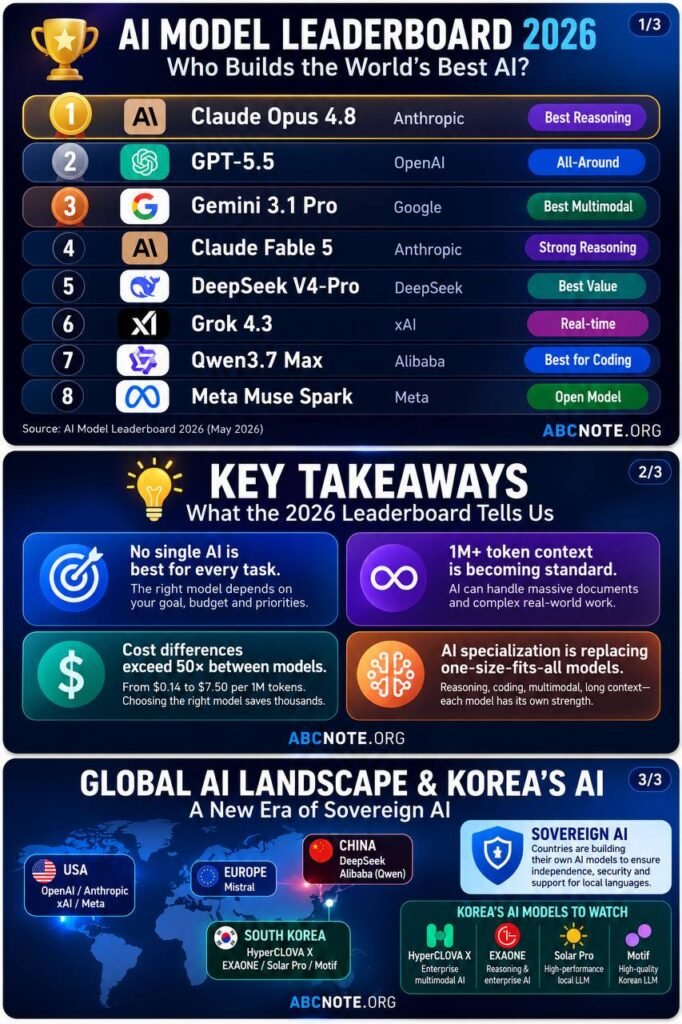
This article does not try to freeze the AI market forever. Model rankings move quickly, providers change prices, and benchmark suites add new tasks. A useful 2026 guide should show what the current leaderboard signals, how to avoid overreading it, and how to make a model choice that still works after the next update. Pair this with abcnote’s AI API cost guide, local AI vs cloud AI guide, and AI coding tools guide if you are building real workflows.
AI model leaderboard 2026: the checked snapshot
Checked on July 31, 2026, Artificial Analysis described its LLM Leaderboard as a comparison of more than 250 AI models across intelligence, price, speed, latency, context window, and related metrics. Its page FAQ named Claude Opus 5 with adaptive reasoning at max effort as the current number one by Artificial Analysis Intelligence Index, and listed the top intelligence group as Claude Opus 5 variants, Claude Fable 5 with fallback, GPT-5.6 Sol, and other high-end reasoning models.
That is a strong signal, but it is not the whole buying decision. A model can lead an intelligence index and still be the wrong choice for a cheap support classifier. A model can be extremely affordable and still fail a hard coding migration. An open-weight model can be perfect for local control and still trail frontier cloud models on some reasoning tasks. The leaderboard answers one question at a time. Your workflow has several questions at once.
Top intelligence signal
Claude Opus 5 variants led Artificial Analysis Intelligence Index in the checked snapshot, with GPT-5.6 Sol and Claude Fable 5 close in the top group.
Open-weight signal
Artificial Analysis highlighted Kimi K3 as the highest-ranked open-weight model in its FAQ, with GLM and DeepSeek models also visible in the open-weight conversation.
Cost signal
The lowest cost-per-task names are not always the same as the highest intelligence names. Cost winners are best for high-volume, lower-risk jobs.
Speed signal
Fast-output and low-latency models belong in live chat, voice, UI assistance, and agent loops where delay breaks the experience.
The best model depends on the job
The biggest mistake in model selection is asking, “What is the best AI model?” without naming the job. A student writing assistant, a codebase migration bot, a customer support router, a private home-lab assistant, and a finance-like analysis tool do not need the same model. Their risk, latency, budget, privacy, and quality requirements are different.
Hard reasoning
Use top intelligence and reasoning models when the task has many constraints, ambiguous evidence, or high correction cost.
Coding
Use models with strong coding and tool-use results, then verify with tests, diff review, branch isolation, and rollback.
High-volume operations
Use lower-cost models for classification, extraction, duplicate detection, tagging, and routine summaries that are easy to check.
Live interfaces
Use low-latency and fast-output models when a user is waiting on the screen, in a call, or inside an interactive agent.
Local and private work
Use open-weight or local models when data control, offline use, customization, or private notes matter more than frontier accuracy.
Long context
Use long-context models when the source material is large, but test whether the answer actually preserves critical details.
How to read Artificial Analysis without overreading it
Artificial Analysis is useful because it collects many models in one place and exposes metrics beyond generic marketing claims. It can show intelligence, output speed, latency, context window, cost, open/proprietary status, and provider-level comparisons. That is much better than choosing only from social-media screenshots.
But no benchmark can perfectly represent your data, your users, your codebase, your policy constraints, or your budget. Treat the leaderboard like a weather report for the model market. It tells you the current conditions. You still decide whether you need a raincoat, a truck, or a short walk.
Use the checked date
Save the date beside any ranking claim. A model that leads today can move next month.
Read the metric name
Intelligence, coding, latency, output speed, price, and context window answer different questions.
Compare nearby models
If two models are close, price, latency, privacy, and reliability may matter more than a tiny benchmark gap.
Check official docs
Use provider pages for pricing, model names, context limits, tool support, and data-handling details.
Current leader group: what it means
The July 31 snapshot points to a familiar 2026 pattern: the strongest cloud models are increasingly reasoning-heavy, and the names near the top often appear with effort settings or reasoning modes. That matters because a max-effort reasoning model may be slower or more expensive than the same family in a lighter mode. If you copy the top leaderboard name into every workflow, you may buy more reasoning than the task needs.
A better approach is to split the model family from the task mode. For example, a premium reasoning mode can handle complex planning, legal-like risk review, or final code reasoning. A lower-effort mode may be enough for ordinary summaries. A cheaper model in the same ecosystem may be better for high-volume preprocessing. The winner is not always the largest model; it is the right model at the right point in the workflow.
Use top models for final judgment
Architecture choices, source synthesis, hard debugging, and high-stakes final answers deserve stronger reasoning.
Use lighter modes for routine steps
Routing, formatting, metadata extraction, and first drafts rarely need the highest effort setting.
Watch retry behavior
A cheap step that retries ten times can become more expensive than a stronger first pass.
Measure correction cost
If humans spend time fixing weak output, the cheaper call was not really cheaper.
Best overall reasoning choice
For the broad “best overall reasoning” slot, the checked Artificial Analysis snapshot makes Claude Opus 5 the obvious benchmark leader to examine first. That does not mean every reader should switch to it immediately. It means a buyer or builder should test it against their hardest examples: ambiguous instructions, multi-document analysis, code reasoning, mathematical constraints, policy-sensitive decisions, and tasks where missing one detail creates expensive cleanup.
If another provider is already integrated into your stack, switching costs matter. OpenAI, Anthropic, Google, DeepSeek, Qwen, and other providers all have different APIs, tool-calling behavior, rate limits, pricing pages, context handling, and enterprise controls. A small benchmark advantage can disappear if migration breaks logging, evals, safety checks, or billing controls.
Best coding model choice
For coding, do not choose only by a general intelligence score. Coding work depends on repository context, terminal/tool behavior, diff quality, test generation, dependency awareness, security discipline, and whether the assistant changes the wrong files. A model that looks strong in a general ranking still needs a real repo test before you trust it on production code.
A practical coding evaluation should include one bug fix, one refactor, one test-writing task, one documentation update, and one intentionally ambiguous request. Then compare whether the model asks clarifying questions, edits only relevant files, runs tests, explains risk, and leaves a reviewable diff. abcnote’s AI agent security checklist is relevant here because coding agents can touch files, secrets, branches, package managers, and production-like credentials.
Use a strong model
Hard refactors, architecture review, security analysis, and migration planning deserve a top reasoning or coding model.
Use a cheaper model
Issue clustering, log explanation, changelog drafts, and simple test ideas can often start on a cheaper tier.
Use local AI carefully
Local coding help is useful for private repos and rough analysis, but check hardware support with the ROCm vs CUDA tradeoff.
Always verify
Run tests, review diffs, isolate branches, and keep rollback. A leaderboard does not replace engineering hygiene.
Best low-cost model choice
The cheapest useful model is not the cheapest model on a page. It is the model that completes your specific low-risk task accurately enough with the least total cost. Artificial Analysis cost-per-task signals can point to candidates such as MiMo, Llama, GPT-5.6 Luna, and other efficient models, but your workload decides the real winner.
Cost is especially important after recent API price movement. If GPT-5.6-style price cuts make more workflows affordable, builders may run more calls, longer contexts, more retries, and more agent steps. That is why the cost guide on abcnote focuses on routing, caching, batching, and caps. Lower unit cost helps only when the system has a spend design.
Good low-cost jobs
Classification, tagging, short extraction, duplicate detection, simple summaries, title variants, and schema cleanup.
Bad low-cost jobs
Final source-backed claims, security decisions, hard code changes, private financial reasoning, and high-impact user messages.
Cost metric to track
Measure cost per successful task, not only cost per token. Include retries and human repair time.
Spend control
Set caps by workflow, user, day, and retry count before a cheaper model increases total volume.
Best open-weight and local AI choice
Open-weight models matter because they create a different ownership path. A business, researcher, home-lab builder, or privacy-conscious user can run some workloads locally, customize the stack, avoid sending every file to a cloud API, or keep offline capability. The July 31 Artificial Analysis FAQ highlighted Kimi K3 as the highest-ranked open-weight model, with GLM and DeepSeek models among other important open-weight names.
That does not mean open-weight automatically means safe, private, cheap, or easy. You still need to read the license, source, model card, hardware requirements, quantization choices, and data path. If you use Ollama or another local runner, you also need enough RAM, VRAM, storage, cooling, and patience. The ROCm vs CUDA guide and Ollama setup guide are practical companions for this decision.
Use open weights for control
Private notes, internal drafts, offline workflows, custom experiments, and high-volume rough processing are good candidates.
Use cloud for frontier quality
Cloud models often win when you need the strongest reasoning, managed availability, enterprise controls, and easy scale.
Check the license
Open-weight does not always mean unrestricted commercial use. Read the actual model license before building around it.
Check the hardware
A local model that barely fits your machine can be slow, unstable, and more expensive in time than a cloud API.
Best long-context model choice
Long context is useful, but it is one of the easiest specs to overbuy. A huge context window can hold more text, but it does not guarantee the model will reason over every detail perfectly. It can also raise cost and latency. Use long context when the task genuinely needs full documents, transcripts, logs, or code references in one pass.
For many workflows, layered summarization is safer. First split source material into sections, extract key claims, preserve citations, and then ask a stronger model to reason over the structured notes. That can be cheaper and more reliable than throwing a massive context into one prompt. Long context is a tool, not a substitute for information design.
Good long-context use
Contract review drafts, multi-file codebase questions, long meeting transcripts, research packets, and audit logs.
Risky long-context use
One-shot answers where missing a tiny detail creates a wrong public claim or broken code change.
Better pattern
Chunk, summarize with citations, verify key facts, then synthesize with a stronger model.
Cost warning
Long inputs can dominate spend even when output is short. Cache stable context where the platform supports it.
A model selection checklist
Before choosing from any 2026 AI model leaderboard, write a small checklist. This prevents the team from chasing hype and gives you a repeatable reason for the model choice.
1. Name the job
Summarization, coding, search, support, reasoning, translation, extraction, automation, or local private work.
2. Name the failure cost
Is a bad answer annoying, expensive, unsafe, public, or legally sensitive?
3. Set latency needs
Live chat and voice need fast response. Overnight analysis can wait for batch or stronger reasoning.
4. Set privacy needs
Decide what can go to a cloud API, what must stay local, and what needs redaction.
5. Compare total cost
Include input, output, cache, batch, retries, tool calls, image/audio/file costs, and human repair.
6. Run evals
Use your own examples. A public leaderboard is useful, but your data is the final exam.
Example choices by reader type
Builder making an AI app
Start with a balanced cloud model for normal user interactions, a top reasoning model for final complex decisions, and a cheaper model for classification and background jobs. Add logging before launch. Watch token volume, retry loops, and quality regressions. Do not wait for the bill to discover that an agent is repeating the same step.
Developer choosing a coding assistant
Test multiple models against your own repository. Choose the one that produces the cleanest diff, respects instructions, runs or suggests tests, and explains uncertainty. A top leaderboard score is useful, but real coding value shows up in the review process.
Home-lab or privacy user
Use open-weight or local models for private notes, rough drafts, offline experiments, and internal classification. Keep a cloud option for tasks where frontier reasoning matters. If you buy hardware, check GPU support and software stack maturity before spending money.
Content or research team
Use cheaper models to cluster source leads and find duplicate angles. Use stronger models for final synthesis, citation-sensitive claims, and editorial review. This keeps output useful instead of turning lower cost into more generic content.
What to ignore in AI model rankings
Ignore any claim that says one model is the best for everyone. Ignore screenshots without dates. Ignore benchmark claims that do not name the metric. Ignore pricing advice that does not separate input, output, caching, batch, and usage volume. Ignore local AI hype that omits hardware, license, and maintenance. Ignore cloud AI hype that omits data handling and recurring cost.
No universal winner
The right model changes by task, risk, budget, latency, privacy, and tooling.
No timeless ranking
A leaderboard is a snapshot. Save the date and expect movement.
No benchmark-only launch
Run your own evals before switching production workflows.
No free local path
Local AI trades API bills for hardware, setup, maintenance, and quality tradeoffs.
FAQ
Which AI model is number one in 2026?
In the Artificial Analysis snapshot checked on July 31, 2026, Claude Opus 5 with adaptive reasoning at max effort was listed as number one by Artificial Analysis Intelligence Index. Treat that as a checked-date leaderboard signal, not a permanent universal winner.
What is the best AI model for coding?
The best coding model is the one that performs well on your repository, follows constraints, produces reviewable diffs, and survives tests. Start with models that rank well on reasoning and coding signals, then verify with your own bug-fix, refactor, test, and documentation tasks.
Are open-weight models good enough now?
Yes, for many local, private, and high-volume workflows. But open-weight models still need license review, hardware planning, quantization choices, and quality testing. They are a control option, not a magic replacement for every cloud model.
Should I always choose the cheapest model?
No. Choose the cheapest model that reliably completes the job after retries and human repair are counted. For high-risk reasoning, public facts, security, and final code review, a stronger model can be cheaper in total because it reduces cleanup.
How often should I re-check the leaderboard?
For production systems, re-check after major model releases, pricing changes, or workflow failures. For casual use, monthly is usually enough. Always re-check before buying hardware, signing a contract, or migrating a major app.
Bottom line
The 2026 AI model leaderboard is most useful when it changes the question from “Which model is famous?” to “Which model fits this job?” Use Artificial Analysis and official provider docs to find current leaders. Then choose by reasoning, coding quality, cost, latency, context, privacy, local control, and your own evals. The best model is not just the one at the top. It is the one that gives the right answer, at the right cost, with the right control, for the work you actually need to do.
Sources checked July 31, 2026
- Artificial Analysis LLM Leaderboard
- Artificial Analysis model directory
- Artificial Analysis FAQ
- Artificial Analysis Data API
- OpenAI API model documentation
- OpenAI API pricing documentation
- Anthropic Claude model overview
- Anthropic Claude pricing
- Google Gemini API model documentation
- Google Gemini API pricing
- DeepSeek API news and model updates
- DeepSeek open-source repository
- Qwen documentation
- Ollama model library
Read next on abcnote
- OpenAI API Cost Guide: Token Budget Before You Build
- ROCm vs CUDA: How to Choose Without Wasting Money
- Local AI vs Cloud AI: Best Privacy Choice for Beginners
- Ollama Setup Guide for Local AI
- AI Coding Tools: How to Choose the Best Assistant Today
- AI Search Optimization: How to Stay Visible in AI Answers
- AI Agent Security Checklist: What to Lock Down First
- AI Data Center Power: 7 Costly Cloud Risks to Watch Now