Quick answer: AI search optimization means making a page easy for answer engines to understand, trust, cite, and send readers back to inspect. It is not a magic trick for forcing your site into Google AI Mode, Perplexity, ChatGPT Search, Brave, or any other AI answer surface. The practical path is familiar but stricter: answer the real question early, use original examples, cite reliable sources, keep pages crawlable, structure the page clearly, and avoid publishing generic summaries that add nothing beyond what the AI can already say.
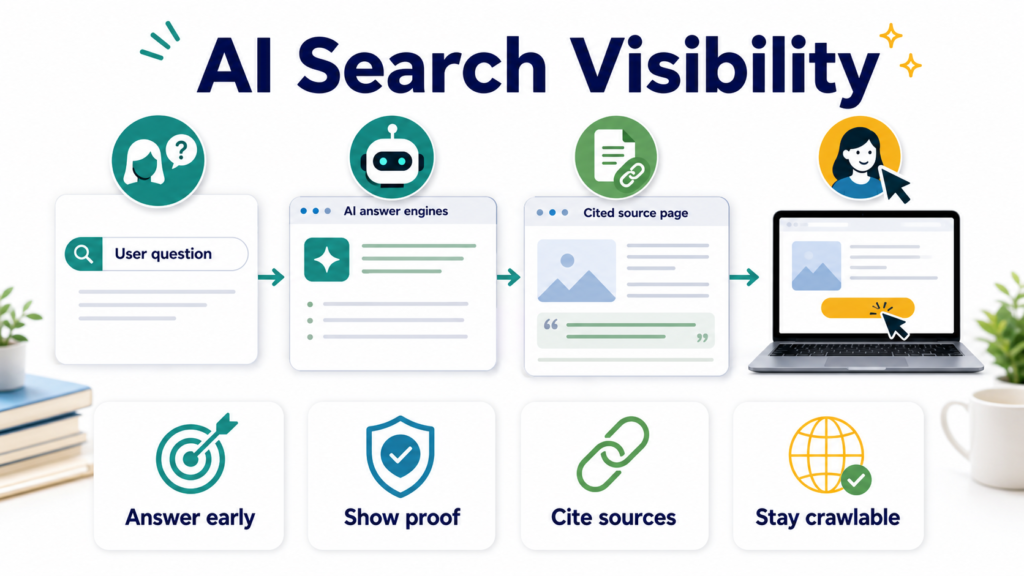
This topic matters now because search is becoming less like a blue-link list and more like a guided answer layer. Google has been expanding AI Mode and AI-powered search experiences. Perplexity documents crawler behavior for its answer product. Brave offers a Search API that can power AI and search applications. Bing and Google still publish classic webmaster guidance, but the way people consume results is changing. A small site can no longer assume that ranking is only about a title, a keyword, and a few backlinks.
For abcnote readers who run a blog, small business site, product page, documentation site, or creator archive, the goal is simple: create pages that are useful even when an AI answer appears above them. If your page gives the clearest answer, the best example, the most current checked source, or a practical checklist readers can act on, it has a better chance of being cited, clicked, bookmarked, and linked. If the page only repeats common advice, AI search gives readers less reason to visit.
This guide builds on the Google AI search playbook, the AI Overviews click-path map, and the AI answer fact-checking loop. Those pages explain how AI answers change user behavior. This article focuses on what to do on your own pages without drifting into spammy answer-engine manipulation.
What changes when search becomes an AI answer
In classic search, a reader scans titles, snippets, URLs, and maybe rich results. In AI search, the system may read multiple sources first, build a summary, and show part of the answer before the reader clicks. That means a weak page can lose traffic faster. It also means a strong page can become a trusted source if it gives answer engines clear evidence and gives humans a reason to inspect the original.
The biggest change is the click reason. A page that only says what many other pages say is easier to compress into an answer. A page with original screenshots, current prices, tested steps, product limits, local context, data notes, expert judgment, or a decision checklist is harder to replace with a generic paragraph. AI search optimization starts by asking what a reader still needs after seeing a short AI answer.
Old habit
Write a page around one keyword phrase and hope the title wins the click.
Better habit
Answer the query quickly, then add proof, examples, and context that make the original page worth opening.
Old risk
Thin comparison posts can look good to a crawler but feel empty to a human.
Better signal
Show what was checked, when it was checked, and how the recommendation changes by use case.
Old metric
Only watching ranking position can miss AI answer impressions, zero-click behavior, and brand visibility.
Better metric
Track impressions, queries, referral patterns, branded searches, internal clicks, and which pages earn links or mentions.
The six visibility rules that still matter
Good AI search pages are not written for robots alone. They are written so a human can understand the answer, and so a machine can identify the answer, the source, the scope, and the limits. Google Search Central’s AI and SEO guidance keeps emphasizing helpful, people-first content. That is still the safest center of gravity.
1. Answer early
Put the direct answer in the opening screen. Do not make readers scroll through a history lesson before they know what you recommend.
2. Add original evidence
Use your own screenshots, tests, examples, workflows, product notes, local context, or decision rules. AI systems can summarize generic text easily.
3. Cite primary sources
Link official documentation, support pages, standards, data pages, and high-quality reporting near the section where the claim appears.
4. Structure the page
Use clear headings, concise paragraphs, accessible images, descriptive alt text, and schema where it genuinely describes the content.
5. Stay crawlable
Avoid accidentally blocking useful crawlers with robots.txt, noindex tags, broken scripts, login walls, or image-only text.
6. Show limits
Say when features, prices, availability, or rules change. A dated source note can be more trustworthy than pretending advice is timeless.
How to write for Google AI Mode and AI Overviews
Google’s public guidance is not a separate secret rulebook for AI results. It points site owners back to core search quality: helpful content, clear page purpose, accessibility, technical SEO, and crawlability. The practical difference is that the answer layer raises the cost of being vague. A page should make it obvious what question it answers, which sources support it, and which part is the author’s practical judgment.
For a small site, that means the first section should be useful by itself. If the query is ‘AI search optimization,’ the reader should learn what it is and what to do first without decoding a long intro. If the query is a product comparison, the page should show who each option is best for before going deep. If the query is a setup guide, the page should show prerequisites, steps, and failure points.
Use clear H2s
Headings should reflect the questions people ask: what changed, what to do, what to avoid, how to measure, and when to update.
Put evidence nearby
Do not dump sources at the end only. Link official guidance in the section where the reader needs it.
Keep image text accessible
Infographics help scanning, but repeat the key points as text cards so mobile readers and crawlers can understand them.
Use structured data honestly
Schema can help clarify recipes, FAQs, products, how-to steps, reviews, and articles, but it should match visible content.
How Perplexity, Brave, and other answer engines change the checklist
Perplexity’s crawler documentation and Brave’s Search API are useful reminders that AI answer surfaces do not all use the web in the same way. Some products crawl pages directly. Some use search indexes. Some combine retrieval, summaries, citations, browser context, or user-provided sources. That makes one universal optimization trick unrealistic.
The durable approach is to make the page easy to retrieve and easy to quote accurately. Use a stable URL. Keep the main answer in HTML text, not only inside an image. Make sure headings describe the section. Give named entities their full names at least once. Put dates beside fast-changing claims. If a crawler or answer engine reaches the page, it should not need to guess what the page is about.
Stable URL
Do not change slugs casually. If you must change a URL, use a proper redirect.
Readable HTML
Core answers should be text. Images, scripts, tabs, and accordions should not hide the only important information.
Specific entities
Use full product, company, protocol, model, app, and place names when they matter.
Crawl policy
Review robots.txt and crawler rules deliberately. Blocking everything can also block discovery.
Source transparency
Show where the claim came from. A cited page is more useful than a confident page with no trail.
Update rhythm
Fast-moving AI/tool pages need visible date checks and periodic refreshes.
What small WordPress sites should do first
A small WordPress site does not need enterprise SEO tooling to become more answer-friendly. Start with the pages that already have the clearest reader value. Improve one page at a time: title, opening answer, headings, source links, image alt text, internal links, and mobile layout. The WordPress category structure guide matters here because scattered categories make it harder for readers and search systems to understand what the site covers.
For an AdSense-style site, this also protects quality. A site filled with thin AI summaries is a weak long-term asset. A site with clear categories, original examples, working links, and mobile-safe visuals has a stronger chance of keeping readers after they land. The AdSense approval checklist is still relevant because trust pages, navigation, privacy policy, and editorial clarity support both humans and search systems.
Rewrite the first screen
Add a quick answer, who the page is for, and the most useful next step. Keep it direct.
Add a checked-source block
List official sources and date checked. Replace dead links before the page ages.
Add original examples
Use a screenshot, short test, scenario, checklist, local observation, or tool-specific note.
Strengthen internal links
Link related pages in context, not only in a final block. Help readers continue the task.
Fix mobile layout
Avoid dense 4-column tables. Use cards, compact 2-column tables, or verified horizontal scroll.
Update old pages
A refreshed older page can be more valuable than another isolated new post.
A practical page template for AI search visibility
Use this structure for a guide, comparison, checklist, or explainers where AI search visibility matters. It is not a guarantee. It is a clean page design that helps readers and makes the content easier to understand.
Opening answer
Define the topic and give the practical answer in two or three paragraphs.
Visual summary
Add one meaningful image or infographic, then repeat the key points as text cards.
Decision sections
Break the topic into what changed, what to do, what to avoid, and how to choose.
Evidence sections
Cite official or high-quality sources inside the section where the claim is made.
Examples
Show real scenarios, sample prompts, screenshots, or short workflows.
Update note
Add date checked, what can change, and which pages readers should verify.
What not to do
AI search creates a temptation to chase shortcuts. That is risky. Search systems and readers both get better at recognizing pages that look optimized but do not help. Avoid claims that promise guaranteed AI-answer placement. Avoid copying AI summaries from other sites. Avoid adding fake expertise, fake tests, fake authors, or fake review data. Avoid hiding the useful answer behind long filler.
Do not promise ranking
No public guide can guarantee inclusion in Google AI Mode, Perplexity, ChatGPT Search, or Brave answers.
Do not publish generic rewrites
If the page says the same thing every AI answer already says, it has little reason to earn a click.
Do not block key content
Important answers inside images, scripts, or login-only pages are harder to discover and cite.
Do not overuse FAQ stuffing
FAQs are useful when they answer real questions. They are weak when they repeat keywords mechanically.
Do not ignore dates
AI tools, search features, pricing, crawler policies, and product availability change quickly.
Do not neglect humans
A page that is readable, useful, and trustworthy for humans is still the best foundation.
How to measure whether it is working
AI answer visibility is still harder to measure than classic ranking. Start with the data you can trust: Google Search Console queries, impressions, click-through rate, page engagement, referral traffic, branded searches, internal-link clicks, and which articles earn natural links or mentions. The Google Trends tech discovery filter can help decide which topics deserve timely updates, but performance should come from your own Search Console and analytics data once pages are live.
Look for patterns instead of one-day noise. A page may lose clicks but gain impressions. A page may get fewer visits from one query but more from long-tail questions. A page may become a source people cite even when direct traffic is modest. AI search optimization is partly SEO, partly editorial quality, and partly product thinking: did the page solve a real decision better than the short answer did?
Search Console
Track queries, impressions, pages, countries, devices, and click-through changes after updates.
Referral logs
Watch traffic from search, answer engines, social shares, newsletters, and other sites.
Internal clicks
If readers continue to related pages, the page is doing more than catching a quick visit.
Refresh queue
Pages about AI search, tools, pricing, and policies should be checked more often than evergreen basics.
FAQ
Is AI search optimization the same as SEO?
It overlaps with SEO, but it is not identical. Classic SEO still matters: crawlability, useful content, clear titles, page speed, links, and structured data. AI search optimization adds more emphasis on answer clarity, source evidence, original examples, and whether the page is worth citing inside an AI-generated answer.
Can I force my page into Google AI Mode or Perplexity?
No. You can make a page more useful, more crawlable, better structured, and easier to cite, but no ethical method guarantees placement in AI answers. Treat guaranteed-placement claims as a warning sign.
Should I block AI crawlers?
That depends on your business model and content policy. Some publishers want maximum discovery. Others want to restrict training or answer-engine use. Review crawler documentation, robots.txt behavior, and your own monetization goals before blocking. Do not block accidentally.
Do backlinks still matter?
Authority and references still matter, but the best link strategy is earning real citations by publishing useful, original, source-backed pages. Thin pages built only for keyword capture are weaker in an answer-heavy search environment.
What should I update first?
Update pages that already have impressions, outdated source links, weak openings, dense mobile tables, or generic summaries. A useful refresh can outperform a new isolated article.
Source notes and date checked
Sources were checked on July 30, 2026. AI search features, crawler documentation, and product availability change quickly, so verify the current source pages before making a permanent policy decision. This guide uses Google Search Central, Google AI Mode, Perplexity crawler docs, Brave Search API, Bing Webmaster Guidelines, and schema.org as source anchors.
- Google Search Central: Succeeding in AI Search
- Google Search Central: AI-generated content guidance
- Google SEO Starter Guide
- Google structured data introduction
- Google robots.txt introduction
- Google Search AI Mode update
- Google Search Central: Helpful content
- Google Search Central: Search quality rater guidelines overview
- Perplexity crawler and bots documentation
- Brave Search API
- Bing Webmaster Guidelines
- schema.org structured data vocabulary
Bottom line: build pages worth citing
AI search optimization is not about tricking answer engines. It is about publishing pages that give a direct answer, show original proof, cite reliable sources, stay technically accessible, and help a reader make a better decision after the AI summary. That is a healthier long-term strategy than chasing every new acronym around answer engines.
Start with one important page. Rewrite the opening answer. Add or update sources. Replace dense tables with mobile-safe cards. Add a meaningful visual. Link related articles naturally. Add a date-checked note. Then watch how the page performs. The web is changing, but useful, trustworthy pages still have a job.
A citation mention is not the same as a useful visit
Imagine an answer engine mentions your page but does not link it. Another answer links the page yet misstates its conclusion. These are different observations and should not count as the same success.
| Situation | Next check | Why it changes the decision |
|---|---|---|
| Name mentioned without a link | Record the query and answer as a mention. | It does not establish a visit or a supported citation. |
| Page linked with an incorrect summary | Inspect the quoted context and the page's wording. | Visibility can coexist with a misunderstanding. |
| Reader arrives and completes the task | Use appropriate site analytics and feedback. | An observable user outcome is stronger than a single screenshot. |
Google's AI-feature guidance says normal SEO fundamentals still apply; it does not promise inclusion. Treat this log as observations from specific queries, times, and settings, rather than a universal ranking measure.