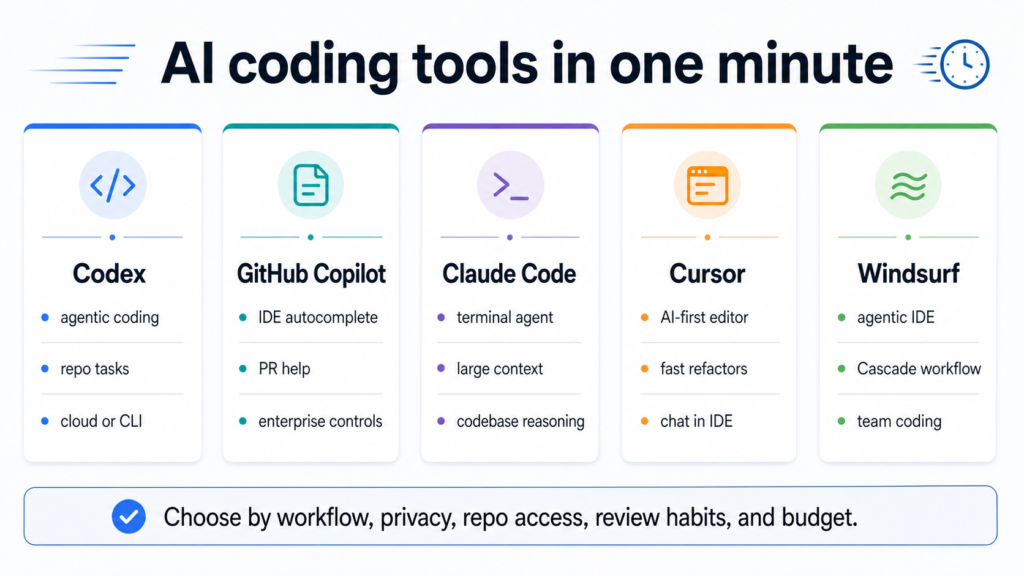
Quick answer: the best AI coding tools are not interchangeable. Codex is strongest when you want an agent to work through repo tasks and explain changes. GitHub Copilot is still the default choice for developers who live inside a familiar IDE and want autocomplete, chat, pull-request help, and enterprise controls. Claude Code is attractive for terminal-first engineers who want large-context codebase reasoning. Cursor is the most natural pick when you want an AI-first editor with fast refactors. Windsurf fits teams that want an agentic IDE and Cascade-style workflow. The safest answer is to choose by workflow first, then privacy, repo access, review habits, and budget.
This comparison is timely because AI coding assistants are moving from fun demos into daily project work. Developers are asking which tool can safely touch a real repository, which one is best for a small team, which one works inside an existing IDE, and which one should never see private code. The hype answer is usually wrong. A useful choice starts with the type of work: autocomplete, bug fixing, repo cleanup, test writing, terminal automation, pull-request review, or larger multi-file refactoring.
The same decision connects to other abcnote engineering guides. If AI tools can call APIs or run scripts, review the OpenAI API cost guide. If private code cannot leave a machine, compare the tradeoffs in local AI vs cloud AI and the Ollama setup guide. If the assistant touches dev containers or command-line tools, your local stack from the Docker vs Podman guide matters too.
AI coding tools compared in one screen
| Tool | Best fit | Use carefully when |
|---|---|---|
| Codex | Agentic repo tasks, code changes, test fixes, explanations, CLI or cloud workflows | The repo has secrets, weak tests, unclear permissions, or changes that require human product judgment. |
| GitHub Copilot | IDE autocomplete, chat, pull-request support, and organization-level developer assistance | Autocomplete may hide weak design, licensing concerns, or code that nobody reviewed. |
| Claude Code | Terminal-first codebase reasoning, large-context questions, multi-file analysis, and scripted workflows | Commands can affect files, dependencies, or local secrets without a tight review loop. |
| Cursor | AI-first editing, fast refactors, project chat, and everyday feature work inside an editor | The editor gets broad context and the team has not defined what can be indexed or shared. |
| Windsurf | Agentic IDE workflows, Cascade-style changes, and team coding around bigger tasks | Generated changes are accepted faster than tests, security checks, and code review can keep up. |
The five questions to answer before choosing
Where do you code?
Existing IDE, GitHub flow, terminal, AI-first editor, or browser/cloud workspace? Pick the tool that fits the place you already review code.
What can it see?
Decide whether the assistant can read the whole repo, only open files, logs, tickets, terminal output, docs, or private customer data.
What can it change?
Autocomplete is different from an agent editing many files. Define approvals before letting a tool run commands or rewrite project structure.
How do you review?
Every AI change needs tests, diff review, security checks, and a human who understands the product intent.
What does it cost?
Subscription cost is only one line. Add API usage, team seats, lost time from bad changes, and security review overhead.
Codex: best when you want an agent on real repo tasks
Codex is built around the idea that an AI assistant can do more than suggest the next line. It can inspect a codebase, propose changes, explain a plan, modify files, and help with tasks such as tests, bugs, migrations, documentation, and refactors. That makes it useful for developers who want to delegate bounded chunks of work instead of only receiving autocomplete suggestions.
The practical strength is repo-level help. Ask it to trace a failing test, explain a module, draft a safer migration, or make a small feature change with tests. The risk is also repo-level. If the prompt is vague, the tool may touch too much. If secrets are visible, you have a policy problem. If tests are weak, the change can look clean while breaking behavior. Codex should work inside a review habit: inspect the diff, run tests, check security-sensitive files, and reject changes that hide product assumptions.
GitHub Copilot: best default for existing IDE and GitHub workflows
GitHub Copilot remains the easiest default for many teams because it sits where developers already work. It supports common IDE workflows, chat, code suggestions, pull-request support, and organization controls through the GitHub ecosystem. For teams that already use GitHub, this lowers adoption friction. Developers do not need to change editors, terminals, repo hosts, or review habits before seeing value.
Copilot is strongest for everyday acceleration: boilerplate, test hints, small functions, API usage examples, comments-to-code, and code-review assistance. It is weaker if the team expects it to autonomously redesign a large system without oversight. Treat it like a fast pair programmer that needs clear context. For enterprise teams, the trust and policy controls matter as much as model quality.
Claude Code: best for terminal-first codebase reasoning
Claude Code is compelling for engineers who think in the terminal and want to ask deep questions about a codebase. It can be useful for understanding unfamiliar repos, planning edits, writing tests, and reasoning across many files. The large-context style is especially helpful when the job is not one isolated function but a larger explanation or refactor path.
The terminal is powerful, so the guardrails should be explicit. Do not give broad command permission in a repo with secrets, production credentials, or uncommitted user work. Keep changes small. Ask for a plan before edits. Read generated shell commands before running them. Use Git diffs as the contract: every file touched should match the task you intended.
Cursor: best when you want the editor itself to be AI-first
Cursor is popular because the AI experience is not bolted on as a small side panel. The editor is designed around chat, context, and fast project changes. That works well for solo builders, startup teams, and developers who want AI to move through files while they stay in an editor-first workflow.
Cursor can feel fast because it reduces the friction between asking, editing, and applying changes. That speed is useful for prototypes, UI work, refactors, and learning a new codebase. It can also create overconfidence. If the editor is allowed to see broad project context, teams need clear rules for private repos, customer data, generated code review, and when a human must stop and manually inspect architecture.
Windsurf: best for agentic IDE workflows and team coding
Windsurf, previously known in the market around Codeium’s developer tools, pushes an agentic IDE workflow. Its Cascade-style experience is aimed at helping the assistant understand intent, edit across files, and keep momentum inside the development environment. It is a reasonable candidate for teams that want more than autocomplete but still want work to happen inside an IDE-like surface.
The right way to evaluate Windsurf is not by a single demo. Test it on a realistic ticket: one bug, one small feature, one refactor with tests, and one documentation update. Check how easy it is to control context, review diffs, undo changes, and avoid touching files outside the task. If your team moves fast, the review process must move with it.
A practical scorecard for real projects
| Project need | Best first shortlist | Why |
|---|---|---|
| Existing enterprise IDE workflow | GitHub Copilot, Codex | Copilot fits adoption; Codex can help with bounded repo tasks. |
| Terminal-first senior engineer | Claude Code, Codex | Both support deeper repo reasoning and task execution when reviewed carefully. |
| Solo founder building fast | Cursor, Windsurf, Codex | AI-first editors and agents reduce switching cost for small product changes. |
| Privacy-sensitive local work | Local AI stack plus limited cloud assistant | Use cloud tools only for sanitized code or low-risk tasks. |
| Large refactor | Codex, Claude Code, Cursor | Repo-level reasoning matters more than autocomplete. |
| Junior developer support | GitHub Copilot with review rules | Autocomplete and explanations help, but mentoring and code review still matter. |
Privacy and security: the hidden difference between tools
The biggest AI coding risk is not that a model writes a bad function. Bad code is visible in tests and review. The larger risk is context exposure and permission creep. Coding assistants may see open files, repo snippets, terminal output, stack traces, issue text, API responses, logs, environment names, credentials, customer examples, or internal architecture. Before adopting any tool, define what it can read and what it can change.
Use vendor security pages, organization controls, and official docs as starting points, then add your own policy. OWASP’s LLM application guidance, NIST’s secure software development work, and NIST AI risk management guidance are useful because they frame AI tools as software systems with input, output, permissions, monitoring, and failure modes. The same habit from the secure login guide applies: protect credentials first, then reduce unnecessary access.
| Risk | What to do | Why it matters |
|---|---|---|
| Secrets in prompts | Never paste API keys, tokens, private certificates, or production credentials | A helpful assistant should not become a secret-storage path. |
| Overbroad repo access | Limit context when possible and keep sensitive folders out of routine prompts | Less context means less accidental exposure. |
| Command execution | Require approval for shell commands, dependency changes, migrations, and file deletion | Agents can move faster than a human review loop. |
| Generated dependency use | Check package names, maintainers, licenses, and security posture | AI can suggest outdated or risky packages. |
| Weak tests | Add tests before accepting larger generated changes | A clean explanation does not prove behavior. |
| License uncertainty | Review copied-looking snippets and project license policy | Teams need a repeatable rule, not a guess. |
Mobile-safe comparison cards
Codex
Choose it for bounded repo tasks, bug fixing, test writing, explanations, and agentic work where a human will inspect the diff before merging.
GitHub Copilot
Choose it when your team already lives in GitHub and common IDEs and wants broad developer assistance with organization controls.
Claude Code
Choose it when terminal workflow, large-context reasoning, and careful command review are more important than IDE autocomplete.
Cursor
Choose it when you want the editor to become the AI workspace for fast project chat, refactors, and feature work.
Windsurf
Choose it when an agentic IDE and Cascade-style coding flow fit the way your team plans, edits, and reviews code.
G2 and review-site evidence
Review sites are useful signals, but they should not decide the whole purchase. For this draft, official product documentation and practical workflow tests are the main evidence because review-site pages can be hard to verify consistently in an automated check. When a team evaluates GitHub Copilot, Cursor, Windsurf, Codex, or Claude Code, use review sites only as a sentiment supplement after confirming current product controls in the official docs.
| Tool | G2 snapshot | How to use the signal |
|---|---|---|
| GitHub Copilot | No rating quoted in this automated check | Use current review pages only as sentiment support after checking GitHub controls. |
| Cursor | No rating quoted in this automated check | Use current review pages only as sentiment support after testing editor workflow. |
| Windsurf | No rating quoted in this automated check | Use current review pages only as sentiment support after testing Cascade workflow. |
| Codex | No clean standalone G2 rating found in this check | Evaluate with official docs, trial tasks, and repository safety review. |
| Claude Code | No clean standalone G2 rating found in this check | Evaluate with official docs, terminal workflow tests, and team guardrails. |
How to test an AI coding assistant before paying for the team
Do not evaluate an AI coding tool with a toy prompt. Use a small but real project and run the same test across tools. The task should include code reading, one bug fix, one test, one documentation update, and one security-sensitive boundary such as not touching environment files. This reveals whether the tool respects context, explains tradeoffs, edits carefully, and helps you review faster.
| Test task | Pass signal | Fail signal |
|---|---|---|
| Explain a module | Names the important files and describes data flow correctly | Invents architecture or ignores key files. |
| Fix a bug | Makes a small diff and adds or updates a test | Changes unrelated files or hides assumptions. |
| Refactor | Improves structure without changing behavior | Large diff with no clear reason. |
| Security check | Warns about secrets, auth, input validation, and dependency risk | Suggests unsafe shortcuts. |
| Documentation | Updates docs to match code, not marketing language | Writes generic docs that do not match the repo. |
| Review support | Explains what changed and what to verify | Asks you to trust a vague summary. |
Budget: subscription price is not the whole cost
The cheapest monthly seat may become expensive if it creates bad diffs, review fatigue, or security cleanup. The most powerful agent may be overkill if your team only needs autocomplete. Budget should include five costs: seat price, API or usage limits, setup time, review time, and risk controls. For a solo developer, speed may matter most. For a team handling customer data, governance may matter more than a slightly better answer on a benchmark.
A good starting policy is simple: one primary coding assistant, one approved experimental assistant, and one local or restricted workflow for sensitive code. That keeps tool sprawl under control. If every developer brings a different assistant with different data settings, the team eventually loses track of what code and logs are going where.
Decision paths
| If you are… | Start with | Add this guardrail |
|---|---|---|
| A student or new developer | GitHub Copilot or Cursor | Treat suggestions as study material; do not submit code you cannot explain. |
| A solo app builder | Cursor, Codex, or Windsurf | Keep commits small and use automated tests before merging. |
| A backend engineer | Claude Code or Codex | Review commands and database changes before execution. |
| A GitHub-heavy company | GitHub Copilot plus Codex trials | Use organization policies and pull-request review. |
| A privacy-sensitive team | Local AI plus limited cloud use | Sanitize prompts and restrict repo access. |
| A fast product team | Cursor or Windsurf trial | Define rollback, review, and ownership before agents edit broadly. |
What not to automate yet
AI coding tools are strong enough to help with real work, but not every engineering decision should be automated. Be careful with production database migrations, payment logic, authentication, authorization, encryption, licensing decisions, legal compliance, customer-data handling, and security incident response. In those areas, AI can help draft checklists, tests, and explanations, but a qualified human should own the final call.
This is similar to using AI agents for shopping, research, or workflow automation. The assistant can reduce tedious work, but permission boundaries matter. For a broader safety pattern, read the AI shopping-agent security guide and the automation guide; the same rule applies to code: let AI assist, but keep approval over money, credentials, data, and irreversible changes.
Source notes and date checked
Sources were checked on July 29, 2026. Product features, pricing, privacy language, enterprise controls, and review-site pages can change quickly. This guide uses official pages from OpenAI, GitHub, Anthropic, Cursor, Windsurf, NVIDIA, OWASP, and NIST.
- OpenAI Codex
- OpenAI Codex CLI on GitHub
- GitHub Copilot documentation
- GitHub Copilot Trust Center
- Anthropic Claude Code overview
- Anthropic Claude Code documentation
- Cursor website
- Cursor privacy policy
- Windsurf website
- Windsurf documentation
- NVIDIA NeMo Guardrails
- OWASP Top 10 for LLM Applications
- NIST Secure Software Development Framework
- NIST AI Risk Management Framework
Bottom line: choose the tool that matches your review habit
AI coding tools are useful because they compress the distance between intent and code. That is also why they need boundaries. The best assistant is the one that matches your workflow and leaves you with a diff you can understand, test, and defend.
For most teams, the practical answer is not one permanent winner. Use GitHub Copilot for low-friction IDE help, Codex or Claude Code for bounded repo reasoning, Cursor or Windsurf for AI-first editing, and local or restricted workflows for sensitive work. Then measure outcomes: fewer bugs, faster tests, clearer docs, smaller review burden, and no surprises around secrets or customer data.
The useful coding comparison includes a rejected patch
Use a hypothetical repository issue with an established failing example. Give candidates the same scope, then include one proposed solution that changes unrelated files in the review record.
| Situation | Next check | Why it changes the decision |
|---|---|---|
| Patch fixes the reported case | Check independent boundary cases and the diff. | One passing test is not the whole acceptance criterion. |
| Patch changes unrelated behavior | Reject or narrow it before merging. | Correct output in one area can hide a larger regression. |
| Assistant explains uncertainty | Check whether its explanation matches the code. | A confident summary is not evidence that the change works. |
Compare reviewer effort and accepted outcomes alongside subscription and usage charges. This is a common evaluation brief, not an assertion that a named assistant is best today.