Quick answer: AI agent security is the set of rules that decides what an agent can see, what it can change, which tools it can call, which secrets it can access, when a human must approve an action, and how the team can replay or reverse what happened. If an agent can browse, code, buy, deploy, email, update tickets, or touch cloud accounts, treat it like a new employee plus a new software integration. Give it identity, least privilege, a sandbox, logs, and a kill switch before it touches real work.
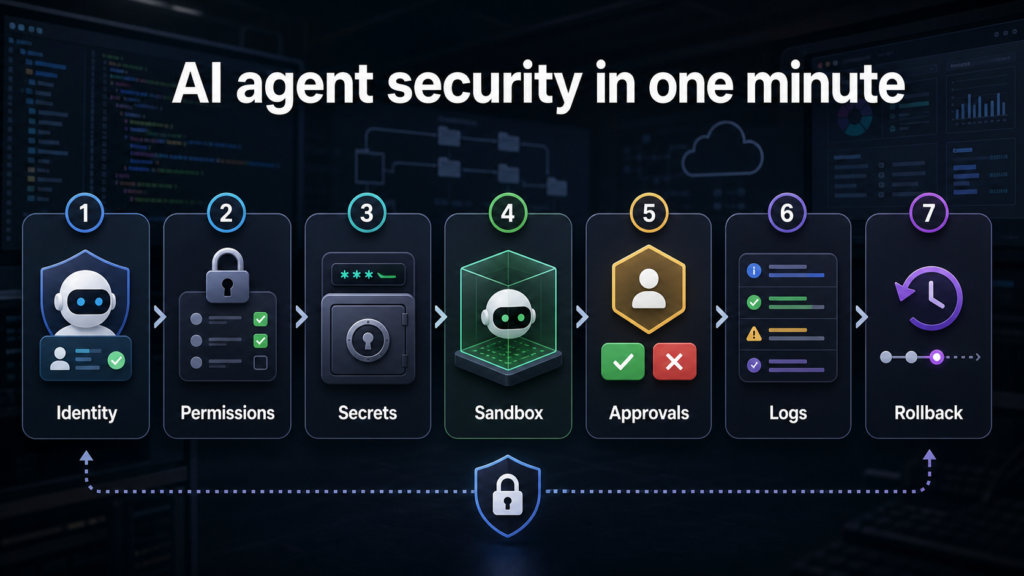
This matters now because AI agents are moving from chat windows into browsers, developer machines, cloud consoles, support desks, procurement flows, and internal automation. A chatbot that only answers questions is one risk profile. An agent that can use tools, read files, commit code, call APIs, or act inside a browser is different. The useful question is no longer only whether the model is smart. It is whether the runtime around the model is controlled.
The same pattern appears across consumer and developer workflows. If an agent can buy things, use the AI shopping-agent security guide. If it can handle credentials, start with the API keys and tokens guide. If it works in a browser, separate risky accounts with browser profiles. If it writes code, compare the boundaries in the AI coding tools guide. The security habit is the same: give the agent only the access needed for the task and keep approval over irreversible actions.
What changed: agents now need runtime controls
Traditional application security asks who can log in, what the app can access, and how changes are audited. AI agents add a harder layer: the agent may decide which tool to use next. It may chain steps together. It may read a document, call an API, fill a form, open a repo, summarize a ticket, and suggest a deployment. That flexibility is useful, but it can also turn a small permission mistake into a broad workflow mistake.
Security vendors and open standards groups are paying more attention to this agentic layer. OWASP has expanded guidance around LLM application risks and agentic AI. NIST’s AI risk work and secure software development guidance are useful anchors because they push teams to identify risks, monitor behavior, and manage software changes. Product pages from vendors in identity, cloud security, and developer security increasingly talk about runtime authorization, agent inventory, tool control, and exposed secrets. The marketing names differ, but the practical control set is consistent.
Identity
Plain-English rule: Every agent needs a named owner, purpose, environment, and account boundary.
Why it matters: If nobody owns the agent, nobody can answer what it did or shut it down.
Permissions
Plain-English rule: Start with read-only or narrow task access, then expand only after testing.
Why it matters: Least privilege limits damage when a prompt, tool call, or workflow goes wrong.
Secrets
Plain-English rule: Agents should not see raw keys, tokens, passwords, or production credentials by default.
Why it matters: Secret exposure can outlive the original agent task.
Sandbox
Plain-English rule: Run code, browser tasks, and file edits in a controlled workspace where possible.
Why it matters: A sandbox turns mistakes into reviewable changes instead of production impact.
Approvals
Plain-English rule: Require a human click for money, deletion, email sends, deployments, permission changes, and external posts.
Why it matters: Irreversible actions should not depend on generated reasoning alone.
Logs
Plain-English rule: Record prompts, tool calls, files touched, API calls, approvals, and final output.
Why it matters: Logs make debugging, compliance, and incident response possible.
Rollback
Plain-English rule: Know how to revoke tokens, stop jobs, revert commits, restore data, and disable routes.
Why it matters: A good rollback plan lowers the fear of using agents responsibly.
A seven-layer AI agent security checklist
1. Name the agent
Give it a purpose, owner, environment, data scope, and expiration date. Avoid mystery automations running under a shared personal account.
2. Limit what it can read
Separate public docs, internal docs, code, logs, customer data, financial data, and credentials. The agent should not see everything just because a human user can.
3. Limit what it can do
Read-only research is low risk. Browser clicks, file edits, API writes, purchases, messages, and deployments require stronger review.
4. Protect secrets
Use secret managers, scoped tokens, temporary credentials, and masked logs. Never paste production keys into a prompt or agent scratchpad.
5. Use a sandbox
Run code in a disposable branch, container, staging tenant, test account, or isolated browser profile before letting output reach production.
6. Add approvals
A human should approve payment, publishing, permission changes, destructive commands, customer-facing messages, and production deploys.
7. Keep audit and rollback
Track the chain of actions and practice revocation. If the agent misfires, the team should know what to stop first.
Permission tiers: match access to the job
The simplest way to reduce risk is to classify agent work into permission tiers. A research agent reading public pages does not need the same trust as a support agent that updates customer records or a coding agent that can run shell commands. Use tiers before choosing a tool. If the tool cannot support the tier you need, the workflow is not ready.
Observe
Allowed actions: Read public pages, summarize docs, draft notes, answer questions from approved content.
Approval rule: No approval needed beyond normal source review.
Assist
Allowed actions: Read selected internal files, draft replies, suggest code, prepare pull-request notes.
Approval rule: Human reviews before sending, merging, or sharing.
Edit in sandbox
Allowed actions: Change files, run tests, fill forms in test accounts, prepare staged updates.
Approval rule: Human reviews diff, logs, and output before promotion.
Act with guardrails
Allowed actions: Call approved APIs, create tickets, update non-critical records, trigger safe jobs.
Approval rule: Pre-approved action list plus monitoring.
High impact
Allowed actions: Payments, production deploys, user permissions, deletion, external publishing, legal or financial actions.
Approval rule: Explicit human approval every time.
Secrets are the first thing to fix
Most agent security programs should start with secrets because leaked credentials are easy to miss and hard to clean up. An agent may read a build log, inspect an environment file, summarize a ticket, process a screenshot, or run a command that prints a token. Even if the model provider has strong controls, your own workflow should assume secrets need minimization.
Use secret scanning, repository rules, short-lived tokens, environment separation, and masked logs. GitHub’s secret scanning and Actions hardening docs are useful starting points for developer workflows. GitGuardian’s reporting on secrets sprawl is a reminder that leaked keys are not a theoretical issue. If your team already struggles with secrets in normal development, do not give agents broad repo or CI access until that is cleaner.
API keys in prompts
Safer pattern: Use a vault, scoped token, or mock value.
Check: Search prompt history and logs for accidental key exposure.
CI secrets in agent-run commands
Safer pattern: Run only approved commands and mask environment output.
Check: Review command logs before sharing them with the agent.
Production credentials
Safer pattern: Use staging credentials or temporary credentials.
Check: Rotate immediately if exposed.
Personal browser session
Safer pattern: Use a separate profile or test account.
Check: Confirm the agent is not logged into banking, email, or admin accounts.
Repo-wide access
Safer pattern: Exclude sensitive files and use branch protection.
Check: Audit files touched after every task.
Browser agents need account boundaries
AI browser agents are attractive because they can search, compare, fill forms, move between tabs, and take action in the same place humans work. That convenience is also the risk. A normal browser often contains email, banking, shopping, work admin panels, saved passwords, passkeys, synced history, personal files, and open sessions. Do not let an agent use your everyday browser profile unless the task is harmless.
Create separate browser profiles for work, personal, school, banking, testing, and agent tasks. Use test accounts where possible. Turn off unnecessary saved payment methods. Keep passkeys and password-manager approvals human-controlled. The secure login guide is relevant here because login convenience can become agent overreach if approvals are too automatic.
Safe browser task
Research public product pages, summarize open documentation, compare non-sensitive options, or draft a form without submitting it.
Needs approval
Checkout, login changes, account linking, email sending, posting, subscription changes, calendar invites, or support-ticket updates.
Avoid for now
Bank transfers, tax portals, health accounts, production admin panels, legal filings, or anything with irreversible personal impact.
Developer agents need branch and command discipline
Coding agents are powerful because they can inspect real files, run tests, and produce concrete diffs. That makes them valuable for bug fixes, tests, migrations, documentation, dependency updates, and learning unfamiliar projects. It also means they can delete files, change dependencies, expose secrets, or alter behavior in places the reviewer did not expect.
Keep AI coding work in a separate branch. Ask for a plan before edits. Review every touched file. Run tests yourself or in CI. Do not allow uncontrolled commands in repos with production secrets. For local/private work, consider the tradeoff in the local AI vs cloud AI guide. Local tools can reduce data exposure, but they do not automatically solve command safety, review quality, or dependency risk.
Branching
Good default: One task, one branch, one reviewable diff.
Why: Small changes are easier to understand and revert.
Commands
Good default: Require approval for install, delete, migration, network, and deploy commands.
Why: Generated commands can affect more than the current file.
Tests
Good default: Ask the agent to add tests, then run them independently.
Why: Passing tests are stronger than a confident explanation.
Dependencies
Good default: Verify package names, maintainers, licenses, and update history.
Why: Dependency confusion and abandoned packages create supply-chain risk.
Secrets
Good default: Never expose .env files, tokens, private keys, or customer data.
Why: Secret leaks are often more damaging than bad generated code.
Runtime authorization: approve actions, not just users
Old access control often asks whether a user has permission. Agent access control needs a second question: is this specific action allowed right now, for this task, with this data, in this environment? That is why runtime authorization is becoming a useful phrase. The decision happens while the agent is working, not only when the user logs in.
A practical runtime rule can be simple. The agent may read approved docs. It may create a draft ticket. It may propose a code diff. It may not send the ticket externally, merge the code, rotate secrets, change user permissions, or spend money without human approval. Each tool call should have an allow list, deny list, and escalation path.
Read public docs
Default policy: Allow
Reason: Low-risk and useful for grounding.
Read internal docs
Default policy: Allow by folder or label
Reason: Internal visibility should match the task.
Write draft output
Default policy: Allow in sandbox
Reason: Drafts are reversible.
Send external message
Default policy: Require approval
Reason: External speech creates business and trust risk.
Change permissions
Default policy: Require approval
Reason: Access expansion can outlive the task.
Spend money
Default policy: Require approval
Reason: Payments need human intent and audit.
Deploy to production
Default policy: Require approval plus CI
Reason: Production changes require a stronger chain of evidence.
Logging: what to record without over-collecting
Good logs help teams trust agents. Bad logs create new privacy problems. Record enough to understand what happened: task ID, agent identity, user, time, data sources, tool calls, files touched, commands requested, approvals, final output, and rollback action. Avoid storing more sensitive prompt content than necessary, and mask secrets in logs.
Logs should answer four questions: What did the agent see? What did it decide? What tools did it call? What changed? If the answer is unclear, the workflow is not ready for high-impact work. For regulated data, check internal retention and privacy rules before storing full transcripts.
Minimum log
Agent name, owner, task, time, tool calls, files or records touched, approval events, and final output.
Sensitive log rule
Mask secrets, avoid unnecessary customer data, and keep retention proportional to the risk.
Incident log
Preserve the action chain, revoke tokens, freeze the workflow, and record the rollback steps.
Buyer checklist for AI agent security tools
If a vendor claims to secure AI agents, ask practical questions before buying. Does it inventory agents and tools? Does it understand identities and permissions? Can it block risky tool calls at runtime? Does it detect secrets in prompts, files, and logs? Does it integrate with your browser, endpoint, identity provider, code host, cloud account, or ticketing system? Does it show a clear audit trail?
Can it inventory agents?
Good answer: Shows which agents exist, who owns them, and what tools they can use.
Weak answer: Only scans prompts after the fact.
Can it enforce policy?
Good answer: Blocks or escalates actions based on tool, data, user, and environment.
Weak answer: Only sends alerts after risky actions finish.
Can it protect secrets?
Good answer: Detects, masks, and helps rotate exposed credentials.
Weak answer: Assumes users will never paste secrets.
Can it sandbox work?
Good answer: Supports test environments, browser isolation, or code execution limits.
Weak answer: Runs everything in normal user context.
Can it support audits?
Good answer: Shows prompt, tool-call, approval, and change history.
Weak answer: Provides vague summaries without evidence.
Can teams tune it?
Good answer: Has allow lists, deny lists, role mapping, and exceptions.
Weak answer: Forces one generic policy for every workflow.
A simple rollout plan for a small team
Small teams do not need a giant governance program before using agents. They do need a short written rule. Start with one workflow, one owner, and one environment. Pick a low-risk task such as summarizing public docs, drafting internal notes, writing tests in a sandbox branch, or preparing a support-ticket draft. Measure whether the output saved time and whether review was manageable.
1
Action: Inventory where agents are already used: browser, coding, support, marketing, cloud, and automation.
Success signal: The team knows which agents exist and who owns each one.
2
Action: Classify tasks by observe, assist, sandbox edit, guarded action, and high impact.
Success signal: High-impact actions require explicit human approval.
3
Action: Clean secrets, browser profiles, repo access, and test accounts.
Success signal: No agent needs a personal everyday account for work tasks.
4
Action: Run one controlled pilot with logs and rollback.
Success signal: The team can explain what happened and revert cleanly.
5
Action: Expand only the workflows that passed review.
Success signal: Faster work without hidden permission growth.
FAQ
Is AI agent security only for enterprises?
No. A solo developer, student, creator, or small business can still lose money, leak secrets, send the wrong message, or damage a repo. The enterprise version has more tooling, but the basic rules are the same: narrow permissions, protect secrets, use a sandbox, approve high-impact actions, keep logs, and know how to stop the agent.
Can I trust an AI agent if the model is from a major company?
A strong model provider is helpful, but it does not replace workflow security. The risk often comes from your permissions, browser sessions, files, logs, plugins, API keys, and review process. Trust the whole system only after checking what the agent can see and do.
What is the first control to implement?
Start with secrets and approvals. Do not expose production keys, tokens, passwords, recovery codes, or private certificates. Then require human approval for payment, production, deletion, external sending, and permission changes.
Are local AI agents automatically safer?
Local agents can reduce cloud-data exposure, but they are not automatically safe. A local agent can still delete files, run dangerous commands, read secrets, or modify code incorrectly. Local privacy and runtime safety are related but separate problems.
Should agents be banned from production?
For most teams, agents should not act directly in production at first. Let them draft, test, analyze, and prepare changes. Production actions should require CI, review, approval, and rollback until the workflow has a strong track record.
Source notes and date checked
Sources were checked on July 30, 2026. Product pages, security tooling claims, and AI-agent platform controls can change quickly, so verify current vendor docs before rollout. This article uses OWASP, NIST, GitHub, GitGuardian, Google, Microsoft, Anthropic, OpenAI, StepSecurity, and current security-vendor pages as practical anchors.
- OWASP Top 10 for LLM Applications
- OWASP Top 10 for LLM Applications
- NIST AI Risk Management Framework
- NIST Secure Software Development Framework
- GitGuardian State of Secrets Sprawl 2025
- StepSecurity Harden-Runner GitHub repository
- GitHub Actions security hardening
- GitHub secret scanning
- Google Secure AI Framework
- Microsoft Responsible AI Standard
- Anthropic Claude Code security
- OpenAI Codex cloud documentation
- Delinea AI authorization overview
- Sweet Security AI security platform
Bottom line: give agents boundaries before work
AI agent security is not about being afraid of automation. It is about making automation usable. Agents become safer when they have a named owner, narrow access, clean secrets, sandboxed execution, human approvals, useful logs, and a practiced rollback path.
The best starting rule is simple: let agents help with reversible work first. Let them read approved sources, draft outputs, prepare diffs, and run tests in a controlled environment. Keep humans in charge of money, credentials, production, deletion, permissions, and external communication. That balance gives you the speed of agents without handing over the keys to the whole system.
A permission inventory should name the effect of each tool
For an illustrative document assistant, reading one folder, writing a draft, and sending that draft are three different effects. A list of connected applications hides this distinction.
| Situation | Next check | Why it changes the decision |
|---|---|---|
| Read tool | Record the folder and data it can expose. | Read access can disclose information even without a write. |
| Write tool | Name the destination and recoverable change. | Draft creation and overwriting records have different consequences. |
| Send tool | Bind recipient, content, and approval to the action. | A general instruction to be careful does not constrain the send operation. |
Review the inventory after adding a tool. The result should be an explanation of what the agent can do, not merely a screenshot showing which connectors are enabled.