Ollama installation is complete only when the application, server, downloaded model and first response all work. Download the native app on Windows or Mac, use the official installer on Linux, then verify those four layers separately. This guide gives you the commands, the result to look for and the next check when a step fails. It also includes a small diagnostic program that can identify an unreachable server or missing model without changing your configuration.
View the full-size editorial illustration. This illustration is not a product screenshot.
The practical goal is one local conversation that you can reproduce after restarting. You do not need to build an agent, expose a network port or install a second chat interface to reach that goal. Keep the first input harmless and short. Once the baseline is recorded, changing storage, context or clients becomes a controlled comparison instead of guesswork.
Know what each download provides
Start at the official Ollama download page. The application supplies the runtime and server. Model weights are downloaded separately. A terminal, desktop chat window or Python program acts as a client. These pieces can fail independently: a working command does not prove that a server is listening, and a responding server does not prove that a requested model is installed.
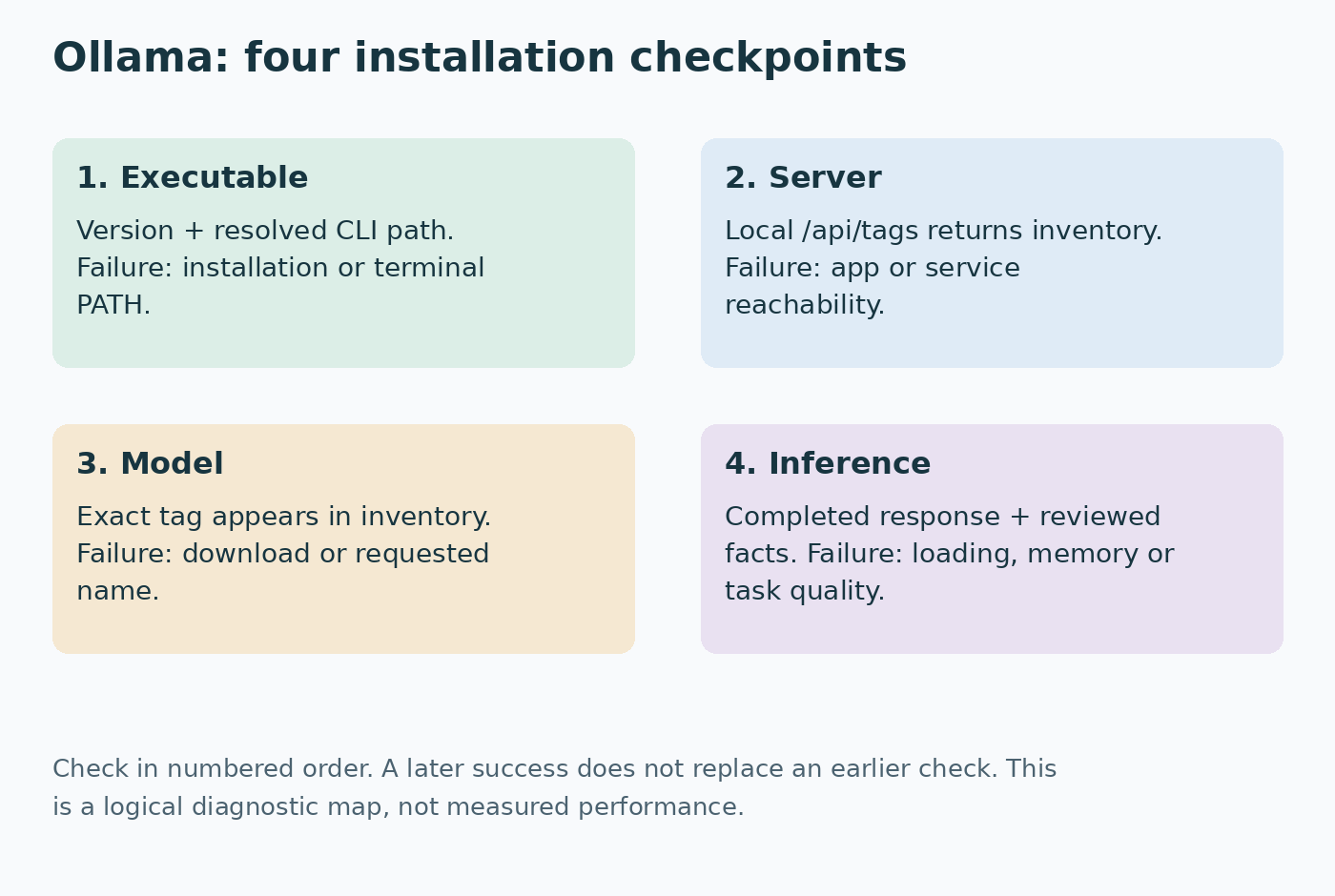
The installation sequence is therefore application → server reachability → model inventory → inference. Follow that order when troubleshooting as well. Trying a different model cannot fix a missing executable. Reinstalling the application is a disproportionate response to a typo in a model tag.
| Computer | Installation route | First check |
|---|---|---|
| Windows | Official Windows installer | New PowerShell window |
| macOS | Official disk image; move app to Applications | App running, then Terminal |
| Linux | Official shell installer | Service status and local API |
Before downloading a large model, inspect available disk space and memory under your normal workload. Storage holds model files; working memory holds loaded state and context. There is no universal conversion from a model's parameter count to the memory your exact configuration needs. The hardware preparation guide explains that distinction and how to measure it before buying anything.
Use qwen3:4b as the concrete short-text example in this article. Its official model page identifies the tag and variant. This is a practice candidate, not an assurance of the best quality or speed. If it does not fit, choose a smaller supported variant and keep the acceptance task unchanged. Record the exact tag you substitute throughout the commands.
Windows: install the app and reopen PowerShell
The Windows requirements currently specify Windows 10 22H2 or newer. Download OllamaSetup.exe from the official download page and run it. The standard installer works per user without requiring administrator rights. Open Ollama from the Start menu. Its background server normally serves the API on port 11434.
Open a new PowerShell window after installation. An older terminal can retain the previous PATH. Run:
ollama --version
Get-Command ollama
Invoke-RestMethod -Uri http://localhost:11434/api/tags
A version proves that this terminal can invoke the executable. Get-Command shows which command resolves. The API request checks a separate server. An empty models collection is acceptable before the first model download; a connection error is not an empty inventory.
If the command is missing, finish the installer and reopen the terminal before editing PATH manually. If the command exists but the API refuses the connection, check that the app is running. Do not immediately start another ollama serve process beside the tray application. Two processes competing for the same port can obscure the original problem.
Mac: launch the application before checking the CLI
The macOS documentation lists Sonoma 14 or newer. Apple M-series systems support CPU and GPU execution, while Intel Macs use CPU execution. Mount the downloaded disk image, drag Ollama into Applications and open it. The app checks for the command-line executable and may request permission to create its CLI link.
In a new Terminal window, run:
ollama --version
command -v ollama
curl --fail --show-error http://localhost:11434/api/tags
Distinguish a CLI-link problem from a server problem. If command -v finds nothing, revisit the app's CLI setup. If the CLI works but curl cannot connect, inspect the running app. A model download is downstream of both checks, so leave model selection alone until they pass.
Keep Activity Monitor available during your later prompt. Unified memory is shared with the operating system and other applications. Close unusually demanding software for diagnosis, then repeat with your normal tools open before deciding the setup is comfortable for everyday work.
Linux: choose a service or a foreground server
The official Linux installation instructions provide this installer:
curl -fsSL https://ollama.com/install.sh | sh
ollama --version
This downloads and executes an installation script. Review the official script and the machine's administration policy before running it. On a systemd installation, check the managed service rather than starting another foreground copy:
sudo systemctl start ollama
systemctl status ollama --no-pager
curl --fail --show-error http://localhost:11434/api/tags
An active unit plus a responding API is the desired server baseline. On systems without systemd, follow the manual route appropriate to the CPU architecture and run ollama serve in one terminal. Use a second terminal for client commands and keep the server terminal open. Architecture-specific packages and AMD additions belong to the manual installation instructions; an amd64 archive is not a universal Linux package.
Treat service installation and user-shell settings as different scopes. Exporting a variable in your terminal does not retroactively configure an already running service. Establish the default working installation first; make service overrides only when a specific need justifies them.
Download one model and preserve its identity
The CLI reference documents model management and interactive chat. Separate download from the first run so you can tell which phase failed:
ollama pull qwen3:4b
ollama list
ollama show qwen3:4b
ollama run qwen3:4b
Wait for pull to complete. Copy the exact installed name from list and inspect the model metadata with show. If run is given a missing model it may download it, which is convenient later but less helpful while isolating first-install failures.
At the interactive prompt, ask:
Explain the difference between RAM and disk storage in three short
sentences. Include one everyday example. /no_think
The Qwen3-specific /no_think instruction expresses a mode for that model family; it is not a general terminal command. Review whether the response distinguishes temporary working memory from persistent storage. A fluent answer that reverses those concepts fails the exercise. Exit the chat with /bye.
Save the model identifier and date beside the tag. Upstream tags can change, so a later run under the same name is not necessarily the exact same installed artifact. Keep model changes separate from runtime updates when comparing behavior.
Use the desktop app without losing diagnostic visibility
On Windows and Mac, open the chat app and select the downloaded local model. Send the same short request. If the chat selector offers local and hosted options, choose the local entry for this exercise. A polished answer in a chat window does not tell you which route was selected.
Keep a terminal available even if you prefer the graphical client. Use list for downloaded models, show for metadata and ps for loaded models. These answer different questions. A model can appear in list while not occupying memory. It may remain loaded after you close a conversation because residency is managed separately from conversation text.
The Ollama FAQ explains how ps reports CPU, GPU or mixed placement. Check it while a request is running or the model remains loaded:
ollama psTreat placement as an observation, not a performance score. GPU execution can still encounter memory pressure or poor task quality. CPU execution may be expected on an Intel Mac. Record what happened before attempting driver changes.
Verify the API with OS-appropriate quoting
The chat API accepts a model and messages array. This first request disables streaming so the result is one completed JSON object. It sets a modest context for the short exercise and uses think: false with the chosen supported model.
On PowerShell:
$payload = @{
  model = 'qwen3:4b'
  messages = @(@{role='user'; content='Explain RAM in one sentence.'})
  stream = $false
  think = $false
  options = @{num_ctx=4096}
} | ConvertTo-Json -Depth 6
$result = Invoke-RestMethod -Method Post `
  -Uri http://localhost:11434/api/chat `
  -ContentType 'application/json' -Body $payload
$result.message.content
$result.done
On macOS or Linux:
curl --fail --show-error http://localhost:11434/api/chat \
  -H 'Content-Type: application/json' \
  -d '{"model":"qwen3:4b","messages":[{"role":"user","content":"Explain RAM in one sentence."}],"stream":false,"think":false,"options":{"num_ctx":4096}}'
Look for a nonempty answer and a completed response. The PowerShell example extracts the text; curl prints the envelope. The API request's messages are explicit conversation input. It does not automatically retrieve an earlier conversation from the desktop application.
PowerShell's object-to-JSON route avoids translating Unix quoting by trial and error. If you change the prompt, keep its string properly quoted and serialize the object again. A malformed payload is a client problem, not evidence that the model is incompatible with the machine.
A diagnostic that checks the server before invoking inference
This original example separates reachability and inventory from generation. Save it as ollama_check.py. It uses Python's standard library and sends only a GET request to loopback. It does not install a model, send your files or change settings. Python is optional for Ollama itself; use this only if you want a small reusable diagnostic.
The model inventory endpoint returns installed-model metadata. The program records names, not entire error bodies or local paths. It deliberately stops before calling the chat endpoint so a slow first model load cannot be confused with basic service failure.
import argparse
import json
import urllib.error
import urllib.request


def classify_inventory(payload, requested):
    if not isinstance(payload, dict):
        return {"stage": "API_SHAPE", "ok": False}
    models = payload.get("models")
    if not isinstance(models, list):
        return {"stage": "API_SHAPE", "ok": False}
    names = []
    for row in models:
        if not isinstance(row, dict):
            return {"stage": "API_SHAPE", "ok": False}
        name = row.get("name") or row.get("model")
        if not isinstance(name, str):
            return {"stage": "API_SHAPE", "ok": False}
        names.append(name)
    present = requested in names
    return {"stage": "MODEL_PRESENT" if present else "MODEL_MISSING",
            "ok": present, "requested": requested, "installed": names}


def main():
    parser = argparse.ArgumentParser()
    parser.add_argument("--model", default="qwen3:4b")
    args = parser.parse_args()
    request = urllib.request.Request(
        "http://127.0.0.1:11434/api/tags", method="GET")
    try:
        with urllib.request.urlopen(request, timeout=10) as response:
            payload = json.load(response)
        result = classify_inventory(payload, args.model)
    except urllib.error.HTTPError as error:
        result = {"stage": "HTTP_ERROR", "ok": False, "status": error.code}
    except (urllib.error.URLError, TimeoutError):
        result = {"stage": "CONNECTIVITY", "ok": False}
    except (ValueError, UnicodeError):
        result = {"stage": "API_FORMAT", "ok": False}
    print(json.dumps(result, indent=2))
    raise SystemExit(0 if result["ok"] else 1)


if __name__ == "__main__":
    main()
Run python3 ollama_check.py on Mac or Linux, or py ollama_check.py on Windows when the launcher is installed. A MODEL_PRESENT result means the endpoint returned the requested name. It does not establish model loading, response quality or accelerator use. Continue with the earlier chat request to test inference.
MODEL_MISSING means inspect the installed list and pull the exact intended tag. CONNECTIVITY means inspect the app or service and endpoint. API_SHAPE or API_FORMAT means the response was not the expected inventory structure; check which process owns the endpoint rather than forcing the program to accept arbitrary text.
The code uses urllib.request for HTTP access. Its classification logic was checked with synthetic valid and invalid inventories. Those checks validate this program's behavior; they are not a live Ollama benchmark or proof of installation on every OS.
Make the first session local without overclaiming privacy
Select the downloaded model and avoid adding remote integrations during the baseline. For Ollama's local-only mode, merge disable_ollama_cloud into the JSON object in ~/.ollama/server.json, then restart the owning app or service. The Windows home-directory equivalent is %USERPROFILE%\.ollama\server.json.
{"disable_ollama_cloud": true}Preserve existing properties when that file already exists. The environment alternative is OLLAMA_NO_CLOUD=1. The detailed settings guide explains where values must be applied on each OS, how to move model storage and how to reverse a change.
After the download, repeating the harmless local prompt while disconnected from the internet is a bounded check of that request path. It does not audit every application, backup, log or future plugin. “Local model” describes inference placement; it does not grant permission to process a company's confidential records.
Use context deliberately before connecting an agent
The context-length documentation describes hardware-dependent defaults. A model's advertised maximum and its active allocation are different. Set a short exercise budget explicitly and observe the loaded workload instead of treating the maximum as your installed capacity.
An agent includes instructions, tool descriptions, conversation history and results in its input. A model that answers a tiny chat comfortably can fail that larger workload. OpenClaw is therefore a separate acceptance stage. Do not carry this article's 4096 example forward as a universal agent setting.
Once this baseline works, continue with the OpenClaw installation guide. It covers the Gateway, provider route and Telegram admission independently. That separation prevents a messaging problem from sending you back to reinstall a healthy Ollama runtime.
Diagnose the first failed boundary
For an unrecognized command, verify executable resolution and reopen the terminal. For connection refusal, inspect the server. For model-not-found, compare the exact name with inventory. For address-already-in-use, inspect the existing owner of port 11434 before starting another process. These checks should precede a reinstall.
If pull fails, record the actual download error and inspect storage and connectivity. If inventory works but chat stalls, model loading and memory are now the relevant layer. Try the same short task with a smaller supported model. Changing network settings and context together destroys the comparison.
The troubleshooting reference gives platform log locations. Windows logs are under %LOCALAPPDATA%\Ollama; Mac logs are under ~/.ollama/logs. For a Linux service:
journalctl -u ollama --no-pager -n 50Read the newest relevant failure around the request time. Preserve the precise error, OS, runtime version and model tag in your private diagnostic note. Remove sensitive paths or prompt content before sharing logs. A screenshot of an error can be useful, but it should not replace the text needed to reproduce it.
Keep a restart test and a usable acceptance record
An installation that works once in the installer terminal can still fail the next morning. Restart the app or managed service, open a new terminal, repeat inventory and then the same prompt. Confirm that the model remains on disk and that you are reaching the intended server.
Keep a compact record: OS and architecture, Ollama version, resolved executable, server method, exact model identifier, inventory result, response completion and processor placement. Add the factual review result. These observations let you identify what changed after an update instead of guessing from memory.
For a worked synthetic exercise, imagine that version and inventory succeed but the answer never completes. The reasonable next investigation is inference loading, memory and logs. If the app restarts and inventory becomes unreachable, the failing boundary moved to the server. This method makes the troubleshooting record useful even without a universal “fix” command.
To unload a model, use ollama stop qwen3:4b. Removing it from disk with ollama rm qwen3:4b is a separate action and may require a new download later. Do not remove a working model simply because you want to end a conversation. Keep configuration and data preservation explicit during any uninstall.
Your next useful improvement should address an observed limitation: storage pressure, a longer input, a different task or another client. The successful end state is a reproducible local answer with a clear diagnostic trail, not a collection of models whose behavior you have never evaluated.
How this guide was prepared
Official documentation was reviewed for this revision. OS instructions are documentation-based, while the diagnostic code, boundary method and acceptance exercise are authored teaching tools. Synthetic checks cover the code's inventory classification; live inference and cross-platform installation were not performed here. The hero is an AI-generated editorial illustration, and the inline graphic explains logical checkpoints rather than measured performance.