Quick answer: Smart Glasses Privacy is now a buying question, not only a policy debate. AI smart glasses can be useful for hands-free photos, voice assistance, translation, calls, navigation, and quick memory capture. They also put a camera, microphone, app account, and possible cloud upload path on your face. Before buying or wearing them, check the recording indicator, app permissions, data controls, battery and heat limits, venue rules, and whether people around you can reasonably understand when recording is happening.
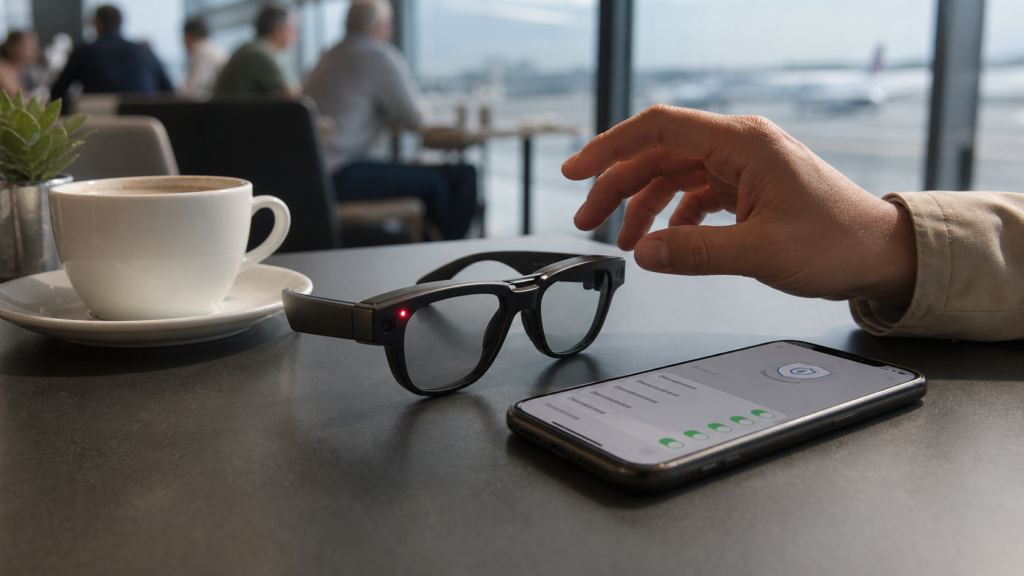
The best way to think about smart glasses is similar to other connected devices: the feature that makes them useful also creates the risk. A robot vacuum can map a home, an AirTag can help with luggage, and an AI shopping agent can act on account data. Smart glasses add one more layer because the sensor is in public and points at people. If you already care about smart home setup, smart luggage tracking, or AI shopping-agent security, the same principle applies here: know what is captured, where it goes, and how to turn it off quickly.
This guide is written for buyers, travelers, parents, office workers, creators, and everyday users who want the convenience without becoming the person everyone avoids at the cafe. It is not a panic piece. Smart glasses can be a genuinely useful product category. But the buyer should check privacy before style, battery life, or camera resolution.
Why smart glasses privacy is suddenly a hot topic
Smart glasses used to feel like a niche gadget. That is changing because newer models look more like ordinary glasses, connect to familiar phone apps, and add AI features that make them feel less like a camera accessory and more like a wearable assistant. Product pages and reviews now talk about photos, videos, voice commands, livestreaming, calls, audio, translation, and AI help in the same package. The result is a device that can be practical, social, and sensitive at the same time.
The privacy tension is obvious. A phone camera is visible because the person usually holds it up. Smart glasses may look like normal eyewear. Even when the device includes a recording light, people nearby may not know what the light means, may not notice it, or may not have a real chance to object. That is why privacy needs to be part of the buying decision, not an afterthought.
The device is more wearable
Modern smart glasses are closer to normal frames, which makes them easier to wear in public and harder for bystanders to interpret.
The assistant is more useful
Voice, AI, translation, media capture, and phone integration make the product attractive beyond simple photos.
The boundary is less obvious
A small indicator light is not the same as openly holding up a phone camera.
The rules vary by place
Airports, schools, offices, gyms, medical settings, events, and private homes can all have different expectations.
The seven checks before you buy
1. Recording indicator
Confirm whether the glasses show a visible capture light or other signal during photo, video, or livestream use. If people cannot tell when recording happens, the social risk rises.
2. App permissions
Check camera, microphone, contacts, photos, location, Bluetooth, notifications, and background access in the companion app.
3. Cloud upload
Understand whether captured media stays on the device, syncs to the phone, uploads to a cloud account, or becomes available for AI processing.
4. Voice wake controls
Know how the microphone wakes, when voice history is stored, and how to disable voice features when privacy matters.
5. Deletion path
Find the delete and export controls before you need them. A privacy feature is weak if you cannot find it quickly.
6. Venue rules
Check whether schools, workplaces, conferences, gyms, medical offices, museums, or events restrict camera glasses.
7. Battery and heat
Recording, AI, and wireless features can drain battery and warm the device. Comfort and reliability matter as much as specs.
What smart glasses can capture
Exact features vary by brand and model, but buyers should assume the privacy review covers at least camera capture, microphone input, companion-app data, account sync, notifications, and device identifiers. Some glasses focus on display and screen mirroring. Some focus on camera and audio capture. Some combine AI voice features with media capture. The privacy checklist changes depending on which sensors are actually present.
A display-only pair of AR glasses has different risks from camera glasses. Glasses that mirror a laptop screen may raise shoulder-surfing and location-use questions. Glasses that record video raise consent and venue-rule questions. Glasses with an AI assistant add account, prompt, voice, and cloud-processing questions. Buyers should not treat all smart glasses as the same category.
Camera
Photos, short clips, livestreaming, scanning, and visual AI features create the strongest bystander privacy concern.
Microphone
Calls, voice commands, dictation, and assistant features can capture nearby speech if controls are misunderstood.
Phone app
The companion app can manage media, location, Bluetooth, contacts, analytics, updates, and account settings.
Cloud account
Sync and AI features may move data beyond the glasses and phone. Read the account and privacy controls.
Display
Screen projection or notifications can expose private information to the wearer or distract the wearer in public.
Sensors
Motion, location-adjacent Bluetooth behavior, and device identifiers can still matter even without constant recording.
Recording indicator: useful, but not enough
A visible recording indicator is one of the first features to check. It helps people understand that capture is happening. But it is not a complete privacy solution. The light may be small, blocked by angle, hard to see outdoors, unfamiliar to people nearby, or misunderstood as a normal status light. The wearer still has to use judgment.
A good buyer question is simple: if someone else wore these glasses near your child, laptop screen, whiteboard, medical conversation, or private dinner, would you immediately know whether they were recording? If the answer is no, you should treat the glasses as a device that requires extra etiquette.
Check brightness
The indicator should be visible in normal indoor and outdoor conditions, not only in a product demo.
Check placement
A light on the front is more understandable than a signal only visible to the wearer.
Check behavior
Know whether the light appears for photos, video, livestreaming, voice commands, or only some capture modes.
Check social clarity
If people around you cannot tell what the signal means, ask before recording anyway.
App permissions are the real privacy control panel
The companion phone app is often where the real privacy decisions live. On iPhone and Android, review camera, microphone, photos, contacts, local network, Bluetooth, notifications, and location access. The FTC’s app privacy advice is useful here because wearable glasses are still controlled through apps, accounts, updates, and permissions. Do not assume the default setup is the best privacy setup.
A practical setup is to start with the least permission needed, then add only what improves the use case. If you only want photos and audio playback, you may not need every notification or contact permission. If you use voice calling, contacts may be useful. If you use travel features, location may matter. The point is to decide intentionally.
Camera and photos
Limit photo-library access if the app does not need full-library visibility. Review whether media sync is automatic.
Microphone
Check whether the app and glasses need microphone access all the time or only during calls and commands.
Contacts
Grant contacts only if hands-free calling or messaging is a real use case.
Location
Use precise location only when it is necessary for the feature. Turn it off for casual capture if possible.
Notifications
Smart glasses can make notifications feel private to the wearer but distracting in social settings.
Background activity
Review whether the app runs in the background, syncs media, or keeps Bluetooth connections active.
Cloud upload and AI features need a second look
AI features make smart glasses more interesting and more complicated. A simple photo that stays on a phone is one privacy profile. A photo or voice command that becomes part of an AI request is another. Buyers should check whether AI features process data locally, on the phone, or in the cloud. They should also check account history, deletion controls, and whether media is used to improve services.
This does not mean cloud features are automatically bad. Cloud AI can make translation, visual help, and voice assistance far more useful. The buyer just needs to know the boundary. The same logic appears in Windows privacy settings and private notes app choices: convenience is fine when the user understands the data path.
Ask where processing happens
Device, phone, cloud, or a mix? The answer affects speed, privacy, battery, and reliability.
Ask what is stored
Photos, videos, voice transcripts, AI prompts, metadata, error logs, and account activity may have different controls.
Ask how deletion works
Look for deletion in the app and account portal, not only on the glasses.
Ask about AI history
Voice and visual assistant history should be reviewed separately from the ordinary photo gallery.
Ask about sharing
If the glasses can livestream or share quickly, check defaults before wearing them around private spaces.
Ask about children
Be extra conservative around schools, playgrounds, sports teams, and family gatherings.
Where not to wear camera smart glasses casually
Smart glasses do not belong everywhere just because they look like normal eyewear. A polite rule is to treat camera glasses like an always-ready phone camera, then raise the standard because other people may not notice the device. If you would feel awkward holding up your phone to film in a place, wearing camera glasses there may be worse.
The strongest caution zones are places where people have a high expectation of privacy, where children are present, where confidential work is visible, or where safety rules matter. For travel, smart glasses may be useful for photos, directions, translation, and quick reminders, but airports, immigration areas, security checkpoints, airline cabins, and museums may have their own rules. When in doubt, turn capture off or put the glasses away.
Medical settings
Clinics, pharmacies, hospitals, therapy rooms, and waiting areas can expose private health information.
Schools and children
Ask first and follow school, camp, sports, and parent rules. Do not normalize hidden-feeling capture around children.
Workplaces
Whiteboards, screens, customer data, prototypes, badges, and private conversations make office use sensitive.
Gyms and locker areas
Fitness spaces create obvious privacy expectations. Camera glasses are a poor casual choice there.
Security areas
Airports, government buildings, concerts, and conferences may restrict recording or camera glasses.
Private homes
Ask the host. A home is not a public recording environment just because the device is wearable.
Buyer cards by use case
Traveler
Useful for quick photos, audio, translation, and hands-free moments. Check airport rules, battery life, storage, offline behavior, and how obvious recording is.
Parent
Useful for hands-free memories, but be careful around other children, school events, sports teams, and family privacy expectations.
Creator
Useful for first-person clips, but consent, music rights, venue rules, and bystander privacy become part of the workflow.
Office worker
Usually risky unless the company has a written policy. Meeting rooms, screens, whiteboards, and customer data should be protected.
Accessibility user
Potentially valuable for audio, visual help, and hands-free assistance. Privacy settings should support the need without unnecessary sharing.
Gadget buyer
Buy only if the everyday use case survives the privacy checklist. Otherwise the glasses may sit unused after the first week.
Smart glasses privacy setup on day one
When the glasses arrive, do not start by filming. Start by installing updates, reading the companion app privacy controls, checking the indicator behavior, and testing deletion. Use a non-sensitive room first. Record a short clip, check where it appears, delete it, and confirm whether it disappears from the glasses, phone, app gallery, and cloud account.
Then test the fast-off behavior. A wearable camera needs an easy off switch. If it takes six taps to stop recording, disable a feature, or mute the microphone, that is a design issue for your life. You should know how to pause capture before entering a meeting, school, clinic, store counter, or private home.
Update first
Install firmware and app updates before judging privacy controls because wearable features change quickly.
Test capture
Take one harmless photo and one short video so you understand lights, sounds, storage, and app sync.
Test deletion
Delete the test media and confirm the path across device, phone, app, and account.
Limit permissions
Turn off permissions that do not support your real use case.
Set a public mode
Create a habit for public spaces: no recording by default, ask before capture, and pause AI features when unsure.
Explain the signal
If people ask what the light means, explain plainly instead of treating concern as overreaction.
How this compares with other smart devices
Smart glasses privacy is stricter than many smart-home decisions because the device travels into other people’s spaces. A smart speaker mainly affects a room you control. A robot vacuum maps your home. A tracker rides in your bag. Camera glasses can enter a cafe, school, office, airplane, or friend’s house. That difference should change your habits.
Smart speaker
Main risk is voice and account data in controlled rooms. Guests can see the device.
Robot vacuum
Main risk is home map, camera sensors, app account, and local network access.
Bluetooth tracker
Main risk is location tracking and unwanted tracking misuse.
Smart glasses
Main risk is public capture, bystander awareness, app sync, voice AI, and venue rules.
Do smart glasses need a privacy policy at work?
For workplaces, yes. Even a small team should treat camera smart glasses as a recording device. A policy does not need to be complicated, but it should answer five questions: where they are allowed, whether meetings can be recorded, how customer or employee data is protected, who approves recordings, and how media is stored or deleted.
This is especially important as AI agents, browsers, and payments move into work tools. The more accounts and automations a team connects, the more careful it must be about sensors and permissions. The AI agent security checklist is a useful companion because both topics depend on scoping access, logging activity, and keeping human approval for sensitive actions.
Meeting rule
No camera glasses in meetings unless everyone knows and agrees to recording.
Screen rule
No capture around whiteboards, dashboards, laptops, customer data, or unreleased products.
Visitor rule
Visitors should not wear camera glasses in private office areas without permission.
Storage rule
Work-related recordings should not live forever in personal galleries or consumer cloud accounts.
Culture rule
If people feel watched, the productivity benefit will not matter.
Buying recommendation
Buy smart glasses if the main use case is real and the privacy controls are understandable. Good fits include hands-free travel photos, audio, calls, accessibility assistance, casual creator clips with consent, and specific work use cases with policy. Weak fits include secretive recording, unclear venue use, children-focused spaces, confidential workplaces, and buyers who will not review app permissions.
The most practical buying rule is this: do not buy the glasses only because they look normal. Buy them because you can use them openly. If the product requires pretending it is not a camera, the privacy fit is poor.
Best overall buyer
Someone who wants hands-free capture or assistance, understands app permissions, and is comfortable asking before recording.
Best travel buyer
Someone who uses the glasses outdoors and in allowed areas, not around checkpoints, private conversations, or restricted spaces.
Best work buyer
A team with written rules, approved use cases, storage controls, and a reason that phone cameras cannot solve.
Skip for now
Anyone who wants stealth, dislikes permission review, or needs guaranteed all-day battery and heat comfort.
Source notes and date checked
Sources were checked on July 31, 2026. Product features, app controls, recording indicators, AI processing, and availability can change quickly. Before buying, check the manufacturer’s current support pages, the store return policy, and the privacy controls inside the latest companion app.
- Meta smart glasses product page
- Meta smart glasses help center
- Meta announcement for Ray-Ban Meta smart glasses
- EssilorLuxottica Ray-Ban Meta press release
- PCMag Ray-Ban Meta review
- PCMag best smart glasses guide
- Forbes best smart glasses guide
- FTC privacy advice for apps
- NIST Privacy Framework
- Apple iPhone hardware access controls
- XREAL support center
FAQ
Are smart glasses always recording?
Not necessarily. It depends on the model, settings, and feature being used. The buyer should check how photo, video, livestreaming, voice commands, and AI features start and stop, and whether an indicator appears during capture.
Is a recording light enough for privacy?
No. A recording light helps, but people may not notice it or know what it means. Consent, place, app settings, and user behavior still matter.
Should I wear camera smart glasses at work?
Only if the workplace allows it and the use case is clear. Meetings, screens, whiteboards, prototypes, customer data, and private conversations make casual use risky.
What should parents check first?
Parents should check recording controls, cloud upload, deletion, school and event rules, and whether other children or families may be captured. Ask before recording around children who are not your own.
Bottom line: buy the glasses you can wear openly
Smart Glasses Privacy is not about rejecting a useful new device category. It is about buying and wearing it with enough awareness that people around you still feel respected. The best smart glasses setup is visible, controllable, easy to pause, easy to delete, and appropriate for the place.
Before you buy, check the recording indicator, companion app permissions, cloud upload path, deletion controls, voice settings, battery and heat behavior, and venue rules. If you can explain those settings clearly and use the glasses openly, the product may be worth it. If the appeal depends on other people not realizing what the glasses can do, skip them.
Smart-glasses buyer privacy rehearsal
In a private setting, check how recording begins, whether bystanders can see an indicator, and which permissions the companion app requests. Review the official documentation for cloud uploads, account sharing, retention, and deletion. Test whether voice activation or background processing continues after disabling optional features. Follow venue and workplace recording rules rather than assuming a visible indicator makes all recording acceptable.
The recording indicator and the upload setting answer different questions
Consider an illustrative pair of camera glasses worn at a family event. People may see a recording light, but that light does not explain where files are stored or which optional AI features process them.
| Situation | Next check | Why it changes the decision |
|---|---|---|
| People agree to a photo | Check what capture action you actually start. | Consent to one picture does not imply consent to continuous recording. |
| Cloud feature is enabled | Inspect retention and sharing controls for that feature. | Device storage and cloud processing are separate boundaries. |
| Workplace or school visit | Ask about site rules before using the camera. | A product feature cannot authorize recording at a venue. |
Use this distinction to decide which functions to enable. The example does not determine local recording law or certify the privacy behavior of a named product.