AI can help you research, outline, summarize, and draft faster. It can also sound confident while being wrong.
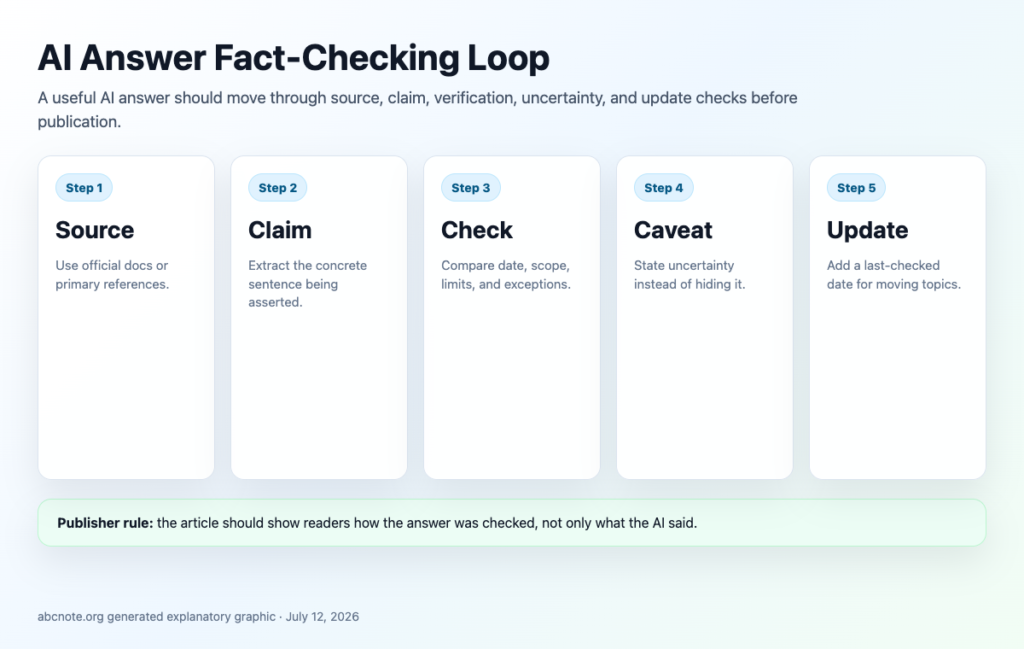
For the wider workflow, continue with ChatGPT vs Claude vs Gemini, then compare Private Document AI, and finish with Local AI Tool Choice.
That is why the question is not "Can I use AI for blog content?"
The better question is: "What review system catches weak AI output before readers see it?"
Quick answer: separate every AI answer into claims, instructions, comparisons, numbers, dates, and opinions. Verify each important item against a reliable source before it becomes final blog content.
A realistic problem: the confident wrong tutorial
Imagine you ask an AI tool how to create a WordPress application password. It gives a neat step-by-step answer.
The writing looks good. The steps sound real. But one menu name is outdated, one permission claim is too broad, and the article never mentions the security risk of sharing credentials.
If you publish that draft, the problem is not that AI helped. The problem is that nobody checked the answer.
What AI is good at
AI can help with:
- organizing messy notes
- turning source links into an outline
- suggesting search questions
- explaining a concept in plain language
- drafting a checklist
- comparing options
- rewriting for clarity
- identifying missing sections
AI is weaker at:
- current prices
- current UI details
- legal or policy interpretation
- account-specific settings
- exact product limits
- security-sensitive steps
- knowing whether a source is authoritative
- recognizing when it is guessing
Use AI for structure. Use sources for facts.
The claim table method
Before editing the prose, extract the claims.
| Claim type | Example | How to verify |
|---|---|---|
| Definition | "A webhook sends an HTTP request when an event happens." | Check official docs or technical references. |
| Step | "Click Settings, then Developer options." | Check the current product interface or official guide. |
| Price | "Tool X starts at $20 per month." | Check the official pricing page on publish day. |
| Comparison | "Tool A is easier than Tool B." | Define criteria and compare features, not vibes. |
| Security advice | "Store this token in a file." | Check official security guidance and use conservative wording. |
| SEO/policy claim | "Google allows AI content." | Link to Google Search guidance and avoid oversimplifying. |
| Opinion | "This is best for beginners." | Explain the scenario and tradeoff. |
This table turns fact-checking into a workflow instead of a vague feeling.
Source ranking
Not all sources are equal.
Use this order when possible:
- Official documentation.
- Official policy pages.
- Official pricing pages.
- Standards or primary technical references.
- Reputable expert tutorials.
- Current reviews or comparisons.
- Forum posts and social discussions.
Forum posts can reveal real problems, but they should not be the only source for a factual claim.
How to verify a technical tutorial
For a how-to article, check:
- Are the steps current?
- Does the reader need an account, plan, plugin, or role?
- Are there permission limits?
- What can go wrong?
- How does the reader verify success?
- What should they do if it fails?
- Are screenshots current and safe?
- Does the article avoid exposing tokens, keys, or private data?
Every technical tutorial should include a "how to know it worked" moment. Without that, beginners are left guessing.
How to verify a comparison article
For a comparison, check:
- What is the reader trying to decide?
- What criteria matter?
- Are price, difficulty, control, privacy, and setup time included when useful?
- Are ratings explained?
- Are product limits current?
- Are affiliate or promotional biases avoided?
- Does the article say who should not choose each option?
Comparison articles fail when they use star ratings without criteria. A star rating is useful only if the reader understands what was measured.
How to verify AI-written introductions
AI introductions often sound smooth but empty.
Ask:
- What problem would make someone search this?
- What will the reader gain?
- What is the concrete takeaway?
- Why is this article worth reading instead of another one?
- Does the intro promise more than the article delivers?
If the answer is vague, rewrite the intro.
Red flags in AI output
Watch for:
- exact numbers with no source
- old product names
- confident statements about policies
- "always" and "never" language
- fake citations
- generic advice that could fit any topic
- missing edge cases
- missing safety notes
- unsupported rankings
- code that has not been tested
- steps that skip account permissions
Do not patch these with nicer writing. Verify or remove them.
A practical fact-check workflow
Use this sequence:
- Ask AI for a draft or outline.
- Extract claims into a table.
- Mark each claim as source-backed, needs checking, opinion, or remove.
- Open official sources for important claims.
- Update the article with the source-backed version.
- Add examples, screenshots, tables, or checklists that help the reader.
- Run a final policy and usefulness review.
This is slower than one-click publishing, but it creates better articles.
Final QA checklist
Before a blog post is ready:
- The reader problem is clear.
- The reader payoff is concrete.
- Important claims have sources.
- Current prices and limits are checked.
- Technical steps include verification.
- Security-sensitive steps include caution.
- Screenshots are safe and responsive.
- Internal links point to related published or planned articles.
- The article does not pretend AI output is firsthand testing unless it was tested.
- The conclusion does not overclaim results.
Internal Link Notes
- Link to Post 4: AI writing without thin content.
- Link to Post 12: what is an LLM.
- Link to Post 17: automation tool comparisons.
- Link to Post 22: screenshot rules.
- Link to Post 29: tutorial QA checklist when live.
Source Notes
- Google Search guidance on generative AI content.
- Google Search spam policies for scaled low-value content risk.
- Google SEO starter guide for people-first structure and helpful pages.
- Official product documentation should be used for each article’s specific claims.
Friday QA
Approval suitability: Pass. Risk notes: Encourages verification and conservative sourcing; avoids medical, legal, financial, or guaranteed-results claims. Originality angle: Provides an operational claim-table workflow rather than generic "check your facts" advice. Before upload: Include a simple fact-check table image only if it improves scanning; otherwise the table in the article is enough.
Last Checked
Last checked: July 12, 2026.
Fact-check the parts that change fastest
AI answers are most risky when they mention current pricing, product limits, install commands, legal wording, security defaults, or compatibility. Verify those claims against official documentation before turning them into a public tutorial.
For software comparisons, keep a short source trail: official docs for setup and pricing, owner repositories for install commands, and compact review evidence where readers expect market context. Do not let a polished draft hide a weak claim.
Use this article beside the AI writing quality guide and the local AI tool comparison whenever a post names real tools.
| Claim type | Preferred source | Action before publishing |
| Install command | Official docs or owner GitHub repository. | Run or verify the current command path. |
| Pricing | Official pricing page checked near publication. | Date-check and avoid exact promises when plans change often. |
| Security | Vendor security docs or platform documentation. | State defaults and limits clearly. |
| Comparison | Official docs plus compact review evidence where relevant. | Keep the final recommendation tied to reader needs. |
AI Fact-Checking source ladder
Use AI Fact-Checking as a source ladder, not a single final pass. Start with the claim the reader will act on, then check whether it comes from an official documentation page, a current pricing or policy page, a reputable publisher, or your own clearly labeled practical recommendation. If the article uses screenshots, pair this process with Tech Blog Screenshot Rules; if the article was AI-assisted, compare it with AI Writing Without Thin Content before upload. After publishing, use Search Console for New Bloggers to see whether searchers are finding the claims you actually answered.
| Claim type | Best source | Publish check |
| Feature, install step, or setting | Official docs, release notes, or product help page | Confirm the page is current and the wording matches the article. |
| Pricing, limits, or plan comparison | Vendor pricing page plus date checked | Avoid old screenshots unless the text says when they were captured. |
| Safety, privacy, or policy advice | Official policy plus a practical limitation note | Do not turn a caution into a guaranteed outcome. |
Google also recommends people-first helpful content; use the official guidance at Google Search Central helpful content guidance when deciding whether a fact-checked section is genuinely useful or just keyword padding.
A concrete AI claim-verification example
When AI claims that a laptop supports two external displays, identify the exact model and configuration, then check the manufacturer’s specifications. Record the source URL and verification date. For pricing, use the vendor’s current pricing page; for speed claims, demand a reproducible benchmark. Remove unsupported claims instead of citing AI-generated references as proof.
One display claim shows why configuration belongs in the citation
Suppose a draft says a laptop supports two external monitors. Before publication, the claim needs a model year, chip configuration, display conditions, and a manufacturer source that actually covers them.
| Situation | Next check | Why it changes the decision |
|---|---|---|
| Source covers a different configuration | Narrow or remove the sentence. | A true statement about another model is still the wrong evidence. |
| Source lists a conditional limit | Carry that condition into the explanation. | Omitting the condition changes the claim. |
| Source cannot be found | Leave the claim unpublished until verified. | A plausible reference title is not a citation. |
This is a hypothetical verification example. The useful artifact is a claim-to-evidence row with the exact condition, not three links chosen only because their domains look authoritative.