AI writing without thin content: AI writing without thin content starts with a simple rule: the tool can help draft, but the published article must add judgment, examples, sources, and real usefulness.
Quick answer
Use this guide to make a cleaner decision, avoid beginner mistakes, and prepare a site that looks useful before monetization.
What You Will Learn
- Where AI writing helps and where it creates risk
- How to add originality before publishing
- A simple editorial workflow for safer AI-assisted posts
Reference Screenshots
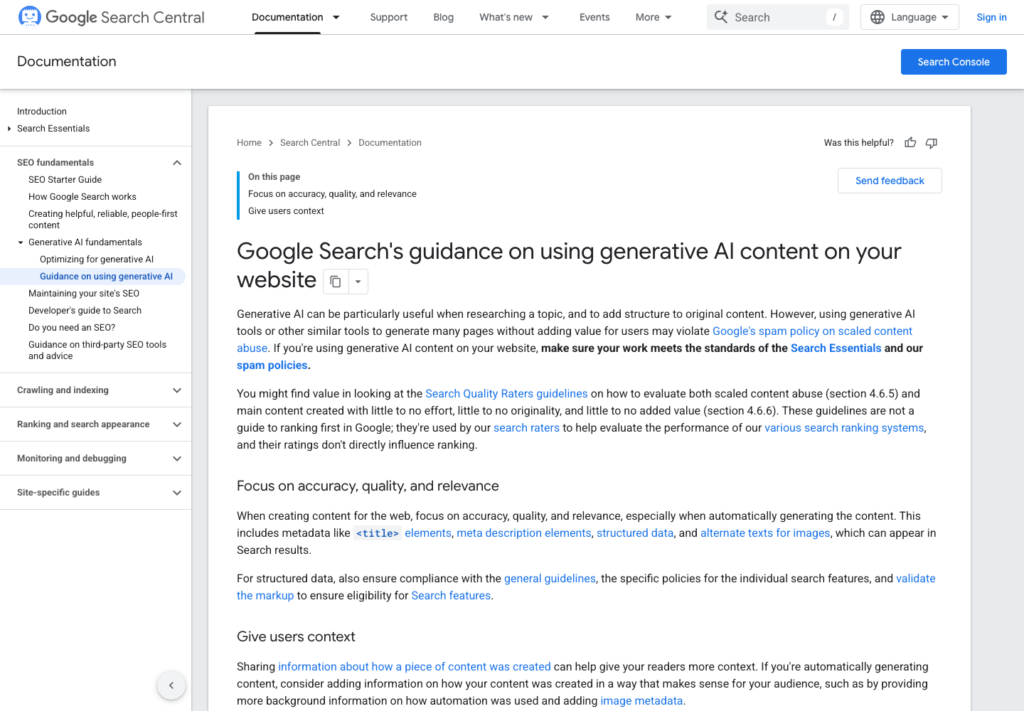
AI can make blogging faster. It can also make bad blogging faster.
That is the central problem. AI writing tools are useful for research, outlines, examples, checklists, editing, and rewriting messy notes. But if a site uses AI to publish many generic pages without adding real value, the result can look thin even if the grammar is clean.
The goal is not to avoid AI. The goal is to use AI in a way that produces better content than you would have made alone.
Thin content is not only about word count
A 1,500-word post can still be thin if it says nothing useful. A shorter post can be valuable if it answers a question clearly.
Thin content usually has one or more of these problems:
- it repeats obvious points
- it has no examples
- it does not help the reader decide or act
- it copies the structure of other search results
- it makes claims without sources
- it uses many words to avoid saying anything specific
- it feels interchangeable with hundreds of other posts
AI can accidentally create this kind of content because it is good at producing smooth, average-sounding answers.
Use AI before writing, not only during writing
One of the best uses of AI is not sentence generation. It is planning.
Before drafting, ask AI to help organize:
- search intent
- reader questions
- possible headings
- missing beginner definitions
- comparison criteria
- checklist items
- risks and mistakes
Then choose what actually belongs in the article. This keeps the writer in control.
Add a real editorial angle
Every useful article needs an angle. The angle is the reason this post should exist instead of another generic article.
Examples:
- not just "best blogging platforms," but "which platform is safer for a beginner AdSense site that may later use automation"
- not just "what is SEO," but "what new bloggers should do before buying SEO tools"
- not just "AI writing tools," but "how to use AI without creating low-value pages"
To turn a generic AI output into niche-specific advice, change the question before you ask for the draft. A generic prompt such as "write about internal links" is likely to produce a generic explanation. A more useful brief might ask: "Create an internal-linking checklist for a small WordPress site with fewer than 20 posts, where new readers need a clear next article to read." The topic is similar, but the reader, constraint, and desired outcome make the advice more practical.
Another useful pivot is to replace a broad recommendation with a decision point. Instead of asking for "tips for choosing a blogging niche," ask what a beginner should check before committing to a niche: whether the site can produce several distinct article types, whether the reader has a recurring problem, and whether the writer can add examples or useful comparisons. The finished section can then explain what to evaluate rather than merely listing popular niches.
The angle gives the post a job. Without it, AI tends to drift into a broad summary. Before keeping a heading, be able to finish this sentence: "This section is here because it helps this particular reader do or decide this."
Make every section earn its place
After drafting, review each section with a simple question:
Does this section help the reader make a decision, complete a task, avoid a mistake, or understand something important?
If the answer is no, cut it or rewrite it. A section does not earn its place simply because it sounds complete or contains a keyword. It needs to move the reader forward.
One practical test is to name the action at the end of each section. A section about source checks should leave the reader knowing which claims need checking and where to check them. A section about an editorial angle should help the reader narrow a broad topic. If no action, decision, or clearer understanding follows, the section probably needs a concrete example, a checklist, or removal.
Anti-pattern: the padded introduction. AI often opens with several sentences about how important, fast-changing, or exciting a topic is before giving any advice. Keep only the context the reader needs to understand the problem. Move quickly to the decision or task.
Anti-pattern: the list with no standard. A draft may offer ten tips but never explain which tip matters first, when it applies, or how to tell whether it worked. Group advice into a sequence, add a condition, or explain the tradeoff. A smaller list with clear use is stronger than a long list of interchangeable suggestions.
This is especially important for AI-assisted drafts because they often include polite filler such as "in today’s digital world" or "it is important to note." Those phrases are not automatically wrong, but they often signal that the draft is stretching.
Use source checks for claims
AI can confidently produce outdated or inaccurate claims. For blog topics involving Google Search, AdSense, WordPress, hosting, plugins, or policies, check important claims against primary or reliable sources.
For example:
- AdSense eligibility should point to Google AdSense Help.
- Search policy claims should point to Google Search Central.
- WordPress API claims should point to WordPress developer documentation.
- Tool pricing should be checked on the vendor page near publication.
A single source can establish a basic fact, but it may not answer the full claim your draft makes. For a claim about a product feature, begin with the product’s own documentation. Then check whether the wording in the article adds a second claim about price, availability, compatibility, policy, or a recommended use case. Those are separate details and may need their own confirmation.
A simple verification routine is: identify the exact sentence; underline the part a reader could rely on; find the most direct source for that part; then compare the draft with at least one additional relevant source when the claim combines several facts or could affect a purchase, setup, compliance decision, or published advice. If the sources do not support the exact wording, narrow the wording, add a caveat, or remove the claim.
For example, a sentence that says a tool is "the cheapest option for beginners" contains more than one assertion. The vendor page may confirm current pricing, but it does not establish that the tool is the cheapest among alternatives or best for every beginner. A safer article either compares clearly defined options using current source material or avoids the unsupported superlative.
Keep a small source note while editing: the claim, the page checked, the date checked, and any limitation. This prevents a final review from becoming a vague memory of having seen something somewhere. It also makes future updates faster when a policy, price, or feature changes.
Anti-pattern: citing a source that only loosely relates to the sentence. A link is not proof if it does not support the specific statement beside it. Readers need sources that match the claim, not decoration at the end of a paragraph.
The more a claim affects a reader’s decision, the more it needs verification.
Avoid mass-producing lookalike articles
Publishing many AI-assisted posts with the same structure can look efficient, but it may weaken the site.
A safer approach is to vary the job of each article:
- one article explains a concept
- one article gives a checklist
- one article compares options
- one article shows a workflow
- one article lists mistakes
- one article gives a readiness review
This creates a useful content library instead of a pile of similar pages.
The best AI writing workflow
A simple workflow looks like this:
1. Pick a topic connected to the site niche. 2. Identify the reader’s real question. 3. Build a brief with keywords, intent, outline, and sources. 4. Draft with AI assistance if useful. 5. Add specific examples, decisions, and caveats. 6. Remove filler and repeated points. 7. Verify factual claims. 8. Add internal links. 9. Review on mobile. 10. Publish only after a final human check.
At the brief stage, write down what the article will not try to cover. This is a useful guardrail against an AI draft turning one focused question into a broad guide. A post for beginners about reviewing an AI draft does not need to become a history of artificial intelligence, a complete SEO course, and a list of every writing tool.
During the draft review, look for places where the article makes the reader do too much interpretation. Replace abstract advice such as "add value" with a visible editorial move: add a scenario, show a choice and its tradeoff, explain a mistake, or provide a sequence of checks. The aim is not to make every section longer. It is to make each surviving section more usable.
Before publication, read the headings alone. They should form a useful path even without the body text: understand the risk, define the angle, improve the draft, verify claims, and review the finished article. If two headings make the same point, combine them. If an important reader question is missing, add only the section needed to answer it.
This turns AI into a writing assistant, not a content factory.
Final principle
AI should reduce the time spent on blank pages and rough organization. It should not replace the judgment that makes content useful.
If a reader can tell what to do next after reading the post, AI helped. If the reader only sees a polished summary of common knowledge, the post is not ready.
Useful references: Google AdSense eligibility guidance, Google SEO Starter Guide, Google guidance on AI-generated content.
Related reading
- AdSense approval checklist
- WordPress category planning
Before You Publish
- Confirm the title includes the focus keyword naturally.
- Check that the meta description is clear and not too short.
- Add one or two relevant internal links after related posts exist.
- Use only images that you own, created yourself, or have permission to publish.
- Keep the article ad-free until AdSense is approved and connected properly.
What an AI-written comparison must add beyond a feature list
Consider a hypothetical file-sync article. A thin version repeats vendor descriptions. A useful version distinguishes successful synchronization from the ability to recover a deleted file, then explains how the reader can check the difference.
| Situation | Next check | Why it changes the decision |
|---|---|---|
| Feature summary | Use official documentation for the supported capability. | A summary supplies facts but may not answer the decision. |
| Original reasoning | Explain why a synchronized deletion leaves a recovery gap. | The article adds a consequence the reader can apply. |
| Suggested exercise | Use disposable files and state what is being observed. | A proposed exercise must not become a fabricated test result. |
Google asks for original value and useful content, not a target word count. The editorial question is what the reader can decide more accurately after reading this particular page.