
Quick answer: Use Obsidian when local files and portability matter, Notion when databases and collaboration matter, and OneNote when Microsoft ecosystem capture and handwriting matter.
The useful answer
Obsidian, Notion, and OneNote are not interchangeable if privacy and AI workflows matter. Obsidian stores notes as local Markdown files by default. Notion is strongest as a structured collaborative workspace. OneNote is strong for capture, handwriting, school notebooks, and Microsoft ecosystem users. The right answer depends on data location, collaboration, search, export, and AI boundaries.
AI workflow decision
Before connecting a notes tool to AI, divide notes into public, work-shareable, private, and never-send categories. Public notes can feed cloud AI easily. Work-shareable notes need company policy. Private notes should use local AI or careful copy/paste. Never-send notes should stay outside integrations and plugins.
Recommended structure
Use an inbox for quick capture, a projects area for active work, a reference area for durable notes, and an archive for old material. In Notion, use databases for status-driven work. In Obsidian, use folders, links, tags, and templates. In OneNote, use notebooks and sections that match real life rather than clever categories.
Migration and lock-in
The exit plan matters. Obsidian’s plain files are easier to inspect and back up. Notion exports are useful but database relationships can need cleanup. OneNote exports and account sync need testing before you rely on them. A serious notes system should have a monthly backup check.
Best use cases
Use Obsidian for private knowledge work, research notes, local RAG experiments, and portable Markdown. Use Notion for editorial calendars, shared task databases, team wikis, and lightweight publishing operations. Use OneNote for handwritten notes, classes, meeting capture, and people already living in Microsoft 365.
| Option | Best use | Main limitation |
|---|---|---|
| Obsidian | Local Markdown knowledge base | Best for private notes, linked thinking, portability, and local-first AI experiments. |
| Notion | Collaborative database workspace | Best for team docs, trackers, publishing workflows, and structured information. |
| OneNote | Notebook capture system | Best for handwriting, school notes, Microsoft accounts, and mixed media capture. |
The next table turns the comparison into a practical checklist, so scan it after the main comparison instead of reading both grids as one block.
| Comparison item | Practical answer | What to check |
|---|---|---|
| Price/cost | All can start free for many users; paid plans or sync/storage/AI features can change total cost. | Verify against your device, account policy, and official documentation before rollout. |
| Supported OS/platform | All cover major platforms in some form, but offline behavior and feature parity differ. | Verify against your device, account policy, and official documentation before rollout. |
| Recommended CPU/RAM/storage | Any modern laptop works; use 8 GB RAM minimum, 16 GB preferred if AI/browser workflows are heavy, and keep local vault backups. | Verify against your device, account policy, and official documentation before rollout. |
| Setup difficulty | OneNote is easy, Notion is medium because database design matters, Obsidian is medium because plugins/sync/structure decisions matter. | Verify against your device, account policy, and official documentation before rollout. |
| Learning curve | OneNote feels familiar; Notion requires database habits; Obsidian rewards Markdown and linking habits. | Verify against your device, account policy, and official documentation before rollout. |
| Speed/performance | Local files can feel fast; large cloud workspaces depend on network and app performance. | Verify against your device, account policy, and official documentation before rollout. |
The next table turns the comparison into a practical checklist, so scan it after the main comparison instead of reading both grids as one block.
| Risk | Safer rule | Review cadence |
|---|---|---|
| Overexposure | Expose the smallest useful folder, app, device, or route. | Monthly |
| Account lockout | Keep recovery codes, backup admin paths, and documented ownership. | Quarterly |
| Data loss | Keep a separate backup outside active sync or test environment. | Monthly |
Decision checklist
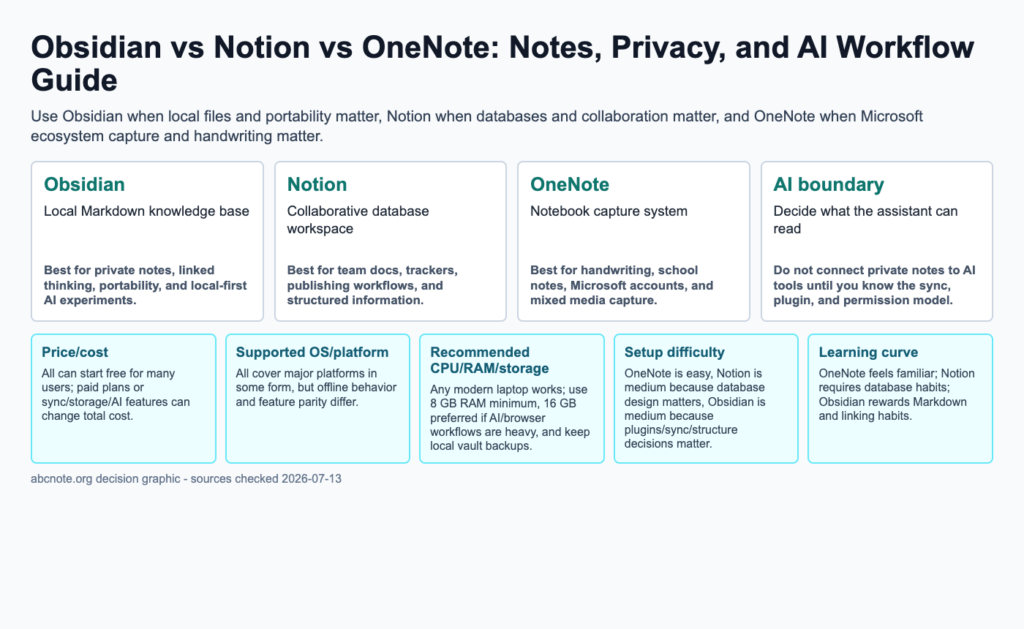
- Obsidian: Local Markdown knowledge base. Best for private notes, linked thinking, portability, and local-first AI experiments.
- Notion: Collaborative database workspace. Best for team docs, trackers, publishing workflows, and structured information.
- OneNote: Notebook capture system. Best for handwriting, school notes, Microsoft accounts, and mixed media capture.
- AI boundary: Decide what the assistant can read. Do not connect private notes to AI tools until you know the sync, plugin, and permission model.
Specification and comparison checklist
- Price/cost: All can start free for many users; paid plans or sync/storage/AI features can change total cost.
- Supported OS/platform: All cover major platforms in some form, but offline behavior and feature parity differ.
- Recommended CPU/RAM/storage: Any modern laptop works; use 8 GB RAM minimum, 16 GB preferred if AI/browser workflows are heavy, and keep local vault backups.
- Setup difficulty: OneNote is easy, Notion is medium because database design matters, Obsidian is medium because plugins/sync/structure decisions matter.
- Learning curve: OneNote feels familiar; Notion requires database habits; Obsidian rewards Markdown and linking habits.
- Speed/performance: Local files can feel fast; large cloud workspaces depend on network and app performance.
- Privacy/security: Local-first notes reduce cloud exposure; cloud collaboration increases permission and account-security responsibility.
- Limitations: No notes app replaces backups, naming discipline, or a clear rule for what AI can access.
Try one note outside the application
Create a disposable note containing a heading, a link, an attachment, and one piece of formatting you depend on. Export it through the application’s supported route, then open the result outside the application. Record what survived and what needs repair. Repeat with a shared note if collaboration matters. This proposed exercise measures portability for your own content; a successful plain-text export alone does not prove that databases, backlinks, attachments, or permissions will transfer.
Separate storage location from collaboration requirements
List three requirements before comparing plans: where the authoritative note lives, who must edit it, and what must survive an export. Local storage can make file ownership easier to understand, while cloud collaboration can reduce coordination work. Neither choice establishes every privacy property by itself: account settings, sync services, attachments, and optional AI integrations still need review.
When a notes application fails your exit test
Reconsider the application if a routine note cannot be recovered without the original service, if important attachments are omitted from the export, or if collaborators require permissions you cannot administer. For a database-heavy workspace, test the database export rather than assuming that a successful paragraph export represents the whole workspace. Keep the source copy until the exported material has been checked.
Keep a usable export sample
When the application or workspace structure changes materially, repeat the same sample export and compare the result. Check attachment paths and shared access separately. Store a recovery copy in a location with a documented owner, and distinguish that recovery copy from a continuously synchronized folder whose deletions may propagate.
Topic documentation
Use each application’s documentation to confirm storage and the exact export format needed for your workspace.
A plain note and a workspace database need different exit tests
Suppose an exported note opens correctly in a text editor, but the workspace also contains database relationships and attachments. The first result demonstrates only part of the migration.
| Situation | Next check | Why it changes the decision |
|---|---|---|
| Plain note | Open the exported file outside the original application. | Readable text demonstrates a narrow portability property. |
| Attachment | Check whether the file and its reference survive. | A working link inside the app may depend on its service. |
| Database or shared workspace | Test relationships and access in the destination separately. | An export format does not automatically preserve collaboration semantics. |
Keep the original until the destination has been checked. This is a migration plan, not a completed comparison of Obsidian, Notion, and OneNote or a claim about every available export format.