Ollama does not need an expensive workstation to produce a first answer. It needs a supported runtime, a model that fits the available memory, and a task small enough to evaluate honestly. Start on the computer you already own, use one exact model tag, and measure the whole task before considering an upgrade. The costly mistake is buying around a parameter count while ignoring context, GPU memory and the applications that must stay open alongside the model.
This is the preparation article in the Ollama series. The installation walkthrough covers the actual download and OS-specific steps. Here the objective is narrower: choose a defensible first model, understand the hardware limits, and leave with a test plan that can justify keeping, tuning or replacing the machine.
Choose the workload before the computer
“Run local AI” is too vague to size. A five-sentence rewrite, a long technical manual, a coding assistant with repository context and three simultaneous users are different workloads. Specify input length, expected output, number of users and the acceptable waiting time. Include whether the job must remain offline after downloading and whether its output is merely a draft or feeds another program.
For an IT handover assistant, a sensible initial boundary is one synthetic incident note in, a factual summary and missing-evidence list out. It should preserve timestamps, distinguish an observation from a proposed cause, and never invent an owner. This gives you a quality gate that remains meaningful even if the response is fast. A large model failing that gate is not the better purchase.
| Your first workload | Start with | Watch first |
|---|---|---|
| Short rewriting or learning | One small text model, short context | Fact preservation and response time |
| Longer notes or technical excerpts | Same model, gradually longer inputs | Context use, omissions and memory pressure |
| Coding tools or several users | A separate workload trial | Sustained capacity and concurrent memory |
Set your own performance threshold. For occasional study, a wait that would be unacceptable during a production call may be perfectly reasonable. Write that threshold before seeing the result; otherwise it is easy to rationalize an impressive but inconvenient setup.
Understand the three layers you are installing
Ollama provides a runtime and a server. Model files provide the learned weights and associated model configuration. A CLI, desktop app or script is the client sending a request. Keeping these layers separate makes both hardware planning and troubleshooting easier. A healthy server can answer an inventory request with no model installed. A model can be downloaded successfully yet fail to load with the chosen context.
A typical local request goes from the client to the local API, then to a model runner using CPU, GPU or both. The downloaded files sit on disk; loaded model state and request processing occupy memory. The server may keep a model resident between calls. This explains why ending a conversation does not necessarily release every gigabyte immediately.
Do not treat a friendly chat window as evidence that the whole workflow is local. Ollama also offers cloud functionality. The model selection and server configuration determine whether that request uses your machine. Other applications can add their own web search, storage and remote calls. Map the actual path rather than relying on the application’s name.
Disk, RAM and VRAM are different budgets
Disk capacity limits which models you can store and how much room remains for downloads, updates and other files. RAM supports the operating system, applications and CPU-side inference. Discrete GPU VRAM is another pool with its own capacity; it is not interchangeable with installed system RAM. On Apple silicon, unified memory is shared, so background applications compete with the inference workload within the overall memory budget.
A useful planning expression is:
Working-memory demand ≈ loaded weights + context/KV state
                        + runtime buffers + other active workloads
This is a reasoning model, not a universal calculator. Architectures, quantization, attention design, backends and execution choices change the components. The downloaded file size is one clue to weight storage, not a guarantee of the loaded footprint. Also allow space for the system to remain responsive; consuming all nominal memory is not a successful fit.
The KV cache stores intermediate attention information needed as a conversation develops. Increasing the context allocation can increase memory demand even if the model weights are unchanged. A model that fits a short chat can therefore become uncomfortable with a long document. Adding parallel requests can introduce another memory multiplier. Start with one request before testing concurrency.
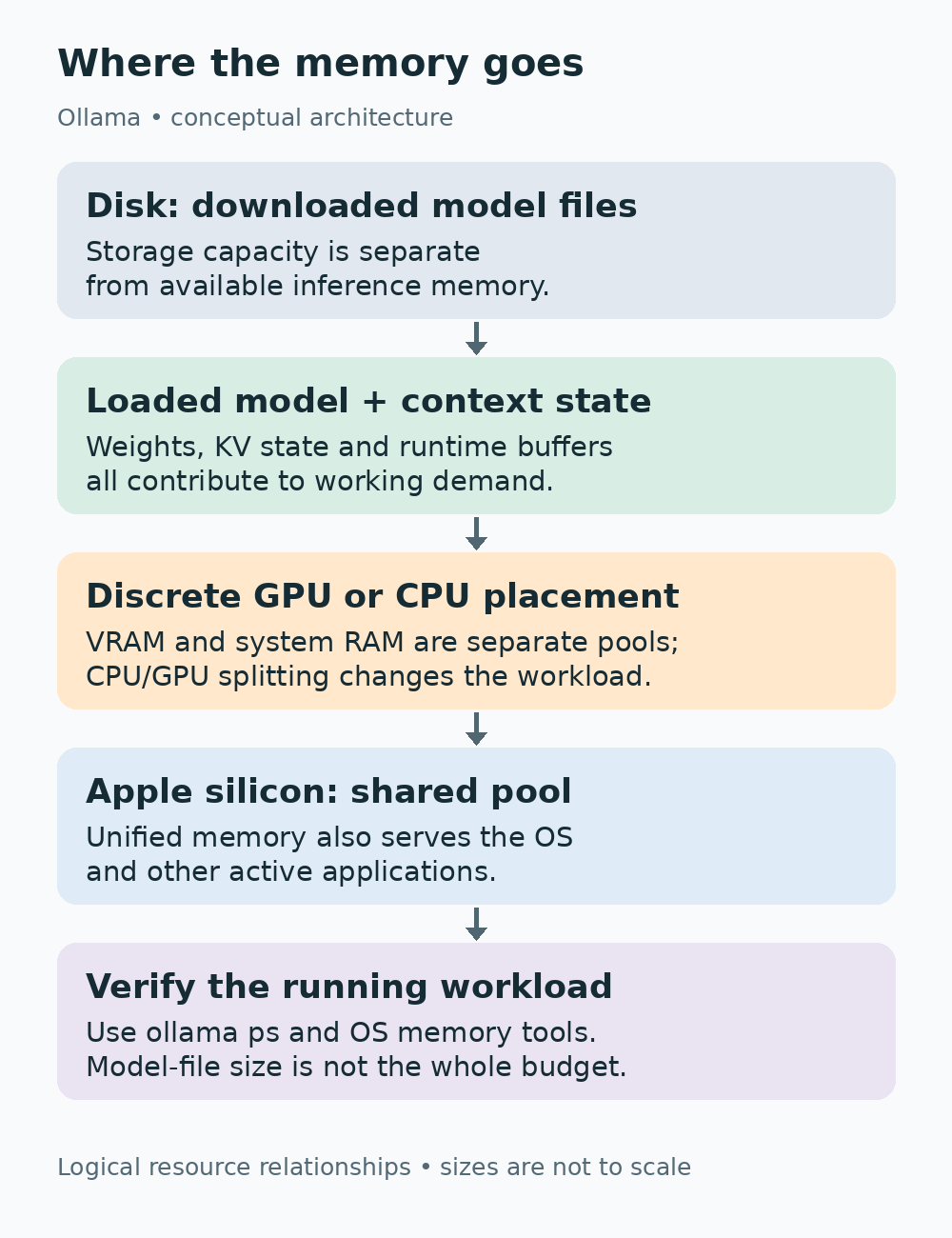
The diagram is a logical separation of resources, not a scale drawing. It intentionally avoids a fixed “model size equals RAM requirement” promise. When the machine struggles, ask which pool is constrained before replacing components.
Read the exact model tag, not just the family name
A name such as Qwen3 describes a family. The tag identifies the variant you ask Ollama to download and run. For this series, the concrete starting example is qwen3:4b. The same family also offers smaller and larger variants. A smaller option can be a better diagnostic starting point when memory is limited, even if you later need a stronger model for the actual task.
ollama pull qwen3:4b
ollama list
ollama show qwen3:4b
After installation, these commands download the example, show the local inventory and inspect its metadata. Record the full tag, model identifier and relevant details. A tag can be updated upstream, so a name alone is not a complete historical record. For repeatable evaluation, save the installed identifier and the date beside your results.
The “4b” label refers to a parameter-count class. It is not four gigabytes, four seconds of latency or a promise of four billion active operations per response. Quantization reduces numerical precision used to represent weights and can reduce storage and memory demands. It is a trade-off to evaluate against your output criteria, rather than a quality score by itself.
Avoid downloading a collection just because each model sounds interesting. Start with one candidate and one fallback. Changing model, context and prompt simultaneously makes it impossible to tell which change produced an improvement. A good local library is a small set of models with known jobs, not a directory of unused downloads.
Check OS support before chasing GPU speed
The current Windows documentation lists Windows 10 22H2 or newer and describes a native application. WSL is not required for that installer path. The macOS documentation lists Sonoma 14 or newer, with CPU/GPU support on Apple M-series systems and CPU execution on Intel Macs. Use the official Linux route for Linux rather than applying Windows assumptions to a service host.
For NVIDIA hardware, identify the exact GPU and driver, then cross-check the Ollama hardware support page and NVIDIA compute-capability listing. Driver requirements can vary by platform and older GPU generation. Do not copy a single driver number into a purchasing rule for every card.
AMD support depends on OS, driver stack, GPU generation and available backend. The current Ollama documentation describes ROCm and Vulkan paths. These are compatibility questions to resolve for the specific machine, not reasons to assume that every Radeon card behaves alike. Installing an arbitrary driver or forcing an unsupported architecture override is not an appropriate first diagnostic step.
A CPU-only response can establish that the runtime and model work. It does not establish that the hardware is suitable for a heavy interactive workload. Conversely, a GPU appearing in Device Manager is not proof that the model runner is using it. Verify runtime placement after a real prompt.
Inventory the machine without exposing private data
On Windows, start with Settings → System → About for the OS and installed RAM. Use Task Manager → Performance to identify memory pressure and GPU activity. Microsoft documents Get-CimInstance for reading CIM system information. The commands below gather basic system information and, if the NVIDIA utility is installed, GPU details. Save only what you need for the trial; a complete system dump is unnecessary.
Get-CimInstance Win32_OperatingSystem | Select-Object Caption, Version
Get-CimInstance Win32_ComputerSystem | Select-Object TotalPhysicalMemory
Get-PSDrive -PSProvider FileSystem
nvidia-smi
TotalPhysicalMemory is a byte count, not a direct measure of memory available while your applications are open. Use Task Manager for that live view. A failure of nvidia-smi on a machine with no NVIDIA GPU is expected; do not interpret it as a failed Ollama installation.
On Mac, use About This Mac for the chip and memory and Activity Monitor for memory pressure. Keep the normal applications open during the eventual trial. Memory pressure and swap behavior are more informative than assuming that all advertised unified memory is reserved for the model.
sw_vers
sysctl -n hw.memsize
df -h
On Linux, inventory the OS, current memory and available storage. On a machine intended to use NVIDIA, check the vendor utility separately. These commands do not install or repair drivers.
cat /etc/os-release
free -h
df -h
nvidia-smi
Use a baseline with the browser, development tools and other daily software you actually intend to run. An empty desktop benchmark can hide the pressure that appears during real use. Take another snapshot during inference and note whether the system starts swapping or becomes difficult to use.
Context length is a workload setting
Model metadata can advertise a maximum supported context, while the running server allocates a smaller one. These are different values. The dedicated context-length documentation currently describes hardware-dependent defaults; the general FAQ contains a simpler default description. Rather than assuming one universal number across versions, explicitly choose a modest context for the first trial and inspect the active runtime.
ollama run qwen3:4bInside the interactive session:
/set parameter num_ctx 4096Then, in another terminal while the model is loaded:
ollama psInspect processor placement and, where your version displays it, the CONTEXT column. The tutorial value 4096 is a starting condition for short text. It is not a recommendation for a large coding agent or an entire manual. The settings article explains server defaults and request-level options.
Increase input length gradually and add facts near both ends of a synthetic document. Ask for all of them. If the answer misses the ending, inspect the actual budget and application behavior; if it misses a fact despite sufficient context, prompt design or model quality may be the problem. “More context” is not a universal cure for poor extraction.
Measure cold starts separately from warm answers
The first request can include loading a model from storage. A later request may reuse resident state. Comparing one cold run on machine A with a warm run on machine B is misleading. Keep both conditions in your record. Also separate the initial internet download from local execution; download bandwidth is not generation performance.
For a small API trial on Mac or Linux, submit a completed-response request. The model must already be downloaded and the server running.
curl http://localhost:11434/api/chat \
  -H 'Content-Type: application/json' \
  -d '{"model":"qwen3:4b","messages":[{"role":"user","content":"Explain RAM in three short sentences."}],"stream":false,"think":false,"options":{"num_ctx":4096},"keep_alive":"5m"}'
On PowerShell, build JSON rather than copying Unix quoting:
$body = @{
  model = 'qwen3:4b'
  messages = @(@{ role = 'user'; content = 'Explain RAM in three short sentences.' })
  stream = $false
  think = $false
  options = @{ num_ctx = 4096 }
  keep_alive = '5m'
} | ConvertTo-Json -Depth 6
$r = Invoke-RestMethod -Method Post -Uri http://localhost:11434/api/chat -ContentType 'application/json' -Body $body
$r.message.content
$r.total_duration / 1e9
$r.load_duration / 1e9
if ($r.eval_duration -gt 0) { $r.eval_count / ($r.eval_duration / 1e9) }
The API usage documentation defines timing values in nanoseconds. Dividing by one billion gives seconds. Output-token rate can be calculated as eval_count divided by eval_duration in seconds, provided the duration is nonzero. That rate excludes some costs a user feels, including loading and prompt processing; keep total response time as well.
Run the same harmless prompt several times and preserve each result rather than reporting only the fastest one. To establish a new cold condition, unload the model with ollama stop qwen3:4b and confirm its state before the next request. Do not invent a tokens-per-second number from a GPU specification.
Evaluate quality with a fixed synthetic incident
Use this invented input so you can inspect every factual detail:
At 08:10, Line A scanner could not reach the application.
A spare scanner worked. At 08:25, the original scanner
reconnected after restarting. No packet capture was taken.
The ticket has no assigned owner.
Ask for observed facts, unresolved questions and proposed next actions. The answer must retain both times, preserve the spare-scanner observation, and state that no packet capture was taken. It should not claim that restarting proved a network fault or that a named engineer resolved the incident.
A quality record should identify omissions and invented statements separately. If an output misses the owner, refine the instruction to ask explicitly for missing ownership. If it adds a cause that was never supplied, mark that as a factual failure. Do not silently repair the answer and then credit the original model with a passing result.
Repeat with two or three deliberately different notes: one with conflicting times, one with no root cause and one with an instruction embedded in quoted source text. You are checking a bounded workflow, not certifying all future answers. Keep the inputs and criteria unchanged when comparing candidates.
Diagnose the bottleneck before upgrading
If a short prompt is slow and ollama ps reports CPU execution, first establish whether CPU-only behavior is expected for this platform and hardware. If acceleration should work, inspect compatibility and logs. Replacing RAM will not repair an unsupported driver path, and a larger disk will not add GPU memory.
If the model loads on GPU but memory pressure rises as input grows, reduce the context allocation or use a smaller variant and repeat. If the system remains responsive but extraction quality fails, the constraint may be the model or task specification. Buying a faster device can accelerate a wrong answer without improving its usefulness.
If cold loads are troublesome but warm answers are acceptable, residency and storage may matter more than raw generation speed. If several simultaneous users degrade performance, the single-user trial was not representative. Test that concurrency deliberately instead of treating a good solo chat as team-server capacity evidence.
For a purchase comparison, record the actual target workflow, not a generic leaderboard. Include total completed-task time, quality defects, input length, active context, placement and normal application load. This is the evidence that makes an upgrade defensible.
Keep cost and privacy claims specific
A local model can remove per-request cloud billing for that local inference path, but the machine still has electricity, storage, maintenance and opportunity costs. If you buy new hardware, include that purchase in the comparison. Do not describe a new workstation as “free AI” simply because its runtime does not charge for each prompt.
Local processing also does not authorize every business dataset. A company laptop may have policies for software, model licenses, confidential records and backups. Model licensing and acceptable use remain separate from whether the files fit. For the first trial, use synthetic data and leave connectors to operational systems out of scope.
For a broader choice, read Local vs Cloud AI after your trial. It is easier to compare data boundaries and costs once you know what your own task requires. Avoid a binary privacy claim that ignores remote integrations or the computer’s local storage practices.
Leave with a decision, not a shopping list
Keep the existing computer if it meets the task’s quality and waiting-time criteria under your normal workload. Tune the model or context if the failure points to memory demand or configuration. Consider new hardware when the measured constraint prevents the work you actually want to do and the candidate upgrade addresses that constraint.
Your trial record should contain OS and driver versions, Ollama version, exact model identifier, input, context, cold and warm timing, processor placement and factual review. None of those values needs to look impressive. They need to explain the decision.
The strongest starting setup is the one whose behavior you can describe and reproduce. Download one model, measure one real task, then spend only to solve the limitation you found.
Technical references
Requirements and commands were checked against the linked official documentation on October 10, 2026. The exercises are authored synthetic examples, not measurements from a claimed personal hardware test. Hero artwork is illustrative; the resource diagram is a logical explanation.