An OpenClaw installation becomes an operating system for your work only when you can explain what is running, what it can access, what changed and how you will recover. A successful Telegram reply is one observation. It does not establish restart reliability, scheduled-job ownership, recoverable state or correct publication authority. This guide turns a working installation into a small, inspectable service, with commands for diagnosis and a rehearsal for recovery.
The examples use a single-owner Gateway and an existing model provider. They also use AKOS, the content-production system operated by ABCNote’s publisher, to explain why runtime health and workflow correctness require different checks. The supplied AKOS records document a specific historical design; they are not a live measurement of today’s deployment. The transferable method is to preserve job identity, inspect the failed boundary and verify external effects before resuming work.
This is part two of the OpenClaw series. Finish the installation walkthrough first. It covers OS routes, onboarding, an Ollama connection and Telegram admission. This article begins after one controlled conversation works and addresses service ownership, diagnostics, configuration changes, scheduled work, backups and recovery.
Establish a baseline that survives tomorrow
Start with a private deployment note. Record the OS, architecture, installation method, OpenClaw version, service account, selected profile, configuration location, state location, agent workspace and provider route. Record which environment owns the Gateway: native Windows, WSL, macOS, Linux or a container. A note saying only “installed on my PC” cannot distinguish two independent configurations on the same machine.
The configuration CLI can identify the active file and validate it without starting a Gateway. Run these in the environment that owns the service:
openclaw --version
openclaw config file
openclaw config validate --json
openclaw gateway status
Keep the output private until you have checked it for account names, paths and credentials. A validation pass means the configuration meets the installed schema. It does not prove the provider accepts a request, the model can execute the task or the correct Telegram sender is admitted. These are separate acceptance observations, with separate failure causes.
For a named profile, use the same global profile selection for every command. Do not validate one profile and restart another. Likewise, do not run a maintenance command under an administrator’s home directory when the actual service belongs to an ordinary user. Record the exact account and profile beside each maintenance result so a later operator can reproduce the scope.
Give the Gateway one service owner
A managed service and a foreground terminal are different lifecycles. The Gateway runbook documents service management and foreground operation. Once you choose managed operation, identify the service before restarting anything. The operating question is which account and installation the service will invoke, rather than whether a command happens to resolve in your current shell.
On macOS, inspect the LaunchAgent arrangement. On Linux or WSL, inspect the systemd user-service arrangement used by the installation. Native Windows service management follows its own installation route. Avoid copying an OS-specific service command into another environment just because both expose an OpenClaw terminal command.
For an already installed managed Gateway, a controlled restart is:
openclaw gateway restart
openclaw gateway status
Before doing this on a busy system, inspect active work and settle operations that might be writing externally. A restart does not establish that the interrupted article upload, database write or message was undone. Preserve the last known job identifier and external object identifier before you disrupt a process that could have crossed that boundary.
After restarting, repeat the same harmless local chat and the same authorized Telegram request. Then repeat a request from an intentionally unapproved account if your deployment permits that controlled test. Your acceptance record needs both the allowed and blocked observations. Merely seeing the Gateway process running leaves the channel and access-policy checks incomplete.
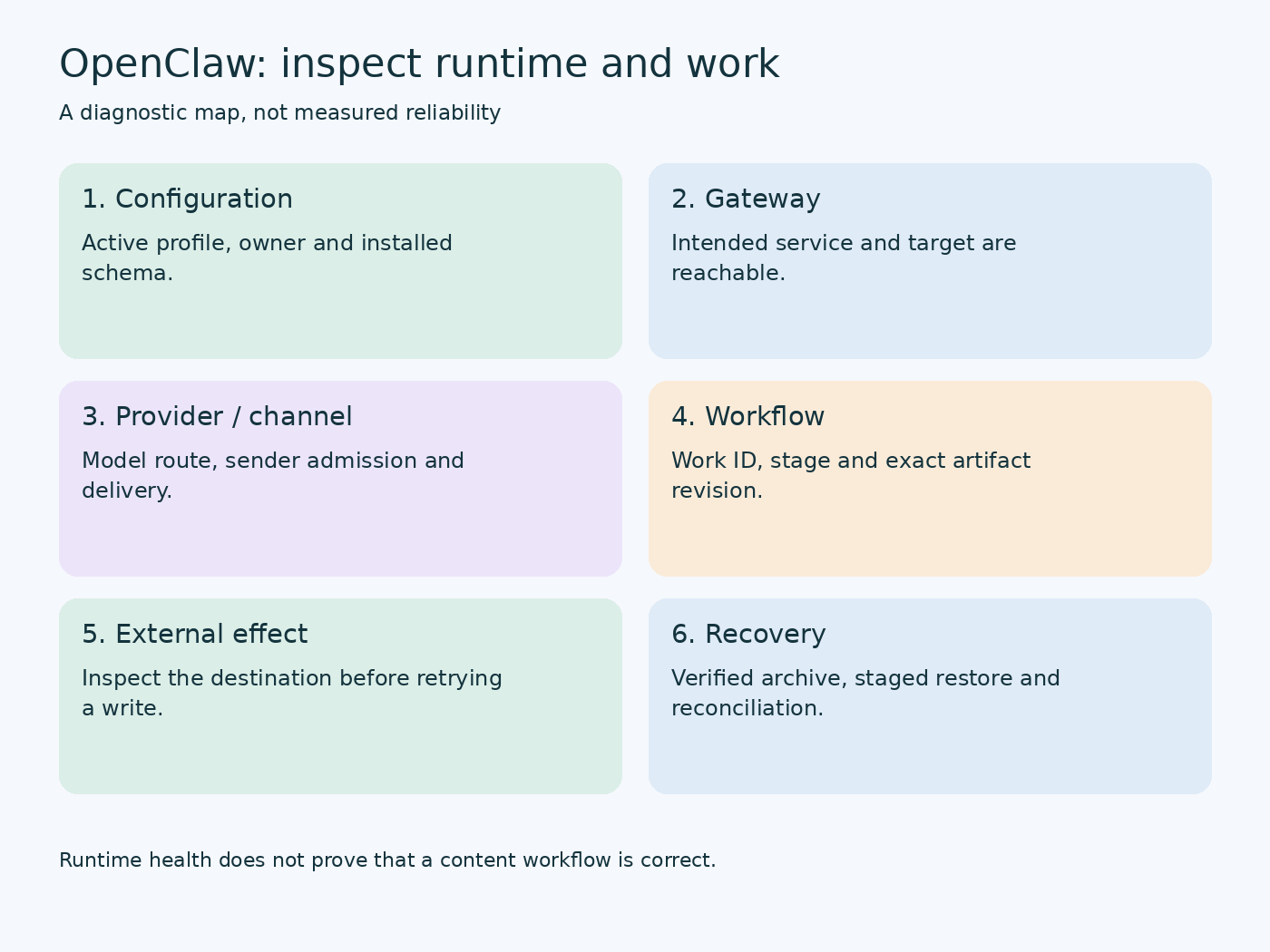
Separate six operating questions
Use the following distinction when an assistant stops replying. It prevents an unrelated reinstall from erasing the useful evidence you already have.
| Boundary | Question to answer | Evidence to preserve |
|---|---|---|
| Configuration | Did this profile validate? | Result and affected setting |
| Gateway | Is the intended service reachable? | Owner, target and status |
| Provider | Is the intended model route usable? | Agent and provider observation |
| Channel | Was this sender admitted and delivery attempted? | Redacted event and timestamp |
| Workflow | Which task owns the current operation? | Job, stage and revision |
| External effect | Was anything already written? | Object ID and readback |
The first four questions concern the runtime. The final two concern the work you built on top of it. OpenClaw does not automatically know that your custom content controller’s A500 stage owns one particular WordPress Draft. Your controller must preserve that relationship explicitly and provide a way to inspect it.
The status reference distinguishes broad diagnosis from optional live checks. Begin with a bounded inspection:
openclaw status --all
openclaw models status
openclaw logs --limit 100 --plain
Status output is a snapshot, not a guarantee about the next request. The logs command retrieves a limited window; that window can omit the original failure if later traffic has displaced it. Record the time of your test and inspect the nearby entries. Preserve the first meaningful error rather than collecting unrelated warnings into an undifferentiated incident.
Read-only diagnosis before repair
An important distinction in current OpenClaw is that ordinary Doctor can perform migrations or guided repairs. “No prompts” does not necessarily mean “no writes.” The explicit read-only mode in the Doctor running guide is:
openclaw doctor --lint --jsonUse its findings to decide what requires action. Preserve the schema version and inspect the reported severity, check identifier and remedy. A command failure before findings are produced is different from a completed inspection that reports a defect. If your installed version does not support the option, inspect its help and release-specific documentation; do not silently substitute a repairing command.
The default lint selection is intentionally bounded. It is not every conceivable check, and it is not a live test of your custom AKOS article workflow. A clean lint report can coexist with a source packet that is incomplete or a WordPress Draft that has the wrong featured image. Diagnose those artifacts with their own acceptance checks.
Keep doctor --fix outside your routine read-only inspection script. When a reported remedy is appropriate, make a backup, understand its affected scope, apply it during a maintenance window and inspect the result. An automatic repair cannot decide whether a custom controller change preserves your editorial contract.
Change one setting with an observable purpose
A useful configuration change starts with an observed limitation. For example, a larger evidence packet exceeds the current context budget, or a model route is unavailable for a specific agent. Write the expected result before editing: which request should behave differently, what must remain the same, and which observation would cause a reversal.
Inspect the existing value and current schema before constructing a replacement. JSON examples from an older release can use different agent structures. The installed validator is authoritative for syntax. Documentation describes the current supported interface; neither substitutes for a request against your actual provider.
openclaw config get agents.defaults.model --json
openclaw config schema
openclaw config validate --json
Do not replace the entire configuration with a sample containing only the field you want to change. Preserve existing agent ownership, channel admission, credentials references, plugin settings and model restrictions. Configuration that parses successfully can still remove an important policy when an existing object was overwritten.
After the change, validate again, use the documented reload or restart behavior for that setting, and repeat the acceptance task. Keep the before/after observation beside the revision. If three unrelated edits occurred at once, you have a successful outcome but weak evidence about which edit caused it. That uncertainty matters when the system fails later.
Diagnose model routing without spending a quota on every check
The model CLI reports selected routes, fallbacks and authentication state. In a multi-agent setup, inspect the intended existing agent explicitly when required by the current command. A global default is not necessarily the route used by a role with its own binding.
For a local provider, check whether the model server is reachable from the Gateway’s environment. Windows localhost and a container’s localhost describe different network namespaces. A successful Ollama request in the Windows host does not prove that an agent inside WSL or a container reaches that same endpoint.
Use the Ollama settings guide when the failure involves server environment variables, context or model storage. Do not confuse a downloaded model with a loaded model, or a model’s maximum supported context with the allocation used by the current request.
A metadata inspection is cheaper and narrower than a live inference probe. Live tests remain necessary for acceptance, but choose one representative request and record it rather than repeatedly sending the same health prompt to a metered provider. For paid or quota-limited services, inspect usage at the provider as well; an incomplete local usage report is not proof of remaining allowance.
Fallbacks need their own operational policy. A fallback can improve availability while changing cost, data location and output behavior. Decide whether the task permits that change. For a role-validation exercise, an undisclosed fallback can invalidate the result even when the answer looks good. Keep the observed provider identity with the test outcome.
Treat scheduled jobs as owned work
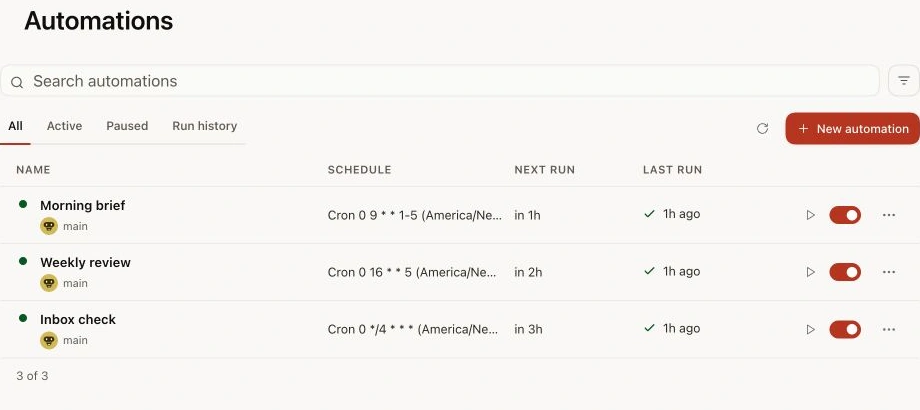
Current documentation uses the automation CLI, with compatibility aliases for cron. Inspect existing jobs before creating anything:
openclaw automations list --all --json
openclaw automations get YOUR_JOB_ID --json
openclaw automations runs YOUR_JOB_ID --limit 10 --json
Replace YOUR_JOB_ID with the exact identifier from the list. These inspection commands do not manually run the job. Separate inventory, last execution result and delivery result. A job can run successfully but fail to deliver its report; a disabled job can retain historical successful runs. Read the current state and history together.
For an AKOS-style research schedule, define the payload’s stopping point: collect a topic packet and wait for review. A schedule is a trigger, not publication approval. Record the job owner, timezone, maximum runtime, retry policy and output destination. A local midnight schedule needs an explicit timezone if the service host or container uses UTC.
Avoid fixing a suspected broken schedule by adding a second job with the same purpose. You can create overlapping runs while the original job remains alive. First inspect whether the existing run is active, waiting on review, failed or unowned. The corrective action should preserve its identity when the same work is being resumed.
Prevent retries from duplicating external effects
Consider a synthetic incident: an article upload receives a network timeout after the server accepted the request. Your controller sees no response and retries creation. There are now two Drafts. The original uncertainty concerned the response, not whether the write happened. This failure pattern appears with messages, uploads and ticket creation as well.
Maintain a private operation record before an external write. It should identify the work item, operation type, target, expected revision and any previously known external object ID. After the write, record the returned ID and verify the object’s state. If the request times out, enter an uncertain-outcome state and inspect the destination before repeating the write.
For a content controller, prefer updating the known Draft ID after you have created it once. Preserve that ID through rework. Compare the currently stored revision with the revision you expect to replace. A title match alone is weak identity: titles can change, and two articles can share similar words.
This is an application design pattern rather than a claim that every OpenClaw tool supplies a universal idempotency key. Use a connector’s native idempotency support when it exists, and build destination readback into the workflow where it does not. If you cannot distinguish “not written” from “written but not acknowledged,” keep the operation pending for inspection.
Back up state, workspace and the application separately
The backup command provides archive creation and verification. Start by inspecting the planned scope:
openclaw backup create --dry-run --json
openclaw backup create --verify
The second command creates a real archive. Record the exact returned path and verification result. Do not assume that a config-only export includes session databases, credentials or workspaces. Inspect the manifest and the included inventory. Keep the archive outside the tree being backed up, and place private archives in access-controlled storage.
OpenClaw state is only one part of an AKOS recovery plan. The custom controller’s database, source packets, approval records, article artifacts and external WordPress state may have different owners and backup methods. List them separately. A Gateway archive should not be described as a complete content-factory backup unless you have verified that all these assets are included.
For a live application database, use its supported backup method or a properly coordinated snapshot. A casual filesystem copy can miss current write-ahead-log state. A successful archive checksum verifies bytes, while database integrity and application consistency require their own checks. Preserve the relationship between controller records and external objects at the recovery point.
Rehearse extraction without overwriting production
Use the archive path returned earlier, not an invented filename. The following placeholders must be replaced with an existing archive and a fresh staging destination:
openclaw backup verify "PATH_TO_ARCHIVE.tar.gz"
openclaw backup restore "PATH_TO_ARCHIVE.tar.gz" --target "FRESH_RESTORE_DIRECTORY"
The documented restore flow extracts into a fresh directory rather than restoring in place. Inspect the extracted manifest, state and workspace assets. This demonstrates that the archive can be read and reconstructed in staging. It does not demonstrate that a restored Gateway can authenticate, that a messaging session remains valid or that an external write can be safely repeated.
Actual activation is a separate maintenance step. Stop the relevant runtime, preserve the current state, follow the documented asset layout and run the appropriate diagnosis before restarting. Review pending approvals and delivery records after a rollback; they may describe an earlier point in time while WordPress or a messaging service has already advanced.
Do not downgrade binaries across migrated state merely because the older release worked yesterday. Check the release’s compatibility and recovery instructions. Binary rollback, database recovery and external-effect reconciliation are different operations. Treat an unknown compatibility result as unresolved rather than forcing an older executable onto newer state.
Update with a target and a completion observation
Use update status and history to inspect the current channel, availability and any active or previous run:
openclaw update status --jsonBefore starting an update, preserve the baseline, backup, intended release and maintenance scope. Inspect release notes for changed schema, runtime requirements and plugins. A version printed by the CLI may differ from the version served by an already running Gateway. Include the live service observation in your after-update record.
If the updater delegates work to a background helper, the initial return is not completion. Inspect the exact run’s final outcome and service health before reopening your workflow. A healthy service after a failed update establishes present availability; it does not rewrite that update as successful or prove the intended candidate is active.
After a successful update, repeat local chat, provider identity, authorized channel delivery, blocked-sender behavior and one bounded custom workflow. Use a synthetic topic packet rather than publishing a real article as your first smoke test. Preserve the old acceptance record so you can identify whether the failure appeared with the upgrade or existed beforehand.
An AKOS operating drill with a clear stopping point
The supplied AKOS design separates research, evidence QA, article architecture, writing, visual work, WordPress Draft creation and final release review. Its applied audit documents installation and preflight verification, while explicitly distinguishing those results from production publication. That distinction is valuable for any operator: infrastructure acceptance and article acceptance answer different questions.
Rehearse one fictional topic through a nonpublishing path. Give it a unique test identifier. Ask research to return a source packet, check the packet’s claims, then request a Draft artifact only after the structure is accepted. Stop before public release. Inspect whether the same work identity, sources and revision survive each handoff.
Introduce one deliberate defect: remove a required source from the evidence packet. The correct outcome is a request for more evidence at the evidence boundary. It should not be repaired by silently inventing a citation during final QA. Introduce a second defect in a separate run: change the final text after approval. The correct outcome is that the earlier approval no longer covers that revision.
Keep the drill result specific: which defect was introduced, which boundary detected it, which artifact was preserved and what resumed afterward. The audit files supplied for this article do not prove that these new drills have run on the publisher’s current host. They provide the design basis for readers to conduct and record their own acceptance.
Leave the next operator a recoverable incident record
Close an incident with the trigger time, first failed boundary, work identifier, last known external effect, remedy, verification and remaining uncertainty. Record whether a retry reused the existing job or created new work. Add a recurrence signature so the next appearance can be recognized without flattening every timeout into the same cause.
For example, a synthetic record might say: provider metadata was available, inference failed, no Draft write was attempted, the local model service was restarted, and the same short task completed afterward. That is narrower and more useful than “restarted OpenClaw; fixed.” It preserves why the remedy addressed the observed failure.
For practical jobs to run once this baseline is dependable, continue with OpenClaw workflows for research and AKOS. Keep the operating record close to the workflow: an impressive automation is maintainable only when someone can inspect its identity, authority and effects after the original conversation has ended.
Preparation and verification scope
This guide combines current official interfaces with original operating methods and the publisher’s supplied historical AKOS design records. Incident examples and acceptance drills are explicitly synthetic. No live restart, production recovery, cross-platform installation or AKOS workload benchmark was performed for this article. The featured banner is supplied by the official OpenClaw repository (https://github.com/openclaw/openclaw); the scheduling UI graphic is supplied by OpenClaw documentation (https://docs.openclaw.ai/); the inline graphic explains operating boundaries rather than measured reliability.