
Quick answer: Choose OpenAI dots if you want a managed, always-on cloud agent with integrated app permissions and approval controls. Choose Meta Muse if you want a managed cloud agent built around an isolated virtual computer, browser work, and carefully controlled purchase flows. Choose OpenClaw if you want to operate and customize the agent yourself—models, tools, messaging channels, automations, and data paths included.
The real difference is not simply which AI model is smartest. It is who operates the agent, who controls its permissions, who fixes it when it fails, and who accepts the consequences of its actions.
That distinction matters because a personal AI agent is no longer just a chatbot. It may read email and files, monitor changing information, run scheduled work, control a browser, prepare purchases, send messages, or keep working while you are away. The more useful it becomes, the more carefully you must define its authority.
Three products, three operating models
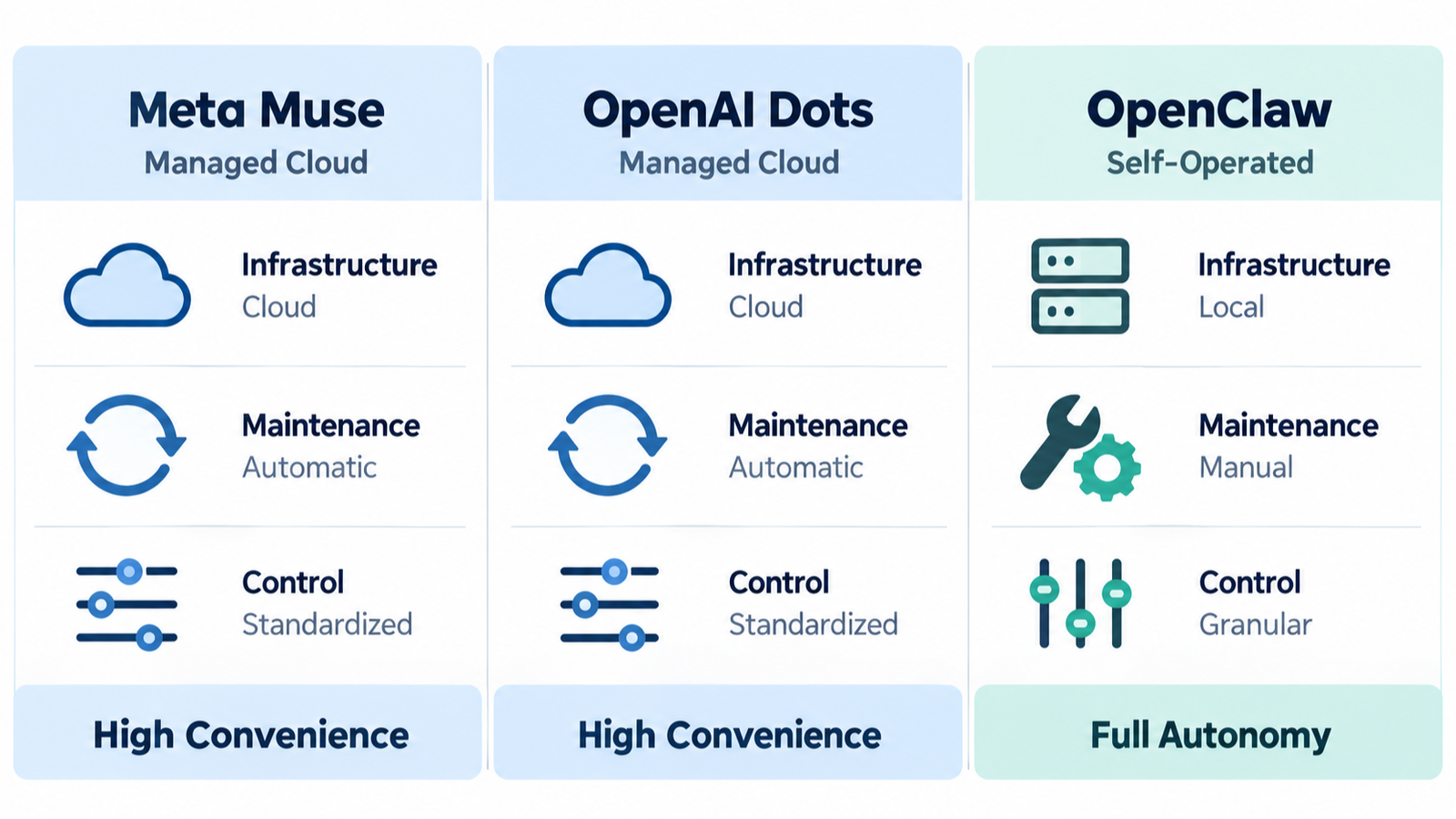
OpenAI dots, Meta Muse, and OpenClaw all pursue an always-available personal agent, but they divide responsibility differently.
| Decision area | OpenAI dots | Meta Muse | OpenClaw |
|---|---|---|---|
| Operating model | OpenAI-managed cloud agent | Meta-managed agent in a per-user Secure VM | Self-hosted or organization-operated Gateway |
| Agent computer | Own cloud computer and browser; optional connection to one local computer | Cloud Secure VM with browser and isolated credential handling | Your Mac, PC, server, VPS, or selected infrastructure |
| Personalization | ChatGPT memory, dot notes, connected apps, feedback, Custom Rules | Conversation history, VM files, memory, subagents, connected services | Prompts, models, workspaces, agents, skills, plugins, policies, and custom code |
| Maintenance owner | Primarily OpenAI | Primarily Meta | You or your IT team |
| Best fit | People who want a finished agent service inside the ChatGPT ecosystem | People who want a managed browser agent and transaction-oriented workflows | People who need deep customization and can operate the system responsibly |
OpenAI dots: the managed ChatGPT agent
OpenAI describes dots as always-on agents powered by GPT-6 Astra. A dot has its own cloud computer and browser, can work on several projects, can use connected apps, and can continue while the user’s device is off. Users can reach the same dot through ChatGPT, Slack, Teams, and supported mobile experiences.
The strongest part of the dots proposition is not merely model capability. It is the surrounding operating system for persistent work:
- Activity View shows ongoing and delegated tasks.
- Custom Rules can allow, pre-approve, require approval for, or block supported actions.
- Proactive research is restricted to read-only tools and cannot directly send messages, change plugin content, or control a browser or computer.
- Auto-review checks some planned actions against the user’s instructions, rules, and safety requirements.
- The most sensitive actions, such as changing a password or transferring money, must be completed by the user.
These controls reduce risk; they do not eliminate it. OpenAI explicitly says dots can make mistakes and that prompt-injection protections cannot remove every threat. A dot can also retain context from conversations and plugins. Disconnecting an app stops new access but does not automatically remove information already incorporated into the dot’s context, and individual dot memories currently cannot be edited or deleted one by one.
Cost: OpenAI states that the first dot is included with eligible Pro or Business Premium plans. Pricing for additional dots or expanded monthly work had not been published when this article was checked.
Meta Muse: a managed agent inside a Secure VM
Meta Muse also uses a cloud operating model, but its architecture is described around a dedicated Secure VM. Meta says Muse can work in the background, launch subagents, build tools, operate a browser, and keep files, generated work, memories, credentials, and authentication tokens inside separated VM components.
Muse’s most concrete controls appear in browser and payment workflows. Meta says the browser agent receives an accessibility-tree view rather than unrestricted raw page control, pauses when the user takes over or credentials are entered, and uses classifiers to detect prompt injection, unrelated personal-data egress, risky forms, and malicious sites.
For purchases, Meta says Muse requires human approval with the exact transaction details every time. When its wallet is used, a limited single-use card number is bound to a particular merchant and amount instead of exposing the regular card number.
Those are meaningful safeguards, but the trust model remains important. Meta’s current architecture restricts employee access through policy; it does not technically prevent Meta from accessing VM data when necessary to operate, secure, or support the service. Meta says a future Confidential VM is intended to provide stronger cryptographic separation. That future feature should not be described as generally available until it launches.
Muse also states that sanitized interaction trajectories may be used to train future model checkpoints. Browser activity can indirectly influence advertising when outside sites or Meta services observe that activity. A buyer should therefore examine the data policy, not assume that an isolated VM means zero provider visibility.
OpenClaw: your agent, your infrastructure, your responsibility
OpenClaw is an open-source agent platform that runs where the operator chooses: a laptop, Mac mini, server, homelab, or VPS. Its always-on Gateway connects models, tools, skills, automations, files, and messaging channels such as Telegram, WhatsApp, Slack, Discord, Signal, and others.
OpenClaw is not one model and it is not a hosted subscription service. The operator selects the model provider or local model, controls authentication, installs skills and plugins, designs cron jobs, defines tool permissions, and decides where sessions and files live. That can produce much deeper personalization than a packaged service—but only because the operator takes on the work that a vendor would otherwise do.
The software itself has no paid tier, yet “free” is incomplete. Total cost may include:
- Hardware and electricity
- Hosted-model and search API charges
- Storage and backups
- Monitoring and remote access
- Time spent installing, testing, updating, and recovering the system
Self-hosting also does not automatically mean all data stays local. If OpenClaw sends a prompt to a cloud model, search provider, plugin, or external service, relevant data crosses that boundary. The operator must trace the complete data path.
Cost changes the decision—but the prices are not directly comparable
My first reaction to managed AI-agent services was the price. Once an AI service moves from occasional chat to an agent that stays available, uses apps, and performs ongoing work, paid plans can quickly move from roughly $20 a month into $100-or-more territory. That can feel expensive before the agent has proved its daily value.
However, the current offers should not be described as identical. Meta says Muse is free for most everyday needs and that subscriptions are available for people who want to do more, but its launch announcement does not provide a complete Muse-specific $20/$100 price table. OpenAI says the first dot is included with ChatGPT Pro or Business Premium. Business Premium is currently listed at $100 per user per month with annual billing or $125 with monthly billing; the lower-priced Business Standard seat is a different tier and should not be presented as including dots.
OpenClaw takes the opposite approach: the software has no subscription and no paid hosted tier. That does not mean the system is free to operate. The user pays for the computer, electricity, model or API usage, backups, network services, and—most importantly—time spent configuring and repairing the system. A cloud subscription can therefore be the better economic choice for someone who does not want to become the operator.
A firsthand OpenClaw perspective: personalization through ownership
I run OpenClaw on my own local equipment for research, monitoring, scheduled cron jobs, article production, music creation, and personal work briefings. These are not demo tasks. They are recurring workflows that I expect the system to remember, coordinate, and improve over time.
What makes OpenClaw compelling to me is not simply that it is open source or subscription-free. It is that I can shape the agent around my own operating style. I can define its roles, prompts, schedules, approval rules, sources, quality gates, tools, and handoff points. I can encode what matters to me instead of waiting for a vendor to expose the exact feature I need.
That freedom has a real cost. I have to install and manage the system, diagnose provider failures, repair broken workflows, implement missing functions, monitor cron jobs, and recover from errors. Some days, including days when an unexpected error consumes hours, OpenClaw feels less like using a polished service and more like manually assembling and operating my own AI platform.
That is also why it can become deeply personal. The troubleshooting, tuning, and feature work gradually turn a general framework into an agent system that reflects my preferences, habits, risk tolerance, and actual requirements. In my experience, OpenClaw is the “build and operate it yourself” choice, while Muse represents the “use a finished managed service” choice. OpenAI dots sits closer to the managed-service side, especially for people already invested in ChatGPT and its connected tools.
The practical question is therefore not “Which one is free?” It is “Would I rather pay a provider to operate the agent, or invest my own hardware and time to own the operating model?” My answer favors OpenClaw because customization matters to me. Someone who values convenience, vendor support, and less maintenance may rationally reach the opposite conclusion.
This is a firsthand account from one customized system, not a guarantee that every OpenClaw installation will behave the same way.
Privacy and control: ask what happens after connection
All three products can become highly personal because their value grows with context. The practical privacy questions are therefore similar even though the architectures differ:
- What can the agent read?
- What can it change or send?
- Where are memories, files, logs, and credentials stored?
- Which external models and plugins receive data?
- Can individual information be corrected or deleted?
- What remains after an app is disconnected?
- Who can access the system for support or security?
- How do you stop, audit, restore, or rebuild it?
A vendor-managed service can offer strong defaults and centralized controls, but it asks the user to trust the provider’s infrastructure and policies. A self-operated service offers architectural freedom, but a configuration mistake becomes the operator’s mistake.
Never delegate these without human control
| Task | Recommended boundary |
|---|---|
| Money transfers, loans, investments, tax filing | Research or draft only; the human performs the final transaction |
| Password, MFA, recovery, or permission changes | Always require human takeover |
| Legal, employment, medical, or contractual commitments | Allow analysis and drafting; require qualified human review |
| Permanent deletion or public publication | Require revision-specific approval and a recovery path |
| Messages containing sensitive information | Verify recipient, content, attachments, and disclosure scope |
Which personal AI agent should you choose?
Choose OpenAI dots when:
- You already work heavily in ChatGPT, Codex, or connected business apps.
- You want cloud work to continue when your own computer is off.
- You prefer vendor-managed upgrades, safety checks, task visibility, and approval controls.
- You accept OpenAI’s cloud and memory model for the intended work.
Choose Meta Muse when:
- You want a managed browser agent organized around an isolated cloud VM.
- Browser workflows, form completion, reservations, shopping, and controlled checkout are central use cases.
- You understand the difference between the current Secure VM and the planned Confidential VM.
- You accept Meta’s data and provider-access model for the intended work.
Choose OpenClaw when:
- You want to choose models, tools, skills, channels, storage, and infrastructure.
- You need custom agents, cron workflows, quality gates, or integrations.
- You can maintain an always-on service and secure its credentials and tools.
- You value control enough to accept debugging, monitoring, backups, and recovery work.
Choose a hybrid approach when:
Different jobs deserve different trust boundaries. A managed agent may be best for low-risk general productivity, while OpenClaw handles custom workflows or data paths you deliberately control. Keep irreversible, financial, legal, and public actions behind explicit human approval on every platform.
A 10-question decision checklist
- Where will the agent run?
- Who installs updates and monitors failures?
- Which accounts, files, and messages can it access?
- Can it send, purchase, delete, publish, or change permissions?
- Which actions always require human approval?
- Where do prompts and outputs travel?
- How are memories reviewed and deleted?
- What happens when a background task fails?
- What is the total cost, including time?
- Who is accountable for the result?
Final verdict
OpenAI dots and Meta Muse make personal agents easier to adopt because the provider operates the cloud environment, updates the service, and supplies the main safety controls. OpenClaw gives the operator more freedom to shape the system, but transfers much more responsibility for security, reliability, cost, and recovery.
The right choice is therefore not “the smartest AI.” It is the operating model you can trust and govern.
In the personal AI agent era, intelligence matters. But operational ownership matters more.
Sources and date checked
Sources checked October 5, 2026. Features, availability, prices, and privacy terms can change.
- OpenAI — Introducing dots
- OpenAI — ChatGPT Business pricing and seat types
- Meta — Introducing Muse and availability
- OpenAI Help Center — Getting started with your dot
- OpenAI — Dots privacy, security, and safety FAQs
- Meta — Muse
- Meta AI Research — How We Built Safety Into Muse
- OpenClaw official site
- OpenClaw — What is OpenClaw?
- OpenClaw security documentation
- OpenClaw API usage and costs
Ask who restores the agent on a Monday morning
Consider an illustrative agent that drafts a weekly report from connected email. The useful ownership comparison is what happens when a connector expires or the agent sends a draft to the wrong destination.
| Situation | Next check | Why it changes the decision |
|---|---|---|
| Managed service | Find the service's permission revocation, support, and export routes. | Hosting responsibility is shared with the vendor, but account choices remain yours. |
| Self-hosted agent | Name the person who restores the host and rotates credentials. | Software availability does not supply an operator. |
| Hybrid workflow | Document which documents and actions cross the local/cloud boundary. | A local planning step does not make later cloud processing local. |
Use the responsibility assignment to choose an operating model before comparing subscriptions. This scenario adds an ownership test; it does not assert equal capabilities or current prices across the three products.