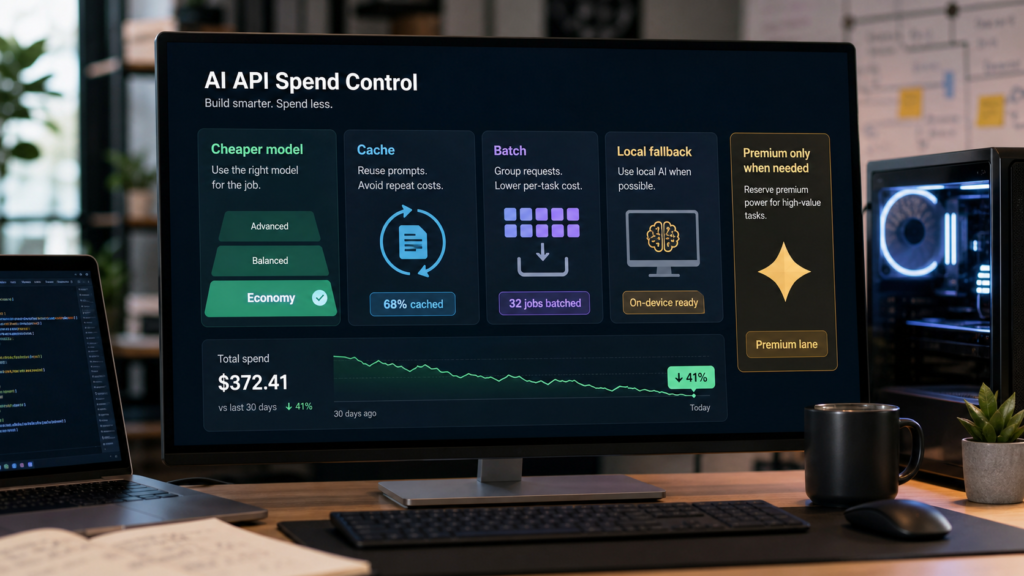
Quick answer: a model price reduction make AI API cost control more important, not less important. When a capable model gets cheaper, builders usually run more experiments, add more agent steps, process more files, and let automations repeat more often. The winning move is not to blindly switch every workflow to the cheapest model. The winning move is to route easy work to cheaper models, cache repeated context, batch background jobs, keep a local AI fallback for privacy or volume, and reserve premium models for decisions where accuracy, reasoning, or review cost matters.
The decision here is whether a proposed price change improves the cost of completed work under your own acceptance rule. It does not report a live provider price or a verified new price-cut announcement.
If you already read abcnote’s OpenAI API cost guide, treat this article as the 2026 update layer: what changes when API prices fall, how to redesign spend controls, and what to check before changing production automations. If your bigger question is whether to stay cloud-based or move workloads onto your own machine, pair this with the local AI vs cloud AI guide and the ROCm vs CUDA builder guide.
a model price reduction: what actually changes
A price cut changes the boundary between experiments, prototypes, and production. Before the cut, a team might avoid long document workflows, frequent classification, agent retries, or synthetic test generation because the bill felt hard to predict. After the cut, those jobs can become more realistic. But cheaper does not mean free, and it does not mean every model tier belongs in every part of the stack.
More workflows become possible
High-volume summarization, extraction, search enrichment, classification, and draft review can move from one-off experiments into repeatable jobs.
Bad loops become cheaper to miss
If an agent retries a tool call 200 times, lower unit cost reduces pain but does not fix the design problem.
Model routing matters more
When model tiers spread out by cost and capability, the stack should choose the right model per task instead of hard-coding one default.
Premium models still have a job
Use stronger models where errors are expensive: final reasoning, policy-sensitive decisions, code review, finance-like calculations, and customer-facing outputs.
The practical test is simple: if a task is repetitive, low-risk, and easy to verify, it is a candidate for a cheaper model. If a task is ambiguous, high-impact, or hard to check, keep it on a stronger model or add human review. That is the difference between saving money and quietly lowering quality.
Build a model routing map before you switch
Most API bills do not come from one dramatic request. They come from repeated calls: every chat turn, every tool loop, every file chunk, every retry, every background scan, every evaluation, and every agent step. A model routing map gives each job a default tier and an escalation path.
Economy tier
Use for classification, tagging, short extraction, routing, duplicate detection, formatting, and predictable summaries where the answer is easy to inspect.
Balanced tier
Use for draft generation, normal coding assistance, user support drafts, multi-step extraction, and tasks that need useful reasoning but not the very best model.
Premium tier
Use for final review, difficult code changes, complex planning, security-sensitive analysis, high-value customer messages, and tasks where a bad answer costs more than the API call.
Local fallback
Use local AI for private notes, high-volume rough drafts, offline experiments, or jobs where latency and privacy matter more than frontier accuracy.
Do not route by vibes. Write down the job, expected input size, expected output size, repeat count, quality bar, and failure cost. A cheap model can be excellent for a small deterministic task and terrible for a long ambiguous task. A premium model can be wasteful for a format conversion and essential for a final architecture review.
The simple AI API cost formula
A useful estimate starts with this shape: monthly cost equals calls per month times average input tokens times input price, plus calls per month times average output tokens times output price, minus any caching or batch savings that really apply. Tool calls, image inputs, file processing, retrieval, and long contexts can add separate costs depending on the platform.
Count repeat volume first
A task that runs once a week can use a stronger model. A task that runs every minute needs stricter routing, logging, and caps.
Measure input and output separately
Long prompts and long answers behave differently. Do not estimate only by the final answer length.
Include agent retries
Agent systems often multiply calls through planning, browsing, tool use, reflection, and correction loops.
Add review cost
A cheap output that takes a human ten minutes to repair may be more expensive than a stronger first pass.
For a small builder, the most useful habit is to log request type, model, input size, output size, success result, retry count, and user-facing value. After one week, you can see which calls produce value and which calls are just noisy motion.
Where cheaper lower model pricing helps most
Lower prices are most valuable when the task is high-volume and quality can be checked automatically or cheaply. That does not mean the work is unimportant. It means the output can be validated with rules, examples, schemas, tests, or human spot checks.
Document triage
Classify documents, identify likely topics, extract dates, and send only difficult items to a stronger model.
Search enrichment
Generate metadata, short summaries, title alternatives, and query rewrites for search or knowledge-base workflows.
Coding support
Use cheaper models for rough test generation, log explanation, small refactors, and issue clustering before a stronger review pass.
Content operations
Draft briefs, compare source notes, create outlines, and check repeated QA flags before final editorial synthesis.
Customer support drafts
Prepare first responses and ticket summaries, but keep escalation and sensitive customer language under review.
Evaluation data
Generate candidate test cases, alternate phrasings, and simple adversarial examples, then verify with deterministic checks.
This is also where abcnote’s recent AI coding and automation coverage connects. If you use AI coding tools, browser agents, or payment-enabled agents, the API bill is only one part of the risk. Permissions, secrets, logs, review gates, and spend caps belong in the same design.
Where not to downgrade too quickly
A cheaper model is tempting, but some workloads punish hidden errors. The output may look confident while losing a constraint, misunderstanding a policy, missing a security issue, or inventing a source. Those failures often cost more than the model call.
Security review
Keep stronger review for secrets, permission scopes, dependency risk, auth changes, prompt injection, and production access.
Final code changes
Use tests and code review. Cheap models can draft, but production diffs need verification and rollback.
Financial or legal-like wording
Avoid personalized advice and unsupported claims. Use sources, caveats, and human review.
Public content with facts
Do not let cheaper generation become thin filler. Verify source links, dates, quotes, and originality before upload.
Agent actions
For payments, emails, deletions, purchases, and admin changes, keep approval gates even if the model call is cheaper.
Long context decisions
A cheaper long-context run can miss details. Summarize in layers and test whether the final answer preserves key constraints.
The best cost control is not always a cheaper model. Sometimes it is a shorter prompt, a better schema, a stronger test, a narrower tool permission, or a human approval step. That is why spend control and safety control should be designed together.
Use caching before rewriting the whole stack
Prompt caching can reduce repeated-input cost when the same long instructions, policy text, examples, or context appear again and again. Caching is not magic, and each platform has its own details, but the idea is practical: stop paying full price to send the same stable context every time.
Good caching candidates
System instructions, style rules, tool descriptions, stable product docs, reusable examples, policy snippets, and long context that changes slowly.
Bad caching candidates
Highly personalized private data, constantly changing logs, one-time files, or prompts that are rebuilt differently on every call.
Builder action
Separate stable prompt blocks from dynamic user data. Version the stable blocks so you know when cache behavior changes.
QA action
Test cached and uncached runs. Make sure cheaper repeated input does not hide stale instructions or outdated source context.
Caching also disciplines prompt design. If every prompt is a giant string assembled differently each time, cost estimation becomes harder. If the stable policy block, retrieval block, and user task block are separated, the workflow is easier to test and cheaper to tune.
Use batch jobs for background work
Batch processing is useful when the result does not need to arrive immediately. Instead of paying interactive prices and creating live latency pressure, builders can group lower-urgency tasks: document labeling, source clustering, nightly QA, synthetic test generation, image alt-text checks, support-ticket summarization, and analytics enrichment.
Batch when speed is not the product
Nightly enrichment, weekly audits, and large offline cleanups do not need the same path as a live chat response.
Keep a retry budget
Batch jobs can explode quietly. Cap rows, cap retries, log failures, and sample outputs before processing the whole queue.
Use schemas
Structured output makes it easier to catch malformed responses, compare quality, and rerun only failed items.
Review samples
Do not trust a 10,000-row batch because the first five rows looked good. Sample across short, long, weird, and high-risk cases.
The price-cut lesson is that more work can move into automation, but automation needs guardrails. If a lower API price causes a team to run unreviewed bulk jobs, the savings can disappear into cleanup time.
When local AI still wins after a model price reduction
Lower cloud model prices do not erase local AI. Local models still matter when data should stay on your machine, when offline use matters, when a high-volume rough task is good enough locally, or when you want to prototype without sending every private note to a cloud API. The tradeoff is setup time, hardware cost, model quality, and maintenance.
If your local path is serious, your software stack matters. Ollama can be a fast way to test local models. GPU-heavy builders should also think about CUDA and ROCm support before buying hardware. The wrong hardware/software pairing can turn cheap local inference into days of troubleshooting.
Use cloud for reliability
Cloud APIs are usually better when you need managed availability, easy scaling, stronger frontier models, and fewer hardware worries.
Use local for privacy experiments
Local AI is attractive for private notes, offline tests, internal drafts, and high-volume rough processing.
Use both for routing
A practical stack can classify locally, send hard tasks to cloud, and keep sensitive or low-value work out of premium API paths.
Do not ignore hardware cost
Local AI is not free. GPU, RAM, storage, electricity, cooling, maintenance, and setup time all count.
A safer migration checklist
Before changing a production workflow because API prices dropped, run a small migration checklist. Price is only one input. Quality, latency, privacy, logging, support, and failure behavior matter too.
1. List every model call
Find the hidden calls: router, planner, tool chooser, summarizer, evaluator, retry, final answer, and logging helper.
2. Set a target tier
Assign economy, balanced, premium, local, or human review to each call. Do not let one default model run everything.
3. Run before-and-after evals
Use real examples, edge cases, and known failures. Compare quality, not only price.
4. Cap spend by workflow
Set daily/monthly limits, per-user limits, retry limits, and alert thresholds before traffic grows.
5. Check privacy and retention
Confirm what data you send, how logs are stored, and whether private files belong in a cloud request at all.
6. Keep rollback simple
Store the old model config. If quality drops, switch back without rewriting the whole app.
This checklist is especially important for agents. An AI agent can multiply calls by browsing, planning, tool use, file reads, payments, and repeated corrections. If your workflow touches money, accounts, admin settings, or private customer data, connect model routing to the same safety controls discussed in abcnote’s AI agent payments guide and API key safety guide.
Practical model-routing examples
Example 1: support ticket triage
Use an economy model to classify tickets, detect language, extract product name, and summarize the issue. Use a balanced model to draft the response. Use a premium model or human reviewer only for refunds, legal-like wording, angry customers, security issues, or unclear account actions. This keeps cost low while preserving review where trust matters.
Example 2: coding assistant workflow
Use a cheaper model to cluster bug reports, explain logs, suggest tests, and create first-pass documentation. Use a stronger model for architecture decisions, security review, complicated refactors, and final diff review. Always run tests. A lower model price should not replace a build, lint, test, and rollback path.
Example 3: content research workflow
Use a cheaper model to cluster source leads, identify duplicate angles, draft private outlines, and flag missing sections. Use stronger synthesis for the public article, source verification, title testing, and final editorial judgment. This keeps the article useful instead of turning lower cost into more generic output.
Example 4: local-private document workflow
Use local AI to preview private notes, remove sensitive details, or create rough summaries. Send only the minimum necessary sanitized context to a cloud model when you need stronger reasoning. This hybrid path is often more realistic than claiming local or cloud is always best.
Common cost traps after a price cut
A price cut can create a false sense of safety. Builders may add more agent steps, keep longer prompts, run every job live, and stop reviewing output because the bill looks smaller. The unit price falls, but total volume rises.
Long prompts copied everywhere
Repeated policy text, examples, docs, and tool descriptions can dominate input cost unless caching or prompt structure is used well.
Unbounded retries
A tool failure can trigger repeated planning and correction loops. Set retry limits and record the reason for each retry.
Premium model as default
Keeping the strongest model on every low-risk task wastes money even after price cuts.
Cheapest model as default
Routing everything to the cheapest model can create hidden quality debt and human cleanup cost.
No usage owner
If every team member can create background jobs without caps, nobody notices cost until the invoice arrives.
No outcome metric
Track whether calls reduce work, improve quality, or create revenue. A cheap call with no useful outcome is still waste.
What to check on pricing pages
Because model prices, names, and limits change quickly, do not copy a price from a news headline into a production budget and forget it. Open the current pricing pages before launch, then save the checked date beside your configuration.
Input and output rates
Some models price input and output differently. Long answers can change the economics more than expected.
Cached input
Check whether your prompt pattern qualifies for caching and whether the savings apply to your exact model and endpoint.
Batch discounts
Check whether background jobs can use batch processing and what completion window applies.
Tool and modality costs
Images, files, retrieval, fine-tuning, audio, or tool calls may have separate rules.
Rate limits
A cheaper model still needs throughput limits that match your product.
Data handling
Confirm retention, enterprise settings, privacy controls, and what logs your own app stores.
If comparing vendors, use official OpenAI, Anthropic, and Google pricing pages rather than screenshots from social media. News articles are useful for trend context. Official docs are the source of truth for the actual build.
Bottom line
a model price reduction are good news for builders, but the best response is not reckless expansion. Treat cheaper AI like cheaper cloud compute: useful, powerful, and still capable of waste. Start with a model-routing map, measure real token use, cache stable prompts, batch slow work, reserve premium models for high-value reasoning, and keep local AI in the mix where privacy or volume makes sense.
The practical question is no longer, “Can I afford one AI call?” It is, “Which AI calls are worth running thousands of times?” When that question is answered clearly, lower prices become leverage instead of noise.
Sources checked July 31, 2026
- OpenAI: Advancing the price-performance frontier with GPT-5.6
- OpenAI API pricing documentation
- OpenAI API prompt caching guide
- OpenAI Batch API guide
- Reuters: OpenAI cuts prices on smaller AI models as businesses scrutinize AI spend
- CNBC: OpenAI cuts prices for GPT-5.6 models as companies grow sensitive to costs
- PYMNTS: OpenAI model price cuts and high-volume AI work economics
- InfoWorld: OpenAI drops GPT-5.6 Luna and Terra API prices
- Anthropic Claude API pricing
- Google Gemini API pricing
- Ollama documentation
- NIST AI Risk Management Framework
A lower token price can increase the cost of an accepted answer
Use an illustrative job with 100 requests. Model A costs $0.01 per request and produces 90 acceptable results. Model B costs $0.007 but produces 60. Before retries or labor, accepted-result cost is about $0.011 versus $0.012.
| Situation | Next check | Why it changes the decision |
|---|---|---|
| Unit price falls | Recalculate cost at the same input/output lengths. | A price change does not change token counts automatically. |
| More outputs require retries | Add retry tokens and review effort. | Cheaper first attempts can produce a higher total. |
| Acceptance remains stable | Check latency and operational constraints before migration. | Cost is one gate among several. |
These prices and outcomes are invented arithmetic inputs, not provider prices or model benchmarks. Compare the cost of completed work under a stated acceptance rule; do not use a price-cut headline as a migration decision.