Quick answer: EV battery health apps can help a used electric vehicle buyer spot range loss, charging habits, warranty risk, and suspicious listings, but they should not be treated like a perfect medical scan. Use them as one layer in a buying checklist: verify the battery warranty, compare the displayed range with real driving, look for state-of-health clues, review fast-charging history when available, run a test drive, and ask for service records. If the app result and the seller story do not match, slow down before you buy.
Used EV shopping is different from used gasoline-car shopping because the most expensive part is not an engine or transmission. It is the traction battery pack. Battery packs are designed to last, and many cars keep useful range for years, but age, mileage, heat, fast charging, long storage at very high or very low charge, software limits, previous repairs, and model-specific warranty rules can change the risk. That is why buyers are searching for app-based battery reports before signing paperwork.
This guide is written for practical buyers, parents buying a first EV, commuters looking at a discounted used model, and tech readers who want better data before trusting a listing. It connects naturally with abcnote’s broader consumer-tech safety guides: if you use AI tools while shopping, read the AI shopping agent security guide; if a seller asks you to create accounts or share documents online, protect those logins with the passkeys or password managers guide. For everyday connected-device buying habits, the same checklist mindset also applies to abcnote’s robot vacuum smart home setup guide.
EV battery health apps in one minute
| Question | What an app may help with | What still needs human verification |
|---|---|---|
| Is the battery degraded? | State of health estimate, usable capacity estimate, range trends, or comparison with similar vehicles | Warranty documents, dealer inspection, service history, and realistic test-drive range. |
| Was the car fast-charged hard? | Some connected reports can infer charging patterns or high-voltage battery behavior | Owner records, onboard charge history if available, and seller explanation. |
| Is the dashboard range believable? | Range history and temperature-normalized comparisons may show whether the guess-o-meter looks optimistic | Drive the car on a normal route and watch energy use, climate control, speed, and weather. |
| Is the warranty still useful? | Apps can organize battery data, but warranty rules come from the automaker | Original in-service date, mileage, country rules, battery-capacity warranty threshold, and transfer conditions. |
| Is the deal too risky? | A weak report can trigger negotiation or a walk-away decision | Independent inspection, title history, accident history, price comparison, and return policy. |
| Can I rely on one score? | No. A score is a signal, not a verdict | Use several evidence layers before deciding. |
What EV battery health means
In everyday buyer language, EV battery health means how much useful battery capacity and charging performance remain compared with when the car was new. The exact technical language can include state of health, usable capacity, degradation, battery-management-system estimates, cell balance, thermal management behavior, fast-charging speed, error codes, and range efficiency. A listing that says “battery is good” is not enough. A buyer needs evidence.
The U.S. Department of Energy explains EV battery basics and the role of battery packs in electric vehicles. EPA consumer guidance also notes that EV range varies with temperature, speed, terrain, accessory use, and driving style. That matters because range loss is not always battery damage. Cold weather, highway driving, low tire pressure, roof racks, heavy cargo, and aggressive acceleration can make a healthy battery look weak during one short drive. Good buying judgment separates normal range variation from true battery degradation risk.
State of health
A practical estimate of remaining battery capacity compared with expected new capacity. It may differ by app, model, and data source.
Displayed range
The car’s range estimate is usually based on recent driving, weather, settings, and software. It is useful but not a battery diagnosis by itself.
Usable capacity
The energy the car lets you use, often lower than gross pack capacity because automakers reserve buffers to protect the battery.
Warranty threshold
Many EV battery warranties define coverage by years, mileage, and sometimes capacity loss below a stated threshold. Read the actual warranty.
The main types of EV battery health apps
There is no single category called “battery health app” that works perfectly for every EV. Buyers will usually see three kinds of tools. The first is a connected-car report service that uses vehicle account data or owner-shared data to compare a car with similar vehicles. The second is an OBD-based app that reads data through an adapter plugged into the car. The third is the automaker’s own app or in-car service screen, which may show charging, range, warranty, alerts, or service messages but not always a direct health score.
Connected vehicle report
Data: range trend, charging behavior, comparison with similar EVs, and market context.
Best use: used-EV shopping confidence.
Limit: needs supported models, permission, enough data, and careful interpretation.
OBD adapter plus app
Data: BMS values, error codes, temperature, voltage, and SOH clues on some models.
Best use: hands-on inspection, older EVs, and technical buyers.
Limit: can be confusing, model-specific, and not official proof.
Automaker app or service screen
Data: charge level, estimated range, service warnings, warranty access, and account status.
Best use: confirming the seller story and ownership transfer.
Limit: may not show detailed battery SOH or independent battery condition.
Vehicle-history report
Data: accident, title, ownership, mileage, service, and recall clues.
Best use: screening the car before trusting battery data.
Limit: does not directly measure traction-battery health.
Apps and reports buyers often encounter
Used EV buyers often see app names before they understand what each tool actually does. The safer approach is to treat each app as one evidence layer. A vehicle-history report is not a battery-health report, a battery app is not a title check, and an OBD scan is not a professional inspection.
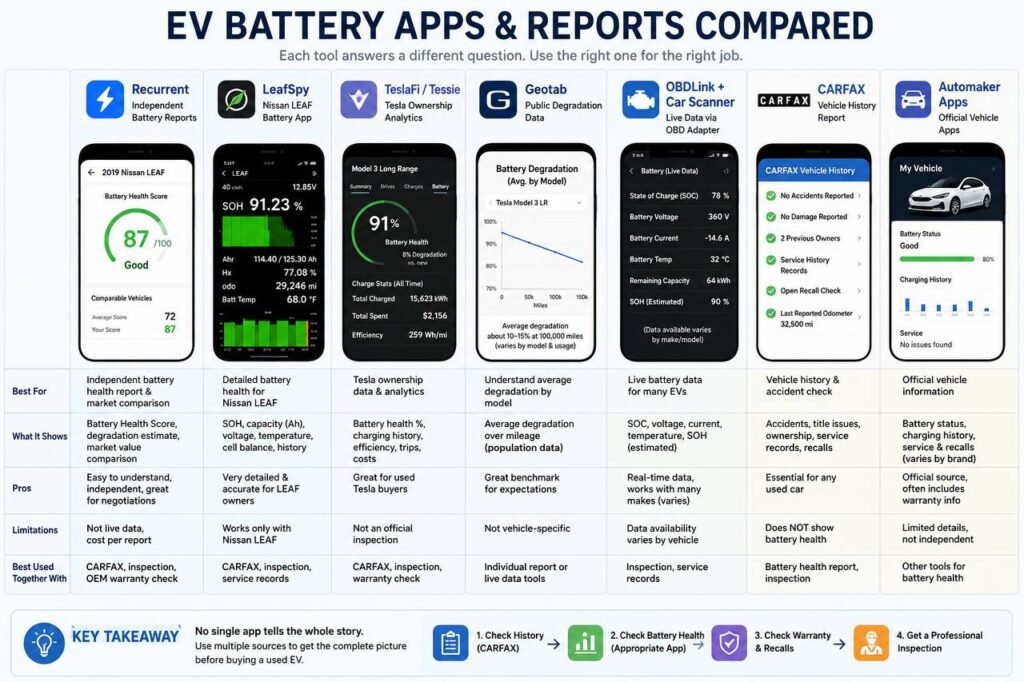
The visual comparison above replaces the wide table because it is easier to scan on desktop and does not force five narrow text columns on mobile. For phone readers, the same information is repeated below as cards.
Recurrent
- Best for
- Independent battery reports and market comparison.
- Shows
- Battery-health score, degradation estimate, range clues, comparable used-EV context.
- Limits
- Not live data; support and pricing vary by vehicle and report access.
- Use with
- CARFAX, warranty check, and inspection.
LeafSpy
- Best for
- Nissan LEAF battery SOH and cell-balance checks.
- Shows
- SOH, capacity, voltage, temperature, cell balance, and LEAF-specific data.
- Limits
- Mostly for Nissan LEAF; needs the right adapter and interpretation.
- Use with
- CARFAX, service records, warranty, and test-drive range.
TeslaFi / Tessie
- Best for
- Tesla ownership analytics.
- Shows
- Charging, efficiency, range trends, trips, costs, and battery-health estimates/features.
- Limits
- Not an official Tesla inspection or warranty decision.
- Use with
- Tesla warranty/service records and inspection.
Geotab
- Best for
- Average degradation expectations.
- Shows
- Population-level degradation patterns by mileage, model, use, and conditions.
- Limits
- Not a diagnosis of the exact VIN.
- Use with
- Individual battery report or live-data check.
OBDLink + Car Scanner
- Best for
- Live battery and diagnostic data.
- Shows
- SOC, voltage, current, temperature, DTCs, and SOH clues where supported.
- Limits
- Data availability varies by EV, adapter, and profile.
- Use with
- Inspection and service records.
CARFAX
- Best for
- Vehicle history and accident/title checks.
- Shows
- Accidents, title, odometer, ownership, service records, and recalls when recorded.
- Limits
- Does not show traction-battery SOH or cell balance.
- Use with
- Battery report and professional inspection.
Automaker apps
- Best for
- Official owner, service, recall, and warranty access.
- Shows
- Battery status, charging history, recalls, service messages, and warranty clues where supported.
- Limits
- Limited detail and not independent.
- Use with
- Other battery-health tools.
Why multiple tools matter
No single app tells the whole used-EV story. A clean CARFAX report helps with title and accident risk, but it does not prove battery state of health. A battery report helps with range and degradation clues, but it does not prove that a flood, collision, or warranty exclusion never happened. An OBD scan may reveal live battery-management-system values, but those values can be model-specific and easy to misread.
1. Check History
Use CARFAX or another vehicle-history report for accident, title, mileage, ownership, service, and recall clues.
2. Check Battery Health
Use the right battery app or report for the vehicle: Recurrent, LeafSpy, TeslaFi/Tessie, OBDLink + Car Scanner, or dealer diagnostics.
3. Verify Warranty
Confirm years, mileage, capacity-retention terms, transfer rules, and exclusions before relying on coverage.
4. Get Inspection
Have an EV-aware mechanic check charging, cooling, warning codes, tires, brakes, suspension, body repairs, and road-test behavior.
Recommend apps by EV brand
Tesla
Start with: TeslaFi or Tessie, plus Tesla app/service records.
Best use: ownership analytics, charging, efficiency, range trends, and warranty context.
Nissan LEAF
Start with: LeafSpy with a supported OBD adapter.
Best use: SOH, battery temperature, cell balance, DTCs, and LEAF-specific inspection signals.
Hyundai / Kia
Start with: Car Scanner + OBDLink where supported, plus MyHyundai/Bluelink or Kia Connect.
Best use: OBD clues, recalls, service messages, charge settings, and warranty confirmation.
Chevy Bolt
Start with: Car Scanner or a Bolt-supported OBD workflow plus GM/Chevrolet service records.
Best use: battery replacement/recall documents, codes, charging behavior, and warranty status.
Ford EVs
Start with: FordPass + professional inspection.
Best use: recall/service alerts, warranty access, charge settings, account transfer, and inspection planning.
Real buying scenarios
Buying a 2022 Nissan LEAF?
Do not rely only on CARFAX. Check LeafSpy SOH, battery temperature, cell-pair balance, DTCs, remaining battery warranty, service history, and whether real test-drive range fits your commute.
Buying a Tesla Model 3?
Ask whether the owner has TeslaFi/Tessie history, compare displayed range with age and mileage, confirm warranty through Tesla documents, and handle account transfer carefully.
Buying a Hyundai IONIQ 5 or Kia EV6?
Check CARFAX, open recalls, warranty status, charging behavior, service records, automaker-app access, and supported OBD data if the seller allows it.
Buying a Chevy Bolt?
Confirm battery recall or replacement records, review service documents, check warranty status, and use OBD data as one layer of evidence.
Buying a Ford EV?
Use FordPass or Ford owner resources for recalls and service context, verify battery warranty, run a charging/range check, and get an EV-aware inspection.
Can you trust battery health apps?
You can trust EV battery health apps as useful signals, but not as final truth. Most apps read or infer data from the battery-management system, connected-car account, OBD values, charging sessions, range behavior, or comparison databases. Those inputs can be incomplete, delayed, reset, temperature-sensitive, or interpreted differently by different tools.
Two apps can show different SOH because they may use different formulas, BMS values, calibration assumptions, usable-capacity estimates, or data windows. Treat disagreement as a reason to inspect more carefully, not as a reason to guess.
- Use app data to ask better questions, not to replace inspection.
- Save screenshots with date, mileage, state of charge, temperature, and app name.
- Compare results with the same model and battery size, not a different trim.
- Treat warranty documents and professional diagnostics as stronger evidence than a seller screenshot.
What to check before installing or connecting an app
Battery apps can require account access, VIN entry, vehicle connection, Bluetooth, OBD adapters, or seller participation. That creates privacy and security questions. Do not give a stranger permanent access to your account. Do not connect a random OBD device you do not trust. Do not share login codes in a text message. If a seller asks you to install an unknown app from outside the official app store, treat that as a red flag.
The same shopping-safety principle applies here as in online buying: the tool should reduce risk, not create a new one. If you are coordinating through marketplaces, emails, or AI shopping helpers, keep sensitive account access separate. abcnote’s AI shopping agent security article covers permission boundaries for buying workflows, while the passkeys/password managers guide explains better login protection.
- Use official app stores or the vendor’s official website.
- Check whether the app supports the exact make, model, year, battery size, and region.
- Understand whether it needs owner account access, OBD data, VIN data, or seller approval.
- Use a reputable OBD adapter and remove it after the inspection unless you own the car.
- Do not share one-time login codes with a seller, buyer, or broker.
- Delete vehicle access and app permissions if the purchase does not happen.
Used EV battery checklist before you buy
| Step | What to do | Why it matters |
|---|---|---|
| 1. Confirm exact battery version | Check trim, pack size, model year, drivetrain, and software/warranty region | Two cars with the same badge can have different range, chemistry, warranty, and charging behavior. |
| 2. Read the battery warranty | Check years, mileage, capacity threshold, transfer rules, and in-service date | A remaining warranty can change the risk and price conversation. |
| 3. Compare app health signals | Use a supported report or OBD reading when available | A health estimate gives negotiation context, especially if the listing claims excellent battery condition. |
| 4. Inspect charging history clues | Ask about home charging, fast charging, long storage, and charging limits | Charging habits can affect aging, although one habit does not prove damage. |
| 5. Run a normal test drive | Drive at normal speed with climate control on and record miles, energy use, and range change | The car must fit your commute, not just a brochure number. |
| 6. Check service records | Look for battery replacements, coolant work, software updates, recalls, and high-voltage repairs | A replaced battery can be good news if documented; hidden repairs are not. |
| 7. Price the risk | Compare report result, warranty, mileage, age, range, and comparable listings | Battery uncertainty should be reflected in price or return protection. |
State of health is useful, but not magic
Many buyers want one number: 94 percent health, 88 percent health, or 72 percent health. That number can be useful, especially when it comes from a consistent data source and is compared with similar vehicles. But it is not magic. EV battery-management systems estimate values through software, sensors, charging events, temperature, and driving data. Different tools can produce different numbers.
For a buyer, the better question is not only “what is the number?” Ask: How was it measured? Is the app supported for this model? Was the car recently reset or updated? Does the range test agree? Does the warranty still apply? Is the seller’s story consistent? Is the price low enough to compensate for uncertainty? One honest 86 percent battery on a fair-priced commuter car may be better than a vague “perfect battery” claim on an overpriced listing.
Warranty rules matter more than forum guesses
Most used EV shoppers should read the battery warranty before arguing over app screenshots. Automakers often provide high-voltage battery coverage for a stated number of years and miles, and some warranties describe capacity retention thresholds. Tesla, Nissan, Hyundai, Kia, and other manufacturers publish warranty terms, but details vary by model year, country, battery type, original sale date, and transferred ownership. A blog comment or seller summary is not enough.
Ask the seller or dealer for the in-service date, current odometer reading, original warranty booklet or official warranty lookup, and any battery-service documents. If the car is near the end of warranty, the app result matters more because you may own the downside. If the car has plenty of battery warranty left and the app result looks normal, the risk may be easier to accept.
| Warranty item | Buyer question | Why it changes the deal |
|---|---|---|
| Years and miles | How much battery warranty remains today? | A car may be low mileage but old, or newer with high mileage. |
| Capacity threshold | Does the warranty mention replacement or repair below a stated capacity level? | Some degradation is normal and may not qualify for coverage. |
| Transfer rules | Does coverage transfer to the next owner? | Private-sale assumptions can be wrong. |
| Prior repairs | Was the battery pack, module, coolant system, or high-voltage part replaced? | Documented replacement can improve confidence; vague repairs raise questions. |
| Exclusions | Are there salvage, misuse, flood, racing, tampering, or charging-related exclusions? | A cheap car with warranty exclusions may not be cheap. |
| Dealer confirmation | Can the dealer print or email warranty status? | Written confirmation beats verbal promises. |
Fast charging history: helpful signal, not automatic blame
Used EV buyers often hear that DC fast charging ruins batteries. The reality is more nuanced. Heat, charge rate, battery chemistry, thermal management, software controls, climate, and charging habits all matter. A well-managed car that fast charges occasionally may be fine. A car stored hot at very high charge for long periods may be more concerning. An app or report that hints at charging patterns should start a conversation, not end it.
Ask the seller how the car was charged most of the time. Home Level 2 charging is usually a normal ownership pattern. Frequent fast charging can still be acceptable for ride-share or road-trip use if the price, warranty, battery health, and service records support it. What matters is whether the asking price reflects the use case.
| Charging clue | Normal interpretation | Question to ask |
|---|---|---|
| Mostly home charging | Often a gentle ownership pattern | Was the car usually charged to a daily limit or left at 100 percent? |
| Frequent DC fast charging | May be normal for road trips or commercial use | Was it used for ride-share, delivery, or long-distance commuting? |
| Low fast-charging speed now | Could be temperature, state of charge, charger issue, or battery/software limit | Can we test a charger under normal conditions? |
| Long storage | Storage at very high or low charge can be a concern | Was the car parked for months, and at what charge level? |
| Battery replacement noted | Could be good if official and documented | What was replaced and is the warranty updated? |
A realistic test drive for range
A short test drive cannot prove long-term battery health, but it can reveal whether the car fits your real use. Start with a known state of charge, note outside temperature, tire pressure if possible, climate settings, route type, speed, passengers, and starting range. Drive a normal mixed route rather than only a slow neighborhood loop. Record miles driven, percent battery used, energy efficiency, and ending range.
Do not obsess over one decimal. Use the test to catch major mismatch. If the car claims 250 miles but loses range quickly on a mild day at normal speed, investigate. If the car’s app report says healthy but it cannot support your commute with winter buffer, it may still be the wrong car. EV shopping should be based on your daily route, charging access, and worst-case needs.
| Test-drive item | Good sign | Warning sign |
|---|---|---|
| Starting charge | Seller allows a normal test with enough charge | Seller avoids letting you see charge/range behavior. |
| Energy use | Efficiency is plausible for speed, weather, and vehicle type | Energy use is unusually poor without explanation. |
| Range drop | Range estimate changes roughly with miles and conditions | Range estimate drops dramatically on a mild, ordinary route. |
| Charging test | Car accepts expected charging level for conditions | Charging errors or slow speed without a clear reason. |
| Warnings | No battery, charging, coolant, or high-voltage warnings | Warning lights, service messages, or recently cleared errors. |
| Comfort buffer | Your commute leaves enough winter and detour margin | The car only works if everything goes perfectly. |
OBD adapters: powerful, but easy to misuse
OBD-based battery checks can be useful for technical buyers because they may expose values that ordinary dashboards hide. Some model communities have well-known app workflows. Nissan LEAF shoppers, for example, often discuss LeafSpy-style data because older LEAF battery condition is a major used-car topic. Tesla, Hyundai, Kia, Chevrolet, Ford, Volkswagen, and other EVs may require different tools, adapters, and expectations.
The risk is overconfidence. A buyer can misread a value, use an unsupported adapter, compare cars incorrectly, or treat a temporary temperature-related value as permanent degradation. If the purchase is expensive, an independent EV-aware inspection or dealer diagnostic may be worth the cost. An app should help you ask better questions, not turn you into an instant battery engineer.
Good OBD use
Confirm model support, read a guide for that vehicle, save screenshots, and compare with warranty and test-drive behavior.
Bad OBD use
Use a random adapter, trust one number, ignore warning codes, or argue with a service department using unsupported data.
Person-to-person sale rule
Get permission before plugging anything into a seller’s car and remove it when the inspection ends.
Dealer rule
Ask for a written diagnostic or warranty-status printout when app data and seller claims conflict.
Red flags that should slow the purchase
- The seller refuses a reasonable battery-health check, test drive, or service-record review.
- The displayed range is much lower than comparable cars in normal weather, with no explanation.
- The car has battery or high-voltage warning messages.
- The vehicle history suggests flood, salvage, severe accident, odometer issues, or repeated unresolved service visits.
- The warranty is expired, unclear, non-transferable, or contradicted by the seller.
- The car charges slowly or errors repeatedly under normal charging conditions.
- The seller pressures you to buy before an inspection or asks you to use suspicious apps or payment links.
- The app report, service records, dashboard range, and seller story point in different directions.
When a lower battery score can still be acceptable
A used EV with some degradation is not automatically a bad purchase. Batteries age. The right question is whether the remaining range, warranty, price, and use case match. A city commuter who drives 25 miles a day and charges at home may be happy with a lower-range EV at the right price. A road-trip family with no home charging should be more cautious. A college student using a cheap short-range EV locally has different needs from a sales rep driving hundreds of highway miles.
| Buyer type | Battery tolerance | Best buying rule |
|---|---|---|
| Short city commute | Can accept more degradation if price is low and charging is easy | Buy only with a comfortable daily range buffer. |
| Suburban family | Needs reliable range for errands, school, weather, and detours | Do not buy a car that barely meets daily needs. |
| Road-trip driver | Needs charging speed, route planning, and highway range | Test DC fast charging and winter/highway assumptions. |
| First EV buyer | Needs simple charging and warranty confidence | Favor documented health, remaining warranty, and a generous return policy. |
| Tech hobbyist | Can handle OBD data and model quirks | Still price the risk; data does not eliminate battery cost. |
| Apartment renter | Needs public charging reliability | A weak battery plus inconvenient charging becomes frustrating fast. |
How to use app data in negotiation
Battery data is useful in negotiation when it is calm, specific, and tied to price. Do not say “the battery is bad” unless you have strong evidence. Say the report shows lower-than-expected health for this age and mileage, the warranty is limited, the range test was weaker than expected, or the charging behavior needs inspection. Then ask for a price adjustment, written warranty confirmation, dealer diagnostic, return window, or independent inspection.
If the report is strong, use it the other way. A clean battery report, good warranty, normal charging, and service records can justify moving faster on a fair deal. The goal is not to scare yourself away from every used EV. The goal is to avoid paying healthy-battery money for a battery-risk car.
| Finding | Negotiation sentence | Possible ask |
|---|---|---|
| App health below similar cars | The battery report is lower than I expected for this mileage. | Price reduction or dealer diagnostic. |
| Warranty nearly expired | The battery warranty is almost over, so I need the price to reflect that risk. | Lower price or extended protection if available. |
| Weak range test | The test drive range did not match the listing claim. | Longer test, charging test, or walk-away. |
| Missing records | I need battery and high-voltage service records before deciding. | Records or written disclosure. |
| Strong report | The battery report and warranty look good, so I am comfortable if the final price is fair. | Move to final inspection and paperwork. |
| Conflicting data | The app, dashboard, and seller story do not match. | Independent inspection before deposit. |
Privacy and account cleanup after the test
EVs are connected devices. A test drive can involve apps, accounts, Bluetooth pairing, navigation history, charging accounts, dealership tablets, email, payment apps, and documents. After an inspection, remove temporary app access, Bluetooth pairing, uploaded documents, saved payment methods, and vehicle permissions you no longer need. If you buy the car, reset the previous owner’s profiles and confirm the vehicle is transferred to your account. If you do not buy, remove your data.
This is the same practical data-hygiene habit abcnote recommends for travel trackers and backups. A used EV can store routes, contacts, garage locations, Wi-Fi names, and account tokens. If you are preparing for a bigger connected-life setup, abcnote’s personal backup strategy guide and AirTag smart luggage guide show the same theme: useful devices need a cleanup plan.
Best practical buying workflow
| Timing | Action | Decision rule |
|---|---|---|
| Before contacting seller | Research model-year battery warranty, common battery issues, and realistic range | If the car cannot meet your route on paper, do not waste time. |
| Before test drive | Ask for VIN, mileage, in-service date, service records, and charging history | Vague answers mean more inspection is needed. |
| At inspection | Use supported battery report, OBD data, or automaker app where appropriate | One data source is helpful; two or three agreeing sources are better. |
| During drive | Record state of charge, miles, range change, energy use, temperature, and warnings | The car must work in real conditions, not just in a listing photo. |
| Before deposit | Confirm warranty, title, history, return policy, and any battery-service documents | Do not let a good app screenshot replace paperwork. |
| After purchase | Transfer accounts, remove old profiles, update software, set charging limits, and save records | Good ownership starts with clean data and a charging routine. |
FAQ: EV battery health apps for used-car buyers
Is Recurrent free?
Recurrent has offered owner-facing vehicle insights and used-EV battery reporting features, but availability and pricing can change by buyer, seller, dealer, and vehicle support. Check Recurrent’s current site before assuming a report is free for the exact car you want.
Is LeafSpy worth it?
LeafSpy is often worth considering for Nissan LEAF shoppers because LEAF battery condition has a direct effect on used value, range, and buyer confidence. It is most useful when paired with the right OBD adapter and enough LEAF-specific knowledge to understand SOH, battery temperature, and cell-balance readings.
Does CARFAX show battery health?
CARFAX is a vehicle-history report. It can show accident, title, ownership, mileage, service, and recall clues when records are available, but it should not be treated as a direct EV traction-battery health test. Use it with a battery report or OBD check, not instead of one.
Which app works for Hyundai or Kia EVs?
Start with the automaker app or owner portal for warranty, recalls, charge settings, and service messages. For deeper battery clues, some Hyundai and Kia owners use Car Scanner with a supported OBDLink-style adapter, but support depends on model, year, region, and available sensor profiles.
Which app works for Tesla?
Tesla owners often use TeslaFi or Tessie for analytics, charging history, efficiency, software, and battery trend monitoring. For purchase decisions, combine those trends with Tesla warranty status, service records, dashboard behavior, and inspection. Third-party analytics are not the same as Tesla’s official warranty decision.
Can two apps show different SOH?
Yes. Two apps can show different state-of-health or degradation estimates because they may use different BMS values, formulas, calibration assumptions, usable-capacity estimates, or data histories. Treat disagreement as a reason to inspect more carefully.
Can I check EV battery health without an OBD adapter?
Sometimes. A connected report, automaker app, service records, warranty lookup, and test drive can all help without OBD. OBD is more useful when the vehicle community has a known workflow and the seller allows a safe adapter connection.
Should I trust the dashboard range estimate?
Use it as one clue, not a diagnosis. Dashboard range often reflects recent driving, temperature, speed, climate control, terrain, and software assumptions. Compare it with app data, actual test-drive energy use, and warranty records.
Source notes and date checked
Sources were checked on July 29, 2026. EV battery warranties, supported app models, connected-car data access, and used-EV market reports change frequently. This guide uses U.S. Department of Energy, EPA, and Transportation.gov resources for EV and battery basics, Geotab and Recurrent for battery-health and degradation reporting context, Car and Driver for consumer battery-life context, and automaker warranty pages for official warranty-reference examples. Always verify the exact model year, region, warranty booklet, and vehicle history before buying.
- U.S. Department of Energy: Electric vehicle basics
- U.S. Department of Energy: Batteries for electric vehicles
- EPA: Electric vehicle myths
- U.S. Department of Energy: Vehicle batteries
- Geotab: EV battery degradation tool and data study
- Recurrent: Used EV battery reports
- Car and Driver: Electric car batteries and life expectancy
- Tesla: New Vehicle Limited Warranty PDF
- Nissan USA: LEAF battery limited warranty
- Hyundai USA: Electric battery warranty
- Kia America: Warranty program
- Ford: Electric vehicle battery warranty
- LeafSpy Pro App Store: Nissan LEAF battery monitoring
- LeafSpy help PDF: SOH definition
- TeslaFi: Tesla data logger and pricing
- Tessie Help: Battery Health
- OBDLink App: diagnostics and live parameters
- Car Scanner ELM OBD2 official site
- CARFAX vehicle history reports
- MyHyundai with Bluelink app
Bottom line: the safest used EV buying process
No single app is enough. The safest used EV purchase comes from combining multiple sources until the story is consistent.
1. Check CARFAX
Review title, accident, mileage, ownership, service, and recall clues. If history is dirty or unclear, demand documents or walk away.
2. Check Battery Health
Use Recurrent, LeafSpy, TeslaFi/Tessie, OBDLink + Car Scanner, a supported automaker app, or dealer diagnostics. If evidence is weak for age and mileage, negotiate or inspect deeper.
3. Verify Warranty
Confirm in-service date, mileage, transfer rules, capacity threshold, and exclusions. If coverage is nearly gone, the price must compensate for battery risk.
4. Get Professional Inspection
Check charging port, cooling, DTCs, tires, brakes, suspension, body repair, and road-test behavior before paying used-EV money.
The winning checklist is simple: history first, battery data second, warranty third, inspection before money. When those four layers agree, a buyer can move with more confidence. When they conflict, pause, negotiate, or walk away.
A used-EV battery report cross-check
Compare a third-party app’s estimated state of health with the vehicle’s own battery diagnostics, service history, and any manufacturer warranty threshold. Do not confuse the dashboard’s displayed range with measured usable battery capacity; temperature, driving history, and software estimates can change range without a matching change in cell health. Ask whether the report was measured or inferred and which vehicle models are supported. If a high-value purchase depends on the result, arrange an independent inspection.
A battery percentage needs a denominator
Suppose one report says 90% state of health while a dashboard shows 220 miles of estimated range. The figures describe different things, and neither explains itself without its method and conditions.
| Situation | Next check | Why it changes the decision |
|---|---|---|
| Health percentage has no method | Ask what capacity baseline and measurement produced it. | A precise-looking number can be an estimate. |
| Displayed range differs from a listing | Check charge level, temperature, and recent driving conditions. | Range estimates can change without a matching capacity change. |
| Warranty is a selling point | Confirm VIN-specific coverage and transfer conditions with the manufacturer. | Remaining years alone do not describe every coverage condition. |
The values are illustrative and do not assess a particular battery. Reconcile the report, service history, and an appropriate inspection before treating app data as a buying conclusion.