Quick answer: AI homework rules should be simple enough for a student to remember before opening ChatGPT, Gemini, Copilot, Claude, or any school-approved AI tool. Use AI for explanations, practice questions, outlines, vocabulary help, feedback, and study planning when the class allows it. Ask the teacher before using AI on graded work. Do not upload private student information, school logins, unpublished classmate work, grades, medical details, or personal documents. Do not submit AI-generated text, code, slides, images, or answers as your own. Parents should check the assignment rule, the data being shared, the student’s final understanding, and whether the student can explain the work without AI.
AI in homework is no longer a tiny edge case. Students can get a paragraph explained in seconds, turn notes into flashcards, translate a confusing passage, check grammar, debug code, or ask for practice problems. That can support learning. It can also blur the line between help and cheating if the family rule is only “do not use AI” or “AI is fine.” The useful middle ground is a clear checklist: what kind of help is allowed, when the student must ask, how to cite AI, what information stays private, and how the student proves they still learned the material.
This guide is for parents, middle school and high school students, college students, tutors, and teachers who want practical AI homework boundaries without panic. It connects naturally with abcnote’s AI note-taking apps privacy guide, because lecture transcripts and homework prompts often contain the same student-data risks. If the tool runs in the cloud, pair these rules with the local AI vs cloud AI privacy guide. If a student account connects to school email, protect it with the passkeys or password managers guide before treating AI as a normal study habit.
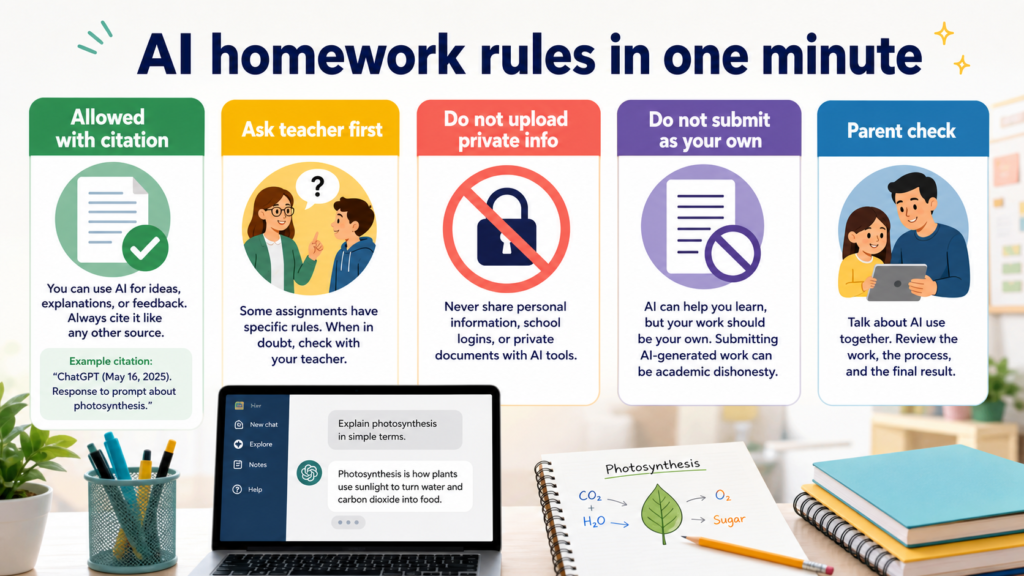
AI homework rules in one minute
| Rule | Student default | Parent check |
|---|---|---|
| Allowed with citation | Use AI for ideas, explanations, feedback, and practice when the assignment allows help. | Can the student show what AI helped with and cite it if required? |
| Ask teacher first | If the work is graded, unclear, creative, or take-home exam style, ask before using AI. | Is the teacher’s rule written in the syllabus, LMS, rubric, or class note? |
| Do not upload private info | Remove names, student IDs, grades, health details, school logins, and classmate work. | Would this still be safe if the transcript, prompt, or file leaked? |
| Do not submit as your own | AI can explain or quiz you, but the final answer must be your own work. | Can the student explain the answer without reading the AI output? |
| Parent check | Use AI with a learning goal, not as a shortcut around thinking. | Did the process create understanding, or only a polished submission? |
What counts as acceptable AI homework help
The safest AI homework use looks a lot like tutoring. A student asks for a concept explanation, a simpler example, a practice question, a study plan, a vocabulary list, or feedback on a draft they already wrote. The AI is helping the student learn, not replacing the student’s work. This is similar to asking a parent, classmate, tutor, writing center, dictionary, calculator, or search engine for support, with one important difference: AI can produce finished-looking answers so quickly that students may skip the learning step.
A good family rule is: AI may help before and after the student’s own attempt, but it should not become the student’s attempt. Before AI, the student should read the prompt, mark what they understand, and try at least a first outline, equation, paragraph, or answer. After AI, the student should revise, verify, cite if required, and explain the final work in their own words. If the student cannot explain the answer, the AI did too much.
Good use
Explain a hard concept, create extra practice, quiz the student, suggest feedback, or help organize notes.
Ask first
Use on essays, take-home tests, lab reports, coding assignments, creative projects, and group work.
Usually not okay
Generate the final answer, hide AI use, rewrite around plagiarism checks, or submit AI output as original work.
Best proof
The student can explain the final answer, show the steps, and identify where AI helped.
The teacher’s rule beats the tool’s promise
AI companies may advertise study support, writing help, math explanation, coding help, or classroom tools. Those claims do not override the teacher’s assignment rule. In real classrooms, AI rules vary widely. One teacher may allow AI brainstorming but ban AI drafting. Another may allow grammar feedback but require a citation note. A coding teacher may allow debugging hints but not generated functions. A history teacher may allow source brainstorming but not AI-written analysis. A take-home exam may ban all outside help.
Students should learn one question: “Can I use AI for this assignment, and if yes, how should I cite it?” That question is not embarrassing. It shows the student is trying to follow the rule. Parents can help by encouraging the question early, not after a finished assignment looks suspiciously polished.
| Assignment type | Default AI rule | Why |
|---|---|---|
| Vocabulary or concept review | Usually safer when used for explanation and practice | The goal is understanding, and the student can still answer independently. |
| Essay or reflection | Ask before using AI to draft or rewrite | Voice, originality, and evidence are usually part of the grade. |
| Math homework | Use AI for explanation after trying the problem first | The steps matter as much as the answer. |
| Coding assignment | Ask whether debugging hints, generated code, or documentation help are allowed | Generated code can hide whether the student understands the logic. |
| Group project | Ask the group and teacher before uploading shared work | Classmate consent and project ownership matter. |
| Quiz, exam, or take-home test | Do not use AI unless the rule explicitly allows it | Assessment rules are stricter than study rules. |
How students should cite AI help
Citation rules are still evolving, and different teachers use different formats. The key habit is transparency. If AI helped with brainstorming, grammar feedback, practice questions, translation support, code debugging, image generation, or summary structure, the student should be ready to say so. A short disclosure can often be enough when the teacher allows it: what tool was used, when it was used, and what it helped with.
Students should not cite AI as if it were a verified source for facts unless the teacher specifically says how to handle it. AI can summarize, but it is not a primary source. For factual claims, students still need textbooks, assigned readings, official data, peer-reviewed sources, news sources, or other approved materials. AI can help find questions to ask; it should not become the evidence.
| Use case | Possible disclosure | Important limit |
|---|---|---|
| Brainstorming | I used ChatGPT to brainstorm possible outline questions, then wrote the essay myself. | The final argument and evidence should be the student’s. |
| Grammar feedback | I used an AI writing tool to identify grammar issues in my draft. | Do not let the tool rewrite the voice beyond the allowed help. |
| Practice questions | I used AI to generate practice questions after studying the chapter. | Verify answers against class materials. |
| Coding hint | I asked for a debugging hint about an error message, not a completed solution. | Keep comments and logic understandable. |
| Translation support | I used AI to clarify vocabulary and then checked the meaning with course materials. | Do not submit a translation the student cannot explain. |
| Image or slide idea | I used AI for visual inspiration and created the final slide myself. | Respect copyright, assignment rules, and citation requirements. |
Privacy rule: do not paste school life into a random box
The privacy risk in AI homework is often invisible. A student may paste a worksheet, essay draft, transcript, group chat, photo of a classmate’s work, teacher comments, accommodation note, school email, or personal story because the tool feels like a private notebook. It may not be private in the way a family expects. Cloud tools can store prompts, attach files, sync across devices, connect to school accounts, or use data according to settings and terms that students never read.
The U.S. Department of Education’s Student Privacy Policy Office and FERPA resources are a reminder that education data deserves extra care. The FTC’s COPPA guidance is also relevant for younger students and child-directed services. Parents do not need to become lawyers to set a useful rule: if a prompt includes identifiable student information, school account details, grades, health or disability information, discipline details, private family information, or another student’s work, stop and ask whether that information is necessary. Most homework help does not need it.
| Do not upload | Safer substitute | Reason |
|---|---|---|
| Student ID, school login, password, or account recovery details | Use a generic description of the problem | Account details can create security risk. |
| Grades, disciplinary notes, accommodation plans, health details | Ask a teacher, counselor, or official support channel | Sensitive education and personal data should stay controlled. |
| Classmate essays, slides, photos, or voices | Ask permission or summarize the assignment without names | Other students did not choose the tool. |
| Full worksheets with names or barcodes | Type only the specific question if allowed | The tool rarely needs the entire document. |
| Private family stories for personal essays | Discuss with a parent or teacher first | Personal writing can reveal more than a student realizes. |
| Teacher feedback from a private LMS message | Use a brief paraphrase | Teacher comments may not be meant for outside systems. |
A parent checklist before AI becomes a homework habit
Parents do not need to approve every prompt. They do need a shared rule before the student gets into trouble. The best conversation is not “AI is cheating” or “everyone uses it.” A better opening is: “Show me one assignment where AI helped you learn, and one assignment where you should not use it.” That makes the student practice judgment.
For younger students, parents should also check age requirements, school-approved tools, account settings, sharing controls, and whether the tool collects or stores content. For older students, the parent role shifts toward process: can the student explain the boundary, disclose use, verify facts, and keep personal information out of prompts?
Assignment rule
Is AI allowed, banned, or allowed only for specific steps such as brainstorming or grammar?
Data check
Does the prompt include names, school account details, grades, health details, or other private information?
Learning check
Can the student explain the final answer, show the process, and answer follow-up questions?
Citation check
If AI helped, does the student know how the teacher wants it disclosed?
Account check
Is the tool school-approved, age-appropriate, and protected with strong login security?
Backup plan
Are drafts, notes, and class files saved somewhere reliable before a device or account problem happens?
Five student prompts that support learning
The prompt matters. A prompt that asks for the final answer teaches less than a prompt that asks for explanation, feedback, or practice. Students can turn AI into a study coach by asking it to slow down, question them, and point to the next concept instead of finishing the assignment.
| Goal | Better prompt | Why it works |
|---|---|---|
| Understand a concept | Explain this concept at a high school level, then ask me three questions to check understanding. | The student must respond, not just copy. |
| Review notes | Turn my notes into a study checklist and mark unclear points I should verify with the textbook. | It keeps the source material central. |
| Essay feedback | Give feedback on my thesis clarity and organization without rewriting the paragraph. | It preserves student voice. |
| Math practice | Create three similar practice problems. Do not solve them until I try first. | It builds skill through practice. |
| Code debugging | Explain what this error message means and suggest where to look. Do not write the full solution. | It helps the student learn the debugging process. |
| Language support | Explain these vocabulary words and give example sentences, but do not write my assignment. | It supports comprehension without replacing work. |
Five prompts students should avoid
Some prompts create academic-integrity risk even when the student does not intend to cheat. If the request asks AI to produce a final answer that will be submitted, impersonate the student’s voice, hide AI use, bypass detection, or process private classmate information, it should stop. Parents can make this rule simple: if you would not be comfortable showing the prompt to the teacher, do not use it.
- Write my essay so it sounds like me. This asks the tool to produce the student’s submission.
- Make this undetectable as AI. This is a red flag because the goal is concealment, not learning.
- Solve all these homework problems and show only final answers. This skips the learning process.
- Rewrite my classmate’s draft and make it better. This uses another student’s work without clear permission.
- Use my school login details to access the assignment. Never share credentials with an AI tool.
- Summarize this private accommodation letter for my project. Sensitive personal information does not belong in a general prompt.
Tool choice: school account, family account, or public chatbot
A school-managed AI tool can have different controls from a public consumer chatbot. A school account may include administrative settings, data agreements, age handling, monitoring, or access boundaries. A family account may give parents more visibility but may not match school policy. A public chatbot may be convenient but can create privacy, retention, and citation uncertainty. The best tool is not always the most powerful one. The best tool is the one that fits the assignment rule, the student’s age, the data being used, and the family’s ability to supervise.
OpenAI, Microsoft, Google, and other vendors now provide education-oriented AI products and school-facing controls. That is useful, but families should still avoid assuming all AI tools are interchangeable. A teacher’s approved AI workspace for one class does not automatically approve a different tool for a different assignment.
| Tool route | Best for | Watch out for |
|---|---|---|
| School-approved AI tool | Class assignments where the school has set rules and accounts | Still follow the teacher’s assignment-specific limits. |
| General chatbot with family supervision | Practice questions, explanations, and parent-guided study | Do not upload private school data or use it for final submissions. |
| AI inside office apps | Draft feedback, summaries, slides, and productivity tasks | Check sharing, file access, and whether school policy allows it. |
| AI note-taking or transcription app | Reviewing permitted recordings and meetings | Consent, retention, and classmate privacy are critical. |
| Local AI tool | Private practice with limited cloud sharing | Setup can be harder and output still needs verification. |
| Search engine AI answer | Quick orientation | Do not treat it as a source without checking original references. |
Academic integrity: the final work must still be the student’s
Academic integrity is not only about catching cheating. It is about whether the grade measures what the student learned. If AI creates the thesis, writes the paragraph, solves the proof, finishes the code, builds the slide deck, and edits the voice until it sounds professional, the teacher cannot see the student’s actual skill. The student also loses the chance to practice.
A practical test is the oral-explanation test. After using AI, the student should be able to explain the assignment prompt, the main choices, the source evidence, the steps, the errors they corrected, and what they would do differently next time. If a parent asks “Why did you choose this answer?” and the student can only say “AI said so,” the work is not ready.
Student-owned work
The student chooses the idea, writes the answer, checks the facts, and can explain the final result.
AI-assisted work
The tool gives examples, feedback, practice, or organization, and the student decides what to use.
AI-replaced work
The tool produces the final submission or hides the student’s lack of understanding.
Ready to submit
The student can show sources, steps, citations, drafts, and learning evidence.
How teachers can make AI homework rules clearer
Teachers can reduce confusion by naming specific allowed and disallowed uses. “Do not cheat with AI” is too vague. A clearer rule says whether AI is allowed for brainstorming, outlining, grammar feedback, coding hints, translation, images, citations, or final drafting. It also says whether students must include an AI-use note. Clear rules protect honest students because they do not have to guess what everyone else is doing.
A small AI-use disclosure box can help. Students can write: tool used, date, purpose, and what changed after using it. Teachers can also vary assessments by including in-class writing, oral explanation, draft checkpoints, source notes, process journals, handwritten planning, and revision reflections. The goal is not to ban every tool. The goal is to make learning visible.
| Teacher policy area | Clearer wording | Student benefit |
|---|---|---|
| Brainstorming | AI may be used to generate possible questions, but the final thesis must be your own. | Students know where help ends. |
| Drafting | AI may not write paragraphs submitted for a grade unless explicitly assigned. | Avoids hidden ghostwriting. |
| Citation | Include a note naming the tool and how it was used. | Normalizes transparency. |
| Coding | AI may explain errors, but generated code must be labeled and understood. | Focuses on reasoning. |
| Privacy | Do not upload classmate work, school records, or private feedback into outside tools. | Protects student data. |
| Assessment | Be prepared to explain your process in class. | Keeps learning central. |
How parents can respond when a student already used AI
If a student already used AI on an assignment, the first response should be discovery, not panic. Ask what tool was used, what prompt was entered, what information was uploaded, whether the teacher allowed it, and what part of the final work came from the student. Then decide whether the student should revise, add a disclosure, ask the teacher, delete uploaded files, or learn a better process for next time.
If private information was uploaded, reduce future risk. Change exposed passwords if credentials were shared. Remove files where possible. Review account settings. Talk to the school if sensitive student records, classmate work, or accommodation information was involved. If the issue is mostly academic, help the student rebuild the assignment from notes and sources so the learning gap closes.
| What happened | Parent response | Next step |
|---|---|---|
| Student used AI for brainstorming | Ask whether the teacher allows it and whether it should be cited | Add a brief disclosure if required. |
| Student pasted a full essay prompt and copied the answer | Treat it as a learning and integrity problem | Rewrite from the student’s own outline and ask teacher if needed. |
| Student uploaded private school information | Check what was shared and where it is stored | Delete, change passwords if needed, and use school channels. |
| Student used AI for math answers only | Ask them to explain each step without AI | Redo practice problems until they can solve independently. |
| Student used AI to debug code | Ask them to explain the fix and comments | Keep a learning note of the error and solution. |
| Student is relying on AI for every assignment | Reset the habit around first attempts and study goals | Use AI after effort, not before thinking. |
A simple family AI homework agreement
Families can turn these rules into a short agreement. It should fit on one page and be easy to repeat. The agreement should not try to predict every app or every classroom. It should set decision rules.
- I will check the assignment rule before using AI on graded work.
- I will ask the teacher when the rule is unclear.
- I will not upload private student information, school logins, grades, health details, or classmate work.
- I will not submit AI output as my own work.
- I will cite or disclose AI help when the teacher asks for it.
- I will use AI to learn, practice, review, and improve my own work.
- I will keep drafts and notes so I can show my process.
- I will explain my final answer without relying on the AI response.
Source-backed principles used in this guide
The sources below point to the same broad principles: human oversight, transparency, privacy, age-appropriate use, student-data protection, fairness, and learning-centered design. The U.S. Department of Education has discussed AI’s role in teaching and learning while emphasizing human-centered use. TeachAI’s school guidance focuses on clear classroom rules and responsible implementation. NIST’s AI Risk Management Framework gives a broader risk vocabulary. FTC and student-privacy resources remind families not to treat education data as casual content.
- U.S. Department of Education: Artificial Intelligence and the Future of Teaching and Learning PDF PDF PDF
- U.S. Department of Education: Student Privacy Policy Office
- U.S. Department of Education: FERPA
- Common Sense Education: How to handle AI in schools
- TeachAI: AI Guidance for Schools Toolkit
- NIST: AI Risk Management Framework
- FTC: Complying with COPPA Frequently Asked Questions
- FTC: How to recognize and avoid phishing scams
- Khan Academy: Khan Labs and Khanmigo
- Microsoft Education: AI for education
- Google AI Principles
- Common Sense Education: AI literacy lessons
Bottom line
AI homework rules work best when they are short, visible, and practiced before deadlines. AI can be a tutor, quiz maker, feedback partner, vocabulary helper, and study organizer. It should not become a ghostwriter, credential collector, classmate-data uploader, or shortcut around learning. The safest rule is not complicated: ask when unsure, cite when required, protect private information, and make sure the student can explain the work.
For related safety habits, continue with the AI note-taking apps privacy guide if your student records or summarizes classes, the local AI vs cloud AI guide if you are choosing where school prompts should run, and the personal backups guide if class drafts, notes, and project files matter.
One assignment can allow tutoring and prohibit drafted answers
For an illustrative essay assignment, the teacher allows vocabulary explanations but prohibits AI-written paragraphs. Those are separate permissions even if the same chatbot supplies both.
| Situation | Next check | Why it changes the decision |
|---|---|---|
| Student asks for a word definition | Use the allowed explanation, then apply it independently. | Learning support stays within the stated permission. |
| Student asks for an entire paragraph | Check the assignment rule before using the output. | Permission to ask questions is not permission to submit generated prose. |
| Rule is unclear | Ask the teacher with the exact intended use. | A general school statement may not settle this assignment. |
Keep any required disclosure with the submitted work. This example does not establish the policy of a particular class, school, or university.