Quick answer: AI note-taking apps can help students capture lectures, summarize meetings, organize study guides, and review class material faster. The risky part is not the summary feature by itself. The risky part is sending class audio, teacher comments, student names, grades, disability accommodations, health details, or school account data into a tool before checking consent, school rules, and privacy settings. A safer workflow is simple: ask whether recording is allowed, use school-approved tools when available, minimize what you upload, review the transcript, delete what you do not need, and keep original notes separate from AI-generated summaries.
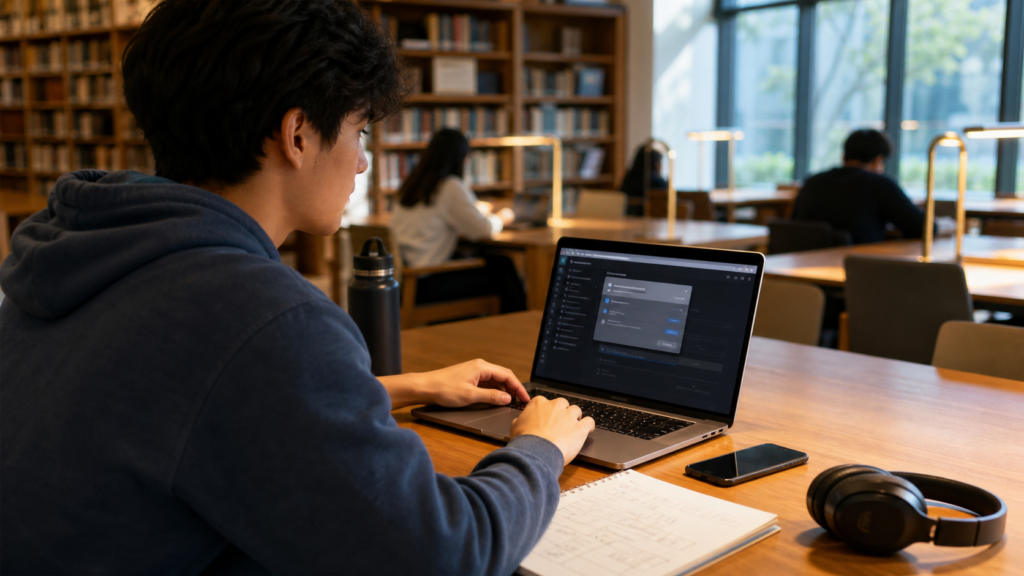
This guide is written for high school students, college students, parents, tutors, and teachers who are trying to use AI for study without turning every class into a data-sharing experiment. It is practical, not alarmist. AI can be useful, especially for students who need organization, language support, review questions, or lecture recap. But education data has different expectations from casual social media notes. Before a student records a class or uploads a shared project, the question should be: who is in the file, what rule applies, and what happens to the data next?
The same security habit shows up across abcnote’s AI and consumer-tech guides. If a tool asks for permissions or purchases on your behalf, start with the AI shopping agent security guide. If a note-taking account is tied to school email or cloud storage, protect it with the passkeys or password managers guide. And because notes, recordings, and transcripts can become irreplaceable school records, connect this workflow with a personal backup strategy before finals week.
AI note-taking apps in one minute
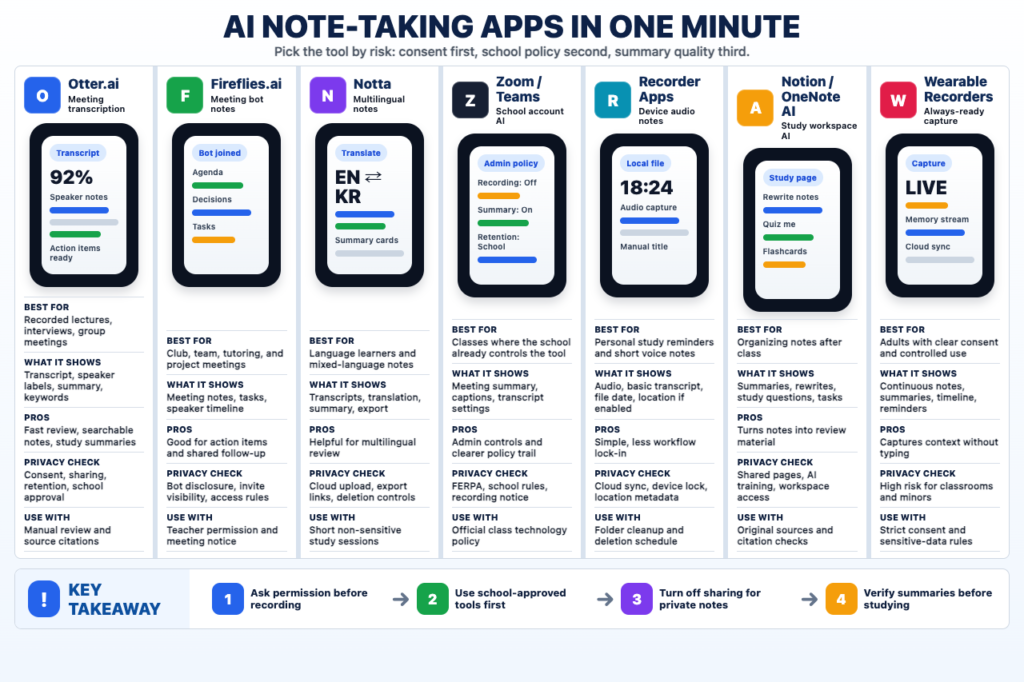
The infographic gives quick desktop scanning, while the cards below keep the same decision process readable on phones.
Ask permission
Recording class, tutoring, or group work can affect other students and school rules. Get consent before capture.
Use school-approved tools
School-managed Zoom, Teams, Google, or LMS settings are usually safer than a random personal app.
Protect private notes
Turn off public links, shared workspaces, training options, and long retention when the app allows it.
Verify summaries
Treat AI summaries as study drafts. Check original slides, readings, teacher instructions, and citations before relying on them.
| Question | Better default | Why it matters |
|---|---|---|
| Can I record class? | Ask the teacher, professor, organizer, or school policy first | Recording can affect other students, copyrighted material, accommodations, and classroom trust. |
| Can I upload lecture audio? | Use school-approved tools or check the app’s data policy | Audio may contain names, questions, grades, health references, or other student information. |
| Can I trust the summary? | Treat it as a draft study aid, not official notes | AI can miss caveats, invent structure, or overstate what the teacher meant. |
| Should I use my school account? | Prefer tools approved by the school or configured by the school | Education accounts may have different privacy, retention, and compliance settings. |
| What should I delete? | Delete recordings and transcripts you no longer need | Less retained data means less future exposure if an account or service changes. |
| What should I keep? | Keep your own notes, syllabus, assignments, and verified study questions | Your grade depends on accurate course material, not a polished AI recap. |
What AI note-taking apps actually do
Most AI note-taking tools combine a few functions: audio recording, speech-to-text transcription, speaker separation, summary generation, action-item detection, searchable notes, calendar integration, and export to documents or task apps. Some tools are built for business meetings. Some are built into video platforms. Some live inside productivity suites. Some are general AI chat tools where students paste notes and ask for study guides. Those differences matter because a class lecture is not the same as a casual personal note.
For students, the best use cases are usually low-risk and high-value: turning your own typed notes into a study checklist, summarizing a textbook chapter you are allowed to use, making flashcards from your own outline, creating quiz questions from a syllabus, organizing vocabulary, and comparing your notes with the class objectives. The higher-risk use cases are recording people without permission, uploading another student’s presentation, submitting AI output as your own work, or storing sensitive school discussions in a tool nobody reviewed.
Good study use
Summarize your own notes, make review questions, organize vocabulary, and build a finals checklist.
Higher-risk use
Record people, upload group work, process health or accommodation details, or use a tool against class policy.
Best habit
Use AI to help review material after you understand the rule, not to bypass attention during class.
Main privacy rule
Do not upload more information than the study task actually needs.
Consent and class recording rules come first
The first privacy step is not buried in an app settings page. It is the class rule. A student may feel that recording a lecture is harmless because the goal is study, but recordings can capture classmates’ names, voices, questions, presentations, accommodations, grades, or personal stories. Some instructors allow recordings. Some allow them only for approved accommodations. Some allow personal audio but not AI transcription. Some ban distribution. Some schools provide official note-taking tools for accessibility.
A respectful script is better than guessing: “Is it okay if I record this lecture for my own study notes?” If the answer is yes, ask whether AI transcription or cloud processing is allowed. If the answer is no, use typed notes, manual summaries, or school-approved support. If the recording is part of an accommodation, follow the school’s process instead of inventing a workaround.
| Situation | Ask this | Safer next step |
|---|---|---|
| Lecture with classmates asking questions | Is recording allowed for personal study? | Record only if the instructor allows it, and do not share the file. |
| Group project meeting | Is everyone comfortable with transcription? | Tell the group where the transcript will be stored and who can access it. |
| Office hours | Can I take notes or record a short recap? | Typed notes may be better because sensitive academic advice can appear. |
| Accessibility accommodation | Which official tool or process should I use? | Use the school-approved route and keep documentation separate. |
| Online class | Does the platform already provide captions or transcript tools? | Use built-in school settings before adding another service. |
| Club or student government meeting | Can I use an AI note tool for minutes? | Announce it, limit access, and remove unrelated discussion. |
FERPA, school policy, and why education data is different
In the United States, the Family Educational Rights and Privacy Act, usually called FERPA, gives eligible students and parents certain rights around education records. Not every student note instantly becomes a FERPA record, and this article is not legal advice. The practical point is that schools treat education data with more care than normal consumer data. Grades, ID numbers, disciplinary details, disability accommodations, health references, and identifiable student information should not be casually pasted into any AI tool.
The U.S. Department of Education’s Student Privacy Policy Office publishes FERPA and student-privacy resources. The FTC has also warned education technology providers to keep privacy promises and protect student data. For a student or parent, this means the safest choice is often a school-approved tool, a tool covered by the school’s contract, or a workflow that removes identifying details before using a general AI service.
| Data type | Risk level | Better handling |
|---|---|---|
| Your own class notes without names | Lower | Can be summarized after checking tool settings and class policy. |
| Lecture recording with classmates | Medium to high | Ask permission, avoid sharing, delete when not needed. |
| Grades, ID numbers, disciplinary details | High | Do not upload to a general tool unless school policy clearly allows it. |
| Health, disability, or accommodation details | High | Use official school channels and avoid unnecessary AI processing. |
| Group project transcript | Medium | Get consent and keep access limited to the group. |
| Published course materials | Depends | Respect copyright, syllabus rules, and platform terms. |
Privacy settings students should check before using a tool
Every AI note-taking app uses slightly different language, but students can check the same basic categories. Look for recording consent controls, workspace sharing, cloud storage, retention, deletion, training or improvement settings, export options, connected calendar access, microphone access, transcript sharing, and third-party integrations. If the setting is confusing, assume the safest workflow is to upload less.
Tool pages from Otter, Zoom, Microsoft, Google Workspace, OpenAI, and Notion show how differently vendors describe AI features, data handling, and organization controls. That does not mean one named tool is always right or wrong. It means students should not choose only by the prettiest summary. Choose by the school rule, the account type, the data you plan to process, and whether you can control retention and sharing.
| Setting | What to look for | Student-friendly default |
|---|---|---|
| Recording notice | Does the app notify participants or provide a consent workflow? | Do not record silently. |
| Sharing | Who can open the transcript, summary, or workspace? | Keep access limited and turn off public links. |
| Retention | How long are audio files and transcripts stored? | Delete recordings after extracting needed notes. |
| Training/improvement | Can your content be used to improve models or services? | Use school-managed settings or opt out where available. |
| Calendar access | Does the app join meetings automatically? | Disable auto-join unless every meeting type is approved. |
| Microphone access | Can the app record outside intended sessions? | Allow only during use and review device permissions. |
| Exports | Can notes be exported to Docs, Notion, email, or tasks? | Export only cleaned study summaries. |
| Account security | Does it support strong login protection? | Use strong passwords, passkeys, or SSO where available. |
A safer student workflow
A safer workflow starts with purpose. Do not open an AI note tool just because it is trendy. Decide what you need: lecture recap, study guide, vocabulary list, missed-class summary, flashcards, quiz questions, or action items from a group meeting. Then use only the data required for that purpose. For many students, typed notes are enough. Audio recording should be reserved for classes where recording is allowed and genuinely useful.
| Step | Action | Why it helps |
|---|---|---|
| 1. Check the rule | Read syllabus language or ask the instructor | Avoids policy problems before the app is involved. |
| 2. Minimize input | Use your own notes or trimmed transcript | Reduces unnecessary student data exposure. |
| 3. Remove identifiers | Delete names, student IDs, grades, and personal details when possible | Keeps the study task focused on learning. |
| 4. Generate study aid | Ask for outline, quiz questions, flashcards, or confusing-topic list | AI is better as a tutor-style assistant than a replacement notebook. |
| 5. Verify against source | Compare the output with syllabus, textbook, slides, and your notes | Prevents confident but wrong summaries. |
| 6. Clean up | Delete audio, transcript, or workspace copies you no longer need | Reduces long-term account and service risk. |
When not to use AI note-taking apps
Sometimes the safest and most respectful answer is to skip the AI tool. Do not use one in a class that bans recording or AI transcription. Do not use it during a confidential advising session, counseling meeting, disciplinary discussion, health conversation, financial aid conversation, or accommodation meeting unless the school explicitly provides that tool for the purpose. Do not upload a classmate’s presentation, essay draft, or personal story without consent.
Students should also avoid using note-taking apps to quietly outsource attention. If the tool encourages you to stop listening, it may hurt learning even when it saves time. Better use is after class: review your notes, ask for a clearer outline, generate practice questions, and identify gaps. AI is helpful when it turns your effort into better recall. It is risky when it becomes a substitute for participation.
- The instructor says recording or AI transcription is not allowed.
- Classmates are discussing personal, health, family, immigration, or financial details.
- The meeting involves grades, discipline, accommodation, counseling, or advising.
- The app would auto-join meetings without everyone knowing.
- The transcript would include another student’s work or presentation.
- The summary will be submitted as your own assignment instead of used for study.
- You cannot find deletion, retention, or sharing settings.
Accuracy: AI summaries can sound better than they are
A polished AI summary can feel more reliable than messy handwritten notes. That is dangerous. AI note tools can miss a professor’s warning, flatten a debate, invent a clean list, confuse speakers, misread technical terms, or turn a tentative comment into a firm rule. In STEM classes, one wrong symbol can change the answer. In history or literature, a summary can erase nuance. In law, nursing, business, or education classes, a missing caveat can matter.
Use a verification loop. Ask the tool to list uncertain points. Compare the summary with slides, syllabus objectives, assigned reading, and your own notes. If the output creates study questions, answer them without looking and then check the source. For exam prep, the best AI output is not the prettiest paragraph. It is the one that helps you find what you still do not understand.
| AI output | How to verify | Watch for |
|---|---|---|
| Lecture summary | Compare with syllabus and slides | Missing caveats or invented structure. |
| Flashcards | Check definitions against textbook | Over-simple wording or wrong terms. |
| Quiz questions | Answer first, then verify with source | Questions that test facts not covered in class. |
| Group meeting minutes | Ask participants to confirm action items | Wrong speaker attribution. |
| Study plan | Match to due dates and exam format | Generic advice that ignores your class. |
| Translation support | Check key terms with course vocabulary | False friends and technical mistranslation. |
Students, parents, and teachers need different checks
A college student choosing a study tool has a different role from a parent helping a minor child, and both are different from a teacher selecting software for a class. Students should focus on consent, account security, academic integrity, and data minimization. Parents should ask what the school allows, whether the tool is age-appropriate, and whether it collects more information than needed. Teachers should coordinate with school policy, accessibility services, IT, and approved vendor lists.
| Reader | Main question | Practical rule |
|---|---|---|
| High school student | Am I allowed to record or use this tool for this class? | Ask first and use school-approved tools when available. |
| College student | Will this help me study without violating class policy? | Use AI for review, not unauthorized recording or assignment substitution. |
| Parent | Is this tool appropriate for my child’s age and school rules? | Check school guidance and avoid unnecessary account sharing. |
| Teacher | Does this tool fit policy, accessibility, and student privacy requirements? | Work with school systems instead of one-off classroom adoption. |
| Tutor | Can I use this with a student’s material? | Get consent and avoid uploading identifiable school data. |
| Club leader | Can AI minutes help without exposing members? | Announce the tool and limit transcript access. |
Tool choice: school-approved beats random convenience
The easiest tool is not always the best tool. If a school provides Microsoft 365, Google Workspace, Zoom, learning-management tools, or accessibility services with configured privacy controls, that may be safer than a personal account in a separate app. A school-managed account can offer admin controls, retention rules, data agreements, and support. A personal consumer account may be fine for your own cleaned-up notes, but it should not become the default place for identifiable class recordings.
General AI tools can still help if you reduce the input. For example, instead of uploading a full class recording, paste your own cleaned outline and ask for a practice quiz. Instead of uploading a group transcript with names, rewrite the action items anonymously. This is where the local AI vs cloud AI privacy guide becomes useful: more sensitive notes may deserve local processing or school-approved processing, while low-risk study outlines can use ordinary cloud tools with careful settings.
| Choice | Best for | Caution |
|---|---|---|
| School-approved AI note tool | Class recordings, accessibility support, managed accounts | Still follow class rules and retention settings. |
| Video-platform AI summary | Online lectures and meetings where the host controls settings | Participants should know when AI features are active. |
| Standalone note-taking app | Personal study workflows and meeting notes | Check consent, sharing, retention, and training settings. |
| General chatbot | Turning your own notes into study questions | Avoid identifiable student data and verify output. |
| Local transcription or local AI | Higher-control workflows for sensitive notes | Setup can be harder and accuracy may vary. |
| Manual notes plus AI cleanup | Lowest-risk everyday studying | Takes more effort but keeps students engaged. |
Account security for AI note-taking apps
A note-taking account can hold class audio, calendars, emails, transcripts, project notes, teacher comments, and exported documents. Treat it like a serious school account. Use strong authentication, avoid password reuse, review connected apps, and remove tools you no longer use. If the app connects to Google Calendar, Microsoft account, Zoom, Slack, Notion, or a school workspace, those permissions can outlive the semester.
A practical monthly check is enough for most students: review account integrations, remove old transcript links, delete test recordings, check sharing permissions, and make sure the recovery email and phone number are current. If a phishing text or fake school login tries to steal access, the same habits from the AI scam texts guide apply: do not click urgent links, open official sites directly, and protect recovery codes.
Login
Use SSO, passkeys, or a strong password manager setup. Do not reuse a weak school password.
Permissions
Review calendar, microphone, cloud-drive, email, and meeting integrations.
Sharing
Turn off public links and remove classmates after a group project ends.
Cleanup
Delete recordings, transcripts, and exports that no longer support learning.
Academic integrity: notes are not assignments
AI note-taking is usually safer when it supports studying rather than replaces work. Summarizing a lecture for review is different from submitting an AI-written discussion post, lab reflection, essay, or homework answer. Many schools now have AI policies that separate allowed support from prohibited substitution. Students should read the syllabus and ask specific questions: Can I use AI to make flashcards? Can I use it to summarize my own notes? Can I use it to draft an assignment? Can I cite AI help?
A clean rule for students is: AI can help you understand material, organize notes, and practice recall, but your submitted work should reflect your own thinking and the class policy. Keep a record of what the tool did. If a teacher asks how you studied, you should be able to explain that you used AI to make a quiz from your own notes, then verified the answers.
| Use | Usually safer | Needs caution |
|---|---|---|
| Flashcards from your own notes | Good study support | Check terms and definitions. |
| Lecture recap after permitted recording | Useful for review | Follow recording rules and delete when done. |
| Essay outline from assignment prompt | May be allowed in some classes | Check policy before drafting. |
| Submitted written answer | Risky | Could violate policy if AI-generated. |
| Group project minutes | Useful with consent | Do not expose sensitive comments. |
| Exam answer prediction | Low value | Can create false confidence. |
A parent checklist for younger students
Parents should not choose AI note-taking tools only by marketing claims. Ask whether the school already has approved support. Check age requirements, account type, data collection, recording rules, sharing settings, and whether the child understands what should not be uploaded. For younger students, manual notes, teacher-provided materials, and school accessibility services may be more appropriate than a consumer AI recorder.
| Parent question | Why it matters | Better action |
|---|---|---|
| Does the school allow this? | School policy may be stricter than app marketing | Ask the teacher or student-support office. |
| Is recording necessary? | Audio captures other children and classroom discussion | Prefer typed notes or school-approved support. |
| What account will be used? | Personal accounts can create retention and sharing issues | Use school-managed tools when available. |
| Can the child delete data? | Old recordings can pile up | Set a cleanup routine together. |
| Does it improve learning? | A tool can make students passive | Use AI output for review questions and recall practice. |
| What happens if the account is hacked? | Notes may include school and personal details | Use strong login protection and backups. |
A teacher checklist before allowing AI notes
Teachers do not need to become software lawyers, but they do need a repeatable classroom rule. Decide whether recording is allowed, when it is allowed, who can access transcripts, how AI summaries can be used, and what students should do for accommodations. Coordinate with school technology staff and accessibility offices instead of letting every student bring a different recorder into the room.
A short syllabus note can prevent confusion: whether audio recording is allowed, whether AI transcription is allowed, whether generated summaries can be shared, and whether AI-assisted study tools are allowed for assignments. The goal is not to ban useful support. The goal is to protect students while making expectations clear.
- Define whether recording is allowed by default, by permission, or only through accommodations.
- Tell students whether AI transcription is treated differently from manual note-taking.
- Use school-approved tools for accessibility and official support.
- Do not require students to create accounts in unapproved tools without school review.
- Explain whether AI-generated summaries can be shared with classmates.
- Separate study support from assignment authorship rules.
Study prompts that avoid unnecessary data
Students can get strong study help without uploading sensitive material. The trick is to write prompts around concepts, outlines, and self-made notes instead of raw recordings full of names and side comments.
| Goal | Safer prompt |
|---|---|
| Summarize your own notes | Turn these notes into a study outline. Keep uncertain points in a separate list. |
| Make flashcards | Create 15 flashcards from this cleaned outline. Use short answers and include common confusions. |
| Find gaps | List what I should review before the test based on these notes and the syllabus topics. |
| Practice recall | Ask me one question at a time from this outline, then wait for my answer. |
| Explain hard concept | Explain this concept at beginner level, then give a class-level version. |
| Prepare group meeting | Convert these non-sensitive action items into a checklist with owners removed. |
Common mistakes to avoid
Because this topic is about privacy and school rules, mistakes are not just technical. They are social and academic. A student can create a problem by recording classmates without warning, auto-joining meetings with an AI bot, sharing a transcript link publicly, relying on a wrong summary, or using a tool in a way that violates the syllabus. Most problems are preventable with a simple checklist.
| Mistake | Why it is a problem | Better habit |
|---|---|---|
| Recording without permission | Breaks trust and may violate school or class rules | Ask first and record only what is allowed. |
| Uploading full raw audio | Captures unnecessary names and personal comments | Use trimmed clips or cleaned notes when possible. |
| Leaving public links open | Class materials can spread beyond the group | Limit sharing and remove access later. |
| Trusting the summary blindly | AI can miss or invent important points | Verify against the course source. |
| Using one app for every meeting | Some meetings are too sensitive for recording | Classify the situation before using the tool. |
| Ignoring account security | Notes and transcripts can expose school data | Use strong authentication and review integrations. |
Best practical rule: classify the note before the tool
Before opening an AI note-taking app, classify the material. Is it your own study outline? A public lecture? A class with peer discussion? A group project? A counseling meeting? A grade-related conversation? The more identifiable or sensitive the material is, the more you should prefer school-approved tools, local processing, manual notes, or no AI processing at all.
This classification habit scales beyond school. It is the same habit used for AI browser agents, shopping agents, automation tools, backups, and local AI choices. Helpful tools become safer when the user decides what data belongs in them before the workflow starts. For a broader automation mindset, the automation guide is a good next step after students learn to separate low-risk convenience from high-risk account access.
| Note category | AI note-taking fit | Recommended path |
|---|---|---|
| Your own cleaned study notes | Good fit | Use AI for outlines, quizzes, and review. |
| Permitted lecture recording | Possible fit | Use approved tools, limit sharing, delete later. |
| Peer-heavy class discussion | Caution | Ask permission and avoid unnecessary transcript sharing. |
| Group project | Possible with consent | Tell the group, limit access, and confirm action items. |
| Advising or counseling | Usually poor fit | Use manual notes or official documentation. |
| Grades, discipline, health, accommodations | Poor fit | Use official school systems only. |
Source notes and date checked
Sources were checked on July 29, 2026. App features, school rules, vendor privacy settings, and AI data controls change often. This guide uses U.S. Department of Education student-privacy resources, FTC privacy and phishing guidance, NIST AI risk-management guidance, Common Sense privacy resources, and public vendor documentation from Otter, Zoom, Microsoft, Google Workspace, OpenAI, and Notion for examples of the kinds of controls students should check. Always verify your own school’s policy and the current settings inside the specific tool.
- U.S. Department of Education: Student Privacy Policy Office
- U.S. Department of Education: FERPA general guidance for students
- FTC: COPPA compliance and student privacy guidance
- FTC: How to recognize and avoid phishing scams
- NIST: AI Risk Management Framework
- Common Sense Privacy Program
- Otter.ai: Privacy and security
- Zoom: AI Companion overview
- Microsoft: Data, privacy, and security for Microsoft 365 Copilot
- Google Workspace: Security and privacy
- OpenAI Trust Portal
- Notion: Notion AI security and privacy practices
Bottom line: use AI for study, not silent surveillance
AI note-taking apps are useful when they help students review, organize, and remember class material. They become risky when students record people without permission, upload sensitive school information, trust summaries without checking them, or leave transcripts sitting in cloud accounts with broad access.
The best student workflow is not complicated: ask first, use approved tools when available, upload the smallest useful amount, verify the output, protect the account, and delete what you no longer need. That keeps the benefit of AI study support while respecting classmates, teachers, school policy, and your own future privacy.
The transcript and the summary need separate deletion checks
Consider an illustrative class meeting with a recording tool. Deleting the summary does not tell you whether the transcript, audio, shared copies, or connected exports were removed.
| Situation | Next check | Why it changes the decision |
|---|---|---|
| Recording is not authorized | Use manual notes and permitted study material. | A useful summary cannot justify unauthorized capture. |
| Tool creates several artifacts | List audio, transcript, summary, exports, and recipients. | Different copies may have different retention controls. |
| User requests deletion | Follow each relevant service's documented deletion route. | Removing one visible note is not evidence that every copy is gone. |
Use the class or meeting policy to decide whether recording is allowed before testing a tool. This is a data-flow example, not a determination of consent law or a certification of a provider's deletion behavior.