
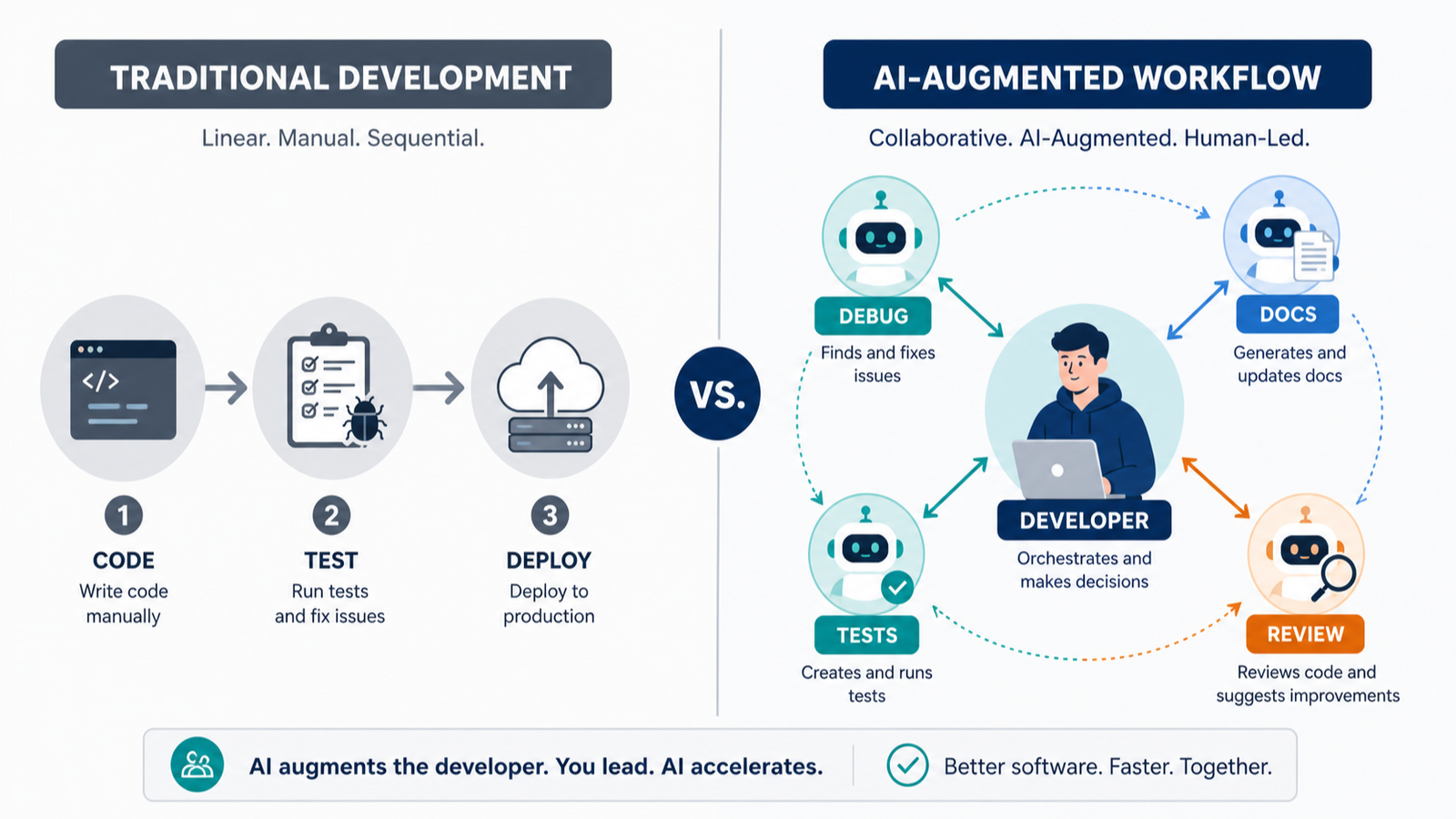
AI-augmented software development is not simply “coding with an assistant.” The practical change is that development environments are evolving into toolkits for directing coding models and coordinating agents. For teams, the key decision is therefore not whether to add AI everywhere. It is whether a proposed workflow gives people clearer control of work, review, testing, deployment, and accountability.
A useful starting point is to treat AI as part of a delivery system rather than as an isolated feature. That system may include continuous development, testing, integration of new code into version control, deployment, and sometimes delivery to clients. The reader reward is straightforward: by the end of this guide, you should be able to identify where an AI-assisted workflow fits, what to test first, and which questions must have an answer before the workflow expands.
The current conversation is broader than code generation alone. Recent coverage describes development environments as toolkits for directing coding models and coordinating agents. At the same time, enterprise-scale AI depends on more than model capability: organization, data foundations, computing costs, and compliance frameworks must evolve together. That is why the best first move is usually a bounded workflow with explicit human ownership—not a vague mandate to “use more AI.”
Quick answer: start with a controlled workflow
Start where work already has a visible handoff: a change is prepared, tested, integrated into version control, deployed, or delivered. Define one owner, one review point, and one way to tell whether the result is acceptable. AI can assist with work inside that boundary, but it should not erase the boundary.
This approach fits the larger purpose of DevOps and DevSecOps: integrating development with IT operations, including security in the latter case, to deliver IT services more quickly and efficiently. It also gives teams a practical way to judge AI augmentation. If a proposed tool or agent makes a handoff less clear, review less reliable, or deployment harder to understand, its apparent speed may not be a meaningful improvement.
| Question | A workable early answer | Why it matters |
|---|---|---|
| What work is being assisted? | A clearly named step such as preparing code, testing, integration, deployment, or documentation. | It prevents an AI initiative from becoming an undefined catch-all. |
| Who directs the work? | A named developer or team with authority to accept, revise, or reject output. | Modern environments emphasize directing models and coordinating agents. |
| Where is the quality gate? | A specific review or test point before the work moves onward. | Delivery remains a system of connected handoffs. |
| What is the expansion test? | A repeatable result that shows the workflow helps rather than merely feels novel. | Scaling AI requires coordinated organizational, data, cost, and compliance decisions. |
What AI-augmented development actually changes
Traditional descriptions of software work often emphasize a sequence: development, testing, integration into a version control system, deployment, and possibly delivery. AI augmentation does not automatically replace that sequence. Instead, it can change how people prepare and coordinate work inside it.
In an AI-augmented environment, a developer may spend less time treating the editor as a place where every action begins and ends. The environment can instead become a control surface for directing coding models and coordinating agents. That phrasing matters. “Directing” suggests intent, constraints, review, and prioritization. “Coordinating” suggests several pieces of work may need to line up before a change is ready to move.
This is a useful distinction because it keeps the human role concrete. The developer is not required to compete with a model at producing text. The developer still has to decide what problem deserves attention, what context is sufficient, what output is acceptable, and whether the result belongs in the delivery path. Those are operational decisions, not decorative ones.
AI workflow automation is described as using artificial intelligence to automate multi-step business processes across systems, handling context, decision-making, and execution without predefined rules. Applied carefully to development work, that definition signals both opportunity and caution. A multi-step workflow can be more capable than a single prompt, but it also has more handoffs, more context to manage, and more places where ownership can become blurry.
Use the delivery path as your map
A disciplined team does not need to invent a new map just because AI is involved. The familiar path of continuous development, testing, version-control integration, deployment, and delivery remains a useful map for asking where assistance belongs.
Development: make the task legible
Before asking a model or agent to help, make the task understandable to a person who was not present when it was created. State the intended outcome, the boundary of the work, and the condition that would make the output unusable. This is not a claim that a particular tool requires a particular prompt format. It is a practical control: work that cannot be explained clearly will also be difficult to direct, review, and hand off.
For a small trial, choose work with an observable result. A vague request such as “improve the application” makes it difficult to determine whether assistance helped. A narrower request gives the team something it can inspect before moving to the next stage.
Testing: preserve an independent check
Testing is already part of the DevOps description of integrated delivery. Keep it visibly separate from generation or orchestration. The important question is not whether an AI-assisted output looks plausible; it is whether the team’s chosen test and review practices accept it.
That separation also makes retrospectives sharper. If a change fails at testing, the team can ask whether the task definition, context, generated work, review, or test coverage was the weak link. Without a clear gate, every problem gets flattened into “the AI made a mistake,” which is rarely specific enough to improve a workflow.
Integration: make ownership explicit
Version-control integration is another useful boundary. A change should have a responsible person or team before it becomes part of shared work. AI can contribute drafts, alternatives, or coordinated sub-tasks, but it cannot make the ownership question disappear. The person accepting the integration should know what was requested, what was changed, and what was checked.
Deployment and delivery: keep the decision visible
Deployment and delivery may be automated in a workflow, but automation is not the same as obscurity. The team should be able to explain what triggers the movement from an accepted change to deployment, and what happens if the expected result is not achieved. This supports the stated DevOps goal of faster, more efficient service delivery while keeping the operational path understandable.
A practical triage checklist before you automate
Use this checklist for a candidate AI-assisted workflow. It is deliberately tool-neutral because the available evidence describes categories of workflow and delivery practice, not a single prescribed product configuration.
- Name the outcome. Can the team state what the workflow is meant to produce or advance?
- Mark the boundary. Is the work limited to a recognizable part of development, testing, integration, deployment, delivery, or a related operational handoff?
- Assign a director. Is a person or accountable team directing the model or coordinating the agents?
- Keep a quality gate. Is there a review or testing point that determines whether work proceeds?
- Trace the handoffs. Can a reviewer tell where context enters, where output goes, and who accepts it?
- Check scale conditions. Have organization, data foundations, computing costs, and compliance been considered before a local experiment becomes a broad program?
- Set a stop condition. Does the team know what result would cause it to revise, pause, or retire the workflow?
A checklist is not bureaucracy for its own sake. It turns an abstract conversation about AI into an operational decision. If several answers are missing, the right next step is usually to clarify the workflow—not to add another agent.
Where coordination creates value—and where it creates risk
Coordinating agents can be useful when work naturally divides into connected sub-tasks. But coordination is not free. Each additional handoff creates a need to decide what information is passed forward, who checks it, and what happens when the sub-tasks disagree or arrive incomplete.
Think of the workflow as a small production line of decisions. One part may prepare a change; another may support testing or documentation; a person may review the result; then the team may integrate and deploy. The value is not that every step becomes automatic. The value is that the work can be organized around a visible outcome with less avoidable friction.
The risk is letting the system become a black box. A workflow that “handles context, decision-making, and execution” across systems sounds powerful, yet that power should make transparency more important, not less. In particular, a team should be able to answer: what context was used, what output was produced, who reviewed it, and what delivery decision followed?
This is also why a single successful demonstration is not enough to justify broad adoption. The conditions for enterprise AI include coordinated changes in organization, data foundations, computing costs, and compliance frameworks. A useful local workflow may still need different governance, budget attention, or operating practices before it can serve a wider organization.
Choose a first use case with a clean decision boundary
The strongest first use cases are usually not the most ambitious. They are the ones where a team can see the before-and-after state, retain an established quality gate, and learn quickly whether the workflow improves a meaningful handoff.
Consider a candidate only if it has these characteristics:
- The work belongs to a recognizable development or delivery stage.
- A human or accountable team can direct and accept the output.
- The work can be tested or reviewed before integration, deployment, or delivery.
- The relevant context can be identified without relying on unstated assumptions.
- The team can explain how the result will affect speed or efficiency of service delivery.
Notice what is absent from this list: a promise of fully autonomous engineering. The evidence available here supports a more grounded picture—development environments becoming places for direction and coordination, and delivery systems integrating development, testing, version control, deployment, and sometimes delivery. That is already a meaningful change in how work is organized.
Do not confuse a tool list with a workflow
There is no shortage of material describing workflow automation, project management, and collaboration applications. A guide to productivity and tools may cover all three categories, but a collection of applications is not yet a process. Teams should decide the workflow first: the outcome, the stages, the owner, and the quality gate. Only then can they evaluate whether a tool helps the work move through that process.
This distinction is particularly useful when discussions become crowded with product names or demonstrations. A tool can be impressive and still be a poor fit for a particular delivery path. Conversely, a modest capability can be useful if it reduces friction at a well-defined handoff while preserving testing and accountable review.
For the same reason, this article does not present a “best tools” ranking. The verified material supports a guide to AI workflow automation as a category and identifies several current development ecosystem updates, but it does not provide comparable, decision-ready evidence for a ranked set of products. A responsible choice begins with the workflow problem, then gathers product-specific evidence suited to that problem.
Keep the human role concrete
Human oversight is often discussed as a general principle. In an AI-augmented development workflow, it becomes more useful when translated into named responsibilities. Someone directs the work. Someone validates the output against the task. Someone accepts the integration. Someone remains responsible for deployment and delivery decisions. In a small team, these may be the same person; in a larger one, they may be distinct roles. What matters is that the responsibility remains visible.
This is not an argument for manual work at every moment. It is an argument for explicit responsibility at each meaningful boundary. Automation can carry out repeatable actions. Models and agents can be directed and coordinated. But delivery still needs people who can decide whether the work is ready to proceed and who can respond when it is not.
That framing also improves communication with stakeholders. Rather than saying “AI will transform the engineering process,” a team can say: “We are testing AI assistance within this defined step; the existing review and test gates remain; we will assess whether it improves delivery speed or efficiency.” It is less theatrical and more useful.
Watch the enterprise conditions before scaling
A local proof of concept can be valuable, but scaling demands a wider view. The available enterprise AI analysis emphasizes four connected conditions: organization, data foundations, computing costs, and compliance frameworks. None should be treated as a late-stage administrative detail.
Organization
Decide who owns the workflow and who can change it. A workflow that crosses development and operations needs an understandable operating model. If responsibility is unclear, speed gains may be offset by slower decisions when something requires review or correction.
Data foundations
Identify what context the workflow needs and who is responsible for maintaining it. The point is not to assume every workflow requires the same information. It is to avoid treating context as an invisible resource. When a system is expected to handle context across systems, the quality and governance of that context become part of the workflow itself.
Computing costs
Consider cost as part of the operating decision, not an afterthought. The enterprise AI analysis explicitly includes computing costs among the conditions for large-scale application. A team does not need an elaborate forecast to begin a trial, but it should know that broader use changes the economics of the delivery system.
Compliance frameworks
Compliance must be designed into the operating conversation. At scale, it is one of the coordinated conditions named alongside model capability, organization, data, and costs. The right question is practical: can the team explain how the workflow will remain within the relevant framework as its use grows?
Use ecosystem news as context, not as a deployment plan
Current Java ecosystem coverage illustrates how much can move at once: a Simple JSON API proposed for JDK 28, Jakarta EE 12 updates, an August 2026 Open Liberty edition, a LangChain4j point release, maintenance releases for Eclipse JNoSQL and GraalVM Native Build Tools, a GlassFish 9.0 milestone release, and a Groovy 6.0 beta release. This is a reminder that an AI-augmented workflow lives inside an evolving software landscape.
The lesson is not that every team should immediately adopt each item. It is that technical change has dependencies. A workflow should be evaluated against the team’s actual delivery path, existing runtime and framework choices, testing practice, and operational responsibilities. News can identify developments worth examining; it cannot substitute for local validation.
Measure the workflow, not the excitement
When teams discuss AI assistance, the loudest evidence is often anecdotal: a task seemed faster, an output looked polished, or a demonstration was compelling. Those observations can justify a trial, but they are too weak on their own to guide a delivery decision.
Instead, define what the workflow is supposed to improve. Since the purpose of DevOps integration is faster and more efficient delivery of IT services, teams can ask whether a bounded AI-assisted process makes a specific handoff clearer, reduces avoidable delay, improves the readiness of work for review, or helps a responsible person coordinate the work more effectively. The measurement should match the selected boundary.
It is equally important to record what did not improve. A workflow may create additional coordination, expose weak context management, or demand operational controls that outweigh its local benefit. Finding that out early is success: it prevents a broad commitment based on a narrow demonstration.
Evidence limits and a sensible next step
The source material used here supports a practical orientation, not a universal product prescription. It establishes that AI-powered development environments are evolving toward direction of coding models and coordination of agents; that DevOps and DevSecOps integrate development with operations, testing, version-control integration, deployment, and sometimes delivery; that enterprise AI scale depends on organization, data, costs, and compliance; and that AI workflow automation can address multi-step processes across systems. It also provides a snapshot of current Java ecosystem movement.
It does not establish that a particular vendor, tool, model, or implementation is best for every team. Before selecting one, gather direct, task-specific evidence about the candidate workflow and evaluate it against the checklist in this article.
The sensible next step is modest: select one development or delivery handoff, name the accountable owner, preserve a review or test gate, and decide in advance what result would justify expansion. That is enough to turn AI augmentation from a slogan into a manageable engineering practice.
Sources
- InfoWorld
- InfoQ Java News
- Software development
- Deloitte releases “2026 Technology Trends” report
- 12 best AI workflow automation tools
- Productivity & Tools Guide 2026
An AI bug fix needs a check it did not write for itself
Suppose a generated patch changes a date parser and adds a test that mirrors its implementation. Both can agree while handling an invalid date incorrectly. Preserve the behavior specification outside the patch.
| Situation | Next check | Why it changes the decision |
|---|---|---|
| Existing failing example | Run it against the original code and the proposed patch. | The test must distinguish the reported failure. |
| New boundary case | Derive expected behavior from the specification. | An independently chosen case can expose a shared assumption. |
| Unexpected dependency change | Ask why it is needed and review its effect separately. | A small requested fix can carry a much larger change. |
Accept the fix when evidence matches the requested behavior and the reviewable change stays within scope. This example describes a review method, not a measured productivity gain or a claim that AI-written tests are always weak.