Quick answer: an AI automation stack is the set of tools that receives information, asks an AI model for help, triggers actions, stores results, and asks a human to approve risky steps.
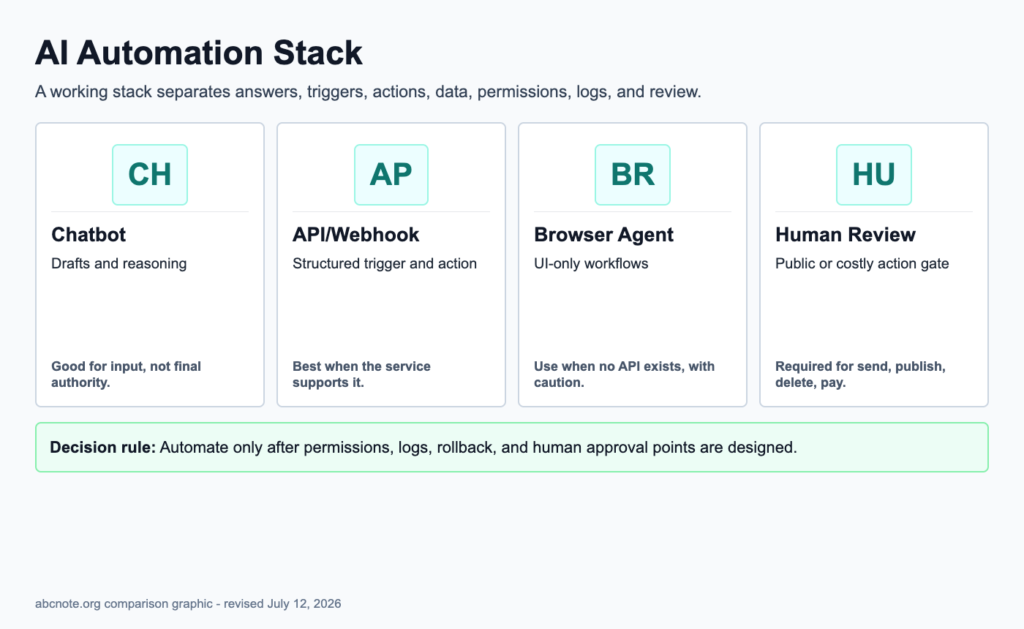
Why people search this
Many teams jump from "ChatGPT can write text" to "AI can run my business." The missing middle is the stack. A chatbot answers. An API connects. A webhook triggers. A browser agent operates a page. A database remembers. A human review step prevents expensive mistakes.
The parts
| Part | What it does | Risk |
|---|---|---|
| Chatbot | Helps a human think and write | Easy to confuse advice with action |
| API | Lets software call an AI model | Cost and key-security mistakes |
| Webhook | Starts a workflow when an event happens | Bad validation can trigger wrong actions |
| Browser agent | Uses websites through a browser | Can click, submit, or change things unexpectedly |
| Scheduler | Runs tasks on a timer | Repeats mistakes automatically |
| Database or log | Stores inputs and outputs | May store private data |
| Human review | Approves risky steps | Slower, but safer |
A safe first build
Build a read-only weekly brief:
- Collect public links or approved internal notes.
- Ask AI to summarize blockers and next actions.
- Save a draft report.
- Send the report to a human.
- Do not let the workflow publish, send email, buy, delete, or change settings.
That workflow teaches the stack without giving it dangerous power.
When to add webhooks
Add webhooks when another app needs to tell your workflow that something happened. For example, a form submission, GitHub event, or payment event can trigger the next step.
Teams should validate webhook source and payload before trusting it.
When to add browser agents
Use browser agents when a task cannot be done through a clean API. Browser automation is powerful but fragile because page layouts, login states, and permissions change.
For risky sites, use browser agents to prepare a draft or report, not to complete the final action without review.
Related reading
- Webhooks Explained: The Simple Trigger Behind App Automation
- Browser Automation: 9 Repetitive Tasks AI Can Help You Do Safely
- API Keys and App Passwords: What to Know Before Connecting AI Tools
Last checked: July 12, 2026.
Use the lowest-risk automation layer that solves the job
A chatbot is good for drafting and reasoning, but it is a weak control system by itself. Reliable automation needs a trigger, structured input, permissions, action limits, logs, and a rollback path. Browser agents are useful, but they should not be the first choice when an API or webhook exists.
| Layer | Use it when | Control needed |
|---|---|---|
| Chatbot | Drafting, summarizing, classifying | Human review |
| API | Structured, repeatable actions | Auth scope and validation |
| Webhook | Event-driven workflow | Signature and retry handling |
| Browser agent | No API exists | Screenshots, approvals, stop rules |
The decision rule is simple: use API first when available, webhook when events matter, browser automation only when needed, and human review for public, financial, account, or destructive actions.
Example: draft upload automation
A blog draft workflow shows why the stack needs layers. A chatbot can write a draft, but it should not publish directly. The API can create a WordPress Draft. A webhook can start the run on schedule. A browser agent can handle a dashboard only if the API is missing. Human review decides whether the article is good enough.
| Step | Automation | Stop rule |
|---|---|---|
| Research | Search and source notes | No source, no claim. |
| Draft | AI writing plus local QA | No reader payoff, no upload. |
| Upload | WordPress REST API | Draft only unless approved. |
| Publish | Manual decision | Human review required. |
This pattern applies outside blogging too: customer replies, file organization, alerts, reports, and browser tasks all need logs, permissions, and a review boundary.
The webhook is received once; the business action may run twice
Consider an illustrative invoice workflow where a webhook is retried after a timeout. The workflow needs a receipt identifier and a visible completion state, not just a prompt asking the agent to avoid duplicates.
| Situation | Next check | Why it changes the decision |
|---|---|---|
| New event arrives | Record the business identifier before acting. | A traceable receipt connects input to output. |
| Delivery repeats | Check whether the outcome already exists. | Repeated transport delivery should not repeat the business effect. |
| Outcome is uncertain | Inspect the destination before retrying. | A timeout does not prove that nothing happened. |
Use AI for bounded interpretation where needed and deterministic controls for duplicate handling. This is a workflow design example, not a claim about the guarantees of a particular webhook service.