Quick answer: choose Synology when you want a polished NAS appliance, a managed software-and-hardware experience, and the shortest path to shared files, backups, and media. Choose TrueNAS when you want to design the server yourself, value ZFS-based storage architecture, and are prepared to make—and maintain—more technical decisions.
Fast comparison
| Need | Better fit | Decision logic |
|---|---|---|
| Simple family files and photo backup | Synology | Its managed appliance approach reduces assembly and administration work. |
| DIY hardware and storage design | TrueNAS | You choose the platform and take responsibility for its layout and upkeep. |
| Lowest setup time | Synology | The software and hardware stack are designed to work together. |
| High-integrity, large-scale data planning | TrueNAS | ZFS emphasizes copy-on-write, checksums, and RAIDZ-oriented storage design. |
| Plex or Jellyfin with minimal tuning | Often Synology | A managed ecosystem and supported hardware integration can make media-server setup more approachable. |
| Learning storage administration deeply | TrueNAS | Pools, datasets, snapshots, storage topology, and hardware choices are more exposed to the owner. |
The real choice: appliance ownership or infrastructure ownership
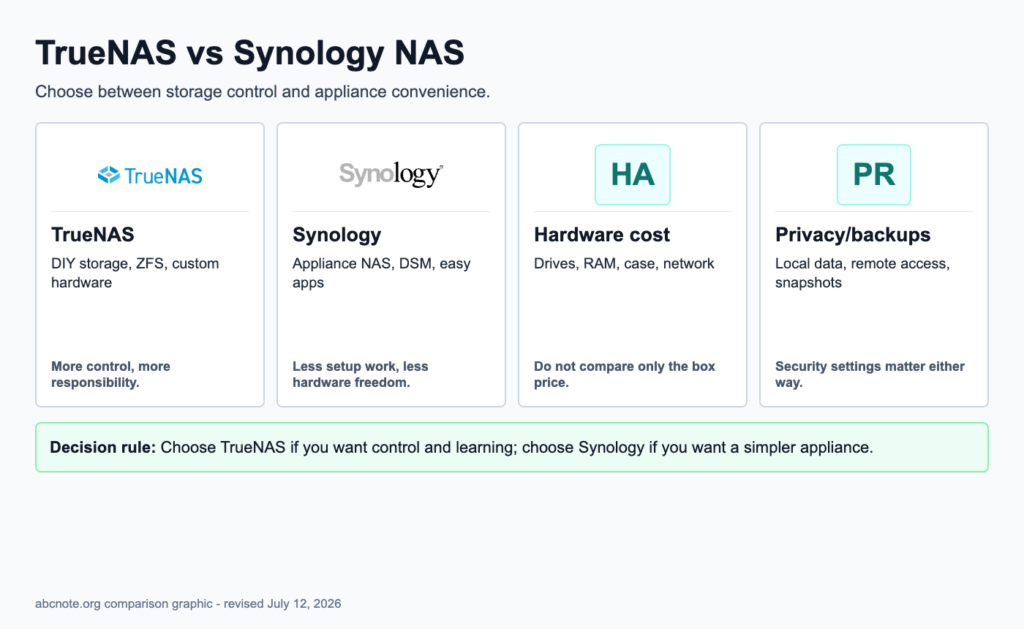
It is tempting to compare these systems as though one is simply more powerful. That misses the more useful distinction. Synology is an appliance model: the enclosure, operating system, drive bays, and management experience arrive as a coordinated product. TrueNAS is an infrastructure model: the owner has greater freedom to select hardware and storage design, but also becomes responsible for compatibility, configuration, maintenance, and recovery decisions.
For a home office, this difference affects ordinary work. A shared folder that must be available every day, a photo library that needs uncomplicated administration, or backups managed by someone who does not want to become a storage specialist all favor a setup with less operational friction. A home lab that exists partly to learn, that needs custom hardware, or that treats data integrity and storage architecture as a primary project can justify the additional control of TrueNAS.
Neither approach removes the need for backups. A NAS is a storage system; it is not automatically a complete recovery plan. Regardless of platform, decide how files will be restored after deletion, drive failure, configuration mistakes, or loss of the NAS itself. Snapshots can help with some local mistakes, but an external or cloud backup and a tested restore procedure remain separate requirements.
ZFS, Btrfs, and Ext4: why the filesystem discussion matters
The filesystem is not a background detail. It determines how a NAS organizes data and what integrity features are available as storage grows. TrueNAS is closely associated with ZFS, while Synology’s platform can use Btrfs or Ext4 depending on the configuration and model. The practical question is not which filesystem has the best name; it is whether its design matches the risk, scale, and administration effort of the data you intend to keep.
ZFS is built around several ideas that matter to people planning a serious storage server. It uses copy-on-write behavior, meaning changes are written as new data rather than overwriting the existing data in place. It also uses block-level checksums, which are intended to help identify data corruption at the storage layer. RAIDZ is part of the ZFS conversation as well, providing a parity-oriented approach for multi-disk storage layouts. Together, these features make ZFS especially relevant when the goal is high-integrity storage with deliberate pool design rather than the quickest possible appliance setup.
Those strengths also explain why TrueNAS asks the owner to think carefully before creating a pool. Storage layout is not merely a capacity calculation. Drive count, redundancy approach, expected growth, workload, and the consequences of a failed component all belong in the initial design. A good TrueNAS build makes those choices explicitly. A rushed one can leave the owner with a layout that is awkward to change later, even if the server initially appears to work perfectly.
Btrfs is also a copy-on-write filesystem and is commonly part of the Synology discussion, but the evidence packet distinguishes it from ZFS in multi-disk parity scenarios: Btrfs is less mature for RAID5/6-style setups. That does not make a Synology NAS unsuitable for home or small-office storage. It means the buyer should avoid treating “Btrfs” and “ZFS” as interchangeable labels when storage architecture and multi-disk resilience are the central reasons for buying the system.
Ext4 is the simpler comparison point. It is a familiar filesystem choice but does not turn a NAS into a high-integrity storage design by itself. If a buyer is choosing TrueNAS specifically for ZFS, the value is in the combination of its copy-on-write design, block-level checksums, RAIDZ-oriented planning, snapshots, and the discipline of building a storage server around those concepts. If the buyer primarily wants a dependable shared-drive appliance, the operational simplicity of a Synology setup may matter more than gaining direct exposure to every layer of that architecture.
Performance should not be reduced to a filesystem slogan. Benchmarks and real-world results vary with drives, network speed, memory, CPU, configuration, and workload. The useful evidence-backed distinction is directional: Synology’s managed ecosystem is well suited to ease-of-use workloads, while TrueNAS with ZFS is favored where high-integrity, larger-scale data management is the priority. Decide first what failure or friction you are trying to minimize: administration burden, or the need to control a more elaborate storage design.
Why ECC memory deserves special attention in a TrueNAS build
ECC memory is often mentioned in TrueNAS discussions without enough explanation. Its purpose is to protect against certain memory errors, including silent bit flips while data is in RAM. This matters because filesystem checksums do not solve every possible problem before data reaches the storage layer. If an error occurs in memory before data is written or checked at that layer, ZFS checksums alone cannot provide complete protection against that path.
That does not mean every basic NAS purchase must become an ECC project. It means the decision should match the role of the machine. For a TrueNAS system being built around high-integrity storage, ECC-capable hardware is a coherent part of the design discussion. The owner has already chosen a platform where component selection, memory capacity, and storage topology are visible responsibilities. ECC is one more way to reduce a class of risk that a storage filesystem cannot independently eliminate.
Synology changes the decision because it packages the experience as an appliance. The buyer is normally choosing among vendor-defined configurations rather than assembling a server from motherboard, CPU, memory, enclosure, and controller choices. That is one reason it can feel more “set and forget”: fewer infrastructure choices are pushed onto the owner. The trade-off is less freedom to tailor or upgrade the machine around a particular storage philosophy.
For either platform, do not confuse ECC with a backup strategy. ECC memory addresses one kind of hardware-level data risk. It does not replace snapshots, off-device backup, account security, updates, or a restore test. Data protection works in layers, and the most sophisticated local storage pool is still vulnerable if its only copy lives in one physical location.
Hardware and cost: calculate the system, not just the box
Synology pricing is comparatively easy to understand: select a NAS model, add drives, and budget for backup storage. You are paying not only for the enclosure but also for the managed operating environment, vendor-integrated drive bays, and the time saved by avoiding a separate server-design exercise. That can be a rational premium when the NAS supports household files, a small office, or a backup routine that must be easy to hand over to another person.
TrueNAS can be assembled from new, used, or repurposed hardware. That flexibility can lower the entry cost when suitable hardware is already available, but it can also conceal costs. Consider the server platform, case and drive mounting, power use, noise, network capability, memory, replacement parts, and the time required to validate and maintain the build. “Cheaper” only describes the purchase price until those other costs are counted.
Memory is not an afterthought in a TrueNAS system. The evidence packet supports treating ECC as an important consideration when data integrity is the goal, particularly because RAM sits in the path between applications and storage. Capacity also needs to reflect the workload. A file server, a media server, containers, and virtual machines do not place the same demands on the system. Build for the jobs the machine will actually perform, not for a vague idea of future-proofing.
Hardware freedom is valuable when it enables a clear requirement: more capable networking, a larger chassis, a CPU chosen for a workload, or an ECC-capable platform. It becomes a liability when every part is selected merely because it is available. A quieter, more predictable appliance can be the better home-office choice if the alternative is an unfinished DIY build that no one has time to administer.
Performance: file sharing, media transcoding, containers, and lab workloads
For normal file sharing, the most visible limits are often the drives, the wired network, and the client device rather than the NAS logo. A modest system can feel responsive when it serves documents and backups over a suitable network. Performance becomes more consequential when several people work at once, large transfers run during backups, media must be transcoded, or the NAS is asked to host applications as well as storage.
Plex and Jellyfin illustrate the difference between a simple workload description and an actual design decision. Direct playback can be relatively straightforward; transcoding adds processing work because the server may need to convert media for the playback device. The evidence packet identifies Synology’s optimized software-and-hardware stack, including Intel Quick Sync integration, as a reason its managed ecosystem can be attractive for media-server users. This does not mean every Synology model will suit every media library or every client. It means an appliance path can reduce the amount of tuning needed to reach a useful result.
TrueNAS can deliver strong raw performance, but the owner must make and configure the high-end hardware decisions. For a media-oriented build, that can mean carefully selecting CPU and graphics capability, then planning how the media service will use it. The extra control is useful for someone who wants to tailor the system. It is less attractive when the goal is simply to keep a household media library working with minimal administration.
Docker containers create a similar fork in the road. A lightweight service such as a dashboard, downloader, or document tool may be a reasonable NAS workload, but each container adds updates, permissions, storage paths, network exposure, and backup considerations. TrueNAS is appealing to users who want to make those infrastructure choices themselves. Synology is appealing when the user wants vendor-integrated applications and a more guided management surface. In either case, storage reliability should not be sacrificed to turn the NAS into every server in the house.
For virtual machines and heavier lab work, separate the question of capability from the question of risk. A powerful TrueNAS system may suit a storage-centric lab, but experiments can create maintenance pressure on the same machine that holds important data. For many home labs, a practical architecture is to keep reliable NAS storage and backups on one system, then run experimental containers, automation, or virtualization on a separate host. That separation limits the blast radius of a broken lab project.
Security and privacy: local storage still needs operational discipline
Keeping data on a NAS can improve control over where files live, but it does not automatically make the system secure. Both platforms still require account hygiene, updates, sensible remote-access decisions, and a recovery plan. The most important rule is simple: do not expose an administrative interface directly to the internet merely because remote access is convenient.
- Use separate accounts rather than sharing an administrator login.
- Use strong, unique passwords and keep the NAS software updated.
- Enable and understand snapshots, then test what a restore actually looks like.
- Keep a backup that is not the same device and not the only copy in the same location.
- Use wired Ethernet where possible for predictable local transfers and backup windows.
- Decide deliberately whether remote access is necessary before enabling it.
Snapshots are helpful for recovery from some local mistakes, such as an unwanted change or deletion, but they are not a substitute for a separate backup. The same is true of RAID or any other drive-redundancy arrangement: redundancy helps a system tolerate some hardware failures; it is not a complete answer to deletion, malware, misconfiguration, theft, or a disaster affecting the device.
A first-build checklist
- Name the primary job. Is this mainly a file server, family backup target, media server, office share, or storage platform for a lab?
- Choose the operating model. Pick Synology when an appliance experience is the requirement; pick TrueNAS when hands-on hardware and ZFS design are part of the requirement.
- Plan data protection before capacity. Include snapshots, an off-device backup, and a tested restore path in the budget.
- Match hardware to workload. Media transcoding, containers, and virtual machines need more consideration than basic shared folders.
- For a TrueNAS integrity-focused build, evaluate ECC. It protects against memory bit flips that filesystem checksums alone cannot address before data reaches storage.
- Keep critical storage and experiments appropriately separated. Do not let a disposable lab project become a single point of failure for important files.
- Document access and recovery. A NAS is only useful in an emergency if the people who need it can restore from it.
Bottom line
Choose Synology for a home office, household, or small team that wants shared storage, backups, and media services with the least infrastructure work. Its strength is not that it makes storage concerns disappear; it makes the day-to-day experience more managed and approachable.
Choose TrueNAS when you intentionally want a DIY storage server and are prepared to own the decisions that come with ZFS, pools, hardware, memory, networking, updates, and recovery. Its strength is not raw complexity for its own sake. It is the ability to build a storage system around high-integrity design and owner control.
The better NAS is the one whose security, backup, maintenance, and recovery demands you will actually meet. Start with the data you cannot afford to lose, then choose the platform that lets you protect it reliably over time.
Sources
- Homelab Compass: Btrfs vs ZFS (2026): Which Filesystem for Your NAS or Homelab?
- WU FTPD: Why Does TrueNAS Recommend ECC Memory
- Selfhostr: Benchmark 2026: ZFS vs Btrfs vs ext4 for Home NAS
- HomeTechOps: Jellyfin & Plex Hardware Transcoding: What GPU You Need
A deleted folder tests a different risk from a failed drive
For an illustrative NAS acceptance check, prepare a disposable folder and identify how it could be recovered after deletion, drive failure, and loss of the main NAS. Those scenarios need different evidence.
| Situation | Next check | Why it changes the decision |
|---|---|---|
| One drive fails | Review the configured redundancy and replacement procedure. | Availability is the immediate question. |
| A user deletes a folder | Identify the applicable snapshot or independent backup. | Redundant disks can preserve the same deletion. |
| Main NAS is unavailable | Restore to an alternative destination. | A copy dependent on the unavailable box may not help. |
Choose between appliance and self-managed infrastructure according to who can perform recovery. This is a proposed recovery brief, not a claim that RAID or a filesystem makes every configuration safe.