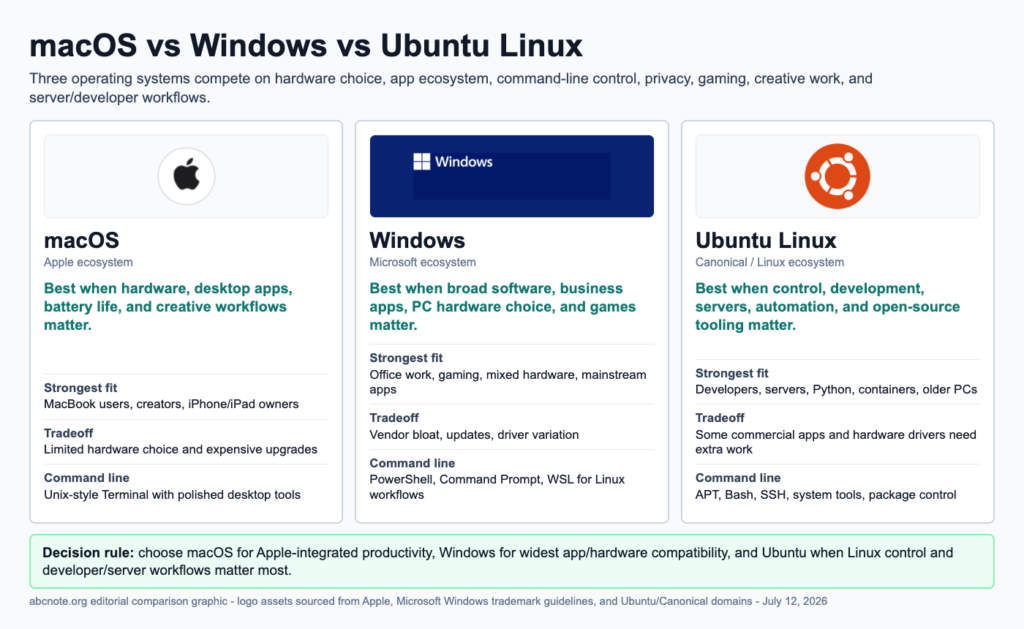
Quick answer: choose macOS if you want Apple’s integrated hardware/software ecosystem, Windows if you need the broadest mainstream PC software and gaming support, and Ubuntu if you want Linux, development, servers, open-source control, or a lighter technical environment.
Why people search this
Most operating-system comparisons become emotional. Readers need something more practical: what can I install, what hardware do I need, what breaks less for my use, and what should I learn if I want to work in tech?
Very short history
| OS | Origin in simple terms |
|---|---|
| macOS | Apple’s desktop operating system, built around the Mac hardware/software ecosystem and a Unix-based foundation in modern macOS |
| Windows | Microsoft’s dominant PC operating system, shaped by broad hardware compatibility, business software, and consumer apps |
| Ubuntu Linux | A popular Linux distribution from Canonical, built on Debian and designed to make Linux more accessible |
Strengths
| OS | Strongest advantages |
|---|---|
| macOS | polished hardware integration, strong creative-app culture, Unix-style Terminal, good laptop experience |
| Windows | huge software ecosystem, gaming, business compatibility, broad hardware choice, familiar PC workflows |
| Ubuntu | open-source control, developer tools, server similarity, package management, useful for older or custom hardware |
Weaknesses
| OS | Common tradeoffs |
|---|---|
| macOS | tied to Apple hardware, less flexible hardware upgrades, some apps/games unavailable |
| Windows | more vendor bloat on some PCs, malware target, settings can feel scattered, updates can interrupt |
| Ubuntu | some commercial apps unavailable, hardware drivers can require work, gaming and creative apps are less universal |
Best uses
| User need | Best fit |
|---|---|
| iPhone/iPad ecosystem and creative laptop work | macOS |
| mainstream office, school, gaming, and business apps | Windows |
| programming, Linux learning, servers, open-source workflows | Ubuntu |
| low-friction everyday computer | Windows or macOS |
| technical learning and command line confidence | Ubuntu or macOS |
| widest hardware price range | Windows or Ubuntu |
Which one should you choose?
Choose based on the software you must run first.
If your school, work, or game requires Windows, choose Windows. If your family already uses Apple devices and you value integration, choose macOS. If you want to learn Linux, build servers, revive older hardware, or understand developer environments, choose Ubuntu.
Which one is best for AI and automation?
All three can be useful:
- macOS is strong for polished laptop workflows, Unix-style tools, and creator/developer overlap.
- Windows is strong for broad app compatibility, gaming hardware, and many consumer tools.
- Ubuntu is strong for servers, containers, command-line tools, and open-source development.
For AI tool users, Windows and macOS are often easier for desktop apps. Ubuntu becomes powerful when you want to understand servers, Python environments, automation, and Linux deployment.
Simple recommendation
Do not ask which OS is best in general. Ask which OS is best for your next three months:
- Need school/work apps: Windows
- Need Apple ecosystem and smooth laptop experience: macOS
- Need Linux learning, servers, and technical control: Ubuntu
- Need all three perspectives for tech work: learn basic file, app, screenshot, print, specs, and Terminal workflows on each
Related reading
- macOS Guide: Install Apps, Delete Programs, Find Files, Print, Check Specs, and Use Terminal
- Windows 11 Guide: Install Apps, Uninstall Programs, Find Files, Screenshots, Printing, Specs, and Commands
- Ubuntu Linux Guide: Install Software, Remove Apps, Find Files, Screenshots, Printing, Specs, and Terminal Commands
Last checked: July 12, 2026.
Choose by job, not by identity
macOS, Windows, and Ubuntu are not just different looks. They assume different software ecosystems, hardware markets, security models, and support paths. The best choice depends on the work you do most often.
| OS | Strongest fit | Main tradeoff |
|---|---|---|
| macOS | Apple hardware, creator tools, iOS/macOS development | Higher cost and low upgrade flexibility |
| Windows | Broad hardware, games, business software, WSL | More vendor clutter and larger malware target |
| Ubuntu | Linux learning, servers, development, old PCs | Some apps and hardware drivers need extra work |
For most households, Windows is the compatibility default. For Apple ecosystem work, macOS is the practical answer. For Linux learning, servers, open-source workflows, or reviving older machines, Ubuntu is the cleanest starting point.
macOS, Windows, Ubuntu comparison fields that matter
A useful macOS, Windows, Ubuntu decision should start with the machine and the work, not with loyalty to an operating system. Windows usually wins when broad hardware support, games, business apps, and peripheral compatibility matter. macOS is strong when the user wants Apple hardware integration, creator apps, long battery life, and a lower-maintenance desktop. Ubuntu is strongest when the user wants Linux servers, development tooling, open-source control, and a lower-cost path on compatible hardware. For setup basics, compare this section with Windows 11 Setup Guide and Ubuntu Setup Guide before making the switch.
| Field | macOS | Windows | Ubuntu |
| Cost | Requires Apple hardware; strong resale value. | Wide range from budget laptops to workstations. | Free OS, but hardware compatibility still matters. |
| Hardware/specs | Best on Apple Silicon with unified memory. | Best choice for broad GPU, gaming, and device support. | Check Wi-Fi, GPU, printer, and sleep support before install. |
| Learning curve | Easy if already inside Apple ecosystem. | Most familiar for office and school users. | Best for users willing to learn terminal and packages. |
| Privacy/security | Strong defaults, but iCloud choices matter. | Strong enterprise tools, but account/sync settings need review. | High control, but updates and repositories are the user’s responsibility. |
Source and evidence note
Use owner sources when updating this comparison: Apple macOS, Microsoft Windows, and Ubuntu Desktop. G2 is not a good primary evidence source for operating systems because these are platforms, not ordinary SaaS products with comparable buyer-review pages. Treat user-review sites as background sentiment only; the decision should rest on hardware, app support, update model, and workflow needs.
macOS, Windows, Ubuntu buyer scenarios
For a family laptop, Windows is usually the easiest default because school portals, banking sites, printers, games, and local repair shops tend to expect it. macOS is better when the buyer already uses iPhone, iPad, AirDrop, Photos, iCloud Keychain, Final Cut, Logic, or other Apple-first workflows. Ubuntu is best when the computer is for learning Linux, coding, servers, Docker, privacy experiments, or reviving compatible hardware without paying for another commercial OS license.
For a creator laptop, macOS often wins when battery life, quiet performance, color-managed screens, and Apple ecosystem tools matter. Windows can still be the better creator choice for NVIDIA GPU workflows, CAD, engineering apps, and game development. Ubuntu can work well for programming, containers, and data work, but buyers should verify camera, audio, GPU drivers, fingerprint readers, sleep, and external-display behavior before depending on it every day.
For a privacy-conscious user, none of the three is perfect by default. macOS and Windows ask the user to choose cloud sync, account recovery, telemetry, location, and app permissions carefully. Ubuntu gives more control, but that control includes responsibility for package sources, updates, backups, and disk encryption. If the same reader also uses cloud AI tools, pair the operating-system decision with Cloud AI Privacy Checklist so local files, browser uploads, and account sync do not quietly undermine the OS choice.
| Reader | Safer default | What to verify first |
| Parent buying a school laptop | Windows or macOS | School apps, printer support, repair options, parental controls, and budget. |
| Developer learning servers | Ubuntu or Windows with WSL | Command-line comfort, Docker needs, GPU support, and backup plan. |
| Creator with iPhone/iPad | macOS | App subscriptions, storage size, external monitor needs, and file-sharing habits. |
| Old laptop revival | Ubuntu or ChromeOS Flex, with Windows only if supported | Driver support, security-update path, SSD/RAM condition, and restore media. |
Before publishing, refresh source pages for Apple macOS support, Microsoft Windows support, and Ubuntu tutorials. The comparison is strongest when each recommendation names the hardware, workload, and tradeoff instead of declaring one operating system best for everyone.
The required application is the first operating-system filter
Imagine a student who needs one school application and an existing printer. Start with those exact requirements before comparing operating-system philosophy or general popularity.
| Situation | Next check | Why it changes the decision |
|---|---|---|
| Required application has a supported version | Check the exact release and license on the candidate OS. | A browser workaround may not supply every required feature. |
| Printer or peripheral is essential | Confirm supported drivers and functions. | Basic connection does not guarantee scanning or special controls. |
| All requirements are satisfied | Compare recovery, update support, and operating effort. | Personal preference becomes meaningful after compatibility. |
Use a spare environment or an available trial before replacing a working system. This is a requirements example, not a universal ranking of macOS, Windows, and Ubuntu.