Google Trends is useful, but it can trick new bloggers.
Quick answer: use Google Trends to compare interest patterns, related queries, regions, and timing. Do not treat a spike as an article idea until you know what readers are trying to solve and whether your site can add something useful.
The real problem with trend chasing
ABC Studio wants more tech blog traffic. Someone opens Google Trends and sees a rising search term around AI, a new app, or a product update. The first instinct is to write immediately.
That is how a site ends up with thin posts.
A trend spike only tells you attention moved. It does not tell you:
- whether readers want a definition, tutorial, comparison, price answer, or warning
- whether the topic will still matter next week
- whether official sources exist
- whether a new site can add anything better than news summaries
- whether the topic fits the site’s long-term clusters
Google Trends should start Discovery, not finish it.
A better Google Trends workflow
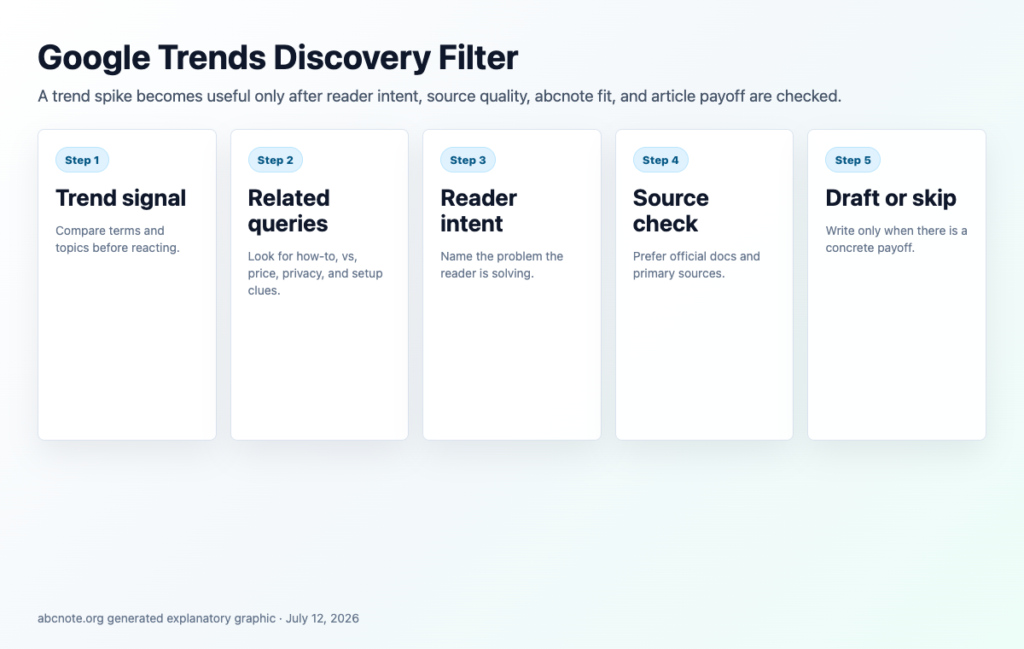
Use this five-step filter:
- Compare the term against nearby terms.
- Check related topics and related queries.
- Decide what the reader is likely asking.
- Verify the topic with official or primary sources.
- Choose article type: explainer, comparison, tutorial, checklist, or skip.
For tech topics, the article type matters more than the spike. A search for "local AI" may need a comparison. A search for "Google AI Overviews" may need an SEO/AEO action guide. A search for a tool name may need a setup guide.
Trend signal vs article decision
| Signal | What it means | What to do |
|---|---|---|
| Sudden spike | Attention jumped quickly. | Check if it is news-only or has evergreen value. |
| Slow climb | Interest is building. | Consider a pillar explainer or beginner guide. |
| Seasonal pattern | Interest repeats. | Plan ahead and update before the next peak. |
| Related queries show "vs" | Readers are comparing. | Build criteria, cost notes, and a decision table. |
| Related queries show "how to" | Readers want steps. | Build a tutorial with screenshots and verification. |
| Related queries show "safe" or "privacy" | Readers fear risk. | Build a safety guide with source notes. |
This table prevents the common mistake: writing the same generic article for every trend.
Search terms vs topics
Google Trends lets you explore search terms and, when available, broader topics. This matters because a term can be narrow while a topic can group related language.
For example:
- "RAG explained" may be a search term.
- Retrieval-augmented generation may be a broader topic.
- "AI can search my documents" may be a beginner phrasing.
Check all three angles before deciding the title. Beginner phrasing often reveals the article people actually need.
A practical Discovery scorecard
Score each candidate from 1 to 5.
| Criterion | Question | Score |
|---|---|---|
| Reader intent | Can we name what the reader wants? | 1-5 |
| Evergreen value | Will the post still help after the news cycle? | 1-5 |
| Source quality | Are official sources available? | 1-5 |
| abcnote fit | Does it fit AI automation, LLM, IT, SEO, or web workflows? | 1-5 |
| Original angle | Can we add a checklist, table, workflow, or image? | 1-5 |
| AdSense risk | Is it safe, original, and not policy-sensitive? | 1-5 |
Draft the article only when the total score is strong and the reader payoff is obvious.
Example: weak trend idea vs useful article
Weak idea:
"AI search is trending."
Useful article:
"AI Overviews Changed SEO: How New Blogs Can Still Earn Clicks."
The useful version has a reader, a problem, and a payoff. It can explain what changed, what Google says officially, how to structure content, and what a new blog should do next.
What to avoid
Avoid trend posts that only say:
- "What is happening"
- "Why everyone is talking about it"
- "Experts say it matters"
- "This could change everything"
Those lines do not help readers. They also age badly.
Instead, give the reader:
- a decision table
- a setup checklist
- a before/after workflow
- a mistake list
- a source-backed action plan
- internal links to deeper guides
Internal link strategy
Every trend article should ask: what deeper guide should exist behind this?
If a post mentions Claude, create or link a Claude setup guide. If it mentions local AI, link a local AI setup guide. If it mentions AI Overviews, link SEO/AEO and Search Console guides.
Do not link to private draft URLs as if they are public. Record the relationship in the tracker, then backfill links after publication.
Bottom line
Google Trends is not a content calendar by itself. It is a signal layer. The real work is translating the signal into reader intent, source-backed guidance, and a concrete payoff.
Last checked: July 12, 2026.
Turn trend interest into a useful article plan
A rising chart is only a signal, not a content plan. Before writing, match the trend to a real reader question: setup, comparison, privacy, cost, troubleshooting, or decision support. If the trend cannot produce a useful answer, skip it.
For technology topics, compare the main query with related queries, breakout terms, region, time window, and news context. Then decide whether the post should be evergreen, timely, or a bridge into a pillar such as local AI, automation, WordPress foundation, or home lab setup.
Use Trends before drafting and Search Console after publishing. Trends can show attention, but Search Console shows whether the title, snippet, and internal links are actually matching real search behavior.
| Trend check | Useful signal | Skip signal |
| Query intent | The reader wants a decision, setup, checklist, or comparison. | The topic is only curiosity with no practical answer. |
| Timing | Interest is rising and the advice can stay useful after the spike. | The topic expires before a new site can rank. |
| Cluster fit | The article links into AI, automation, Search Console, or home-lab guides. | It would become an isolated one-off post. |
| Originality | abcnote can add examples, screenshots, decision rules, or source-backed steps. | The draft would only repeat common summaries. |
Final practical check before publishing
Before publishing, read the first screen on a phone and ask whether the visitor can see the promise, the main recommendation, and the next step without scrolling through filler. If not, tighten the opening and move the most useful decision rule higher.
Verify changing details close to publication: product names, official documentation URLs, platform policies, model availability, Search Console terminology, and any pricing or account-limit claim. For fast-moving AI and search topics, use decision rules instead of pretending one snapshot will stay true forever.
Keep the article connected to the rest of abcnote. A reader should be able to move from this draft into AI automation, local AI, Search Console, or WordPress foundation guides through contextual links in the body, then use the read-next block as a final path.
A rising search term still needs an answer you can contribute
Imagine two candidate articles: a general AI-trend roundup and a guide to why a local model fails to load. The second can have lower search interest yet offer a clearer task and an explainable diagnostic path.
| Situation | Next check | Why it changes the decision |
|---|---|---|
| Interest spikes around news | Identify the short-lived event and the enduring question. | A spike does not establish a durable reader need. |
| Topic matches your evidence | List the example or analysis you can actually support. | Search demand does not create expertise or experience. |
| Existing article covers the question | Improve it rather than opening another similar URL. | Separate keywords are not always separate reader tasks. |
Google Trends is a relative-interest signal, not a monthly search-volume estimate. Use it after defining the reader's problem and the contribution you can make.