Quick answer: if you want local AI to feel useful, choose the model size first, then choose the app and hardware. For most people, the realistic target is a 7B-8B model on 16-32 GB RAM, or a smoother setup with 32 GB RAM plus 8-12 GB VRAM. Larger 13B-14B models usually need 32 GB RAM and 10-12 GB VRAM to feel comfortable. 30B+ models belong on stronger desktops or servers, not ordinary office laptops.
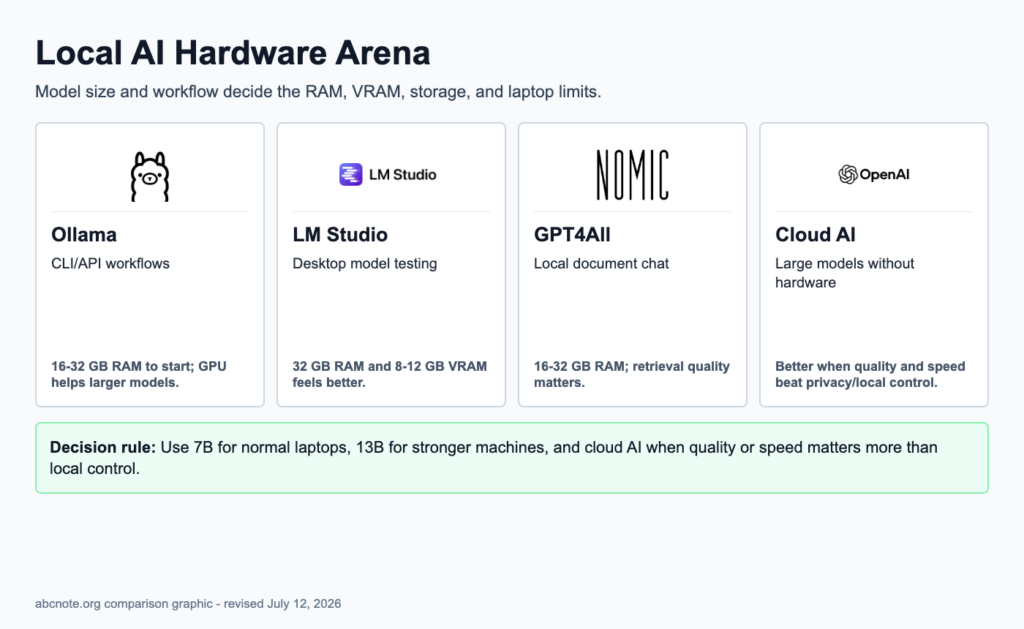
Fast hardware picks
Use this as the first decision:
- Existing 8 GB office laptop: use cloud AI, or only test tiny 1B-3B local models.
- 16 GB laptop: test 3B-8B local models; do not expect fast large-model work.
- 32 GB laptop or MacBook: reasonable target for daily 7B-14B local AI experiments.
- Windows desktop with 12 GB VRAM GPU: strong practical setup for Ollama, LM Studio, and 7B-14B models.
- Desktop with 24 GB VRAM or more: better for 30B-class experiments.
- 70B+ local models: usually use a GPU workstation, server, or cloud API instead.
What 3B, 7B, 13B, and 30B mean
The B means billion parameters. Parameters are the internal numeric weights a model uses to generate answers. A larger parameter count often means stronger reasoning and writing quality, but it also needs more memory and runs slower.
A 7B model has about 7 billion parameters. A 13B model has about 13 billion. Parameter count alone does not determine the memory you need: quantization changes the model-weight footprint, while context length, KV cache, runtime overhead, and CPU/GPU memory placement also affect real-world requirements. Treat the hardware ranges in this guide as starting points rather than guaranteed minimums, and check the exact model file and runtime before purchasing hardware.
For normal users, the important rule is simple: bigger model class means more RAM, more VRAM, more storage, more heat, and slower output unless the hardware is strong enough.
Practical recommendation by solution
These are abcnote practical recommendations based on official tool docs where available, official hardware notes, and common local-LLM usage patterns. Always check the current tool docs before buying hardware.
Ollama
Best fit: developers, API tests, scripts, local server workflows, and people comfortable with terminal commands.
- Minimum to test: 8-16 GB RAM, modern 64-bit CPU, SSD storage.
- Better daily target: 32 GB RAM plus NVIDIA GPU with 8-12 GB VRAM, or Apple Silicon with 16-32 GB unified memory.
- Storage target: keep at least 100 GB free if you plan to compare several models.
- Why: Ollama is strong when the local model needs to be called from scripts or tools.
- Watch out: official Windows docs note that models can take tens to hundreds of GB of storage. GPU support depends on platform, driver, and model placement.
LM Studio
Best fit: desktop users who want to browse, download, and compare local models visually.
- Minimum to test: 16 GB RAM, SSD, modern CPU.
- Better daily target: 32 GB RAM, 8-12 GB VRAM, and 100 GB+ free SSD space.
- Best machine type: Windows desktop/gaming laptop with NVIDIA GPU, or Apple Silicon Mac with enough unified memory.
- Why: LM Studio is easier for learning model selection, GPU offload, and local server behavior without starting from the command line.
- Watch out: model size, context length, and GPU offload decide whether it feels fast or frustrating.
GPT4All
Best fit: local document chat and private note experiments.
- Minimum to test: CPU with AVX/AVX2 and enough RAM to load the selected model.
- Better daily target: 16 GB RAM for general testing; 32 GB RAM or GPU acceleration for smoother work.
- Best machine type: laptop or desktop where privacy matters more than maximum speed.
- Why: GPT4All is useful when the first job is local file/document chat rather than automation.
- Watch out: local document chat still needs source checking. A local model can still misread or invent details.
Jan.ai
Best fit: local-first desktop assistant workflows and users who want a ChatGPT-like local app.
- Minimum to test: 8 GB RAM, AVX2 CPU on Windows.
- Better daily target: 16-32 GB RAM, 6 GB+ VRAM for GPU acceleration.
- Storage target: 10 GB minimum, more if you keep several models.
- Why: Jan.ai is useful as a local assistant-style app with configurable local engines.
- Watch out: if GPU acceleration is not working, performance can drop sharply.
Model size to hardware map
| Model class | Good for | Practical hardware target |
|---|---|---|
| 1B-3B | quick tests, simple classification, low-power machines | 8-16 GB RAM; CPU or integrated GPU can be enough |
| 7B-8B | everyday local chat, summaries, coding help tests | 16-32 GB RAM; 6-8 GB VRAM is a useful GPU target |
| 13B-14B | better writing/reasoning and heavier local work | 32 GB RAM; 10-12 GB VRAM or strong unified memory |
| 30B-34B | advanced local experiments | 64 GB+ RAM; 16-24 GB+ VRAM |
| 70B+ | serious local workstation or server use | 128 GB+ RAM depending on quantization; 48 GB+ class GPU setup or cloud/server |
CPU, RAM, VRAM, and storage explained without filler
| Component | What matters for local AI | Buying guidance |
|---|---|---|
| CPU | Runs the model when no GPU is used and handles general app work | Modern Intel/AMD with AVX2 is a safer PC target; Apple Silicon is strong for unified-memory workflows |
| RAM | Holds model data, app memory, document context, browser tabs, and OS overhead | 16 GB is a floor for serious testing; 32 GB is the better practical target |
| VRAM | GPU memory used for faster model inference when GPU acceleration works | 8 GB is useful for 7B-8B models; 12 GB is better for 13B-14B; 24 GB opens larger models |
| Storage | Stores the app and downloaded model files | Use SSD; plan 100 GB+ if comparing several models |
| Cooling | Sustained model runs create heat | Thin laptops may throttle; desktops and gaming laptops sustain speed better |
MacBook, Windows laptop, desktop, or mini PC?
| Machine type | Best local AI use | Weakness |
|---|---|---|
| Apple Silicon MacBook with 16 GB memory | small local models, LM Studio/GPT4All tests, travel workflows | unified memory is shared, so bigger models hit limits quickly |
| Apple Silicon MacBook with 32 GB+ memory | smoother 7B-14B workflows, local document tests | expensive upgrades; still not a 70B workstation |
| Windows gaming laptop with RTX 4060/4070 class GPU | good 7B-14B local AI testing if cooling is decent | VRAM limit and fan noise matter |
| Desktop with RTX 3060 12 GB / 4070 Ti / 3090 24 GB | better performance per dollar for local AI | less portable |
| Office laptop with 8-16 GB RAM and no GPU | possible for tiny models and learning | slow for useful daily work |
| Mini PC with 32-64 GB RAM | quiet local server experiments and CPU inference | GPU acceleration may be limited |
Recommended setups by goal
| Goal | Recommended starting hardware |
|---|---|
| Just learn local AI | 16 GB RAM, SSD, small 3B-8B model |
| Compare Ollama and LM Studio seriously | 32 GB RAM, 8-12 GB VRAM or Apple Silicon 32 GB |
| Local document chat with GPT4All | 16-32 GB RAM, SSD, clean document folder |
| Daily private assistant experiments | 32 GB RAM, 8-12 GB VRAM, 100 GB+ free SSD |
| Larger model experiments | 64 GB RAM, 24 GB VRAM desktop-class GPU |
| Production/team workflow | consider cloud API or a dedicated GPU server instead of one laptop |
Do not buy hardware before checking these five items
- Which local AI app will you use first?
- Which model size do you need: 3B, 7B, 13B, 30B, or larger? Remember that B means billion parameters, not GB.
- Does your workflow need speed, privacy, offline access, or low cost?
- Is the data sensitive enough to justify local hardware?
- Would a cloud API be cheaper than a hardware upgrade for the next three months?
When cloud AI is still the better answer
Use cloud AI first if you need the strongest answers today, if your laptop has 8 GB RAM and no GPU, if you only run a few tasks per week, or if the local setup time costs more than the API bill.
Local AI is valuable when privacy, control, offline use, repeated experiments, or learning matter enough to justify hardware and maintenance.
Source notes
- Ollama Windows docs: storage for the binary and models, with models potentially taking tens to hundreds of GB.
- Ollama hardware support docs: platform-specific GPU support depends on drivers and supported GPU families.
- GPT4All FAQ: CPU, Apple Silicon Metal, and GPU support; CPU needs AVX/AVX2 and enough RAM to load the model.
- GPT4All system requirements file: recommended PC RAM 16 GB and GPU-class guidance with 8 GB+ VRAM for GPU inference.
- Jan.ai Windows docs: AVX2 CPU, 8 GB minimum RAM, 16 GB recommended, 6 GB VRAM minimum, 10 GB storage minimum.
- LM Studio docs: local server and structured-output workflows; hardware targets should be chosen by model size and GPU offload needs.
Last checked: July 12, 2026.
Hardware targets by real use case
The letter B in 7B or 13B means billion parameters. It is a rough size class for the model, not the same as download size. Bigger models usually need more memory and run slower, especially on laptops with limited cooling or no dedicated GPU.
| Use case | Practical target |
|---|---|
| Try local chat | 16 GB RAM, SSD storage, 3B-7B quantized model. |
| Daily local AI work | 32 GB RAM, 8-12 GB VRAM if using a GPU, 7B-13B model. |
| Document workflows | Enough RAM for model plus index, fast SSD, careful source review. |
| Best quality answers | Use cloud AI unless privacy, offline use, or cost control is the main goal. |
For buying decisions, prioritize RAM first, then SSD capacity, then GPU VRAM if the machine is for local AI. A cheap laptop with 8 GB RAM may run small demos, but it is not a comfortable local AI workstation.
A memory estimate before buying hardware
Model weights alone provide a lower-bound estimate: a 7-billion-parameter model at 4 bits is roughly 3.5 GB of raw weight data before quantization metadata, runtime overhead, context cache, and other processes. Actual memory demand can be substantially higher. Choose a model and quantization first, then test your intended context length and concurrent workload. On unified-memory Macs, do not treat advertised total memory as fully available to the model; the operating system and other applications also need headroom.
Reproducible test: Record model tag, quantization, context length, time to first token, tokens per second, and peak system memory before recommending a RAM or VRAM tier.
Weights are the floor, not the full memory budget
For an illustrative 7-billion-parameter model at four bits per parameter, raw weight storage is 7 billion × 4 ÷ 8 = 3.5 billion bytes. That is about 3.5 decimal GB, before quantization metadata or runtime allocation.
| Situation | Next check | Why it changes the decision |
|---|---|---|
| Weights fit in advertised memory | Reserve capacity for the OS, runtime, and other processes. | The specification is not fully available to the model. |
| Longer context is required | Measure context-cache and runtime memory on the actual model. | The same weights can produce a different memory requirement. |
| Several requests run together | Measure the intended concurrency. | One successful session does not size a shared server. |
This is a lower-bound calculation, not a purchase guarantee or a benchmark. Distinguish decimal GB from binary GiB when comparing reports, and buy against observed peak demand with appropriate headroom.