Quick answer: the best Korea translation apps setup for most American travelers is not one app. Download Papago for Korean-specific signs, menus, and everyday phrases; keep Google Translate or Apple Translate for offline backup and broad language support; use DeepL or ChatGPT for longer explanations when privacy allows; and pair the translation app with Naver Map, a working eSIM or pocket Wi-Fi, and a few polite Korean phrases. The goal is not perfect Korean. The goal is fewer wrong orders, fewer lost transfers, smoother check-ins, and less panic when a sign or receipt is only in Hangul.
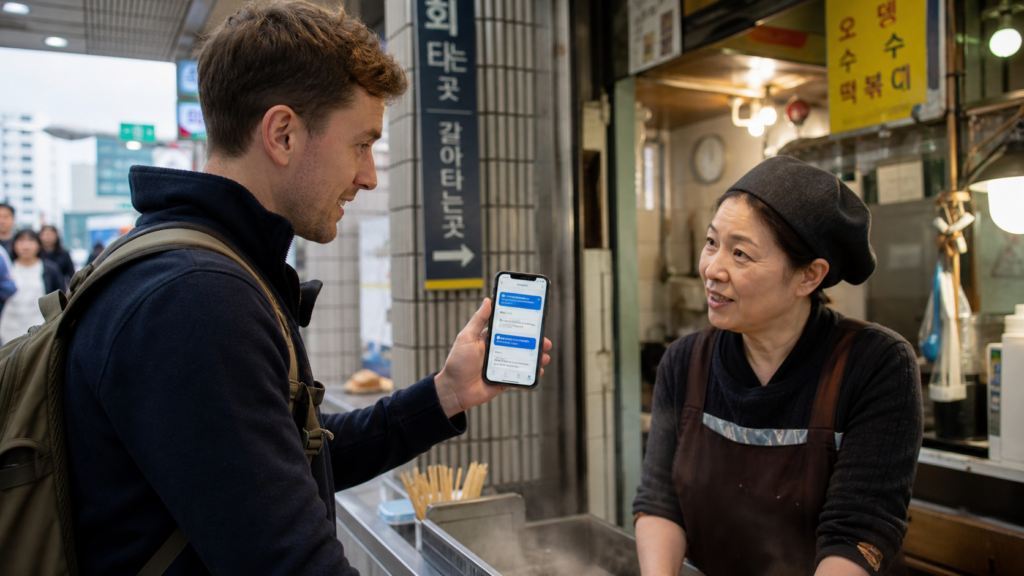
This guide is written for first-time Seoul visitors, military families visiting Korea, students, parents, business travelers, and food travelers who know that English is available in many tourist areas but not everywhere. In Korea, the difficult moments often happen at small restaurants, subway transfers, taxis, clinic desks, markets, luggage counters, delivery apps, and kiosks. A translation app helps, but only if you prepare it before the trip and know when not to trust it.
Start with connectivity. A camera translator is useless if your phone has no data, the language pack is not downloaded, or the app cannot load at a busy station. If you have not chosen travel internet yet, read abcnote’s Korea eSIM or pocket Wi-Fi guide first. If subway navigation is the bigger worry, pair this article with abcnote’s Korea subway apps guide.
Korea translation apps in one minute
| Need | Best first choice | Backup choice |
|---|---|---|
| Korean signs and menus | Papago camera translation, then compare with context | Google Translate camera or Apple Live Text plus Translate. |
| Offline emergency phrases | Google Translate or Apple Translate downloaded before travel | Screenshot key Korean addresses and phrases. |
| Restaurant ordering | Papago for menu words and short requests | Show a simple English sentence translated into Korean. |
| Subway or map names | Use Naver Map/Kakao-style Hangul place names, not only translation | Save screenshots of station names and exits. |
| Long explanations | DeepL or ChatGPT when you can remove private details | Ask hotel staff or 1330 for human help. |
| Privacy-sensitive issues | Use official portals, hotel desk, clinic staff, or 1330 instead of pasting private data into AI | Translate only a generic version of the problem. |
Why Korea is a special translation-app case
Korea is highly digital, but that does not mean every travel situation is English-first. A visitor may see Hangul-only kiosk categories, delivery notices, refund screens, subway exit names, bus stop names, allergy warnings, food labels, and service messages. Romanization can help, but it is inconsistent enough to confuse search results. The same place may appear as Gyeongbokgung, Gyeongbok Palace, 경복궁, or a nearby gate name. The safest travel habit is to keep the Hangul name visible.
This is where Papago becomes especially useful. Naver built Papago around Korean and other Asian-language use cases, and many Korea travelers prefer it for natural Korean phrasing. Google Translate remains valuable because it is familiar, broad, and strong as an offline backup. Apple Translate and iPhone Live Text are useful because they are built into iOS workflows. DeepL can be helpful for polished written explanations. ChatGPT can help explain a confusing situation, but it should not receive passport numbers, health data, payment-card details, hotel reservation codes, or private messages unless you understand the privacy tradeoff.
The app translates words
It does not know whether the restaurant is closed, whether an exit is under construction, or whether the clerk misunderstood your request.
Hangul matters
Save Korean place names, station names, addresses, and food names in Hangul. It reduces wrong-map and wrong-taxi risk.
Short sentences work better
Translate one request at a time. Long polite English paragraphs often create clumsy Korean.
Human help still wins
Use hotel staff, station staff, store workers, or the Korea Travel Hotline 1330 when the situation affects money, health, safety, or transport.
Best Korea translation apps by situation
| App or tool | Use it for | Practical limit |
|---|---|---|
| Papago | Korean signs, menus, short travel phrases, camera translation, voice conversation attempts | Still needs context. Camera output can fail on stylized menus, vertical signs, glare, handwriting, and food slang. |
| Google Translate | Offline language packs, broad backup translation, camera translation, multi-language travel | Korean nuance can feel less natural in some everyday situations, so compare important phrases. |
| Apple Translate and Live Text | iPhone built-in translation, quick text capture, on-device convenience where supported | Feature availability depends on iOS version, language support, and whether the captured text is clear. |
| DeepL | Polished longer writing, emails, messages, or formal explanation drafts | Not ideal for fast street situations if you need camera/menu help. |
| ChatGPT | Explaining confusing translated text, turning a rough phrase into a simpler version, travel planning questions | Do not paste sensitive personal data, reservation codes, medical details, or full private chat screenshots. |
| Korea Travel Hotline 1330 | Human help for travel interpretation and tourism questions | Use for higher-stakes moments, not every snack purchase. |
Before you fly: the 20-minute setup checklist
Do the setup while you are still on home Wi-Fi. Waiting until arrival creates the worst version of the problem: tired, jet-lagged, carrying luggage, and trying to download a language pack on weak airport Wi-Fi. A good travel setup is boring because it is already tested.
- Install Papago and open it once before departure.
- Install or update Google Translate and download Korean for offline use if your phone and region support it.
- On iPhone, test Translate and Live Text with a photo containing Korean text.
- Save hotel name, hotel address, nearest subway station, and emergency contacts in Hangul and English.
- Take screenshots of the hotel address, airport route, first subway route, and return route.
- Add Naver Map or your preferred Korea navigation app, because translation alone does not solve routing.
- Choose travel internet before arrival. Camera and voice translation are much more reliable with data.
- Create a small notes file with polite fallback phrases such as hello, thank you, one moment please, no spicy food, no pork, no seafood allergy, and can you help me call a taxi.
Use Papago first for Korean menus and signs
Papago is often the best first app for Korean-specific travel friction. Use it for restaurant menu categories, convenience-store labels, subway notices, ticket-machine screens, and quick polite requests. It is especially useful when English translations on signs are partial or when a restaurant menu uses Korean food words that do not translate neatly.
The practical trick is to translate in layers. First, take a camera scan of the whole sign or menu to understand the category. Then zoom in on one item. Then search the Hangul food name separately if needed. A menu item such as 김치찌개, 제육볶음, 순두부찌개, 떡볶이, 오뎅, or 닭갈비 may translate literally, but the traveler still needs to understand what it is, how spicy it may be, and whether it includes pork, seafood, or bones.
Useful short phrases to translate
| English phrase | Why it works |
|---|---|
| Can I order this one? | Short, direct, and easy to show while pointing at a menu. |
| Is this spicy? | Better than asking for a full ingredient explanation in a crowded restaurant. |
| Does this have pork? | Useful for dietary restrictions; replace pork with beef, seafood, peanuts, or alcohol. |
| Can I pay by card? | Most places accept cards, but small markets and temporary stalls may vary. |
| Can I get it to go? | Helpful at bakeries, cafes, and street-food counters. |
| One moment, I am using a translation app. | Polite and lowers pressure when the conversation stalls. |
Keep Google Translate or Apple Translate as offline backup
Papago is strong for Korea, but a travel setup should not depend on one app. Google Translate’s offline language packs can help when data is weak, roaming fails, or an app update misbehaves. Apple Translate and Live Text are useful for iPhone travelers because text recognition is often close at hand inside Photos, Camera, or system actions. The official support pages change over time, so check language download and camera features before departure.
Offline translation is not magic. It may be less accurate than online translation, and camera translation may still require good lighting and clear text. But it is enough for signs, labels, directions, and simple emergency phrases. The traveler who can translate a station notice offline is in a much better position than the traveler who can only stare at a loading screen.
Use AI chat carefully for explanations, not private data
Generative AI can be useful when a normal translation app gives a strange result. For example, you can type: “This Korean menu translation says blood sausage soup. Explain what this food might be for an American traveler.” Or: “Rewrite this request in very simple Korean: I am allergic to shellfish.” That can create a clearer practical explanation than a word-for-word translator.
The risk is privacy. Do not paste passport pages, medical records, prescription labels, bank messages, full reservation codes, private KakaoTalk messages, or payment screenshots into an AI chat just because you need translation. If you want help, remove personal details and ask about the generic phrase. For account security while traveling, abcnote’s passkeys or password managers guide is a useful companion because travelers often log into email, airline, bank, and hotel accounts on the move.
Good AI use
Explain a confusing food name, rewrite a short polite request, or compare two translated meanings.
Bad AI use
Paste a passport, payment card, medical chart, full hotel booking, or private chat screenshot.
Better prompt
Remove names and codes, then ask: What does this phrase mean in a restaurant or subway context?
Best fallback
For travel help, use hotel staff, station staff, or the Korea Travel Hotline 1330 when the stakes are high.
Camera translation: how to get better results
Most bad camera translations come from bad input. Korean signs can be vertical, reflective, handwritten, stylized, partially covered, or mixed with prices and abbreviations. Take the photo straight on. Fill the frame with the text. Avoid glare. If the whole sign fails, crop to one line. If a menu is long, translate one item at a time. If the output sounds strange, search the Hangul term separately.
| Problem | What to do |
|---|---|
| Vertical sign | Rotate the phone or crop the line before translating. |
| Glare on menu cover | Move the menu, change angle, or ask for a paper menu if available. |
| Handwritten note | Ask staff, use voice, or type the Hangul manually if you can copy it. |
| Food slang | Search the Korean word plus English explanation instead of trusting literal translation. |
| Kiosk screen timer | Take a photo first, step aside, translate the photo, then return to the kiosk. |
| Subway notice | Translate the key words: station name, exit, transfer, temporary, closed, delayed, replacement bus. |
Restaurant and cafe routine
In tourist neighborhoods, many staff members understand basic English. In local restaurants, small shops, and market stalls, a simple translation-app routine is more respectful than a long speech. Smile, say hello, point to the menu, show one short translated sentence, and wait. If there is a line behind you, step aside and decide before returning.
Do not translate a paragraph such as: “Hello, I am visiting from America and I was wondering if perhaps you could recommend something that is not too spicy and does not contain shellfish because I have a mild allergy.” Use two short lines instead: “I have a shellfish allergy.” Then: “Can you recommend a not-spicy menu item?” Short lines are easier for the app and easier for the worker.
Subway, taxi, and address routine
Translation apps help with signs, but Korea travel routing should use local place names. Keep the Hangul address for your hotel, Airbnb, restaurant, clinic, and meeting point. If a taxi driver, station staff member, or shop worker sees only a translated English name, the result can be ambiguous. A place name in Hangul is usually safer.
For Seoul subway, translation apps are secondary to a good subway or map app. Use abcnote’s Korea subway apps guide to choose the navigation layer, then use Papago or Google Translate for notices, exits, and station signs. Save screenshots of the route and the destination station in both English and Hangul. If data fails underground, screenshots still work.
Shopping, markets, and convenience stores
Convenience stores, markets, beauty shops, pharmacies, and clothing stores are perfect translation-app training grounds because the stakes are usually low. Use camera translation for labels, ask short questions, and keep a few payment phrases ready. If you are buying food, do not rely only on a literal translation for allergens. Look for official allergen labeling where available, ask staff when possible, and avoid guessing when the risk is serious.
For a smoother first food stop, use the translation app to read ingredients and heating instructions before standing at the microwave, kiosk, or counter. Ask staff when a label is unclear.
Privacy and safety checklist
| Situation | Safe translation habit | Avoid |
|---|---|---|
| Passport or immigration document | Ask official staff or translate only generic instructions | Uploading full passport images to random tools. |
| Hospital, pharmacy, or insurance issue | Use professional staff, official forms, or 1330-style help when appropriate | Relying on machine translation for diagnosis or medication decisions. |
| Bank, card, or payment problem | Use official app, card issuer, hotel desk, or bank branch | Pasting card numbers, OTP codes, or bank messages into AI chat. |
| Private chat or dating app | Translate only the sentence you need after removing names and personal details | Uploading screenshots with faces, phone numbers, or account names. |
| Police or legal issue | Ask for official interpretation support | Treating a consumer translation app as legal advice. |
Common translation mistakes American travelers make
The most common mistake is trusting a translation because it looks confident. Translation apps usually do not say, “I am unsure.” They produce output. A traveler has to judge whether the output fits the situation. If a food name, address, medical phrase, payment request, or transport notice feels strange, slow down and verify.
- Using only English place names instead of Hangul names.
- Forgetting to download offline language packs before the flight.
- Translating long polite paragraphs instead of short direct sentences.
- Showing private reservation, passport, or payment details to unnecessary apps.
- Trusting camera translation on stylized menus without checking the food context.
- Assuming a translated subway notice means the whole route is impossible instead of checking the next train, exit, or transfer.
- Not having a human-help fallback for health, safety, money, or official-document issues.
A practical app stack for three traveler types
| Traveler | Install before travel | Main routine |
|---|---|---|
| First-time Seoul tourist | Papago, Google Translate, Naver Map, transit app, eSIM app or carrier profile | Use Papago for signs/menus, Google offline as backup, and Hangul place names for routing. |
| Food-focused traveler | Papago, Google Translate, map app, saved allergy phrases | Translate menu items one by one, search Hangul food names, and ask short dietary questions. |
| Business or family visitor | Papago, DeepL, ChatGPT with privacy caution, map app, hotel and meeting addresses | Use DeepL or AI for longer messages only after removing sensitive data; keep official names in Hangul. |
| iPhone-only traveler | Apple Translate tested, Google Translate offline, Papago, Live Text tested on Korean screenshots | Use built-in capture for quick text, Papago for Korean nuance, and screenshots for offline moments. |
What to do when the translation sounds wrong
Bad translations are not failures if you catch them early. When a translation sounds odd, simplify the source sentence. Replace idioms with plain words. Translate one sentence at a time. Try the opposite direction: Korean to English, then English back to Korean. Compare Papago with Google Translate. Search the Hangul phrase in a map, image search, or official site. Ask a human if the consequence matters.
For example, do not translate: “I am good” when refusing food. The literal result may not express the social meaning. Use a clearer phrase such as “No thank you” or “I do not need a bag.” Do not translate a food allergy with casual wording. Use direct wording: “I have a peanut allergy” or “I cannot eat shellfish.”
Source notes and date checked
Sources were checked on July 23, 2026. App features, offline language support, privacy controls, and official travel-help pages can change, so check the official support pages before departure. This guide uses official pages from Papago, Google Translate, Apple, DeepL, OpenAI, and Korea tourism sources, plus Korea.net reporting on foreign tourist app preferences.
- Naver Papago
- Naver Papago app overview
- Google Translate Help: Download languages to use offline
- Google Translate Help
- Apple Support: Translate text, voice, and conversations on iPhone
- Apple Support: Use Live Text
- DeepL Support: Translating text
- OpenAI Help: ChatGPT data controls
- Korea.net: Foreign tourists prefer domestic apps like Naver Map for visits
- Visit Korea: Korea Travel Hotline 1330
- Visit Korea: Useful apps
- Korea Tourism Organization: Travel essentials
Bottom line: use translation apps as a travel system
Korea translation apps are most useful when they work as a system: Papago for Korean nuance, Google or Apple for offline backup, DeepL or ChatGPT for longer explanations, Naver Map or a subway app for routing, and human help for high-stakes situations. Do not chase the one perfect app. Build a small stack that keeps working when data is weak, signs are confusing, and the line behind you is getting longer.
The best traveler habit is simple: keep Hangul visible, translate short sentences, avoid sharing private data, and verify important results through a second route. That routine will not make every conversation perfect, but it will make Seoul, Busan, Jeju, restaurants, markets, taxis, and subway transfers much less stressful.
Translate the destination name separately from the instructions
Imagine a traveler translating a Korean restaurant address. A natural English sentence can still lose the exact building name needed by the driver. Save the original Korean text as well as the explanation.
| Situation | Next check | Why it changes the decision |
|---|---|---|
| Address or place name | Keep the original spelling and show the map pin. | A transliteration may not match local signage. |
| Menu ingredient | Ask a short follow-up about the exact ingredient. | A fluent translation may hide an uncertain term. |
| Medical or payment instruction | Ask the responsible person to confirm the meaning. | High-impact decisions deserve more than a machine translation. |
This workflow separates identifying the place from understanding the conversation. It does not rank current translation-app accuracy; use a human interpreter when the consequences justify one.