beginner SEO and AEO: Beginner SEO and AEO now belong together. A new blog must be easy for readers, search engines, and AI answer systems to understand.
Use this guide with AI Overviews and Clicks, compare it against Google Trends for Tech Topics, and keep Search Console for New Bloggers close when you turn the idea into a real workflow.
Where this fits in the abcnote stack
SEO and AEO connect publishing quality with automation because AI-assisted drafting only helps when the final page answers a real query and links readers to the next useful public guide. Continue with these public abcnote guides: WordPress Categories, Search Console Metrics, AdSense Approval Checklist, AI Writing Without Thin Content.
Quick answer
Use this guide to make a cleaner decision, avoid beginner mistakes, and prepare a site that looks useful before monetization.
What You Will Learn
- What SEO and AEO mean for a new blog
- How headings and concise answers help discovery
- Which beginner actions matter before advanced tools
Reference Screenshots
These screenshots were captured from the relevant official sites while preparing this article. They are used as visual references so the guide feels concrete, not generic.
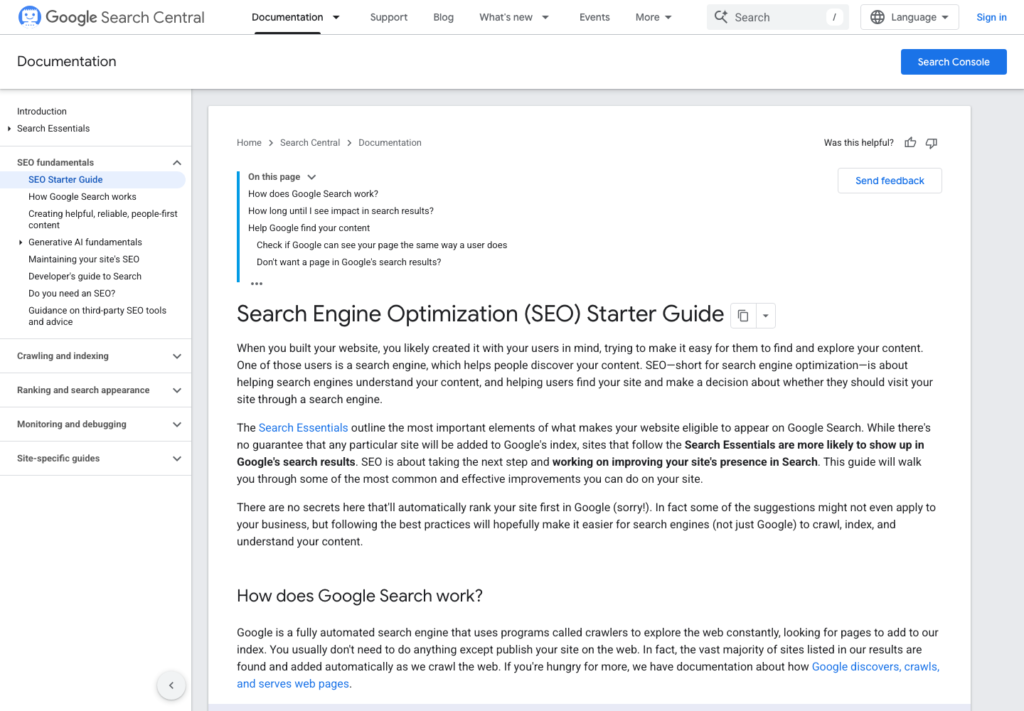
SEO used to sound like a checklist of tricks: keywords, backlinks, titles, and technical settings. Those basics still matter, but search is changing. Google Search now includes generative AI features such as AI Overviews and AI Mode, and many users get answers before they click.
That does not mean new blogs are dead. It means new blogs need to be clearer, more useful, and better structured.
This beginner guide explains SEO and AEO in practical terms for a new blog.
SEO is still the foundation
SEO stands for search engine optimization. At the beginner level, it means helping search engines crawl, understand, and rank your content while also helping readers find useful answers.
For a new blog, the basics are:
- write about a clear topic
- use descriptive titles
- answer the main question early
- organize headings logically
- use short readable paragraphs
- link related posts together
- add descriptive image alt text
- avoid duplicate or copied content
- make the site fast and mobile-friendly
This is not glamorous, but it is the base layer.
AEO means writing for answers
AEO usually means answer engine optimization. The idea is simple: structure content so that answer engines, AI summaries, and readers can understand the answer quickly.
AEO does not replace SEO. It adds a sharper focus on direct answers, definitions, steps, decision guides, and trustworthy structure. Traditional SEO often concentrates on whether a page can rank for a query; AEO also asks whether a system can accurately extract a useful part of that page. Concise paragraphs and definition-first formatting make that extraction easier.
Structured data can support this work. In particular, FAQPage schema provides a structured verification layer that helps systems distinguish questions from answers. It does not turn weak content into a useful answer, and it is not a substitute for clear on-page writing. It should reflect questions and answers a visitor can actually read on the page.
Consider two versions of the same beginner topic. A product review might open with a verdict, identify who should consider the product, explain the main tradeoff, and then support that judgment with separate sections for features, limits, and alternatives. A how-to guide might open with the outcome, list the prerequisites, present the steps in order, and add troubleshooting after the steps. Both can rank in search. The second format is usually easier to extract as a sequence; the first is easier to extract when its recommendation and comparison criteria are explicit.
For example, if the article is about WordPress.org vs WordPress.com, the first section should not hide the answer. It should state the practical difference and then explain when each one makes sense. A direct opening could say that WordPress.org gives a site owner more control because it is self-hosted, while WordPress.com may suit a beginner who wants a more managed setup. The rest of the article can then explain hosting, customization, costs, and the decision criteria instead of making the reader hunt for the conclusion.
For a factual overview of FAQ formatting and answer-oriented structure, see HubSpot’s guide to FAQs for AEO and SearchAtlas’s explanation of schema for AEO.
Start with the reader’s question
Before writing, define the exact question the reader has.
Weak topic: "WordPress and AdSense"
Better topic: "Should a beginner use WordPress.org or WordPress.com for an AdSense blog?"
The better topic has a decision inside it. Decision-based content is easier to structure and more useful to readers.
Put the short answer near the top
A good blog post can still be detailed, but the reader should not have to dig through 600 words to understand the main answer.
A simple opening structure:
1. State the problem. 2. Give the short answer. 3. Explain who the article is for. 4. Show what the reader will learn.
This helps both people and search systems understand the page.
Use headings that make sense by themselves
Headings should not be vague. A reader scanning only the headings should understand the article’s path.
Weak headings:
- Introduction
- Things to Know
- More Details
- Conclusion
Better headings:
- What WordPress.org actually means
- Why self-hosted WordPress gives more control
- When WordPress.com may still be enough
- What to check before choosing a platform
Specific headings make the post more useful and easier to quote, summarize, or internally link.
Add decision tables only when they help
Tables are useful when readers need to compare options. But a table should not replace explanation. Use the table to make the choice visible, then use the surrounding paragraphs to explain the context, exceptions, and next action.
Good table use cases:
- WordPress.org vs WordPress.com
- hosting plan criteria
- AI writing tool categories
- AdSense readiness checklist
- SEO tasks before and after launch
The same principle applies when choosing between a conventional FAQ and a page designed to make its answers easier to identify.
| Page element | Standard blog treatment | Answer-ready treatment |
|---|---|---|
| Opening | A broad introduction before the conclusion. | A short answer, definition, or recommendation followed by context. |
| Questions | Questions are implied inside long narrative sections. | Real reader questions appear as clear headings with direct answers. |
| Markup | Visible text only. | Visible, accurate FAQ content may also be represented with FAQPage schema where appropriate. |
| Reader outcome | The reader must infer the recommendation. | The reader can identify the answer and decide whether to read the supporting detail. |
FAQ and structured formats are not automatically better for every page. A personal comparison, original review, or complex decision may need more narrative. The practical test is whether the format helps a reader find a specific answer without stripping away the evidence needed to trust it. This FAQ schema overview explains why visible question-and-answer structure and structured data are related but distinct parts of that work.
Avoid huge tables that are hard to read on mobile. If a table is too wide, simplify it.
Internal links help build topical trust
A new blog should not publish isolated posts. Each post should connect to related posts.
For example:
- a WordPress.org comparison post links to a hosting checklist
- a hosting checklist links to a domain guide
- an AI writing post links to a fact-checking checklist
- an AdSense checklist links to required pages and mobile readability
Internal links help readers continue learning and help search engines understand the site’s topic cluster.
Do not chase every trend
AI Overviews, AEO, GEO, zero-click search, and AI search tools are real trends. But a beginner blog should not chase trendy terms without useful content behind them.
A practical rule:
Use trend terms only when they help explain a real reader problem.
Start by separating a durable change from a noisy label. A durable change affects the work a reader must do: for example, more people may expect a quick answer before deciding whether to read a full guide. That gives the publisher a useful action: place a clear answer near the top, support it with the details that justify it, and provide a next step for readers whose situation is more complex. A noisy label is a new acronym that does not change the page’s purpose, evidence, or structure.
Use three questions before turning a trend into a post or section. First, does the trend connect to a recurring reader question you can state plainly? Second, can you show a concrete decision, process, comparison, or example rather than repeating predictions? Third, will the advice still help if the platform changes its name or interface next year? If the answer is no, keep researching instead of publishing a thin reaction.
For instance, “How should a beginner format an answer so readers can scan it?” is a durable topic. It can include an opening answer, useful headings, a small comparison table, and examples. “Everything you need to know about the latest search acronym” is often a weak topic unless it resolves a real choice for the reader. The first article earns attention through utility; the second can become a summary of industry chatter with no clear outcome.
Watch for warning signs of trend-chasing: a title promises a major change but the body only defines buzzwords; examples are generic; the advice is “use AI” without explaining what to do; or every paragraph repeats a term without adding evidence. These patterns can make an article sound current while leaving the visitor with no usable next action.
A better publishing rhythm is to update a useful evergreen guide when the trend changes the reader’s decision. Add a dated note, revise the affected section, and link to current primary documentation when available. Do not rebuild a sound beginner guide merely to add every new label. Clear writing, honest limits, and practical examples age better than a pile of keywords.
For example, "AEO" is useful if the article teaches how to structure answers. It is not useful if it is just added to a title to sound current. Research summarized in a comparison of AI Overviews and traditional search emphasizes extractable formatting, but that is a reason to improve clarity—not a reason to make unsupported promises about traffic or rankings. See Google AI Overviews vs. traditional search results for that distinction.
Audit your own content before publishing
A quick audit helps a beginner improve a page without treating SEO or AEO as a guessing game. Read the draft once on a phone-sized screen and once as a person who has never seen the topic before.
- Name the job of the page. Write the reader’s question in one sentence. If the page cannot answer a specific question, decision, or task, narrow the topic before adding more words.
- Check the first screen. The title, opening, and first heading should make the payoff clear. Add a short answer when the reader needs a decision, then make clear who may need a different answer.
- Test every heading. Read only the headings in order. They should tell a coherent story without vague labels such as “More details.” Rewrite headings as questions, outcomes, comparisons, or steps where that genuinely helps.
- Mark unsupported claims. A confident sentence is not evidence. Verify changing facts, policies, prices, and platform features with a reliable current source. If you cannot verify a claim, remove it or state the limitation plainly.
- Look for extractable answers. Where the article answers a common question, use a direct sentence before the longer explanation. For a process, make the sequence clear. For a comparison, explain the criteria before or after the table.
- Inspect links and examples. Internal links should take the reader to the next useful lesson, not merely fill space. Examples should clarify the decision; replace generic examples with a realistic scenario when possible.
- Remove filler and repetition. Delete sentences that restate the heading, repeat a keyword, or promise value without delivering it. Use the recovered space to explain a tradeoff, exception, or next step.
- Finish with an action. Tell the reader what to check, compare, or read next. A useful ending does not need a dramatic conclusion; it needs a sensible handoff.
Before publishing, check:
- Does the title match a real question or decision?
- Is the short answer near the top?
- Are headings specific?
- Are paragraphs readable on mobile?
- Are claims verified?
- Are related posts linked?
- Does the post avoid filler?
- Does the post help someone take the next step?
If the answer is yes, the post is more likely to be useful in both traditional search and AI-assisted search.
Final thought
New bloggers do not need to master every advanced SEO tactic before publishing. The first job is to create clear, useful, original content around a focused topic.
In the AI search era, vague content is easier to ignore. Clear content with real structure still has a job.
Useful references: Google AdSense eligibility guidance, Google SEO Starter Guide.
Related reading
Before You Publish
- Confirm the title includes the focus keyword naturally.
- Check that the meta description is clear and not too short.
- Add one or two relevant internal links after related posts exist.
- Use only images that you own, created yourself, or have permission to publish.
- Keep the article ad-free until AdSense is approved and connected properly.
The practical goal is not to make the article look optimized only to a plugin. The goal is to make it readable, trustworthy, and useful enough that the optimization score reflects real quality.
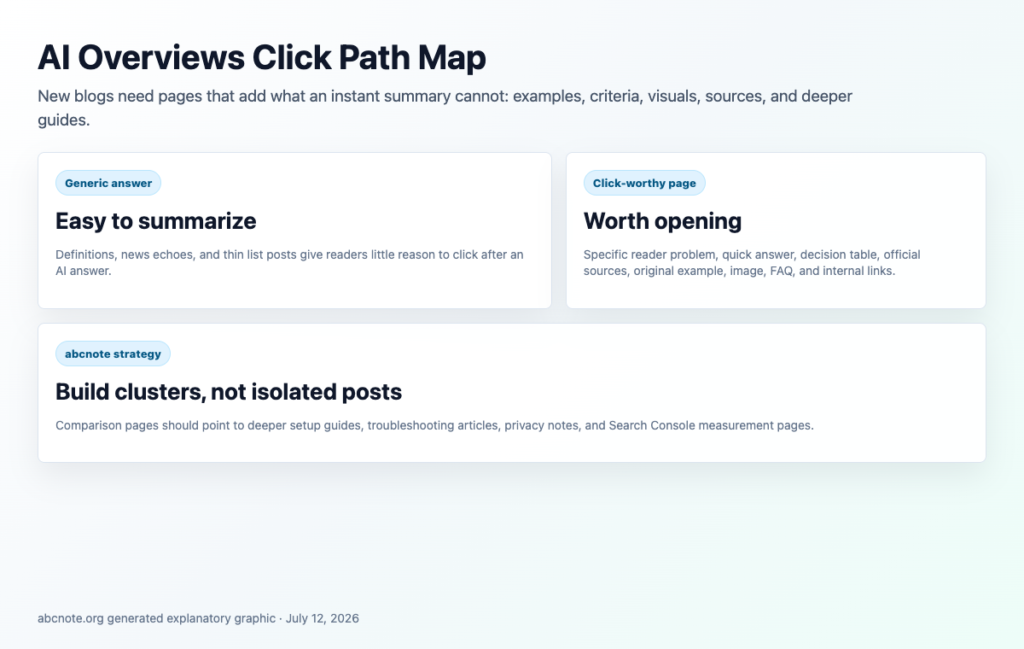
Practical QA pass before this draft is ready
Read the article from the viewpoint of a visitor who wants a decision, not a lecture. The first screen should state the payoff, the middle should show steps or decision evidence, and the ending should point to related public abcnote guides.
Check that links appear where the reader needs them. A WordPress setup paragraph can link to categories or Search Console. A writing-quality paragraph can link to AI fact-checking. An automation paragraph can bridge toward webhooks, Zapier, Make, or n8n.
For SEO and AEO: 7 Proven Ways New Blogs Win AI Search, the repair goal is practical depth: enough examples, checklists, source-backed links, and mobile-safe tables that the article feels complete without relying on a private Draft or a final-only link block.
| QA item | Pass rule | Reader benefit |
| Length | Keep the public body above 10,000 characters with useful examples. | The draft feels complete, not thin. |
| Links | Use contextual internal links plus final read-next links. | Readers can continue naturally. |
| Readability | Use active, direct sentences and short paragraphs. | Technical topics feel easier to scan. |
| Tables/images | Use visible borders and explanatory images. | Mobile readers can still review choices. |
Decision checklist
Use the official source when the article mentions setup, policy, pricing, or platform limits. If a detail changes often, write the date checked near the recommendation or phrase the guidance as a decision rule rather than a permanent claim.
Remove private workflow notes. The public article should not tell readers that a section exists to satisfy a content gate. It should simply give the useful answer with clear evidence.
End by connecting the topic to the next reader action: improve site structure, verify content quality, check screenshots, or build safer automation only after the publishing foundation is stable.
SEO and AEO publishing checks
SEO and AEO work should end with a practical decision, not just a list of features. Recheck the official source, confirm the risk that matters most, and test one small workflow before applying the advice to a full site, device, account, or team process.
For current details, review Google SEO starter guide. Interface names, pricing, AI controls, privacy settings, and documentation links can change, so the final recommendation should match the current source rather than an old screenshot.
| Check | What to verify | Why it matters |
| Answer | Put a clear answer near the top, then add detail. | Helps both readers and search systems. |
| Originality | Add examples, screenshots, and practical tradeoffs. | Avoids generic AI summaries. |
| Links | Build paths between related posts. | Helps readers continue without hitting dead ends. |