pages needed before AdSense approval: The pages needed before AdSense approval are not just legal decoration. They help prove that your blog is a real site made for real readers.
AdSense Pages decision checkpoint
AdSense Pages is the short version of the decision this article helps readers make. Use the decision details, official source links, and internal next-step links together before choosing the platform, host, or review page setup.
Use this checklist with AdSense Approval Checklist, use the next step with WordPress Categories, and keep Search Console for New Bloggers nearby before publishing or monetizing the site.
Where this fits in the abcnote stack
Trust pages sit beside the WordPress foundation because they make categories, navigation, Search Console signals, screenshots, and content-quality checks easier for reviewers and readers to understand. Continue with these public abcnote guides: AdSense Approval Checklist, WordPress Categories, Search Console Metrics.
Quick answer
Use this guide to make a cleaner decision, avoid beginner mistakes, and prepare a site that looks useful before monetization.
What You Will Learn
- Which trust pages a new blog should prepare
- What each page should include
- Where to place those pages in navigation and footer
Reference Screenshots
These screenshots were captured from the relevant official sites while preparing this article. They are used as visual references so the guide feels concrete, not generic.
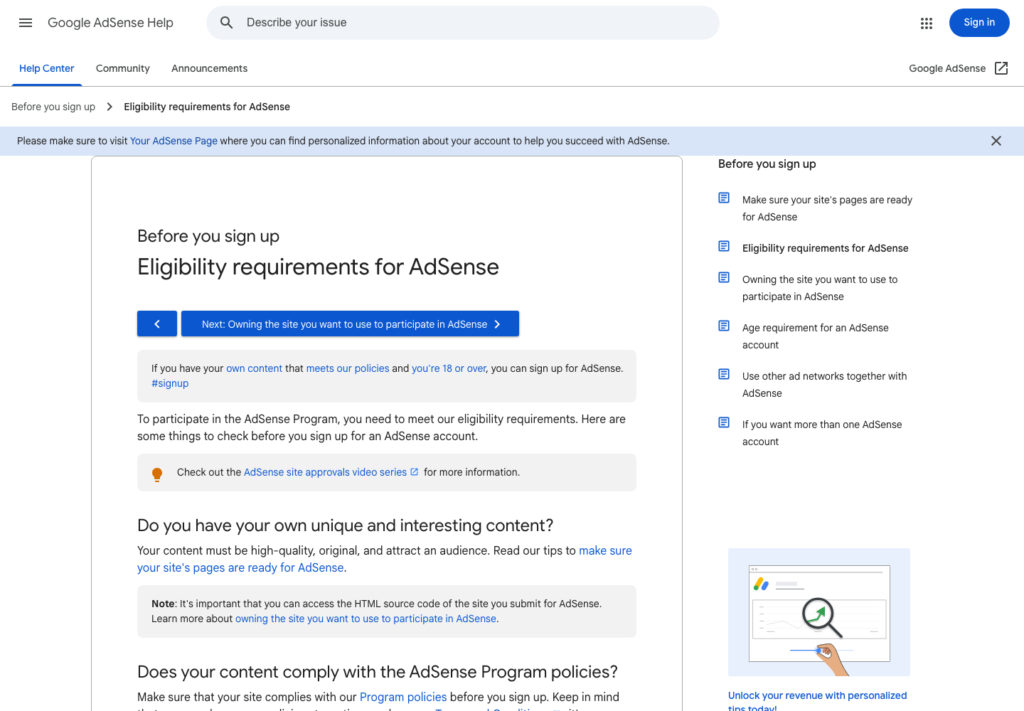
New bloggers often ask which pages are "required" before applying for AdSense. The honest answer is that Google does not publish one simple universal checklist that says every site must have the exact same set of pages in the exact same format.
But that does not mean pages are optional.
Before applying, your blog should look like a real site made for real readers. It should explain who runs it, how readers can contact you, how privacy is handled, what the site covers, and how content is created. These pages help a reviewer, a reader, and a future advertiser understand that the site is not a thin content shell.
Why trust pages matter
AdSense eligibility guidance emphasizes original, useful, high-quality content. Trust pages support that goal because they show the site has an owner, a purpose, and basic operating standards.
They also improve user experience. A reader who lands on a new blog from search may wonder:
- Who made this?
- Can I contact them?
- Is this site collecting data?
- Is the content AI-assisted?
- Are there affiliate relationships?
- Can I trust the information enough to keep reading?
Trust pages do not replace good posts. They support them.
About page
The About page should explain what the site is, who it helps, and why it exists.
For a beginner WordPress and AdSense blog, the About page might say the site publishes practical guides about WordPress setup, SEO basics, AI-assisted writing workflows, Search Console learning, and blog operations.
Keep it honest. Do not pretend to be a large media company if the site is a one-person project. A small site can still be trustworthy if it is clear and useful.
Include:
- the site mission
- the main topics covered
- the type of reader the site helps
- the editorial approach
- a simple note about AI assistance if used
Contact page
A Contact page gives readers, partners, and reviewers a way to reach the site owner.
It does not need to be complicated. A simple contact form or dedicated email address is enough for many beginner sites.
Avoid publishing a personal email if you do not want spam. A domain email or contact form is cleaner. Make sure the page works on mobile and is linked from the footer or main menu.
Privacy Policy
A Privacy Policy explains how the site handles personal information, cookies, analytics, forms, and third-party services.
This page becomes especially important when a site uses analytics, contact forms, embedded media, newsletter tools, affiliate tracking, or advertising systems.
Do not copy a random policy from another site. Use a generator or template as a starting point, then adjust it to match what your site actually uses. If the site is very simple before monetization, the policy should still be truthful rather than inflated.
Terms or Terms of Use
A Terms page explains basic rules for using the site. It can cover acceptable use, intellectual property, limitations, external links, and changes to the site.
Not every small blog starts with a long legal-style Terms page, but having a clear Terms page can make the site feel more complete and professional.
Keep it readable. A page that looks copied and unrelated to the actual blog does not build much trust.
Disclaimer
A Disclaimer is useful when the blog gives opinions, comparisons, tool recommendations, setup guidance, or future reader-facing monetization notes.
For a WordPress and AdSense blog, a disclaimer can explain that content is for general educational purposes, that tools and pricing may change, and that readers should verify details before buying a service.
This is especially important for hosting, domain, plugin, and SaaS comparisons because pricing and features change often.
Editorial Policy
An Editorial Policy is not always mentioned in beginner checklists, but it is valuable for AI-assisted blogs.
This page can explain:
- how topics are selected
- how AI tools are used
- how drafts are reviewed
- how sources are checked
- how corrections are handled
- how paid or affiliate content would be disclosed later
For a new site, this page can separate responsible AI-assisted publishing from low-effort AI spam. It tells readers that automation is used to support the work, not replace judgment.
Cookie Policy
Whether you need a separate Cookie Policy depends on your tools, audience, and legal requirements. Many small sites include cookie information inside the Privacy Policy at first.
If the site uses analytics, embedded videos, newsletter forms, or advertising systems later, cookie disclosure becomes more important. Before applying for AdSense, make sure the privacy language matches the current site setup.
Navigation and footer placement
Trust pages should not be hidden.
Put core pages in predictable places:
- About in the main menu or footer
- Contact in the main menu or footer
- Privacy Policy in the footer
- Terms and Disclaimer in the footer
- Editorial Policy in the footer or About area
The goal is not to make the menu crowded. The goal is to make the site feel complete.
Common mistakes
Avoid these mistakes before applying:
- leaving the About page empty
- using a Contact page that does not work
- copying another site’s Privacy Policy without editing it
- making legal pages that mention tools you do not use
- hiding important pages from navigation
- publishing trust pages with broken formatting
- saying AI is not used when it actually is
Trust pages should be simple, accurate, and connected to the real site.
A practical minimum set
For a new AdSense-focused WordPress blog, I would prepare at least:
- About
- Contact
- Privacy Policy
- Terms or Terms of Use
- Disclaimer
- Editorial Policy
This does not guarantee approval. Nothing does. But it gives the site a stronger trust foundation before review.
Good trust pages say: this is a real site, made for readers, with clear standards.
Useful references: Google AdSense eligibility guidance, Google SEO Starter Guide.
Related reading
Before You Publish
- Confirm the title includes the focus keyword naturally.
- Check that the meta description is clear and not too short.
- Add one or two relevant internal links after related posts exist.
- Use only images that you own, created yourself, or have permission to publish.
- Keep the article ad-free until AdSense is approved and connected properly.
The practical goal is not to make the article look optimized only to a plugin. The goal is to make it readable, trustworthy, and useful enough that the optimization score reflects real quality.
Make trust pages useful, not ceremonial
About, Contact, Privacy, and editorial pages should explain who the site helps, how readers can reach the owner, what data the site may collect, and how content is reviewed. Thin trust pages that only repeat generic legal language do less for readers than a short, clear page that matches the actual publication.
For a practical technology site, the About page can state the site focus: WordPress setup, SEO, AI writing, automation, local AI, privacy, and home-lab decisions. The Contact page should work on mobile. The Privacy page should match analytics, cookies, forms, and future monetization choices.
Link these pages from navigation or footer areas that readers can find. Then connect article-level work to the Search Console metrics guide, because impressions, indexed pages, and query fit show whether the site is becoming discoverable before applying.
| Page | What to verify | Common weak spot |
| About | State the site topic, reader benefit, and editorial approach in plain language. | A vague brand paragraph that could describe any blog. |
| Contact | Use a working form or reachable email path and test it on mobile. | A hidden or broken contact route. |
| Privacy | Match analytics, forms, cookies, and future monetization tools. | Copying a policy that does not match the site. |
| Navigation | Keep public pages reachable without relying on private Draft links. | Footer-only links that are hard to inspect on phone screens. |
Final review before this draft is ready
Check the page on a phone before publishing. The title should wrap cleanly, the first paragraph should answer the visitor quickly, and every table should keep visible borders without forcing the reader to pinch and guess.
Use official pages for setup, pricing, policy, documentation, or product limits. If a platform changes often, phrase the recommendation as a decision rule and note that the source was checked in July 2026 rather than pretending the number will stay fixed forever.
The reader should leave with one clear next action: choose a host, create trust pages, protect the domain, simplify categories, or read Search Console signals before monetizing.
AdSense Pages final checks
AdSense Pages should improve reader trust before it tries to improve rankings. Confirm the official source, keep the user-facing promise narrow, and remove anything that looks like a private planning note instead of public advice.
For current details, review Google AdSense site eligibility. Documentation, pricing pages, eligibility language, and product screens can change, so the final draft should match current source pages instead of relying only on old screenshots.
| Check | What to verify | Why it matters |
| Identity | Make About and Contact pages easy to find. | A real publisher should not feel anonymous. |
| Privacy | Explain data, cookies, analytics, and contact handling plainly. | Trust pages support both users and review quality. |
| Navigation | Avoid empty categories and hidden policy pages. | Reviewers and readers need a complete path. |