Quick answer: A Mac mini can be an excellent personal AI server, but the right choice is rarely “local AI wins.” Choose local-first when privacy, predictable availability, and infrastructure control justify operating the system yourself. Choose cloud-first when model capability and low maintenance matter most. For many people, the practical answer is hybrid: run the agent, files, schedules, and selected small models locally while using cloud models for harder work.
The key question is not whether a Mac mini can run AI. It can. The real question is which parts of the AI system should run locally, which parts should use cloud services, and who will maintain the complete workflow when something breaks.
A model server and an AI agent are not the same thing
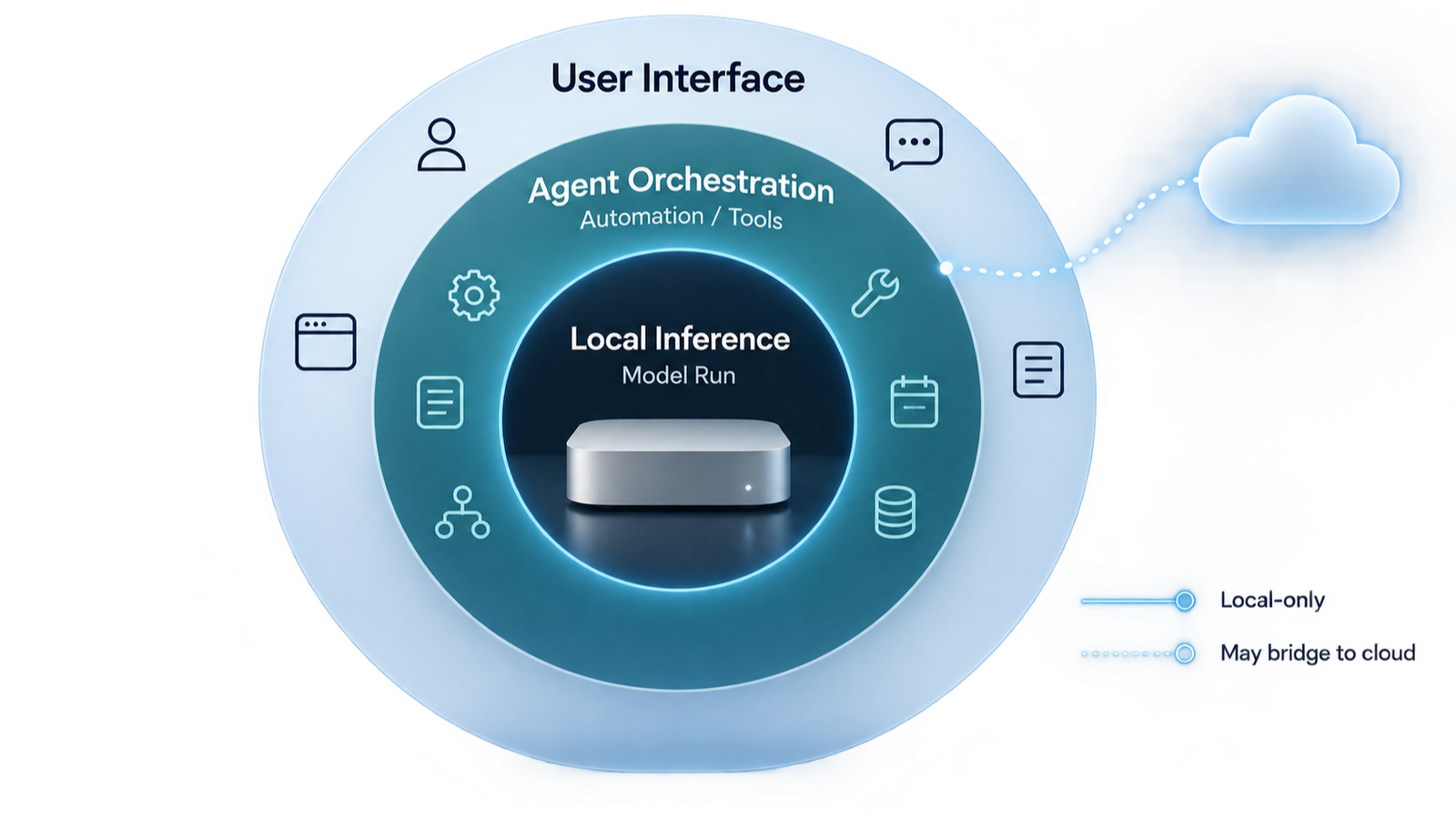
A common mistake is to treat “local AI,” “Ollama,” and “OpenClaw” as interchangeable terms. They are different layers.
- Model runtime: Software such as Ollama loads a model and produces responses.
- Agent platform: OpenClaw coordinates models, files, tools, messaging channels, memory, skills, and automations.
- Applications and interfaces: A browser, Telegram, Slack, WhatsApp, desktop app, or custom dashboard is how the user interacts with the system.
- Infrastructure: The Mac mini, storage, network, backups, power, and remote-access controls keep the service available.
OpenClaw can run on a Mac mini while using a cloud model. It can also call a local model through Ollama. Running OpenClaw locally therefore does not automatically mean every inference is local, and using Ollama does not automatically create a complete personal agent.
Why the Mac mini is attractive for personal AI
Apple silicon combines CPU, GPU, and unified memory in a compact, quiet, energy-efficient computer. Unified memory is especially relevant because the model, operating system, applications, and agent processes share the same pool. A Mac mini can stay on continuously, has fast local storage and networking, and can operate without a dedicated display after setup.
That description matches my daily experience with a 16GB M4 Mac mini. It is quiet enough to disappear into the background, produces little noticeable heat in ordinary agent work, and uses so little power at idle that I am comfortable leaving it on continuously. Apple’s published measurement for the 2024 M4 Mac mini configuration is 4 watts at idle and up to 65 watts under its maximum test load; actual use varies by workload and attached devices.
macOS also gives me both sides of a practical server. I can use the GUI for setup, monitoring, file management, and applications, while Command Line tools and scripts handle background services, scheduled work, automation, and recovery. For a personal operator, that combination is easier to live with than a server that is only convenient through a terminal—or a desktop that is difficult to automate.
Current Mac mini configurations and chip generations change over time. When this article was checked, Apple’s current specification page listed mainstream unified-memory options including 16GB, 24GB, and 32GB, with higher memory available on Pro configurations. Buyers should confirm the current generation and price rather than relying on an older model label.
Memory matters more than marketing. The amount of unified memory sets a practical ceiling for local models, context size, concurrent services, and responsiveness.
16GB, 24GB, or 32GB: what is realistic?
The ranges below are planning guidance, not guaranteed performance. Exact results depend on model architecture, quantization, context length, runtime overhead, concurrent apps, and the speed standard you consider usable.
| Unified memory | Practical local use | Main limitation | Best buyer |
|---|---|---|---|
| 16GB | OpenClaw Gateway, automations, document tools, and smaller quantized models—often around the 7B/8B class—with moderate context | Limited room for larger models, long context, and multiple memory-heavy processes | Existing owner, beginner, or cloud-model-first hybrid user |
| 24GB | More comfortable local experimentation, 14B-class quantized models, larger context, and simultaneous agent services | Still not a replacement for high-end GPU servers or the strongest cloud models | New buyer wanting a balanced personal AI server |
| 32GB | More headroom for 20B–32B-class quantized experiments, longer context, embeddings, databases, and multiple services | Large models may still be slow; memory capacity does not guarantee interactive speed | Serious local-AI user who has already proved the workload |
A model that technically loads is not necessarily useful. Long time-to-first-token, slow generation, thermal limits, and reduced context can make an impressive demonstration frustrating in daily work. Test the actual model, quantization, and prompt length you intend to use.
What I learned from running 12 agents on two machines
I use two machines to operate 12 AI agents, with a 16GB M4 Mac mini playing a central role. The agents handle research, monitoring, scheduled cron jobs, article production, music workflows, and personal work briefings. For personal use, that environment delivers enough practical performance—even though it is not a high-end local-model laboratory.
The key is to separate agent operations from model inference. The Mac mini can reliably host the OpenClaw Gateway, sessions, files, schedules, tools, background programs, and local services. It does not need to run the strongest model locally to be valuable. I use smaller Ollama models only for limited workloads and send demanding reasoning or generation to stronger cloud models.
The 16GB ceiling is real. macOS, the agent platform, background programs, model context, and Ollama all compete for the same unified memory. Small quantized models can be useful, but larger models, long contexts, heavy generation, and multiple simultaneous inference jobs quickly expose the limitation. A 16GB Mac mini should therefore be described as a capable agent host with modest local AI—not as a substitute for a GPU workstation.
The less obvious weakness is power continuity. I currently do not have a UPS or another dedicated power safeguard. A utility outage—or simply someone accidentally disconnecting the power cable—takes the machine and its resident agents offline. Cron jobs stop, monitoring pauses, and messages or scheduled work may be missed until the system restarts and services recover.
This taught me that an always-on AI agent is an infrastructure service, even when it sits quietly on a desk. Auto-start, service health checks, restart policies, missed-job recovery, backups, and a UPS matter as much as processor benchmarks. Two machines also provide useful capacity and separation, but they are not redundancy unless workloads, state, and recovery are deliberately designed to fail over.
Despite those limits, the system is already useful enough for my personal workload. The low noise, low power draw, GUI-plus-Command-Line flexibility, and ability to run many specialized agents make the Mac mini an excellent personal automation server. Its best role in a 16GB configuration is hybrid: local orchestration and lightweight models, with cloud inference for the work that needs more intelligence or compute.
This is a firsthand account from one customized environment, not a universal performance guarantee.
Ollama: the easiest local-model starting point
Ollama provides a straightforward way to download and run supported open models locally and exposes interfaces that other applications can call. It is useful for testing whether local inference actually improves a real workflow before buying more hardware.
A sensible pilot is:
- Install Ollama from its official source.
- Choose one small model appropriate for the available memory.
- Test the same real task repeatedly—not just a demo prompt.
- Measure response quality, time to first token, generation speed, and memory pressure.
- Connect it to OpenClaw only after the standalone model is stable.
- Keep a cloud-model fallback for tasks the local model cannot perform reliably.
Do not expose the model service directly to the public internet merely for convenience. Keep it on the local interface or a properly controlled private network, and treat remote access as a separate security project.
OpenClaw on Mac mini: why the combination works
OpenClaw’s Gateway turns the Mac mini from a model box into an always-available personal agent platform. It can connect messaging channels, run skills and tools, schedule cron jobs, store session state, use local or hosted models, and coordinate specialized agents.
The advantage is customization. The operator can decide:
- Which model handles each workload
- Which accounts, files, and tools each agent can access
- Which scheduled jobs run automatically
- Which actions require human approval
- Where logs, memory, and artifacts are stored
- How failures are retried, reported, and recovered
The disadvantage is exactly the same list. Every option becomes an operational decision. OpenClaw is free and open source, but the user becomes the platform owner.
Local, cloud, or hybrid?
| Factor | Local-first | Cloud-first | Hybrid |
|---|---|---|---|
| Setup | Highest | Lowest | Moderate |
| Model capability | Limited by hardware | Usually strongest and newest | Select per task |
| Data control | Potentially strongest if every dependency stays local | Depends on provider controls and policy | Sensitive work can be separated |
| Maintenance | You own it | Vendor owns most of it | Shared responsibility |
| Offline use | Possible for fully local workflows | Usually unavailable | Selected functions remain local |
| Best fit | Technical users with a clear privacy or control requirement | People buying outcomes, not infrastructure | Most serious personal-agent users |
The true cost of a “free” local AI server
Local software may have no subscription fee, but total cost of ownership includes more than the Mac mini purchase.
- Hardware: Mac mini, storage, cables, network equipment, and possibly a UPS
- Electricity: Continuous operation and attached storage
- Cloud usage: Model APIs, web search, media generation, or external services
- Operations: Updates, monitoring, backups, incident recovery, and security reviews
- Time: Installation, tuning, troubleshooting, and rebuilding after failure
Cloud AI turns much of this into a subscription or usage charge. Local AI turns part of the bill into hardware and personal labor. Neither is automatically cheaper. Compare the cost for a defined workload over a realistic period.
Privacy: trace the complete data path
A Mac mini under your desk is not proof that the workflow is local. Trace one request from beginning to end:
- Where does the prompt enter?
- Which agent and memory files can read it?
- Which model receives it?
- Which tools, plugins, and search services are called?
- Where are logs and outputs stored?
- Which backups copy the data elsewhere?
If OpenClaw uses a hosted model, that part of the request follows the provider’s policy. If a local model uses a cloud search tool, search terms leave the machine. “Local-first” is meaningful only when the boundary is documented.
Security and reliability checklist
- Keep the OpenClaw Gateway local or behind authenticated private access.
- Use separate service accounts and least-privilege permissions.
- Deny tools an agent does not need.
- Require human approval for sends, purchases, deletions, publishing, and permission changes.
- Protect API keys and tokens outside ordinary prompts and shared files.
- Back up configuration, agent workspaces, databases, and critical artifacts.
- Record cron history, failures, retry counts, and the last successful checkpoint.
- Test restart and restoration before relying on the system.
- Update OpenClaw, model runtimes, macOS, and plugins deliberately—not blindly.
- Run the available security audit after material configuration changes.
Three recommended buying paths
Path 1: You already own a 16GB Mac mini
Do not replace it before testing. Use it for OpenClaw, automation, files, databases, and small local models. Use cloud models for difficult reasoning and large-context work. Upgrade only after measured memory pressure or model limits block a valuable workflow.
Path 2: You are buying specifically for local AI
For a new purchase, 24GB is the more balanced starting point; 32GB provides more experimentation headroom. Confirm the current Mac mini generation, memory options, and price. If your main goal is large local models, compare the Mac mini with higher-memory Macs and dedicated GPU systems before buying.
Path 3: You do not want to operate infrastructure
Use a managed cloud agent or cloud AI service. Buying a Mac mini will not remove operational work; it will transfer that work to you. A service is often cheaper when your own maintenance time is included.
Final verdict
A Mac mini is a strong personal AI server when it hosts a workload you understand and are willing to operate. A 16GB machine can be very useful for OpenClaw and hybrid workflows, but it should not be marketed as a substitute for high-end local inference. A 24GB or 32GB configuration buys more local-model flexibility, not freedom from maintenance.
For most users who want a capable personal agent rather than a local-model hobby, hybrid is the best answer: keep the Gateway, schedules, selected data, and small models local; use cloud models when capability matters; and keep consequential actions under human approval.
The winner is not local or cloud. The winner is the architecture whose cost, data path, failure modes, and owner you can clearly explain.
Sources and date checked
Sources checked October 5, 2026. Apple configurations, model availability, and software behavior change; verify current specifications before purchasing.
- Apple — Mac mini Technical Specifications
- Apple — Mac mini power consumption and thermal output
- Apple Platform Security
- Ollama official site
- Ollama documentation
- OpenClaw official site
- OpenClaw — What is OpenClaw?
- OpenClaw local models
- OpenClaw security
- OpenClaw API usage and costs
A monthly bill and a three-year machine belong in one calculation
Assume a local machine costs $900 and you plan to keep it for 36 months. The hardware allocation is $25 per month before electricity, repairs, and administration. Compare that with the cloud work it actually replaces.
| Situation | Next check | Why it changes the decision |
|---|---|---|
| Cloud usage below $25 per month | Check whether local privacy or offline availability is the real benefit. | The illustrative hardware allocation already exceeds this inference bill. |
| High repeatable local workload | Measure power and quality on representative tasks. | High volume helps only when the local model completes the work. |
| Occasional demanding cloud task | Retain a bounded cloud route if policy allows. | Buying hardware solely for rare peaks may leave capacity idle. |
These are assumed costs, not current Mac prices. Track total workflow cost, including failed outputs and operator time. Agent count alone says little about concurrent inference or required memory.