
Choosing an AI workflow automation tool starts with the workflow, not the product name. Write down what begins the work, what data changes hands, which decisions need a person, and what a successful outcome looks like. Then test whether a prospective tool fits that path, connects to the systems already in use, and can be operated responsibly by the team that will own it. Workflow automation tools move work forward automatically from rules, triggers, data changes, and user actions.
The useful result is not a grand “AI strategy.” It is a clear decision: automate this bounded process now, redesign it first, or leave it manual because the exceptions and ownership are not yet clear. This guide gives you a repeatable way to make that call.
Start with one workflow, not a tool catalog
Automation catalogs can make evaluation feel like a product-shopping exercise. It is more reliable to begin with a single piece of work that is frequent enough to matter and defined enough to inspect. Describe it in plain language before opening a demo, comparison page, or pricing screen.
For example, a workflow description can answer four simple questions: what event starts the work; what information is needed; what action or decision follows; and how someone knows the work is complete. These questions keep an evaluation tied to operations rather than feature labels.
“Automate customer intake” is too broad to assess. “When a submitted request contains the required fields, create a review task, route it to the appropriate owner, and record the outcome” is specific enough to test. The second description exposes the actual design questions: required fields, routing logic, exceptions, ownership, and completion evidence.
The fast decision table
| What you observe | Best next move | What to verify |
|---|---|---|
| The process is a predictable sequence with a clear starting event. | Explore a simple rule-based automation first. | Whether the trigger, action, and completion state are clearly defined. |
| The process has several handoffs, branches, or systems involved. | Map the workflow before comparing platforms. | Which branch is routine, which needs a person, and where data is created or changed. |
| The team cannot agree on the desired result or the responsible owner. | Pause tool selection and clarify the operating process. | Who can approve exceptions and who is accountable for the final outcome. |
| A proposed tool sounds impressive but cannot be tested against a real process. | Ask for a narrowly scoped demonstration or pilot. | How it handles your trigger, data, handoff, and exception path. |
| The proposed change affects several teams. | Include the relevant business and technical owners early. | Whether the workflow can be operated across functions rather than by one isolated team. |
This table is deliberately simple. Its job is to prevent a common failure mode: treating every workflow as if it needs the same level of automation. A short, stable process may need a straightforward rule. A multi-step process may need a carefully designed workflow. A process with unclear ownership may need a decision before it needs software.
Know what “workflow automation” means here
Workflow automation is work moving forward automatically based on rules, triggers, data changes, and user actions. That definition is practical because it directs attention to observable events. A trigger may be a submission, a status change, or another event in a business process. A data change may make the next action possible. A user action may start, approve, correct, or close part of the workflow.
Use that definition to separate a workflow from a task. A task is one unit of work. A workflow is the path that determines what happens before, during, and after that task. A tool may help with either, but an evaluation should make the distinction explicit. If the team only needs a reminder or one recurring handoff, do not force it into a larger architecture. If the work crosses people and systems, document the sequence and decision points before assuming that a single feature solves the problem.
Map the path before asking for AI
“AI” can be part of an automation evaluation, but it should not erase the underlying path. First, map the ordinary flow. Identify the starting event, the inputs, the expected action, the owner, and the completion signal. Then identify what changes when the workflow is not ordinary.
A useful map can be written as a short sequence:
- An event occurs.
- The workflow checks whether the required information is present.
- The workflow routes or prepares the next action.
- A person reviews, approves, or corrects when the process requires judgment.
- The outcome is recorded so the next owner can see what happened.
This is not a claim that every workflow must use these exact steps. It is an evaluation template. Its value is that it turns vague requirements into testable questions. If a proposed platform cannot show how it behaves at each relevant step, the evaluation is incomplete.
Separate simple rules from complex workflows
One of the most important choices is whether the work is genuinely simple. A simple rule can be appropriate when the same event reliably leads to the same action and exceptions are rare, visible, and manageable. The design conversation is short: define the trigger, define the condition, define the action, and define how to check the result.
A complex workflow deserves more preparation. It may contain multiple branches, different owners, several systems, or decisions that cannot be reduced to one fixed condition. In that case, the right question is not “Which tool has the most features?” It is “Can we explain the path well enough to test it?”
Do not treat complexity as a badge of sophistication. More branches create more places for a workflow to be misunderstood. The most useful design is often the smallest one that makes the handoff visible and gives an accountable person a clear place to intervene.
Evaluate fit with the current stack
Current systems matter because a workflow has to work where the team already works. When comparing tools, ask which existing systems provide the trigger, hold the data, receive the resulting action, and give people visibility into progress. A tool can look capable in isolation and still be a poor fit when the actual workflow depends on information or ownership elsewhere.
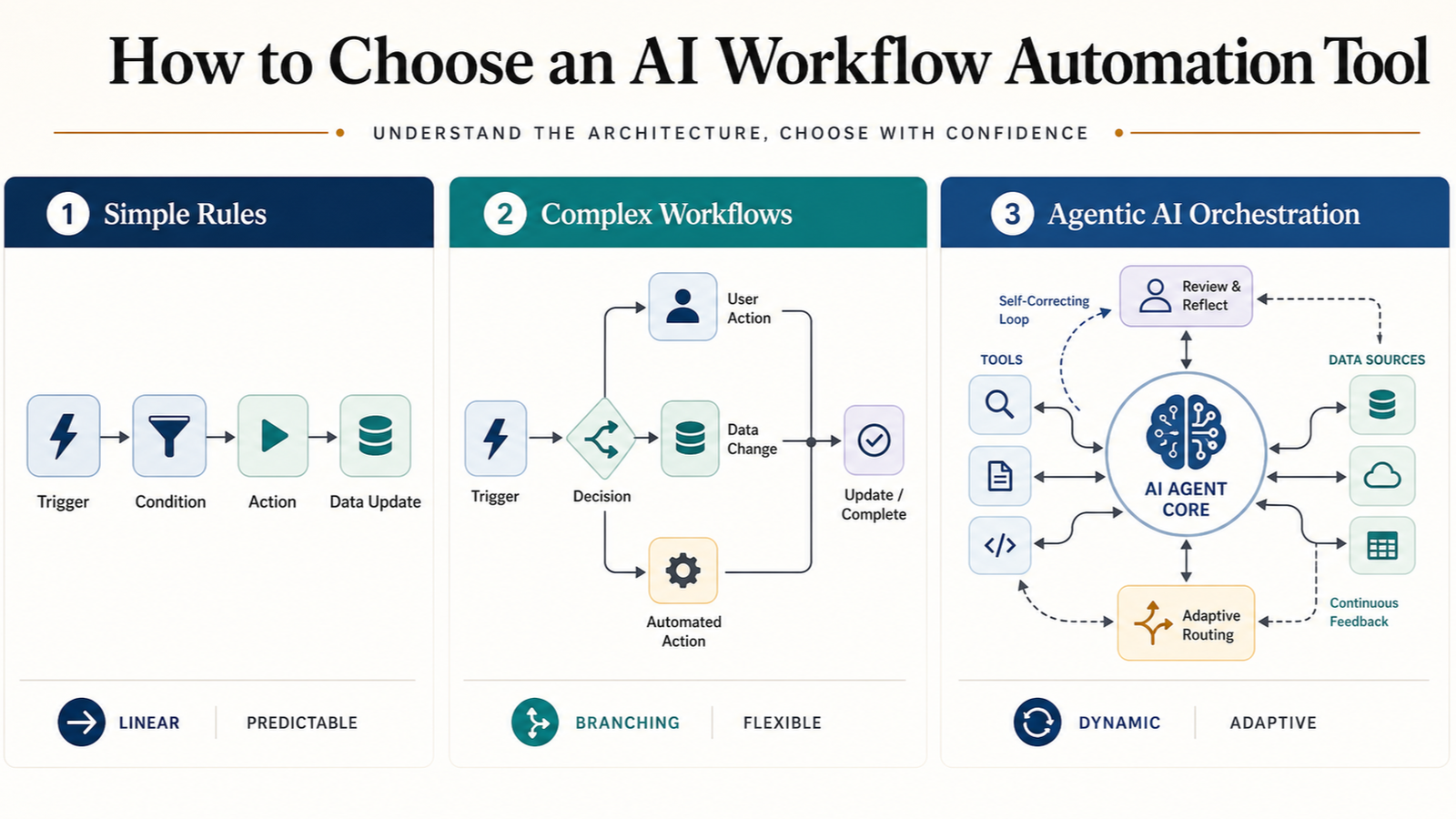
Use a concrete fit checklist during every demo or trial:
- Can the team show the real trigger that begins the workflow?
- Can it show where the necessary data comes from and where it goes next?
- Can it show how a person sees the workflow’s current state?
- Can it show what happens when required information is missing?
- Can it show how a person corrects or stops a problematic run?
- Can it show who owns the workflow after launch?
These are not product requirements presented as universal facts. They are practical questions that reveal whether a proposed automation can be operated in the environment where it will live.
Make scale an operating question
Enterprise leaders face a crowded market of tools claiming agentic AI capabilities, making it difficult to identify the platform that fits a workflow, integrates with the existing technology stack, and scales across the organization. That makes “scale” worth defining before it becomes a sales phrase.
For an evaluation, scale can mean several different things: more workflow volume, more people using the process, more teams depending on it, more systems connected to it, or more exception cases that need attention. Decide which meaning matters for the workflow at hand. A tool choice cannot be judged clearly against an undefined version of scale.
Ask each prospective provider or internal owner to demonstrate the path that matters most, not merely the ideal path. If a workflow is expected to move from one team to several, include the people who will receive the handoffs. If the workflow depends on shared standards, make those standards visible before the pilot begins.
Put ownership beside the automation
Automation changes how work is handed off, which means ownership must be explicit. A workflow can be technically configured and still fail operationally if nobody knows who resolves an exception, approves a change, or decides whether the process is working as intended.
For a single workflow, name four roles even if one person performs more than one:
- Process owner: defines the intended business outcome.
- Workflow operator: monitors the process and responds when it needs attention.
- Technical owner: understands the relevant systems and connections.
- Decision owner: approves material changes to the workflow.
This framing also helps with cross-functional work. Current enterprise AI discussion emphasizes cross-functional AI Centers of Excellence rather than leaving the IT department to work alone. The takeaway for a smaller evaluation is straightforward: do not make a workflow decision using only one perspective when its consequences land across business, operations, and technology.
Use a pilot to answer one decision
A pilot should test a decision, not merely prove that a platform can produce a polished demonstration. Choose one bounded workflow and define what the team needs to learn. Examples of decision questions include: Can the workflow start from the real event? Can the necessary data pass through the intended path? Can the responsible person understand and correct an exception? Can the relevant owners agree that the resulting handoff is usable?
Keep the pilot small enough to inspect. A large, vague pilot creates many explanations for an unclear outcome. A narrow pilot gives the team a chance to observe the trigger, the data movement, the action, and the final state. Document what changed, who intervened, and what remained manual. Those observations are more useful than an abstract impression that the tool felt advanced.
Questions to ask before committing
Use these questions as a final review. They are designed to make hidden assumptions visible.
- What specific event starts this workflow?
- What information must be present for it to proceed?
- What action should happen automatically?
- Where does human judgment remain necessary?
- What is the exception path when the workflow cannot proceed normally?
- Which systems are involved at the beginning, middle, and end?
- Who is responsible for monitoring the workflow after launch?
- How will the team know the intended outcome occurred?
- What change would cause the workflow to be reviewed or redesigned?
- Can the team explain the process without relying on a vendor phrase or product demo?
If these questions cannot be answered, the issue may be the process definition rather than the product shortlist. That is useful information. It prevents a purchase or implementation from becoming the place where basic operating decisions are discovered for the first time.
Common evaluation traps
Choosing from a feature list
A feature list can be helpful after the workflow is understood. It is a weak starting point when the team has not defined its trigger, data, owner, and desired outcome. Begin with the process, then use features to test fit.
Calling every step “agentic”
Market claims about agentic AI do not by themselves explain how a workflow will behave. Ask for the observable path: what begins the work, what information is used, what action follows, and what a person can review or correct.
Ignoring the exception path
Normal flow is only part of the operating design. A responsible evaluation asks what happens when information is missing, a handoff is unclear, or the result needs correction. The answer does not need to be elaborate, but it should be known before a workflow becomes important to the team.
Leaving ownership implicit
Automation may span business and technical work. If responsibility is left implicit, the workflow can become difficult to maintain. Name an owner for the process and an operator for the day-to-day path before launch.
A practical selection sequence
Use this sequence for a disciplined, low-drama evaluation:
- Choose one recurring workflow that is worth examining.
- Write the trigger, inputs, actions, owners, and completion signal.
- Mark the steps that are stable rules and the steps that need human judgment.
- List the systems that supply or receive information.
- Use the decision table to decide whether the workflow is simple, complex, or not yet ready.
- Evaluate prospective tools against the real path rather than a generic scenario.
- Run a bounded pilot that answers a defined operating question.
- Record the exception path and assign ownership before broader use.
The point is not to make automation selection slow. It is to make the decision legible. A team that can describe its workflow clearly is in a stronger position to recognize whether a tool fits, whether a process needs redesign, and whether a proposed implementation is ready for responsible use.
What this guide can and cannot decide
This guide offers a decision framework, not a ranked product list. The available evidence establishes that workflow automation is based on rules, triggers, data changes, and user actions; that the market includes many AI automation tools with claims about agentic AI; and that evaluation should consider workflow fit, existing technology, and organizational scale. It does not provide verified product-specific capabilities, prices, security features, integrations, or performance comparisons. Do not infer those details from this framework; verify them directly for any tool under consideration.
If you are also assessing technology used to evaluate a vehicle purchase, ABCNote’s EV battery health app checklist offers a similarly practical approach: define the evidence you need before relying on an app or a claim.
Quick answer
Choose an AI workflow automation tool by starting with one real workflow and testing the tool against its trigger, data, actions, human decision points, exception path, current systems, and accountable owner. Use a simple rule for a stable, predictable path; map a complex process before selecting a platform; and pause selection when the workflow’s outcome or ownership is still unclear.
Sources
- Tom’s Guide — Buying Guides: Advice for Buying New Technology
- Tom’s Guide — Buying Guides: Advice for Buying New Technology, Page 2
- AI Industry Review — Deloitte releases “2026 Technology Trends” report
- Kore.ai — 12 best AI workflow automation tools
- Softr — 7 best workflow automation tools in 2026
- Automation Atlas — Best Self-Hosted Workflow Tools (2026)
The duplicate invoice is the useful workflow pilot
Use a hypothetical supplier invoice received twice to compare automation tools. A demo that processes one clean invoice misses the practical question: can the system recognize repetition, request an approval, and recover after an interruption?
| Situation | Next check | Why it changes the decision |
|---|---|---|
| Same invoice received again | Use a stable business identifier and inspect duplicate handling. | A transport retry should not create a second business outcome. |
| Amount requires approval | Check that execution waits for the named approver. | A notification alone is not an approval gate. |
| Accounting connector fails | Inspect the resume point before retrying. | Restarting the whole flow can repeat an already completed step. |
Compare the same exception in each shortlisted tool. A tool that handles the normal path quickly but leaves ambiguous side effects may create more review work than it removes. This is a pilot design, not a vendor performance ranking.