Quick answer: choose a Korea eSIM if you are a solo traveler with an unlocked eSIM-compatible phone and you mainly need maps, translation, KakaoTalk, subway apps, web search, and reservations. Choose pocket Wi-Fi if several people will share one connection, you need laptop/tablet data, or your phone cannot use eSIM. Choose a prepaid Korean SIM when local voice calls or a Korean phone number matter more than the fastest setup.
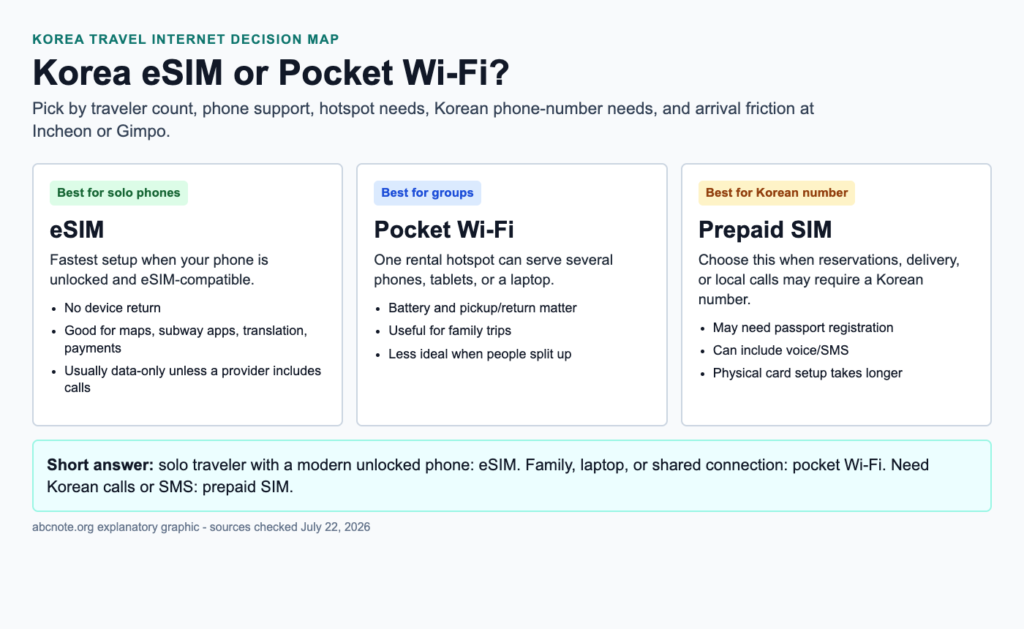
This Korea eSIM or Pocket Wi-Fi guide is written for travelers who want a useful decision before landing in Seoul, not a generic list of vendor plan names. Korea has excellent mobile networks, airport pickup counters, travel eSIM vendors, and carrier prepaid options, so the best choice is usually about friction: phone compatibility, group size, battery, hotspot needs, and whether a Korean number is required.
The practical rule is simple. If you are alone, your phone is unlocked, and your itinerary is mostly Seoul, Busan, Jeju, trains, restaurants, cafes, and translation apps, eSIM is usually the cleanest option. If you are traveling with family or carrying a laptop, pocket Wi-Fi can be cheaper and easier to share. If you need local calls, delivery coordination, hospital contact, school contact, or a reservation that expects a Korean number, a prepaid SIM may solve problems that data-only eSIM cannot.
Korea eSIM or Pocket Wi-Fi decision in one minute
Korea eSIM or Pocket Wi-Fi cost and fit checks
Travel eSIM
Cost pattern: Often sold by data amount or days. Short trips can be inexpensive.
Best fit: Solo travelers with unlocked eSIM-ready phones.
Hidden cost: Some plans are data-only, so local calls or SMS may still need another solution.
Pocket Wi-Fi
Cost pattern: Usually a daily rental plus possible deposit, insurance, or late-return fee.
Best fit: Families, groups, and multiple-device travelers.
Hidden cost: Battery management, pickup/return friction, and one shared device becoming a single failure point.
Prepaid SIM
Cost pattern: Can be more expensive than a data-only eSIM, but may include a Korean phone number.
Best fit: Longer stays, reservations, delivery, local calls, or service signups.
Hidden cost: Airport counter time and phone compatibility checks.
For a three-day solo Seoul trip, eSIM often wins because the setup is fast and no device return is required. For a seven-day family trip with four phones and a laptop, pocket Wi-Fi may be cheaper per person if everyone stays together. For a month-long stay, prepaid SIM or carrier-specific visitor plans deserve more attention because voice, SMS, identity checks, and ongoing support become more important.
Phone compatibility and setup difficulty
The easiest Korea eSIM setup happens before departure: buy the plan, save the QR code or app login, install the eSIM while you still have stable home Wi-Fi, and keep the travel line turned off until arrival if the provider recommends it. The mistake is waiting until the arrival hall, tired and surrounded by luggage, to discover that your phone cannot add the eSIM.
For iPhone users, check Settings, Cellular, and available eSIM options. For Galaxy users, check SIM manager and confirm that your specific model supports eSIM in your country version. A US unlocked iPhone or flagship Galaxy is usually straightforward; an older device, carrier-locked phone, or region-specific model is where travelers get stuck.
Pocket Wi-Fi has a different setup profile. You reserve the unit, pick it up at an airport counter or delivery point, turn it on, connect each device to its Wi-Fi network, and return it at the end. That is physically simple, but it adds a device, charger, battery level, and return deadline. If the hotspot dies at 5 p.m. in Myeongdong, every connected traveler loses data at once.
Privacy and security while using travel internet
A travel eSIM or SIM reduces the need for random public Wi-Fi, but it does not make accounts safe by itself. Before a Korea trip, set up strong account recovery, passkeys, password manager access, and device backup. abcnote has a separate guide on Passkeys Setup because losing access to email or bank accounts during travel is far more painful than paying a few extra dollars for data.
Pocket Wi-Fi creates a small shared network. That is convenient, but it means several devices depend on one hotspot password and one battery. Use a strong Wi-Fi password if the rental device allows it, avoid changing admin settings unless the provider tells you to, and do not treat the hotspot as a secure office router. For a deeper home networking comparison, the Wi-Fi 7 vs 6E guide explains why device count, bands, and interference matter even when the travel hotspot is much simpler.
Public Wi-Fi in hotels, cafes, airports, and trains is still useful as a backup. Avoid sensitive account changes on unknown networks, prefer HTTPS, keep operating systems updated, and use a reputable VPN if your employer requires it. For photos, passport scans, and travel documents, back up before departure; the personal backup guide is a good pre-trip checklist.
Korea apps that make reliable data worth paying for
Korea is easy to travel with mobile data and frustrating without it. Visitors commonly use Naver Map or KakaoMap for local directions, Papago or Google Translate for language help, KakaoTalk or WhatsApp for messaging, AREX and subway apps for transit planning, airline apps for boarding passes, and restaurant or attraction pages for hours. A data connection turns small moments into solvable tasks: reading a menu, checking a train platform, finding the correct exit, or translating a pharmacy question.
If you are traveling outside Seoul, data becomes even more useful. In Jeju, Busan, Gyeongju, Sokcho, or countryside destinations, you may rely on bus timing, taxi apps, hotel messages, maps, and translation more often. Pocket Wi-Fi can still work well, but a solo traveler may prefer the simplicity of an eSIM that follows the phone everywhere.
When Korea eSIM is the best answer
Choose eSIM when your phone supports it, your carrier unlock status is clear, you do not need a Korean number, and you want the least airport friction. It is especially strong for solo travelers, couples who each want independent data, frequent travelers who dislike rental returns, and people who want to activate a plan before the plane lands.
- Best use cases: solo Seoul trip, short business trip, weekend stopover, digital maps, translation, mobile tickets, messaging, browser search.
- Strengths: no physical card, no rental device, no return counter, can keep home SIM installed, can be bought before departure.
- Weaknesses: phone must support eSIM, usually data-only, support quality varies by reseller, activation rules differ by provider.
- Setup difficulty: low if the device is compatible; high if the phone is locked or the traveler waits until arrival to check.
- Privacy note: safer than random public Wi-Fi for routine browsing, but account security still depends on passkeys, passwords, and device hygiene.
When pocket Wi-Fi is the best answer
Choose pocket Wi-Fi when several devices need one connection, your group stays together, your phone cannot use eSIM, or you want a familiar Wi-Fi network instead of changing mobile line settings. It is still a strong Korea travel option because airport pickup and return are common and the mobile networks behind the rental devices are generally good.
- Best use cases: family trip, group tour, laptop work, tablet navigation, older phones, shared hotel-to-tour movement.
- Strengths: connects multiple devices, avoids eSIM compatibility risk, good for laptops, easy for less technical travelers.
- Weaknesses: extra device to charge, rental return required, group separation problem, possible loss/damage fees.
- Setup difficulty: low for connecting devices, medium for logistics because pickup, charging, and return matter.
- Performance note: speed depends on carrier coverage, hotspot model, number of connected devices, and local congestion.
When a prepaid SIM is the better Korea travel internet choice
Prepaid SIM deserves attention when a Korean number matters. Some reservations, local services, delivery coordination, medical appointments, school/camp contacts, and support calls are easier with a local number. A data-only eSIM may still let you message through apps, but it may not solve a voice/SMS requirement.
The tradeoff is friction. Physical SIM setup can require passport registration, counter time, and swapping or managing SIM slots. If your phone has one physical SIM slot and you need to keep your home SIM active, think carefully before relying on a physical prepaid SIM. If your phone supports dual SIM or eSIM plus physical SIM, you have more flexibility.
Roaming from your home carrier: when convenience wins
Home carrier roaming is not always the cheapest, but it can be the least stressful. If your US carrier includes international data, or if you have a business plan where the company pays roaming fees, roaming may be good enough for a short trip. Check speed limits, hotspot support, and daily fees before relying on it.
The roaming choice is strongest for travelers who do not want another vendor, QR code, rental device, or airport counter. It is weakest for heavy data users, families, and longer trips where daily fees add up. If you expect to upload large videos, take many cloud backups, or use a laptop heavily, compare the total cost against pocket Wi-Fi and local SIM options.
Airport pickup vs buying before departure
Buying before departure favors eSIM. You can read the instructions calmly, install the eSIM, screenshot support details, and board the plane knowing what will happen on arrival. Airport pickup favors pocket Wi-Fi and prepaid SIM because the counter staff can hand over a device or help with physical SIM setup.
Incheon Airport is organized, but arrival days can still be tiring. Long flights, immigration, bags, train tickets, and hotel check-in make troubleshooting feel worse. If you are not confident with phone settings, either install eSIM before departure or choose an airport counter option where a person can help.
Performance expectations in Seoul, Busan, Jeju, and trains
Korea has strong mobile infrastructure, but no travel internet product guarantees perfect speed everywhere. Dense tourist areas can be congested. Underground spaces, basement restaurants, older buildings, mountain areas, and trains can create weaker signals. The provider matters, but the device and location matter too.
For most travelers, the difference between eSIM, pocket Wi-Fi, and prepaid SIM is less about raw speed and more about usability. Can you activate it? Can you keep it charged? Can each traveler access it when separated? Can you call if needed? Can you hotspot a laptop? These questions matter more than a theoretical maximum Mbps number.
A practical 2026 buying checklist
- Confirm your phone is unlocked and eSIM-compatible before buying a Korea eSIM.
- Check whether the plan is data-only or includes voice/SMS.
- Estimate real data use: maps and messaging are light; video uploads, cloud backups, and tethering are heavy.
- For pocket Wi-Fi, check pickup location, return location, battery life, connected-device limit, and loss fee.
- For prepaid SIM, check passport registration, Korean number availability, voice/SMS terms, and physical SIM slot needs.
- Keep provider support instructions offline in screenshots or notes.
- Do not rely on one connection for mission-critical work; keep hotel Wi-Fi, roaming, or a second phone as backup if needed.
Mistakes to avoid with Korea eSIM or Pocket Wi-Fi
Mistake 1: buying eSIM without checking carrier lock
A locked phone can block travel eSIM activation. Check this before buying. If your phone is locked, pocket Wi-Fi or home carrier roaming may be safer.
Mistake 2: assuming data-only means phone number
Many travel eSIMs provide data, not a Korean number. Messaging apps can still work, but local voice/SMS needs a different plan.
Mistake 3: using one pocket Wi-Fi for people who split up
Pocket Wi-Fi works only near the device. If travelers separate often, each person needs their own data plan or the group will keep negotiating who carries the hotspot.
Mistake 4: forgetting hotspot battery
A pocket Wi-Fi unit is another device to charge. Carry a power bank if the group depends on it for directions and translation.
Mistake 5: ignoring account security before travel
Set up account recovery, passkeys, device backups, and password manager access before leaving. The best data plan cannot help if you lose access to your primary email.
Best choice by traveler type
| Traveler type | Recommended setup | Backup idea |
|---|---|---|
| Solo first-time Seoul visitor | Korea eSIM with enough data for maps and translation. | Hotel Wi-Fi and saved offline address screenshots. |
| Family of four staying together | Pocket Wi-Fi plus one phone with roaming backup. | Power bank and pickup/return reminders. |
| Remote worker | Pocket Wi-Fi or high-data eSIM plus hotel Wi-Fi. | Separate work VPN and no large cloud sync on mobile data. |
| Traveler needing local calls | Prepaid SIM with Korean number. | Messaging app plus hotel front desk support. |
| Older locked phone | Pocket Wi-Fi or home carrier roaming. | Printed hotel address and airport counter help. |
| Privacy-sensitive traveler | eSIM/SIM for mobile data, avoid random public Wi-Fi for sensitive tasks. | Passkeys, VPN if required, and device backup. |
Korea eSIM or Pocket Wi-Fi airport mistake check
Korea eSIM or Pocket Wi-Fi decisions are easiest before the flight. Check whether the phone is unlocked, whether the model supports eSIM, whether the plan allows hotspot use, whether local calls are needed, and whether the group can survive if one shared device loses battery.
Source notes and date checked
Source and pricing pages were checked on July 22, 2026. Provider plans, airport counters, activation rules, speed policies, and prices can change. Before publishing or buying, recheck the official pages below.
- Korea Tourism Organization: travel essentials and support
- Incheon Airport: roaming, SIM, and Wi-Fi services
- Apple Support: using eSIM while traveling internationally
- Samsung: Galaxy eSIM support
- GSMA: eSIM consumer information
- Airalo South Korea eSIM plan page
- Nomad South Korea eSIM plan page
- LG U+ short-term roaming / prepaid services
- SK telecom roaming and prepaid information
- KT roaming and SIM information
- Google Fi international coverage help
- T-Mobile international roaming support
Bottom line: Korea eSIM or Pocket Wi-Fi?
For most solo travelers in 2026, the best Korea travel internet choice is an eSIM because it is simple, fast, and does not add rental logistics. For families, laptop users, and travelers with uncertain phone support, pocket Wi-Fi remains practical. For anyone who needs Korean calls or SMS, a prepaid SIM may be the better choice even if it takes longer to set up.
The smartest plan is not the one with the biggest headline data number. It is the one that works with your phone, your group, your arrival day, your privacy needs, and the real tasks you will do in Korea: maps, translation, transit, reservations, photos, messages, and emergency contact.
One shared hotspot can split a family's navigation plan
Consider an illustrative family whose pocket Wi-Fi stays with one parent while another takes a child elsewhere. The issue is connection ownership, not only the rental price.
| Situation | Next check | Why it changes the decision |
|---|---|---|
| Everyone stays together | Check coverage, battery, pickup, and return logistics. | A shared connection may match the itinerary. |
| Travelers separate | Plan an independent data path for each group. | The lowest group price may create an avoidable dependency. |
| Phone needs account-verification messages | Confirm voice and SMS features separately from data. | An advertised data plan does not establish access to a phone number. |
Before departure, match the phone's exact compatibility and carrier-unlock status with the plan. This example does not claim a particular carrier's current support, speed, price, or airport availability.