
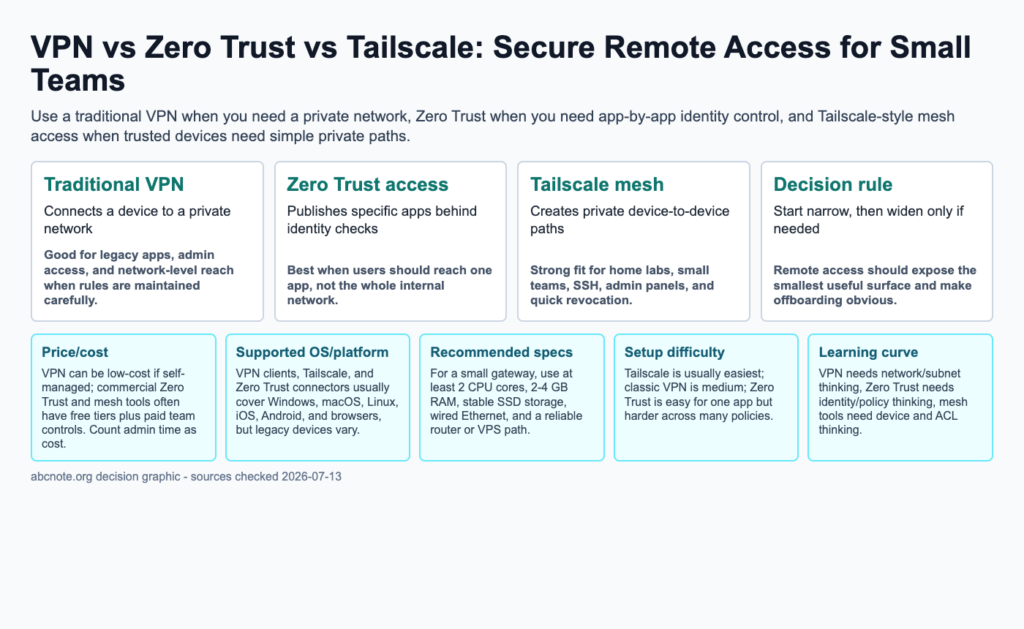
Quick answer: Use a traditional VPN when you need a private network, Zero Trust when you need app-by-app identity control, and Tailscale-style mesh access when trusted devices need simple private paths.
The useful answer
A VPN is a private network tunnel. Zero Trust access is usually an identity-controlled front door to specific applications. Tailscale-style mesh networking is a private network between approved devices, often built on WireGuard concepts. For a small team, the best choice is the one that reduces exposed services while staying simple enough to maintain every month.
What to choose first
If one person needs SSH to a mini PC or admin panel, start with Tailscale-style access before opening firewall ports. If a team needs to expose one internal web app, use Zero Trust application access. If old software expects the user to be on the office LAN, a VPN may still be necessary, but it should be segmented and monitored.
Recommended rollout
List every service that needs remote access, then mark it as screen control, web app, SSH, file share, database, or whole-network access. Give each service the narrowest route that works. Add MFA, write an offboarding checklist, test from a different network, and remove unused routes after the test.
Common mistakes
The most common mistake is treating remote access as a convenience project instead of an identity and exposure project. Public RDP, public SSH with passwords, shared admin accounts, and forgotten VPN profiles are bigger risks than choosing the wrong brand.
Best use cases
Classic VPN still fits legacy LAN access. Zero Trust fits web apps and SaaS-like internal tools. Mesh access fits trusted devices, home servers, developer machines, SSH, and emergency admin access. Many small teams end up using a combination instead of one universal answer.
| Option | Best use | Main limitation |
|---|---|---|
| Traditional VPN | Connects a device to a private network | Good for legacy apps, admin access, and network-level reach when rules are maintained carefully. |
| Zero Trust access | Publishes specific apps behind identity checks | Best when users should reach one app, not the whole internal network. |
| Tailscale mesh | Creates private device-to-device paths | Strong fit for home labs, small teams, SSH, admin panels, and quick revocation. |
The next table turns the comparison into a practical checklist, so scan it after the main comparison instead of reading both grids as one block.
| Comparison item | Practical answer | What to check |
|---|---|---|
| Price/cost | VPN can be low-cost if self-managed; commercial Zero Trust and mesh tools often have free tiers plus paid team controls. Count admin time as cost. | Verify against your device, account policy, and official documentation before rollout. |
| Supported OS/platform | VPN clients, Tailscale, and Zero Trust connectors usually cover Windows, macOS, Linux, iOS, Android, and browsers, but legacy devices vary. | Verify against your device, account policy, and official documentation before rollout. |
| Recommended specs | For a small gateway, use at least 2 CPU cores, 2-4 GB RAM, stable SSD storage, wired Ethernet, and a reliable router or VPS path. | Verify against your device, account policy, and official documentation before rollout. |
| Setup difficulty | Tailscale is usually easiest; classic VPN is medium; Zero Trust is easy for one app but harder across many policies. | Verify against your device, account policy, and official documentation before rollout. |
| Learning curve | VPN needs network/subnet thinking, Zero Trust needs identity/policy thinking, mesh tools need device and ACL thinking. | Verify against your device, account policy, and official documentation before rollout. |
| Speed/performance | WireGuard-based paths can be fast, but relay use, upload speed, routing, DNS, and device CPU decide real performance. | Verify against your device, account policy, and official documentation before rollout. |
The next table turns the comparison into a practical checklist, so scan it after the main comparison instead of reading both grids as one block.
| Risk | Safer rule | Review cadence |
|---|---|---|
| Overexposure | Expose the smallest useful folder, app, device, or route. | Monthly |
| Account lockout | Keep recovery codes, backup admin paths, and documented ownership. | Quarterly |
| Data loss | Keep a separate backup outside active sync or test environment. | Monthly |
Decision checklist
- Traditional VPN: Connects a device to a private network. Good for legacy apps, admin access, and network-level reach when rules are maintained carefully.
- Zero Trust access: Publishes specific apps behind identity checks. Best when users should reach one app, not the whole internal network.
- Tailscale mesh: Creates private device-to-device paths. Strong fit for home labs, small teams, SSH, admin panels, and quick revocation.
- Decision rule: Start narrow, then widen only if needed. Remote access should expose the smallest useful surface and make offboarding obvious.
Specification and comparison checklist
- Price/cost: VPN can be low-cost if self-managed; commercial Zero Trust and mesh tools often have free tiers plus paid team controls. Count admin time as cost.
- Supported OS/platform: VPN clients, Tailscale, and Zero Trust connectors usually cover Windows, macOS, Linux, iOS, Android, and browsers, but legacy devices vary.
- Recommended specs: For a small gateway, use at least 2 CPU cores, 2-4 GB RAM, stable SSD storage, wired Ethernet, and a reliable router or VPS path.
- Setup difficulty: Tailscale is usually easiest; classic VPN is medium; Zero Trust is easy for one app but harder across many policies.
- Learning curve: VPN needs network/subnet thinking, Zero Trust needs identity/policy thinking, mesh tools need device and ACL thinking.
- Speed/performance: WireGuard-based paths can be fast, but relay use, upload speed, routing, DNS, and device CPU decide real performance.
- Privacy/security: Avoid public RDP/SSH. Use MFA, device review, logs, least privilege, and fast revocation.
- Limitations: No tool fixes weak account security, unmanaged devices, forgotten ex-employee access, or outdated servers.
Start with one remote service and a revocation test
Choose one internal service that a named teammate needs, then define who can reach it, from which enrolled device, and through which route. Record the intended destination rather than granting access to an entire network by default. From a separate connection, check the allowed path and a deliberately disallowed path. Revoke the test device or user and check again. This proposed pilot evaluates access scope and removal; it is not a measured comparison of product speed.
Decide whether access belongs to a device, an application, or a network
A network connection and an application policy answer different questions. Write the required resource beside the user identity: one web application, one server, or several network services. Then check whether the chosen plan can enforce that boundary and whether a departed teammate can be removed without changing everyone else’s access. A mesh tool is an implementation choice; zero trust describes an approach to authorization. They should not be treated as mutually exclusive product categories.
When the proposed remote-access design is too broad
Pause the rollout if reaching one application requires opening unrelated services, if devices cannot be removed promptly, or if nobody owns the identity and routing configuration. An easy connection demonstration does not settle these questions. For a team with several administrators, include an ownership handover in the pilot so recovery does not depend on one person’s account.
Review reachability after staff or device changes
After a teammate leaves, a laptop is replaced, or a route changes, repeat the allowed-versus-denied access check. Record the identity, resource, configuration change, and observed outcome without copying credentials into the log. Review unused routes and enrolled devices on a schedule the team can maintain; these checks are an editorial operating recommendation rather than a vendor compliance requirement.
Topic documentation
Check identity, tags, and destination policy for the remote-access design you deploy.
How to Secure Remote Access publishing checks
Secure Remote Access should start with the asset being protected, not the most fashionable network product. A personal home lab, a small team dashboard, and a browser-automation workstation need different trust boundaries.
Before publication, recheck official VPN, Zero Trust, and Tailscale documentation for pricing, identity-provider support, device posture language, logging, and platform support. The safer recommendation is the one a reader can maintain after the first setup succeeds.
| Check | Practical rule | Why it matters |
| Identity | Require named users and device review for admin paths. | Shared credentials make remote access hard to audit. |
| Network scope | Expose only the service or subnet that the workflow needs. | Smaller access windows reduce blast radius. |
| Automation | Keep browser agents and webhooks behind separate profiles or service accounts. | Remote convenience should not bypass human review. |
A remote-access pilot with a lost-device scenario
List which users need access to which applications, then test access from a managed device and an untrusted device. Confirm that authentication, least-privilege policies, device revocation, and audit logging work as intended. Simulate a lost laptop by revoking its access and recording how quickly the session stops. Tailscale is a specific networking product, while zero trust is a broader security design approach; they are not interchangeable categories.
Remove one user's access without breaking everyone else's
Imagine a three-person team with access to one internal web application. One contractor finishes the job. The useful pilot question is whether that person's access can be removed while the remaining team continues working.
| Situation | Next check | Why it changes the decision |
|---|---|---|
| Access follows a shared credential | Replace the shared route with accountable individual authorization where feasible. | A departed person may retain the same secret. |
| Access follows a user and device | Remove the intended identity or device and test the resource. | Changing the policy must have an observable effect. |
| Access also exposes unrelated services | Narrow destination and network permissions. | Connectivity to one application should not silently become broad reachability. |
Use disposable identities for the pilot. This is a proposed authorization check, not a claim that VPN, zero trust, and Tailscale are equivalent product categories or that a configuration passed an independent assessment.